Key takeaways
- Compare five cooling fans for the iPhone 17, from a 27W Black Shark with app control to a 50W liquid cooler, with mount, power, and noise notes to check.
The iPhone 17 stays cool in short bursts, but long games and long 4K clips push the A19 chip hard enough that the frame rate dips and the back turns warm. A cooler on the back pulls heat straight off the glass, so the chip holds its speed longer and the phone stays comfortable to hold. The choice is not only about raw cooling power. Mount style, power source, noise, and weight shape whether a cooler fits the way you play.
This guide covers five coolers that fit the iPhone 17, from a 27W Black Shark with app control to a 50W liquid-cooled unit for desk play, plus two light Comvin picks for casual sessions. Every pick was chosen from the name and details on its Amazon product page, and each one snaps onto the built-in magnets of the iPhone 17 or grips the phone with a clip. The guide is for mobile gamers who run long matches, streamers who film, and anyone who records clips outdoors.
Quick Picks
As an Amazon Associate we earn from qualifying purchases.
| Product | Best for | Key spec from title |
|---|---|---|
| Black Shark Magnetic Cell Phone Cooler 4Pro | Long matches with app control | 27W TEC plate, drops to -15°C in 30 seconds |
| WHYNOTRY 50W Magnetic Phone Cooler | Desk gaming with maximum cooling | 50W liquid cooling, freezes in 15 seconds |
| Black Shark Magnetic Cooler 2 Pro | Light, simple cooling on the go | 73 g, 7,200 rpm fan, up to 23°C drop |
| Comvin Magnetic Cell Phone Cooler | A display and two modes | 15W TEC plate, temperature display, dual mode |
| Comvin 3-in-1 Magnetic Cell Phone Cooler | One cooler for phone and tablet | 15W TEC plate, magnetic mount plus clip, RGB light |
How to Choose
Cooling Method: TEC Plate or Plain Fan
A thermoelectric plate, often called a TEC plate, cools by moving heat off the back glass, while a plain fan only blows air across the surface. The TEC picks in this guide drop the back by 15 to 35 degrees Celsius, enough to keep the A19 chip at full speed in a long match. A plain fan helps a little, but it cannot pull the phone below room temperature. The trade is condensation. A cold plate in humid air gathers droplets, so wipe the back dry after a session. In a humid room, pick a cooler with a sensor that stops the plate from getting too cold.
Mount: Magnetic Snap-On or Clip
The iPhone 17 has built-in magnets, so a magnetic cooler snaps straight onto the back glass with no extra parts. That is the fastest way to start a match. A thick case can weaken the hold, so take the case off before a long session. A clip grips the phone from the sides and works with any case, but it adds bulk and can press on the side buttons if it sits too low. The Comvin 3-in-1 in this guide gives you both, which is handy when you switch between a bare phone and a cased one. Tug the cooler gently after you fit it and confirm it stays put before you start.
Power: Adapter, Cable, and the Busy Port
Every cooler here runs from a cable, not a battery, so plan where the power comes from. The strong picks need a wall adapter of 20W or more, and the WHYNOTRY 50W only works with the adapter in its own box, so do not swap in a random charger. A cooler plugs into the wall, not into the phone, so the USB-C port of the iPhone 17 stays free while you play. That matters because the phone charges at about 30W wired, and you may want a cable in the port during a long match. Keep a spare adapter near your desk and check the cable length, since a short cable ties you to the wall.
Noise and Condensation
A fan at 7,200 rpm makes a hum you can hear in a quiet room, while a slower fan stays in the background. The picks here run from 31 to 35 decibels, but a microphone will still pick up the fan in a stream or a call. If you record voice, point the outlet away from the mic or use a headset mic. Condensation is the other worry. A plate at minus 15 degrees in humid air will gather droplets, so run the cooler at a middle setting when the room feels damp, wipe the phone dry after the session, and never leave a cold cooler on a phone you are about to put in a pocket.
The 5 Best Options
Black Shark Magnetic Cell Phone Cooler 4Pro

For most players, the Black Shark 4Pro is the pick that does everything well. A 27W semiconductor plate pulls the back of the phone down to minus 15 degrees Celsius in about 30 seconds, and a 7-blade fan at 7,200 rpm moves the waste heat away so the plate stays cold for a full match. The Shark Arsenal app sets the fan speed and the RGB light, and dual sensors cut the power if the plate passes 60 degrees or drops below minus 15. The grip comes off, so the cooler snaps on with magnets or clips onto the phone.
Specs
- 27W semiconductor cooling, drops to -15°C in 30 seconds
- Up to 40°C temperature drop
- 7,200 RPM fan with 7 blades
- 35 decibels noise level
- Shark Arsenal app control with RGB lighting
- Detachable grip for magnetic or clip-on use
- Dual NTC sensors with auto shut-off above 60°C or below -15°C
- 12-month warranty
Best for: Long gaming sessions where you want app control, RGB light, and strong cooling in one unit.
Watch out for: The listing covers several Black Shark cooler models, so confirm the 4Pro variant before ordering. The fan needs an adapter of 20W or more, which is not in the box.
WHYNOTRY 50W Magnetic Phone Cooler

The WHYNOTRY 50W is the most powerful cooler here, and it belongs on a desk. A liquid cooling system freezes the pad in 15 seconds, and the listing claims a drop of up to 35 degrees Celsius in a warm room, with three levels from 30W to 40W and then 50W. A V12 magnetic levitation motor spins at 5,200 rpm and hums at only 31 decibels, so it is the quietest pick here even at full power. The pad is half an inch thick and weighs 2.4 ounces, and the box adds a back clip, a magnet sheet, and a storage rack.
Specs
- 50W peak power with liquid cooling
- Freezes in 15 seconds, up to -35°C drop
- 5,200 RPM V12 magnetic levitation brushless motor
- 31 decibels noise level
- 0.5 inch thick, 2.4 oz
- 3 temperature levels: 30W, 40W, 50W
- Includes 48W power adapter, magnet sheet, back clip, heat sink, storage rack
- Magnetic for MagSafe iPhone 12 and newer
Best for: Desk gaming and live streaming where maximum cooling matters more than portability.
Watch out for: This cooler only works with the wall adapter provided by the seller, so do not try another adapter. It has no battery, so it must stay plugged in while it runs.
Black Shark Magnetic Cooler 2 Pro
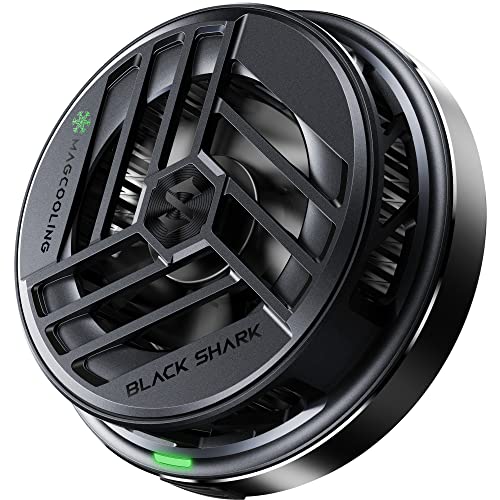
The Black Shark 2 Pro is the light, simple pick for players who want cooling without bulk. It weighs only 73 grams, and a ring of 15 NdFeB magnets holds it flat against the back glass while 112 heat transfer fins and a fan spinning at 7,200 rpm pull heat away. The listing claims a drop of up to 23 degrees Celsius, plenty for short matches and casual play, and the slim body adds almost no weight to a phone that weighs 177 grams. A 1.5 m Type-C cable comes in the box, so you can reach a wall adapter from a couch.
Specs
- 10W semiconductor cooling, up to 23°C drop
- 7,200 RPM fan with 5 blades
- 35 decibels noise level
- 73 g, 62 x 62 x 22 mm
- Ring of 15 NdFeB magnets
- 112 heat transfer fins
- 1.5 m double-ended Type-C cable included
- Iron and silica gel body
Best for: Short matches and casual play where a light cooler you can pocket matters most.
Watch out for: The listing says this cooler is not for phones that need wireless charging, since the magnet blocks wireless charging and NFC. Remove the case for the best contact with the back glass.
Comvin Magnetic Cell Phone Cooler

The Comvin magnetic cooler is the pick for players who like to see the fan at work. A small display shows the temperature, and two modes switch between a quiet setting and a stronger one, so you can run it soft on calls and hard in matches. Its 15W thermoelectric plate and fan work together to pull heat off the back, and the magnetic mount snaps onto the MagSafe ring of the iPhone 17. The iron body feels solid in the hand, and the USB-C input takes power from any 5V source, which runs from a wall adapter or a laptop port.
Specs
- 15W thermoelectric and fan cooling
- Dual mode with temperature display
- 35 decibels noise level
- 1,800 RPM maximum fan speed
- USB Type-C input, 5 Volts
- Magnetic mount for MagSafe iPhone, Android, iPad, and tablet
- Iron body
Best for: Players who want a temperature display and two modes in a simple magnetic cooler.
Watch out for: At 15W it cools less than the 27W and 50W picks, so it suits medium sessions rather than all-day play. Confirm the listing still has a seller before ordering.
Comvin 3-in-1 Magnetic Cell Phone Cooler

The Comvin 3-in-1 is the flexible pick for players who switch between phones, tablets, and a tripod. It snaps on magnetically for the iPhone 17, and a clip in the box grips a device without magnets, so the same cooler works on a tablet for streaming or on a second phone. Its 15W thermoelectric plate and forced-air fan cool the back while RGB light adds a glow for streams, and the USB-C input runs from any 5V source. The clip also helps when a thick case blocks the magnets, which makes this the safest choice if you are unsure whether your case is magnetic.
Specs
- 15W forced air and thermoelectric cooling
- 35 decibels noise level
- Magnetic mount plus clip in the box
- RGB lighting
- USB Type-C input
- For iPhone MagSafe series, Android, iPad, and tablet
- For gaming, live streaming, and outdoor vlogging
Best for: Players who want one cooler for a phone, a tablet, and a tripod setup.
Watch out for: The clip adds bulk when you hold the phone in one hand for a long match. At 15W it cools less than the stronger picks in this guide.
Which One Fits Your Situation
Long Matches at a Desk
Pick the WHYNOTRY 50W when you play at a desk for hours. The liquid cooling system holds the back cold through long matches, and the 48W adapter in the box means you never hunt for a charger. The 31-decibel fan stays quiet enough for voice chat, and the storage rack keeps the pad off the desk when you stop. Just remember it has no battery, so it only runs while it stays plugged into the wall.
Competitive Play With a Controller
Pick the Black Shark 4Pro when you play ranked matches with a controller in your hands. The 27W plate keeps the A19 chip at full speed, and the app lets you set the fan before the match starts. The detachable grip snaps on with magnets, so you can fit the cooler in seconds and pull it off between games. Keep a 20W adapter in your bag, since the box has no charger.
Short Sessions on the Go
Pick the Black Shark 2 Pro when you play in short bursts and want a cooler you can pocket. At 73 grams it adds almost nothing to the 177-gram iPhone 17, and the magnetic ring snaps on in a second. The 1.5 m cable reaches a wall adapter or a power bank on a couch, and the simple design has no app to set up. It suits casual matches and quick clips more than all-day play.
One Cooler for Phone and Tablet
Pick the Comvin 3-in-1 when one cooler has to serve a phone, a tablet, and a tripod. The magnetic mount snaps onto the iPhone 17, and the clip in the box grips a tablet for streaming or a second phone without magnets. The RGB light adds a glow for streams, and the USB-C input runs from any 5V source. It is the safest choice when you are unsure whether your case is magnetic.
Common Mistakes
- Buying a cooler that only clips on, then finding it presses the side buttons of the iPhone 17.
- Running a TEC plate at full power in a humid room and letting condensation gather on the back glass.
- Using a weak adapter with a 27W or 50W cooler, then wondering why the plate never gets cold.
- Leaving a magnetic cooler on the phone while you try to charge wirelessly, since the cooler blocks the MagSafe ring.
- Picking a cooler that covers the camera module, then finding every photo has a dark corner.
Frequently Asked Questions
Is a cooling fan the same as a gaming controller?
No. A cooling fan pulls heat off the back of the phone so the A19 chip holds its speed, while a gaming controller adds buttons, triggers, and sticks for play. The two solve different problems, and many players use both at once. A cooler snaps onto the back, a controller grips the sides, and neither one replaces the other.
Is a cooling fan the same as a MagSafe power bank?
No. A MagSafe power bank adds charge to the battery, while a cooling fan pulls heat off the back so the chip holds its speed. Both snap onto the same magnetic ring, so you cannot use them at once. Pick the fan for long games and the power bank for long days away from a wall outlet.
Can I charge the phone while a cooler is on?
Yes, through the USB-C port. The coolers in this guide plug into a wall adapter, so the port of the iPhone 17 stays free while you play. Wireless charging is blocked while a magnetic cooler covers the MagSafe ring, so take the cooler off if you want to charge on a pad. The Black Shark 2 Pro listing warns that its magnets also block NFC.
Will a cold TEC plate damage my phone with condensation?
No, if you use it with care. A plate at minus 15 degrees in humid air gathers droplets, so run a middle setting when the room feels damp and wipe the back dry after the session. The Black Shark 4Pro has dual sensors that cut the power if the plate gets too cold. Never leave a cold cooler on a phone you are about to pocket.
More from Amazon
Programs that pair well with the guide above. Offers and eligibility are set by Amazon and may change.
Free shipping on eligible items, Prime Video and more. Eligible new members can start with a free trial.
Start a Prime free trialAd-free music streaming. Eligible new subscribers can start with a free trial.
Try Music Unlimited freeA Prime membership for ages 18-24 with a trial period. Eligibility is set by Amazon.
See Prime for Young AdultsAudiobooks and podcasts to listen to on the go. Eligible new members can start with a free trial.
Try Audible freeAs an Amazon Associate we earn from qualifying purchases.