Key takeaways
- Compare five USB-C flash drives for iPhone 17, from a 1000MB/s Gen 2 drive for ProRes to a tiny waterproof Samsung, with speed and fit notes to check.
The real decision is whether you need a drive that can record ProRes video straight from the phone, or just a fast way to move photos and files off it. The iPhone 17 has a USB-C 3 port that moves data at up to 10 Gbps, so a slow USB 2 stick wastes the port, while a Gen 2 drive can use the full lane. The catch is that headline read speeds say little about write speeds, and write speed is what decides whether a long ProRes clip records cleanly or drops frames.
This guide is for iPhone 17 owners who shoot a lot of video, back up photos on the go, or move big files between phone, Mac, and Windows PC without a cloud upload. Every drive below was chosen from its name and specs on the Amazon product page, with the connector, interface generation, and read and write figures the listing states, so you can match the drive to the job instead of guessing.
Quick Picks
As an Amazon Associate we earn from qualifying purchases.
| Product | Best for | Key spec from title |
|---|---|---|
| PNY DUO LINK V3 | ProRes recording | USB 3.2 Gen 2, 1000MB/s read |
| SanDisk Ultra Dual Drive Luxe | Everyday carry | USB 3.2 Gen 1, 400MB/s read |
| SanDisk Ultra Dual Drive Go | Colorful everyday use | USB 3.2 Gen 1, 400MB/s read |
| Samsung Type-C Flash Drive | Tough outdoor use | USB 3.2 Gen 1, 400MB/s read |
| SanDisk Ultra Dual Drive USB-C | Budget transfers | USB 3.1 Gen 1, 150MB/s read |
How to Choose
Match the interface to the phone
The iPhone 17 USB-C port moves data at up to 10 Gbps, which matches USB 3.2 Gen 2. A Gen 2 drive such as the PNY in this guide can use the full lane, while a Gen 1 drive tops out near 5 Gbps, which still feels fast for copying photos and clips. A USB 2 stick caps at 480 Mbps and wastes the port entirely, so check the interface generation on the listing before you buy, not just the connector shape. The connector alone tells you nothing about speed, since slow drives also ship with a USB-C plug.
Read speed is only half the story
Most listings lead with a big read figure, and every drive in this guide lists a read speed between 150MB/s and 1000MB/s. Read speed decides how fast files copy off the drive to a computer, which matters when you unload a day of shooting. Write speed decides how fast the phone can save files to the drive, and it is usually much lower than the read figure. The PNY lists 800MB/s write, which suits direct recording, while the older SanDisk Dual Drive lists 75MB/s write, which suits moving finished files rather than recording live video. Always find the write figure before you buy.
Check the format and the Files app
The iPhone sees an external drive through the Files app, under Locations, and most drives ship formatted exFAT, which the phone, a Mac, and a Windows PC can all read and write. A drive formatted NTFS may not accept new files from the phone, so check the format on the listing or reformat the drive on a computer before the first shoot. Keep in mind that formatting erases everything on the drive, so move any files off it first. Also confirm the drive shows up in Files before a job that depends on it, and carry a spare cable or adapter if you plan to move files to a computer with only USB-A ports.
Size, shape, and case fit
All five drives here hold 256GB, which stores many hours of 4K clips and thousands of photos, though ProRes files are so large that a full day of heavy shooting can still fill one. Shape matters as much as capacity. A wide dual-connector body may not seat fully when the phone wears a thick case, so check the plug length and the case opening before you buy. A tiny drive such as the Samsung sits almost flush and is easy to forget, which is handy on the move but also easy to lose. A swivel cover or a sliding cap protects the connector, and a keyring hole helps the drive survive a pocket or a bag.
The 5 Best Options
PNY DUO LINK V3 256GB

The PNY DUO LINK V3 is the only drive in this guide with a USB 3.2 Gen 2 interface, and it is the one to pick when the phone has to write video straight to the drive. Its listed write speed of 800MB/s is far above the rest of the group, so long ProRes takes can record without the phone warning that the drive is too slow. The dual USB-C and USB-A ends mean the same stick plugs into the iPhone and into an older laptop without an adapter, and 256GB holds a solid day of 4K clips before it needs emptying.
Specs
- 256GB capacity
- USB 3.2 Gen 2 interface
- Read speed up to 1000MB/s
- Write speed up to 800MB/s
- Dual USB-C and USB-A connectors
- Model P-FDI256DULNK3TYC-GE
Best for: Recording ProRes video straight to the drive.
Watch out for: Confirm the listing still has a seller before ordering, and check the plug seats fully with your case on.
ASIN: B0FC3GCM8D
SanDisk Ultra Dual Drive Luxe 256GB

The Luxe is the polished all-rounder of the group, with a metal body and a swivel cover that protects whichever connector is not in use, so there is no cap to lose. Its listed read speed of 400MB/s moves a full camera roll to a computer in minutes, and the dual USB-C and USB-A ends cover the phone and a desktop with one stick. It is a carry-and-copy drive rather than a recording drive, since the listing states read speed and leaves write speed unstated, but for moving finished photos and clips it is fast and tough enough for daily use.
Specs
- 256GB capacity
- USB 3.2 Gen 1 interface
- Read speed up to 400MB/s
- All-metal casing with swivel design
- Dual USB-C and USB-A connectors
- 1.75 x 0.48 x 0.34 inches
- 0.48 ounces
- Model SDDDC4-256G-GAM46
Best for: Everyday carry between phone and computer.
Watch out for: The listing states read speed only, so check the write figure if you plan to record to it.
ASIN: B0CLBP6Q4F
SanDisk Ultra Dual Drive Go 256GB

The Dual Drive Go is the colorful sibling of the Luxe, with the same dual connectors and the same listed read speed of 400MB/s, wrapped in a plastic body with a swivel cover and a keyring hole. The lavender finish makes it easy to spot in a bag, and the swivel protects both connectors without a loose cap. It suits anyone who wants a bright, light stick for moving photos and clips between phone and computer, and the listed speed is quick enough to clear a full day of shooting in minutes.
Specs
- 256GB capacity
- USB 3.2 Gen 1 interface
- Read speed up to 400MB/s
- Dual USB-C and USB-A connectors
- Swivel design with keyring hole
- Color Lavender
- Model SDDDC3-256G-G46L
Best for: Bright, light everyday transfers between phone and computer.
Watch out for: Older listings for the same drive family show 150MB/s read, so confirm the model SDDDC3-256G-G46L before ordering.
ASIN: B0CJ5V52C9
Samsung Type-C USB Flash Drive 256GB
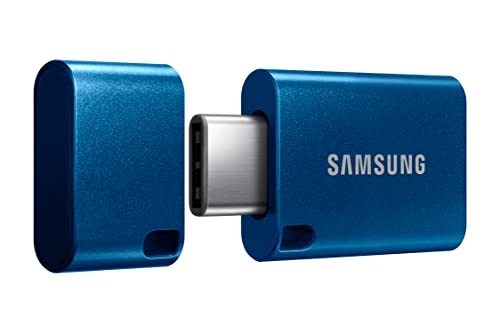
The Samsung Type-C drive is the smallest stick in this guide, a blue thumb-sized body that plugs straight into the phone and barely sticks out, which suits a pocket or a bag where a long drive would snag. Its listed read speed of 400MB/s matches the SanDisk dual drives, and the listing calls the body waterproof, so rain and splashes are less of a worry on a trip. There is no second connector, so moving files to an older computer with only USB-A ports needs an adapter, but for a phone-first workflow the tiny size is the point.
Specs
- 256GB capacity
- USB 3.2 Gen 1 Type-C interface
- Read speed up to 400MB/s
- Waterproof body
- Color Blue
- Model MUF-256DA/AM
Best for: Tiny, rugged storage for travel and outdoor shoots.
Watch out for: USB-C only, so an adapter is needed for computers with USB-A ports alone.
ASIN: B09WB2NL8W
SanDisk Ultra Dual Drive USB-C 256GB

The original Ultra Dual Drive is the budget pick of the group, and its listed speeds are the slowest here, with 150MB/s read and 75MB/s write. That is still three times faster than a USB 2 stick, and it is plenty for moving photos, documents, and finished clips off the phone at the end of the day. The dual USB-C and USB-A ends cover the phone and a computer with one stick, and the slim body fits a pocket without a fuss. Pick it when the job is freeing space and moving finished files, not recording live video.
Specs
- 256GB capacity
- USB 3.1 Gen 1 interface
- Read speed up to 150MB/s
- Write speed 75MB/s
- Dual USB-C and USB-A connectors
- 1.5 x 0.81 x 0.37 inches
- 0.321 ounces
- Model SDDDC2-256G-G46
- 5-year manufacturer warranty
Best for: Low-cost transfers and freeing phone space.
Watch out for: The slowest write speed in this guide, so do not use it for direct ProRes recording.
ASIN: B06XC1WGQR
Which One Fits Your Situation
You shoot ProRes video on the phone
Pick the PNY DUO LINK V3. Its Gen 2 interface matches the phone 10 Gbps port, and its listed 800MB/s write speed is the only figure here built for recording video straight to the drive. Format it exFAT before the shoot, test a short clip first, and empty it after each session, since ProRes files fill 256GB fast.
You back up photos and clips every day
Pick the SanDisk Ultra Dual Drive Luxe or the Dual Drive Go. Both list 400MB/s read, both carry USB-C and USB-A ends, and both clear a full camera roll to a computer in minutes. The Luxe suits a metal build and a clean look, while the Go suits a bright finish and a keyring hole. Either one frees phone space fast after a trip.
You travel light and shoot outdoors
Pick the Samsung Type-C drive. It is the smallest stick here, its body is listed as waterproof, and it plugs straight into the phone without a dangling adapter. Slip it into a pocket or a camera bag and it barely adds bulk. Keep in mind it has no USB-A end, so pack a small adapter if the trip ends at an older computer.
You want the cheapest way to free space
Pick the SanDisk Ultra Dual Drive USB-C. Its listed speeds are the slowest in this guide, but 150MB/s read and 75MB/s write still move photos, documents, and finished clips off the phone far faster than a USB 2 stick. The dual ends cover phone and computer, and the slim body costs little to carry. Use it for end-of-day transfers, not for recording.
Common Mistakes
- Buying a USB 2 stick and expecting it to use the phone 10 Gbps port.
- Trusting the headline read speed and skipping the write figure before recording.
- Plugging in a drive formatted NTFS and finding the phone cannot save new files to it.
- Forgetting to check that a wide dual-connector body seats fully with a thick case on.
- Recording a long ProRes take to a nearly full drive and running out of room mid-clip.
Frequently Asked Questions
How is a USB-C flash drive different from a USB-C adapter?
An adapter changes one connector into another, such as USB-C to HDMI or USB-C to USB-A, and it holds no files. A flash drive is storage, so it plugs into the phone USB-C port and holds photos, video, and documents you can open in the Files app. You may need both: a drive for storage and an adapter for a display or a card reader.
How is a USB-C flash drive different from a USB-C hub?
A hub adds ports to the phone, such as extra USB-A sockets, an HDMI output, and a card reader, and it needs a power cable to run them all. A flash drive adds storage only, so it is smaller, needs no extra power, and plugs into the phone. Choose a hub when you need many ports at a desk, and a drive when you need room for files.
Can I record ProRes video straight to a USB-C flash drive?
Yes, the iPhone 17 can record ProRes to an external drive, but the drive must use a USB 3 interface, and the write speed must keep up with the video stream. The PNY in this guide lists 800MB/s write and a Gen 2 interface, which suits direct recording. Slower drives may drop frames or stop the take, so test a clip first and keep the drive formatted exFAT.
Will these drives work with a case on the phone?
Most slim drives seat fully through a standard case opening, but wide dual-connector bodies can stop short on thick or rugged cases. Check the plug length against the case opening, or test the fit before a shoot that depends on the drive. If the plug does not seat fully, remove the case for the transfer, or pick a slimmer drive such as the Samsung in this guide.
More from Amazon
Programs that pair well with the guide above. Offers and eligibility are set by Amazon and may change.
Free shipping on eligible items, Prime Video and more. Eligible new members can start with a free trial.
Start a Prime free trialAd-free music streaming. Eligible new subscribers can start with a free trial.
Try Music Unlimited freeA Prime membership for ages 18-24 with a trial period. Eligibility is set by Amazon.
See Prime for Young AdultsAudiobooks and podcasts to listen to on the go. Eligible new members can start with a free trial.
Try Audible freeAs an Amazon Associate we earn from qualifying purchases.