Key takeaways
- Compare five Bluetooth mice for iPhone 17, from a full-size MX Master 3S to a pocket Pebble, with AssistiveTouch setup, DPI, and battery notes.
A mouse on an iPhone 17 is not a small laptop. Apple only lets a pointer in through AssistiveTouch, so the cursor is a dot, not an arrow, and there is no desktop, no right-click menu, and no drag-and-drop the way a computer does it. That single fact decides the whole purchase: the best mouse is the one that pairs cleanly over Bluetooth, tracks well on the surface you actually use, and feels right in your hand for the hour you spend with it. Everything else is secondary.
This guide is for people who edit documents on a big screen, answer long messages without the on-screen keyboard, or use a pointer because tapping is hard. The five mice below were picked from the names and specifications shown on their Amazon product pages, with Bluetooth pairing, sensor resolution, battery life, and hand fit checked first.
Quick Picks
As an Amazon Associate we earn from qualifying purchases.
| Product | Best for | Key spec from title |
|---|---|---|
| Logitech MX Master 3S | Long desk sessions with a big screen | 8000 DPI sensor, Quiet Clicks |
| Logitech MX Anywhere 3S | Travel in a jacket pocket | 8000 DPI sensor, 99 g compact body |
| Logitech Pebble M350 | Quiet rooms and light packing | Silent clicks, 18-month battery |
| Logitech M720 Triathlon | Switching between three devices | 6 programmable buttons, 24-month battery |
| Logitech Lift Vertical | Wrist comfort in a handshake grip | 57-degree angle, 4000 DPI sensor |
How to Choose
Pair It Through AssistiveTouch First
Before you look at any sensor number, learn the pairing path, because it decides whether the mouse works at all. Open Settings, then Accessibility, then Touch, then switch on AssistiveTouch. Under Devices, choose Bluetooth Devices and put the mouse into pairing mode. The phone finds it in a few seconds and the dot cursor appears. Once paired, a single click taps where the dot rests, the scroll wheel moves the page, and the side buttons keep their default job because the customization app for these mice does not run on iOS. If the dot never shows up, turn AssistiveTouch off and on again and check that the mouse is not still paired to a laptop.
Match the Sensor to Your Screen
Sensor resolution matters more once the phone leaves your hand. On the 6.3-inch screen, a 1,000 DPI sensor is enough, because the dot only has a short distance to travel. The picture changes when the phone drives an external display through its USB-C port, at up to 4K and 60 Hz, because the same dot now has to cross a much wider canvas. That is where a 4,000 or 8,000 DPI sensor earns its keep, and where an adjustable sensor helps you slow the dot down for careful taps. Glass desks deserve a second look: a sensor that tracks on glass keeps working where an optical sensor gives up and asks for a pad.
Size, Shape, and Hand Fit
A mouse that fits your hand beats a mouse with a bigger spec sheet. The Master 3S fills a large palm and suits a full day at a desk, while the Anywhere 3S and the Pebble disappear into a sleeve or a jacket pocket for travel. The Lift stands the hand upright, which suits small to medium hands that ache after hours on a flat mouse. Weight matters too: a 99 g mouse feels different from a 141 g mouse. If you can, hold the shape in a store first, because palm grip, fingertip grip, and the upright grip all ask for different bodies, and no sensor number fixes a shape that fights your hand.
Power and Extra Buttons
Rechargeable and battery mice ask for different habits. The Master 3S and the Anywhere 3S charge over USB-C and run up to 70 days, with a one-minute charge giving three hours of use, so a dead mouse is a short pause. The Pebble, the M720, and the Lift run on a single AA battery for 18 to 24 months, so you swap a cell twice a year and never hunt for a cable. Extra buttons are the other fork: they are handy on a computer, but the customization app does not run on iOS, so on the iPhone they keep their default jobs. Count the buttons you will actually use.
The 5 Best Options
Logitech MX Master 3S

The Master 3S is the full-size desk mouse in this list, built for the longest sessions. Its right-hand body fills a large palm, the thumb wheel gives horizontal scrolling, and the MagSpeed wheel flies through long documents or clicks into a precise ratchet. The 8,000 DPI Darkfield sensor tracks on glass and glossy desks that stop ordinary mice, and Quiet Clicks cut the click sound by 90 percent, so late-night work stays quiet. It pairs over Bluetooth with the iPhone 17, charges over USB-C, and runs up to 70 days on a full charge, with a one-minute charge giving three hours of use.
Specs
- 8000 DPI Darkfield sensor, tracks on glass
- Quiet Clicks, 90 percent less click noise
- Rechargeable Li-Po 500 mAh battery, USB-C charging
- Up to 70 days per charge, 1-minute charge gives 3 hours
- 7 buttons, including thumb wheel and gesture button
- 141 g, 124.9 x 84.3 x 51 mm
- Logi Bolt USB receiver included in the box
- Bluetooth wireless connection
Best for: Long desk sessions where the iPhone 17 drives a big external display.
Watch out for: Confirm the listing still has a seller before ordering, and check that you are buying the Standard Edition with the receiver in the box, since a Bluetooth-only edition ships without one.
Logitech MX Anywhere 3S

The Anywhere 3S keeps the same 8,000 DPI sensor and Quiet Clicks in a jacket-pocket body. At 99 g it disappears into a laptop sleeve, and the MagSpeed wheel still spins through long pages. It pairs over Bluetooth, charges over USB-C, and runs up to 70 days, with a one-minute charge giving three hours. The catch is in the box: only a charging cable ships with it, and the Logi Bolt receiver is not included. That matters on a desktop without Bluetooth, not on the iPhone 17, which pairs over Bluetooth directly. Six buttons cover the basics, and the compact shape suits smaller hands best.
Specs
- 8000 DPI Darkfield sensor, tracks on glass
- Quiet Clicks, less click noise than the earlier model
- Rechargeable Li-Po 500 mAh battery, USB-C charging
- Up to 70 days per charge, 1-minute charge gives 3 hours
- 6 buttons, including Back, Forward, and wheel mode-shift
- 99 g, 100.5 x 65 x 34.4 mm
- Bluetooth Low Energy connection
- Charging cable in the box, Logi Bolt receiver not included
Best for: Travel and café work where the mouse has to ride in a pocket.
Watch out for: No receiver in the box, so a computer without Bluetooth needs a separate receiver, and the small body can cramp a large hand on long days.
Logitech Pebble M350
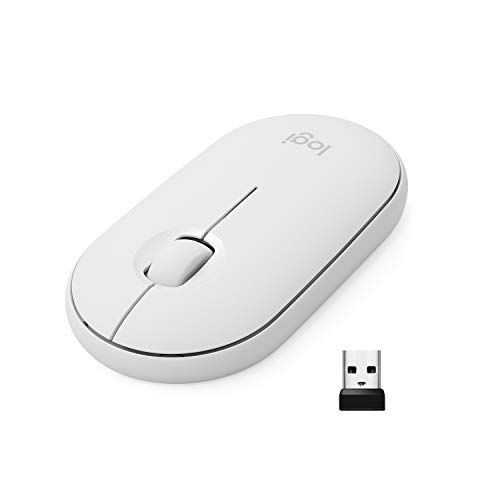
The Pebble M350 is the quiet, pocketable mouse for light days. Its flat, round body slips into a bag without a bulge, and SilentTouch switches cut click noise by about 90 percent, so it works in libraries and shared rooms without drawing looks. It connects over Bluetooth or the tiny USB receiver stored under the magnetic top cover, and a single AA battery lasts up to 18 months, so charging never matters. The 1,000 DPI sensor is fine for documents and browsing on the phone screen. The flat shape gives the palm almost no rest, so long sessions tire the hand, and there are no spare buttons.
Specs
- 1000 DPI high-precision optical sensor
- SilentTouch clicks, about 90 percent less click noise
- Bluetooth plus USB nano-receiver stored in the mouse
- 1 AA battery, up to 18 months of battery life
- 3 buttons, ambidextrous slim shape
- 4.21 x 2.32 x 1.04 in, 4.21 oz with battery
- Works with iPadOS, Windows, macOS, Chrome OS, and Android
Best for: Quiet rooms, libraries, and light travel where silence matters most.
Watch out for: Only 1,000 DPI, so the dot crawls across a large external display, and the flat shape tires the palm on long days.
Logitech M720 Triathlon
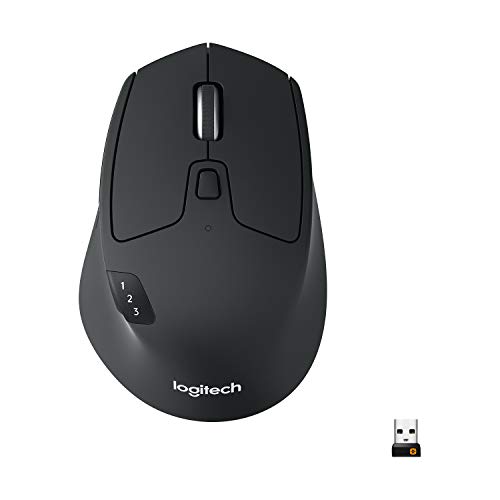
The M720 Triathlon is the multi-device workhorse. It stores pairings for up to three computers, phones, or tablets and jumps between them with a dedicated Easy-Switch button, so the iPhone 17 can share a mouse with a laptop and a tablet. The full-size right-hand body has a sculpted thumb rest, six programmable buttons, and a hyper-fast scroll wheel that spins freely or clicks into a ratchet. A single AA battery lasts up to 24 months, and the 1,000 DPI sensor handles documents and browsing without fuss. It connects over Bluetooth Low Energy or the included Unifying receiver, though the phone only needs Bluetooth.
Specs
- 1000 DPI optical sensor
- 6 programmable buttons, including gesture button
- Bluetooth Low Energy plus Logitech Unifying receiver
- Pairs with up to 3 devices, Easy-Switch button
- 1 AA battery, up to 24 months of battery life
- 135 g, 115 x 74 x 45 mm
- Hyper-fast scroll wheel with tilt
- Model 910-006036
Best for: One mouse shared between the iPhone 17, a laptop, and a tablet.
Watch out for: Only 1,000 DPI, so it is not the pick for a 4K external display, and the right-hand shape does not suit left-handed users.
Logitech Lift Vertical

The Lift holds the hand at a 57-degree angle, like a handshake, and that is its whole argument. For small to medium right hands, the upright posture takes pressure off the wrist during long days, and the 4,000 DPI sensor adjusts in fine steps. Four customizable buttons sit within easy reach, Quiet Clicks keep the sound down, and a single AA battery lasts up to 24 months. It pairs over Bluetooth Low Energy or the included Logi Bolt receiver and works with iPadOS too. The upright shape needs a few days to feel normal, and left-handed users need the separate left-hand version.
Specs
- 4000 DPI sensor, fully adjustable
- 4 customizable buttons
- Bluetooth Low Energy plus Logi Bolt USB receiver
- 57-degree handshake angle, for small to medium hands
- Quiet Clicks
- 1 AA battery, up to 24 months of battery life
- 125 g, 108 x 70 x 71 mm
- 10 m wireless range
Best for: Long days when a flat mouse leaves the wrist aching.
Watch out for: Right-hand only in this listing, so left-handed users need the separate left-hand version, and the upright shape takes a few days to feel normal.
Which One Fits Your Situation
You Edit Documents on a Big Screen
Pick the MX Master 3S. When the iPhone 17 drives an external display through USB-C, at up to 4K and 60 Hz, the high DPI sensor and the thumb wheel make long documents easy to move through. The Anywhere 3S is the backup pick if the same setup has to travel, since it keeps the same sensor in a pocket-size body.
You Travel Light
Pick the MX Anywhere 3S or the Pebble M350. The Anywhere keeps the fast wheel and the glass-tracking sensor for hotel desks, while the Pebble is lighter on the budget and silent in quiet rooms. Both pack flat, travel well in a bag that never stays in one place, and pair over Bluetooth in seconds.
Your Wrist Aches After Long Days
Pick the Lift Vertical. The handshake angle and the 4,000 DPI sensor cut hand movement and wrist twist across a full day, and the AA battery runs for two years. Give it a few days: the upright grip feels strange at first, then the flat mouse starts to feel wrong.
One Mouse for Phone, Laptop, and Tablet
Pick the M720 Triathlon. Three stored pairings and the Easy-Switch button move the pointer between the iPhone 17, a laptop, and a tablet without re-pairing. The Lift is the second choice here, with the same three-device switching in a vertical body. Keep one pairing free for a borrowed laptop or a hotel computer.
Common Mistakes
- Buying a mouse with a USB receiver only and no Bluetooth: the iPhone 17 has no USB-A port for the dongle, so the mouse cannot connect at all.
- Expecting a desktop cursor and menus: AssistiveTouch shows a dot, and the mouse taps where the dot rests, so treat it as a pointing aid, not a computer replacement.
- Assuming the extra buttons can be remapped on the phone: the customization app for these mice does not run on iOS, so the buttons keep their default jobs.
- Forgetting that a sleeping mouse will not pair: wake the mouse first, then open the Bluetooth Devices list under AssistiveTouch.
- Choosing a 1,000 DPI mouse for a large external display: the dot crawls across a 4K screen, so a 4,000 or 8,000 DPI sensor is the better call there.
Frequently Asked Questions
Should I buy a mouse or a Bluetooth keyboard for my iPhone 17?
They do different jobs, so the answer is often both. A keyboard types long text far faster than tapping, while a mouse points, taps, and scrolls without covering the screen. The mouse only works through AssistiveTouch, with a dot cursor, while a keyboard pairs as a standard Bluetooth keyboard. If you type all day, start with the keyboard; if you tap and scroll all day, start with the mouse.
Do I need a USB-C hub to use a Bluetooth mouse?
No. A Bluetooth mouse pairs straight to the phone, and no hub, cable, or adapter is involved. A hub only enters the picture when you want more at once: a wired external display plus charging, or a USB-A dongle for a mouse that has no Bluetooth. The USB-C hub guide on this site covers that setup, but the mouse itself needs none of it.
Can I use the mouse while the iPhone drives an external display?
Yes. Connect the phone to the display with a USB-C to HDMI adapter, and the mouse keeps working through AssistiveTouch while the picture fills the bigger screen. The dot cursor stays a dot, so pick a higher DPI sensor, 4,000 or 8,000, to cross a 4K screen without dragging the mouse across the whole desk.
Why does my mouse disconnect or feel slow?
Three usual causes cover most cases. First, the mouse went to sleep, so wake it and re-pair it under AssistiveTouch Devices. Second, the battery is low, so swap the AA or charge over USB-C. Third, the DPI is too low for the screen you are using, so raise it if the mouse allows it, and move closer to the phone if other Bluetooth gear crowds the signal.
More from Amazon
Programs that pair well with the guide above. Offers and eligibility are set by Amazon and may change.
Free shipping on eligible items, Prime Video and more. Eligible new members can start with a free trial.
Start a Prime free trialAd-free music streaming. Eligible new subscribers can start with a free trial.
Try Music Unlimited freeA Prime membership for ages 18-24 with a trial period. Eligibility is set by Amazon.
See Prime for Young AdultsAudiobooks and podcasts to listen to on the go. Eligible new members can start with a free trial.
Try Audible freeAs an Amazon Associate we earn from qualifying purchases.