Key takeaways
- Compare five MagSafe ring holders for iPhone 17 cases, from a slim Lamicall grip to a 360-degree Case-Mate stand, with hold and charging notes.
The iPhone 17 is a 6.3-inch phone that weighs 177 g, with a flat back and a built-in MagSafe ring, so a magnetic ring holder is the simplest way to carry it one-handed. The real decision is how much grip you need against how often you charge without a cable, because every magnetic ring sits between the phone and the charger. A strong ring keeps the phone steady on a crowded train, while a thin one stays flat enough to slip into a pocket.
This guide is for iPhone 17 owners who carry the phone in one hand, watch video at a desk, or mount the phone in a car. Every pick below was chosen from the name and specs on its Amazon product page, with the hold strength, ring size, and charging behavior stated on that page.
Quick Picks
As an Amazon Associate we earn from qualifying purchases.
| Product | Best for | Key spec from title |
|---|---|---|
| Lamicall Magnetic Phone Ring Holder | Strongest everyday hold | 4.4 lbs magnetic force |
| Case-Mate Magnetic Phone Ring Holder | Sparkle finish with a full spin | 360-degree rotation |
| Uenlio 3-Fold Magnetic Ring Holder | Double-sided mount use | Double-sided MagSafe grip |
| Doflyesky Magnetic Phone Ring Holder | Heavy-duty metal build | N52 magnets with 2.5 kg hold |
| Bordsek MagSafe Phone Grip Holder | Flexible stand angles | Dual-sided magnetic design |
How to Choose
Hold strength against the phone and case weight
The iPhone 17 weighs 177 g, and a case adds weight, so the magnet must hold the phone plus the case while you walk. Listings state hold strength in pounds or kilograms, and a figure near 4 lbs or 2 kg is a safe floor for one-handed use. A ring that holds only the phone can slip when the case is thick or the phone swings at your side. Check whether the stated force is measured with the bare phone or with the included metal ring, because the two numbers differ. A stronger magnet also matters when the ring doubles as a car mount, since a bump in the road tests the hold harder than a desk does.
Ring size, finger fit, and pocket bulk
A ring that is too small pinches the finger that carries the phone, while a ring that is too large catches on pockets and bag seams. Most magnetic rings measure close to 2.3 inches across, which suits an index finger, but a larger hand may want a wider loop. Thickness matters as much as width: a slim ring near 4 mm slides into a pocket without snagging, while a chunky metal ring adds a ridge that presses against a palm. Try the ring on the finger you use most, and check that it folds flat against the case when you are not holding it.
Stand angles for video, calls, and typing
A ring holder earns its place when it props the phone up without a separate stand. Look for a ring that locks at more than one angle, so the phone can sit upright for a video call and tilt back for watching a film. A ring that spins 360 degrees lets you switch between portrait and landscape without peeling it off the case. Some rings only hold the phone in landscape, which is fine for video but poor for calls. Check the listing for the angles it supports, and confirm the ring stays open under the weight of the phone rather than folding shut mid-call.
Wireless charging and MagSafe case fit
The iPhone 17 charges wirelessly at up to 25W through MagSafe or Qi2.2 with a 30W or stronger adapter, but a metal ring between the phone and the charger blocks that connection. Most rings in this guide must come off before wireless charging, so a snap-on ring you can remove in one second beats an adhesive ring you must peel off. A MagSafe case is the other half of the fit: the ring snaps straight onto a case with built-in magnets, while a plain case needs the metal ring that comes in the box. That metal ring only sticks to a hard, flat surface, never to soft silicone or TPU.
The 5 Best Options
Lamicall Magnetic Phone Ring Holder

The Lamicall ring is the pick for owners who want the strongest hold in the thinnest body. It snaps onto the MagSafe ring of the iPhone 17 with 4.4 lbs of magnetic force, and the included metal ring lifts that hold to 9.9 lbs on a case without magnets. At 1.12 ounces and 4.2 mm thick, it adds almost no bulk, and the ring folds out as a finger loop or a desktop kickstand. The listing names the iPhone 17, 17 Pro, 17 Pro Max, and 17 Air, so the fit is stated rather than guessed.
Specs
- 4.4 lbs magnetic force, up to 9.9 lbs with the included metal ring
- 1.12 ounces, 4.2 mm slim
- Ring diameter 2.32 inches
- Fits iPhone 17, 17 Pro, 17 Pro Max, 17 Air, and MagSafe cases
- Finger grip and desktop kickstand
- First available October 10, 2025
Best for: One-handed carrying on a commute with a strong magnetic hold.
Watch out for: The ring is magnetic on one side only, so it cannot stick to a metal surface by itself. Remove it before wireless charging, and press the metal ring firmly for 2 minutes before first use.
Case-Mate Magnetic Phone Ring Holder

The Case-Mate ring is the pick for owners who want a grip that looks like jewelry rather than hardware. Its metal body carries a crystal finish, and the ring spins a full 360 degrees, so you can set the viewing angle for video, calls, or reading without peeling the ring off. It snaps on and off the MagSafe ring with no adhesive, which leaves no sticky marks on the case. The listing names the iPhone 17 among the phones it fits, and the ring doubles as a kickstand for hands-free viewing at a desk.
Specs
- Metal body with a crystal finish
- 360-degree rotation
- Kickstand for hands-free viewing
- Snaps on and off with no adhesive residue
- Compatible with iPhone 12 through iPhone 17, including iPhone 17 Pro and iPhone 17 Pro Max
- Item model number CM049622
Best for: A dressy grip that spins to any viewing angle.
Watch out for: The crystal finish adds shine but no extra hold, so treat the hinge gently and check it stays tight over time. Remove the ring before wireless charging.
Uenlio 3-Fold Magnetic iPhone Ring Holder
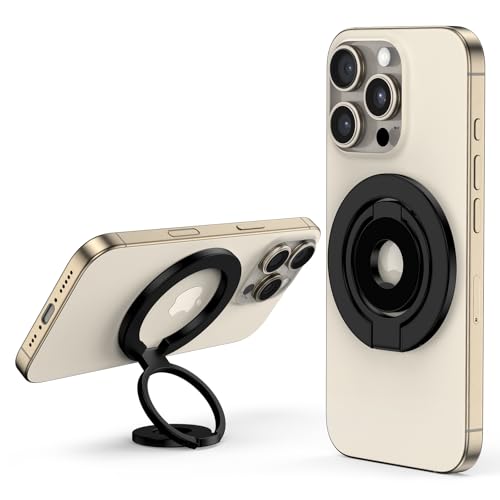
The Uenlio ring is the pick for owners who want a ring that also works as a mount. Its double-sided MagSafe design grips the phone on one side and sticks to metal surfaces on the other, so the same ring holds the phone in your hand, props it on a desk, or hangs it on a fridge or gym rack. The ring folds in three parts and rotates 360 degrees, which gives more viewing angles than a fixed loop. A metal ring comes in the box for phones and cases without built-in magnets.
Specs
- Metal body
- 360-degree rotatable ring
- Double-sided MagSafe grip
- Kickstand for video and calls
- Works with iPhone 17, 17 Pro, 17 Pro Max, and 17 Air
- Metal ring included in the box
- First available July 30, 2025
Best for: Owners who want one ring for grip, stand, and metal-surface mounting.
Watch out for: The double-sided magnet can attract metal dust and small metal objects in a bag, so wipe it clean before use. Remove the ring before wireless charging.
Doflyesky Magnetic Phone Ring Holder

The Doflyesky ring is the pick for owners who want a heavy-duty metal ring that can also mount to gym gear. Its body is CNC-machined zinc alloy, and the N52 magnets inside hold up to 2.5 kg, which is far more than the 177 g iPhone 17 plus a case. The ring is magnetic on both sides, so it grips the phone and sticks to metal racks, freezers, and car mounts alike. Two parts of the ring adjust separately, which lets you set the grip angle and the stand angle on their own.
Specs
- CNC-machined zinc alloy body
- N52 magnets with up to 2.5 kg holding force
- Double-sided magnetic design
- Works with iPhone 12 through iPhone 17 MagSafe cases
- Adjustable grip and stand angles
- First available March 8, 2023
Best for: A metal ring that doubles as a gym and car mount.
Watch out for: Zinc alloy weighs more than plastic rings, so the phone feels heavier in the hand. Keep bank cards away from the strong magnets, and remove the ring before wireless charging.
Bordsek MagSafe Phone Grip Holder

The Bordsek ring is the pick for owners who want a flexible stand that adjusts to many angles. Its dual-sided magnetic design lets the ring act as a finger loop, a kickstand, and a mount on metal surfaces, and the loop flips to set the phone upright for calls or tilted back for video. The listing names the iPhone 17 directly, and a metal ring comes in the box for cases without magnets. It is the most adjustable ring in this guide, which suits owners who change viewing angles through the day.
Specs
- Dual-sided magnetic design
- Adjustable kickstand loop
- Finger ring grip and phone stand
- Works with iPhone 17, 17 Pro, 17 Pro Max, and 17 Air
- Metal ring included in the box
- First available June 5, 2025
Best for: Owners who change viewing angles often and want a flexible stand.
Watch out for: This ring does not support wireless charging while attached, so take it off before charging. The metal ring only sticks to hard, flat surfaces, not to soft silicone or TPU cases.
Which One Fits Your Situation
You walk and commute with one hand free
Pick the Lamicall ring when the phone spends the day in one hand on trains and sidewalks. Its 4.4 lbs of magnetic force holds the 177 g iPhone 17 plus a case without slipping, and the 4.2 mm body stays flat in a pocket between stops. Add the included metal ring if the case has no magnets, and press it firmly for 2 minutes before the first use.
You watch video at a desk all day
Pick the Case-Mate ring when the phone sits on a desk as a second screen. The 360-degree spin sets the phone upright for calls and flat back for video, and the kickstand holds the angle without a separate stand. Snap it off in one second when the workday ends and the phone goes on a charger.
You swap between grip and wireless charging daily
Pick the Uenlio ring when the ring comes on and off several times a day. Its magnetic snap removes in one motion, so wireless charging at up to 25W starts the moment the ring is off. The double-sided design also lets the phone hang on a metal rack at the gym between charges.
You use a magnetic car mount
Pick the Doflyesky ring when the phone rides on a car mount. Its N52 magnets hold up to 2.5 kg, which keeps the phone steady over bumps, and the double-sided body sticks straight to a magnetic mount with no extra plate. Set the stand angle before driving, and keep the ring clear of the charging pad at home.
Common Mistakes
- Buying an adhesive ring for a soft silicone or TPU case, where the glue never bonds
- Leaving a metal ring on the phone for wireless charging, then wondering why charging stops
- Picking a ring too small for the finger that carries the phone all day
- Sticking the metal ring on a curved or textured case back instead of a flat one
- Assuming every magnetic ring works as a car mount when only double-sided rings do
Frequently Asked Questions
How is a ring holder different from a magnetic grip?
A ring holder is a finger loop that snaps onto the MagSafe ring and folds out as a kickstand, while a magnetic grip is a strap or handle that mounts the phone to metal surfaces. The ring suits one-handed carrying and desk viewing. The grip suits gym gear or a fridge. Both use the same MagSafe magnets, so either fits an iPhone 17 case with built-in magnets.
How is a ring holder different from a MagSafe wallet?
A MagSafe wallet holds cards and folds out as a stand, while a ring holder holds the phone in your hand. The wallet adds card storage and bulk, and cards must come out before the wallet goes near a strong magnet. The ring adds almost no bulk and keeps the phone steady in one hand. Pick the wallet when you carry cards, and the ring when you carry the phone.
Can I charge the iPhone 17 wirelessly with a ring holder attached?
No, not with the rings in this guide. A metal ring between the phone and the charger blocks the MagSafe connection, so wireless charging at up to 25W will not start. Snap the ring off before setting the phone on a charger, then snap it back on when charging ends. Wired charging through USB-C works with the ring attached, since the cable plugs into the bottom of the phone.
Will a ring holder fit on an iPhone 17 case?
Yes, if the case has built-in MagSafe magnets, the ring snaps on. The iPhone 17 case does not fit the iPhone 17 Pro, so buy a ring sized for the base model and check the listing names the iPhone 17. For a plain case with no magnets, use the metal ring from the box, and stick it only to a hard, flat back, never to soft silicone or TPU.
More from Amazon
Programs that pair well with the guide above. Offers and eligibility are set by Amazon and may change.
Free shipping on eligible items, Prime Video and more. Eligible new members can start with a free trial.
Start a Prime free trialAd-free music streaming. Eligible new subscribers can start with a free trial.
Try Music Unlimited freeA Prime membership for ages 18-24 with a trial period. Eligibility is set by Amazon.
See Prime for Young AdultsAudiobooks and podcasts to listen to on the go. Eligible new members can start with a free trial.
Try Audible freeAs an Amazon Associate we earn from qualifying purchases.