Our Top Picks
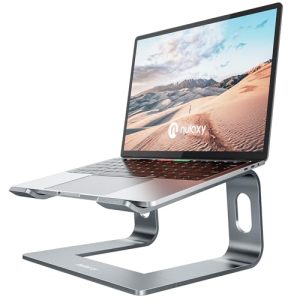
 Nulaxy Full Aluminum Laptop Stand1 Count (Pack of 1)11.5 x 8.3 x 2.3 inches1.8 poundsCheck on Amazon


A laptop is built for portability, not for posture. When the screen sits flat on a desk, most people hunch forward and tilt their chin down for hours. A stand lifts the screen closer to eye level, opens airflow under the machine, and clears space underneath for a keyboard or notebook.
The five stands below cover the main ways people use a laptop at a desk: a fixed riser for a permanent setup, two adjustable folding stands for people who move between rooms, and two vertical docks for laptops used closed beside an external monitor.
As an Amazon Associate, we earn from qualifying purchases.
Quick Answer
For most desk setups, the Nulaxy C3 fixed riser is the simplest choice, while the Nulaxy C1 adjustable stand suits people who change height and angle often. Vertical storage works best with the OMOTON single-slot dock or the Twelve South BookArc Flex, and the Amazon Basics ergonomic stand is the practical pick for a first adjustable riser.
1. Nulaxy C3 Laptop Stand
The Nulaxy C3 is a fixed aluminum riser for people who want a stand that stays in one place and never needs adjusting. It is a detachable two-piece frame that slots together without tools and has no hinges to loosen over time. The open back leaves the underside of the laptop exposed to moving air. A lip at the front edge keeps the laptop from sliding forward, and silicone pads protect the desk.
At about 6 inches of lift, the C3 raises a laptop screen to a height that pairs naturally with an external keyboard and mouse. That pairing matters, because typing directly on a raised laptop forces the wrists into an awkward angle. The stand fits laptops from 10 to 16 inches and supports machines up to 22 lbs, far more than any standard laptop weighs. When the workday ends, the frame comes apart and packs flat, so it can travel in a bag or slide into a drawer.
Specs
- Material: Aluminum alloy
- Laptop fit: 10 to 16 inches
- Screen lift: About 6 inches
- Load capacity: Up to 22 lbs
- Design: Detachable two-piece frame with open-back cooling
- Grip: Silicone pads and front lip
- ASIN: B07P54RSPY
2. Nulaxy C1 Laptop Stand
The Nulaxy C1 is the adjustable sibling of the C3, built around two support rods that set both height and viewing angle. The stand folds through a series of positions. The vented upper panel lets air move under the laptop, and the dual-rod layout spreads the load across two points.
Capacity is the headline here. The C1 is built to support laptops up to 44 lbs, which makes it a comfortable match for large 17-inch notebooks and mobile workstations that would overwhelm lighter stands. It fits laptops from 10 to 17 inches, and anti-slip silicone pads hold the machine in place while protecting its underside from scratches. When folded, the whole stand collapses flat enough to slip into a backpack or briefcase, so it works for people who set up a workstation in cafes, hotel rooms, or shared offices.
Specs
- Material: Aluminum alloy with ventilated panel
- Laptop fit: 10 to 17 inches
- Load capacity: Up to 44 lbs
- Adjustment: Dual support rods set height and angle
- Cooling: Geometric heat-vent panel
- Portability: Dual-fold design collapses flat
- ASIN: B077B9W343
3. OMOTON Vertical Laptop Stand

The OMOTON vertical stand takes a different approach: instead of lifting a laptop for typing, it stores the laptop upright and out of the way. The stand is a single aluminum slot that grips the closed laptop from the sides, holding it vertically beside a monitor. That frees the whole footprint the laptop would otherwise occupy.
The slot width adjusts from 14 to 69 mm, so it accepts slim ultrabooks as well as thicker gaming laptops, and it fits machines up to 17.3 inches. A screw mechanism sets the width, and silicone lining inside the slot protects the laptop finish from scuffs. The base is wide and flat, which keeps the stand planted when the laptop is pulled out or slid back in. Because the laptop sits closed, this stand works only as storage, not as a typing platform, and it pairs with a laptop used in closed-lid mode with an external monitor.
Specs
- Material: Anodized aluminum alloy with silicone lining
- Laptop fit: Up to 17.3 inches
- Slot width: Adjustable from 14 to 69 mm
- Load capacity: Up to 15.4 lbs
- Design: Single-slot vertical dock
- Base: Wide flat base for stability
- ASIN: B074PPGHMC
4. Twelve South BookArc Flex
The Twelve South BookArc Flex is the premium vertical option, a single-slot dock that stores a closed laptop upright beside a monitor. It uses interchangeable inserts to set the slot width for a specific laptop, so the machine sits snug without wobble and without pressure on the hinge. The non-slip base keeps the dock steady when the laptop is lifted out one-handed.
What sets the BookArc Flex apart is how precisely it fits. Rather than a screw-adjusted slot, it ships with inserts sized for different MacBook models, so the owner picks the insert that matches their machine and the dock holds it exactly. The laptop stays secure even on a desk that gets bumped, and the compact footprint takes up little more space than the laptop itself.
Specs
- Material: Anodized aluminum
- Design: Single-slot vertical dock with interchangeable inserts
- Fit: Sized for MacBook Air and MacBook Pro models
- Base: Non-slip
- Use: Closed-lid storage beside an external monitor
- Finish: Brushed aluminum to match MacBook
- ASIN: B0C28MN2R1
5. Amazon Basics Ergonomic Laptop Stand
The Amazon Basics ergonomic stand is a Z-style folding riser that adjusts both height and tilt. The frame folds flat for storage, unfolds in seconds, and locks into a range of positions that lift the screen up to 7 inches. The open frame leaves the laptop base exposed to air, and non-slip silicone pads keep the machine from sliding while hooks at the front edge stop it from slipping forward.
The stand fits laptops from 10 to 15.6 inches. It supports machines up to 11 lbs, and the whole unit weighs about 0.77 kg, so it is easy to carry between rooms or pack for a trip. When folded, it measures about 1.8 inches thick, so it slides into a laptop bag alongside the computer.
Specs
- Material: Aluminum alloy
- Laptop fit: 10 to 15.6 inches
- Height adjustment: Up to 7 inches
- Load capacity: Up to 11 lbs
- Weight: About 0.77 kg
- Folded thickness: About 1.8 inches
- ASIN: B0BLRJ4R8F
How to Choose
Start with how you use the laptop. If the screen is your main display and you type on the laptop keyboard, choose an adjustable riser with a modest lift. If you use an external keyboard and mouse, a fixed riser gives a cleaner setup with nothing to adjust, and the screen can sit higher. If the laptop spends its working hours closed beside a monitor, a vertical dock is the better shape entirely, since it stores the laptop instead of raising it.
Check the fit before anything else. Measure the laptop screen size and compare it with the stand fit range, then check the thickness if you are considering a vertical dock, since a thick gaming laptop needs a wider slot than a slim ultrabook. Weight capacity matters most for large machines: a 17-inch workstation needs a stand built for heavy loads, while a 13-inch ultrabook works on almost any stand.
Material and stability come next. Aluminum stands feel solid, dissipate heat, and last longer than plastic ones, and a wide base or a heavy frame resists tipping when the laptop is lifted out. Silicone pads protect both the laptop and the desk, and a front lip or hook stops the machine from sliding forward at steeper angles.
Think about the desk itself. A small desk benefits from a vertical dock or a stand that folds flat and stows away, while a large desk can host a fixed riser permanently. If the desk is shared, an adjustable stand lets each person set a comfortable height. If the laptop moves between home and office, weight and folded size matter as much as lift height.
Who Should Skip
A laptop stand is not for everyone. People who work with the laptop on their lap, on a couch, or in bed will get little from a desk stand, because the stand needs a flat surface to work. People who use a laptop docked to a monitor arm with the screen already at eye level may also find a stand redundant.
Very large or very heavy laptops need careful matching. A 17-inch mobile workstation or a thick gaming laptop can exceed the size and load limits of smaller stands. Check the fit and load numbers first, and choose a heavy-duty adjustable stand or a vertical dock with a wide slot.
Finally, anyone who types directly on the laptop keyboard for hours should be cautious with tall fixed risers. Raising the screen also raises the keyboard, which forces the wrists upward and can cause discomfort over time. The fix is simple: pair a tall stand with an external keyboard and mouse, or choose a low adjustable stand that keeps the keyboard near desk height.
Frequently Asked Questions
What size laptop stand do I need?
Match the stand fit range to your laptop screen size, and check thickness for vertical docks. Most stands in this guide fit 10 to 17-inch laptops, but a 17-inch machine needs a stand rated for its size and weight.
Is a fixed or adjustable laptop stand better?
A fixed riser is better for a permanent desk setup with an external keyboard, because it has no moving parts. An adjustable stand is better for shared desks, travel, and people who change position through the day, because the height and angle can change in seconds.
Do laptop stands help with cooling?
A stand helps by lifting the laptop off the desk and exposing its underside to moving air. Open frames and vented panels work best, and the benefit is largest during long sessions with demanding software.
Can I use a laptop stand with an external monitor?
Yes, and that is one of the best uses for a stand. A riser holds the laptop screen beside the monitor as a second display, while a vertical dock stores the closed laptop out of the way.
Final Verdict
The best laptop stand is the one that matches how you actually work. For a fixed home office with an external keyboard, the Nulaxy C3 fixed riser is the simplest choice. For shared desks and travel, the Nulaxy C1 adjustable stand offers the widest range of positions and the highest load capacity. For a monitor-first setup, the OMOTON vertical dock stores a laptop neatly, and the Twelve South BookArc Flex does the same job with a more precise fit for MacBook owners. For a first stand, the Amazon Basics ergonomic riser covers the essentials with no fuss.
Product and ASIN Reference
| Product | ASIN |
|---|---|
| Nulaxy C3 Laptop Stand | B07P54RSPY |
| Nulaxy C1 Laptop Stand | B077B9W343 |
| OMOTON Vertical Laptop Stand | B074PPGHMC |
| Twelve South BookArc Flex | B0C28MN2R1 |
| Amazon Basics Ergonomic Laptop Stand | B0BLRJ4R8F |
More from Amazon
Programs that pair well with the guide above. Offers and eligibility are set by Amazon and may change.
Free shipping on eligible items, Prime Video and more. Eligible new members can start with a free trial.
Start a Prime free trialAd-free music streaming. Eligible new subscribers can start with a free trial.
Try Music Unlimited freeA Prime membership for ages 18-24 with a trial period. Eligibility is set by Amazon.
See Prime for Young AdultsAudiobooks and podcasts to listen to on the go. Eligible new members can start with a free trial.
Try Audible freeAs an Amazon Associate we earn from qualifying purchases.