Our Top Picks
The best 20000mAh power bank for a laptop and phone is the one whose stated USB-C output meets or beats the wattage printed on your laptop’s own charger, and among these seven listings that points to the 130W and 140W models for larger machines and the 65W, 87W and 100W models for lighter ones. Capacity is nearly identical across the group, since every title says 20,000 mAh. What separates them is wattage, port layout, built-in extras and how much you want to spend.
That framing matters because “20000mAh” is the number everyone shouts and the one that tells you the least about whether your laptop will charge. A laptop looks at watts, not milliamp-hours, and it will refuse, throttle or merely sip power if the bank cannot meet its demand. So this guide starts with the wattage match, moves to the energy math, and only then goes through each listing.
Start here: match the bank to your laptop charger
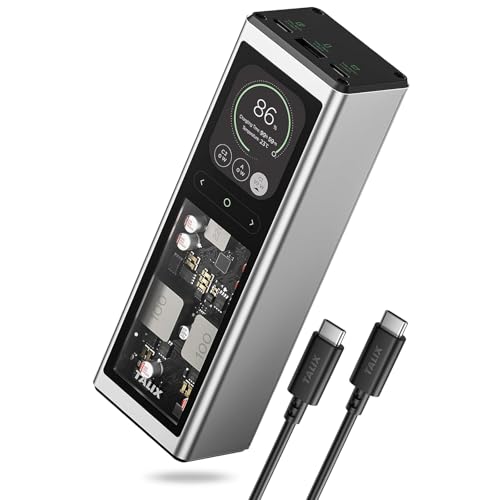
TALIX 140W USB-C Port Laptop Power Bank, 20000mAh 3-Port | PD 3.1 Fast Charging, Portable Charger with Digital Display, Battery Pack for MacBook, Lenovo, Dell, iPhone, Samsung




As an Amazon Associate we earn from qualifying purchases. Product prices and availability are accurate as of the date/time indicated.

JUOVI 65W Portable Charger for Laptop Power Bank 20000mAh | USB C Laptop Power Bank Fast Charging Battery Pack for Laptop MacBook Dell XPS iPhone 17/16/15/14 Series Samsung and More


As an Amazon Associate we earn from qualifying purchases. Product prices and availability are accurate as of the date/time indicated.

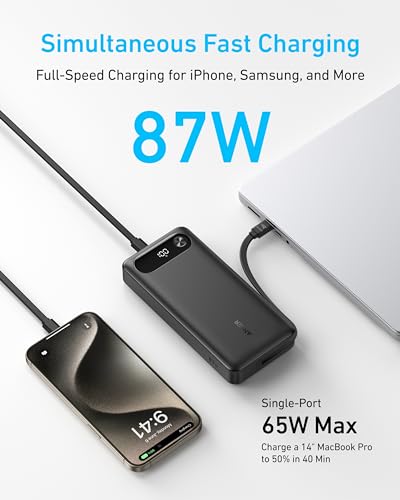
Anker Power Bank, 20,000mAh Travel Essential, Built-in USB-C Cable(Black) | 3-Port 87W Max Fast Charging Battery Pack, for MacBook, iPhone 16 / 15 Series, Samsung, Switch, and More


As an Amazon Associate we earn from qualifying purchases. Product prices and availability are accurate as of the date/time indicated.

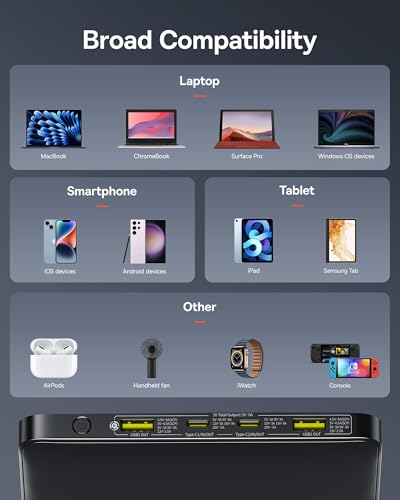
Baseus Laptop Portable Charger 100W 20000mAh, Blade Travel Power Bank Fast Charging 2 USB-C & 2 USB-A Port, Steam Deck Battery Pack for MacBook iPad iPhone 17/16/15/14/13 Samsung S24 etc.



As an Amazon Associate we earn from qualifying purchases. Product prices and availability are accurate as of the date/time indicated.
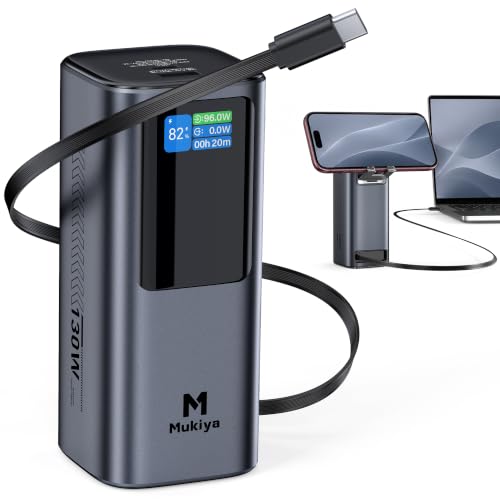
Mukiya Laptop Power Bank, 20,000mAh 130W Built-in Retractable USB C Cable | Portable Charger, Battery Bank with Built-in Phone Stand for MacBook/iPhone/iPad/Samsung/Steam Deck, Flight-Safe


As an Amazon Associate we earn from qualifying purchases. Product prices and availability are accurate as of the date/time indicated.

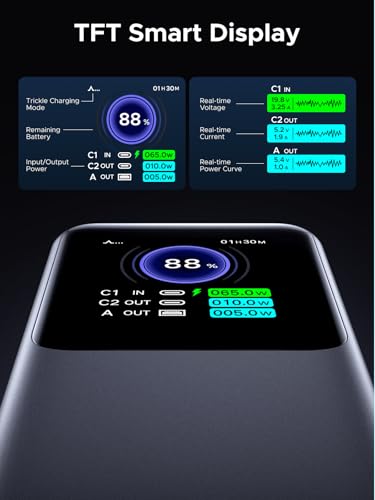
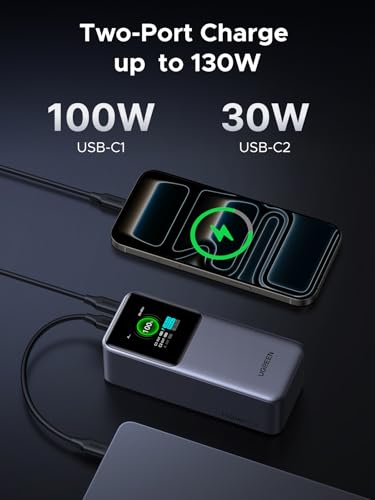
UGREEN Nexode 20000mAh 130W Portable PD Power Bank for MacBook Pro 16 | TFT smart display, 72Wh, PD 3.0. Fast for MacBook, iPad, iPhone 17/16, 3-port for multiple devices





As an Amazon Associate we earn from qualifying purchases. Product prices and availability are accurate as of the date/time indicated.

JUOVI Power Bank 65W 20000mAh Laptop Portable Charger | Fast Charging with 4 Ports LED Display External Battery Pack for MacBook Air iPad Tablet iPhone Samsung Steam Deck etc


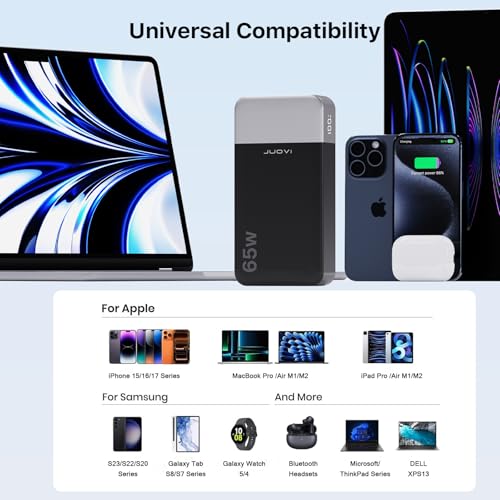

As an Amazon Associate we earn from qualifying purchases. Product prices and availability are accurate as of the date/time indicated.
Look at the small print on your laptop’s wall charger. It states an output in watts, often in a line such as “20V 3.25A”. Multiply the two for watts. Then find the row below that fits. The wattage bands are general rules of thumb for typical machines, not a guarantee, so your own charger label overrides the table.
| Your laptop charger says | Typical machine | Listings in this set with enough stated output |
|---|---|---|
| Up to about 65W | Thin-and-light notebooks, tablets, handhelds | All seven, including the two 65W JUOVI listings |
| Around 70 to 90W | Mid-size laptops with modest graphics | Anker (87W max), Baseus (100W), Mukiya (130W), UGREEN (130W), TALIX (140W) |
| Around 100W | 14 to 16 inch performance models | Baseus (100W), Mukiya, UGREEN, TALIX |
| 130 to 140W | Larger workstation-class laptops | TALIX (140W), Mukiya and UGREEN at 130W, subject to the listing’s port details |
A caution on that last row: a 130W bank does not necessarily deliver 130W on every port at once, and some laptops will not accept a charger rated lower than their own. If the titles do not spell out the per-port split, treat that as a “check the listing” item.
The seven listings at a glance
| Listing | Stated output and ports | Price tier | Best for |
|---|---|---|---|
| TALIX 140W Laptop Power Bank | 140W USB-C, 3-port, PD 3.1, digital display | Premium | Large laptops that want maximum headroom |
| JUOVI 65W (first listing) | 65W USB-C, 20000mAh, for MacBook and Dell XPS | Budget | Light laptops and phones at low cost |
| Anker 20,000mAh Travel Essential | 87W max, 3-port, built-in USB-C cable | Mid-range | Travelers who hate carrying a cable |
| Baseus Blade 100W | 100W, 2 USB-C and 2 USB-A, Steam Deck mentioned | Premium | People charging four devices |
| Mukiya 130W | 130W, built-in retractable USB-C cable, phone stand, flight-safe | Mid-range | Desk or flight use with integrated cable |
| UGREEN Nexode 130W | 130W, PD 3.0, TFT display, 72Wh, 3-port | Mid-range | MacBook Pro 16 class owners |
| JUOVI 65W (second listing) | 65W, 4 ports, LED display | Budget | A budget four-port option |
Capacity versus usable energy: a worked example
Milliamp-hours describe charge, not energy, and the cells inside a bank run at a nominal voltage of roughly 3.6 volts. So 20,000 mAh at 3.6 V works out to 72 watt-hours (20 amp-hours times 3.6 volts). UGREEN’s title states 72Wh directly; for the other six, the same figure is our assumption from the 20,000 mAh label, and a maker rating at 3.7 V would print about 74Wh instead.
Not all of that energy reaches your devices. Boosting from cell voltage to 5, 9 or 20 volts and running the charging chips costs energy, and heat is where it goes. We will assume 85 percent efficiency, which is a plausible figure rather than a published one. That leaves about 61 watt-hours to spend.
Now apply it to a travel day. Say your laptop has a 50 watt-hour battery and your phone has a 15 watt-hour battery (both assumed, so check your own devices). One full laptop recharge takes about 50 Wh, which leaves about 11 Wh, enough for roughly three-quarters of a phone charge. If you charge the phone twice instead, that is 30 Wh and you have 31 Wh for the laptop, around 60 percent of a refill. In other words, one bank covers either one laptop plus a top-up, or several phone charges and a partial laptop boost, not both in full.
A second calculation shows why wattage is only half the story. At a steady 65W, 61 Wh of usable energy runs out in a little under an hour (61 divided by 65 is about 0.94 hours). In real use, a laptop draws far less than its charger’s maximum most of the time, so the bank keeps going longer when you are working rather than fast-charging an empty battery. Heavy tasks that keep the CPU and GPU busy will drain much faster.
Weight is the cost of capacity. Titles in this set do not state weights, so check the listing; as an estimate, banks in this class commonly weigh somewhere in the region of 400 to 550 grams, which is the weight of a small hardback book. Larger display and ports mean slightly more.
The seven power banks, one by one
TALIX 140W USB-C Laptop Power Bank, 3-Port
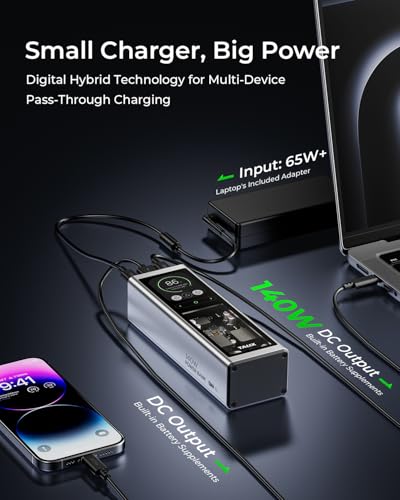
The TALIX title promises the highest output in the group: 140W from a USB-C port, three ports in total, PD 3.1 fast charging and a digital display, with compatibility named for MacBook, Lenovo, Dell, iPhone and Samsung. PD 3.1 is the Power Delivery revision that extends the standard to higher power levels, which is why a 140W figure is even possible over USB-C. A 140W bank is the sensible choice if your laptop’s charger is in that neighborhood, because anything lower can leave the machine charging slowly under load.
The digital display is more than decoration. A readout of remaining percentage or output wattage is the quickest way to learn how your laptop behaves on the bank. Whether it shows watts, percentage or both, the title does not say, so confirm on the listing.
The caveat with high-output banks is that the headline figure is almost always a maximum for one port. When three ports are in use, the controller usually divides the output. If you plan to charge a laptop and two phones at once, check for a per-port table. Also, a 140W charge requires a cable and a laptop that both support the higher power levels; a standard phone cable will limit the charge.
It sits in the premium tier by price within this set, and the cost makes sense only if you need the headroom. For a phone and a 65W ultrabook, you would be paying for capability you never use.
Pros
- Highest stated output in the set, at 140W
- PD 3.1 and a digital display, per the title
- Three ports for a laptop plus phones
Cons
- Premium pricing versus lighter-duty banks
- Per-port output when several ports are in use is not in the title
- Requires a cable and laptop that support high wattage
Who it’s for: owners of larger laptops with charger ratings near 140W who also carry a phone.
JUOVI 65W Portable Charger for Laptop (first listing)
This JUOVI listing is described as a 65W USB-C laptop power bank with 20000mAh capacity, naming MacBook, Dell XPS, iPhone 17, 16, 15 and 14 series and Samsung. The 65W figure is the most common laptop charger rating for slim notebooks, which makes this the logical budget answer when the machine you carry is a light one. It is also the lowest-priced option in the group, tied with its sibling.
A budget price comes with unanswered questions. The title does not say how many ports there are, whether a display exists, whether a cable is included, or how the 65W is shared. Those details live on the listing page, and they are worth reading carefully because a single-cable, single-port bank behaves very differently from a four-port one.
The device compatibility list names iPhone 17, 16, 15 and 14 series. We cannot verify phone compatibility beyond what the title lists, but the phone side of a USB-C bank is rarely the problem; the laptop is. If your laptop’s own charger is above 65W, expect slower charging or none under load.
Another estimate: at 65W, a 61 Wh usable pool covers about 55 minutes of full-rate charging, or many hours of light office work, since a thin laptop typically draws a small fraction of 65W when not charging a drained battery. These are our assumptions and not figures from the listing.
Note that this listing and the later JUOVI one are near-duplicates in capacity and wattage; the title differences, including ports and display, are covered under the second entry.
Pros
- Lowest price tier in the set
- 65W matches many thin-and-light laptop chargers
- Compatibility named for MacBook, Dell XPS, iPhone and Samsung
Cons
- Not enough for laptops with 90W or higher chargers
- Port count, cable and display are not stated in the title
- Near-duplicate of another JUOVI listing, which can confuse comparisons
Who it’s for: budget shoppers with a light laptop and a phone.
Anker Travel Essential Power Bank, Built-in USB-C Cable
Anker’s listing stresses travel: a built-in USB-C cable, three ports, and 87W maximum fast charging, with a black finish and compatibility named for MacBook, iPhone 16 and 15 series, Samsung and Switch. A built-in cable removes one of the commonest failure points in a travel kit, which is the cable you forgot, and it tends to be the cable that works at the stated wattage because it is part of the design.
The wording “87W Max” is worth reading closely. A maximum is a ceiling, not a promise on every port at once, and the title says nothing about how output is split among the three ports. Anker’s own product page and manual are the place to learn the split. If you want to charge a laptop and a phone together, find that table before buying.
Built-in cables are a convenience with a cost. If the cable frays or fails, the whole unit loses its main laptop output unless other ports can substitute. The title does not state the cable’s length or whether it retracts. Do not bend or yank a built-in cable at the connector, and stop using any bank whose cable looks damaged.
At 87W the unit covers most 65W and many 70 to 80W laptop chargers. If your charger is stamped 100W or more, step up to a 100W-plus model. This is mid-range by price in the set.
Pros
- Built-in USB-C cable means one less item to pack
- 87W maximum suits many slim laptops
- Three ports; names a gaming handheld in the compatibility list
Cons
- The 87W figure is a maximum; the split across ports is not in the title
- A damaged built-in cable is harder to replace
- Not enough for 100W-plus laptop chargers
Who it’s for: frequent travelers with a thin laptop who value fewer loose cables.
Baseus Blade Laptop Portable Charger 100W
The Baseus title describes a “Blade” travel power bank at 100W with 20000mAh, two USB-C ports and two USB-A ports, and names Steam Deck, MacBook, iPad, iPhone 17, 16, 15, 14 and 13 and Samsung S24. Four ports is the largest count in the set, and mixing two USB-C with two USB-A is useful if you still carry older accessories such as a wireless earbud case or a fitness band that charges over USB-A.
The word “Blade” and the travel positioning suggest a slim, flat form, but the title does not give dimensions or weight, so check the listing. Flat banks pack well into a laptop sleeve, though they are not always the lightest. Also check whether the display or indicator lights are present.
One-hundred-watt output is the sweet spot for many 14 to 16 inch laptops, whose chargers are often in the range of 65 to 100W. As with every multi-port bank, the headline wattage generally applies to one USB-C port; plug in a second device and the split may reduce what the laptop gets. USB-A ports are normally much lower powered than USB-C ports, so use them for small accessories only.
Let’s run a quick scenario: laptop on one USB-C port, phone on the other, earbuds on USB-A. If the bank divides output, your laptop may see something closer to 65 to 80W while the phone draws its share. That is an estimate of how sharing commonly works, not a statement from the listing. For laptops that run near their limit, charge the laptop alone when you are in a hurry.
This is the highest-priced listing in the set, so the extra USB-A ports and the Baseus brand are what you are paying for.
Pros
- Four ports including two USB-C
- 100W covers many 14 to 16 inch laptop chargers
- USB-A ports help with older accessories
Cons
- Highest price tier in the set
- Output sharing among four ports is not described in the title
- Dimensions and weight not stated
Who it’s for: people who carry a laptop, a phone and a few small accessories and want one hub.
Mukiya Laptop Power Bank 130W, Built-in Retractable USB-C Cable
Mukiya’s listing packs a lot into its title: 130W output, a built-in retractable USB-C cable, a built-in phone stand, and compatibility for MacBook, iPhone, iPad, Samsung and Steam Deck, along with “Flight-Safe.” The retractable cable is the standout. It keeps the main laptop connection inside the body, so no tangling, though a mechanism with moving parts is something to inspect on arrival.
The phone stand turns the bank into a small desk prop, handy for video calls or watching a stream while the phone charges. Stand designs differ, and the title does not describe the angle or stability, so look at the photos.
“Flight-Safe” is a claim to verify rather than rely on. The rule that matters is the watt-hour rating printed on the unit, which for a 20,000 mAh bank should be around 72Wh by our estimate, below the 100Wh threshold that airlines commonly apply to spare lithium batteries. Always carry such banks in your cabin bag, never in checked luggage, and follow your airline’s current rules.
With 130W stated, this should handle the same laptops as the UGREEN listing, subject to the usual port-sharing caveats. A built-in retractable cable also means you are tied to the length and connector rating of that cable; if it only supports a lower wattage than the headline, you would not know from the title. Read the listing for the cable’s rating.
By price it is mid-range, the same tier as the Anker and UGREEN entries, which makes the extra integrated features the differentiator.
Pros
- 130W stated output
- Built-in retractable USB-C cable and phone stand
- “Flight-Safe” noted in the title (verify against airline rules)
Cons
- Retractable mechanisms have moving parts that can wear
- Cable’s own wattage rating is not in the title
- Stand design and stability are unspecified
Who it’s for: desk-and-travel users who want a tidy, cable-free carry and a stand for video calls.
UGREEN Nexode 130W Portable PD Power Bank, 72Wh
The UGREEN title is unusually explicit: Nexode, 20000mAh, 130W, PD 3.0, a TFT smart display, 72Wh, three ports, and a specific mention of MacBook Pro 16. The 72Wh figure is the only watt-hour rating printed in any title in this set, which is useful in two ways. It confirms the nominal energy our math assumed, and it gives you the number airlines care about, comfortably under the common 100Wh threshold.
The color TFT display is a step beyond a basic LED readout, and it can show input and output details, depending on the model. The title does not say precisely what the display shows, so check before buying if you want live wattage readings. Seeing the wattage being drawn is the best way to find out whether your laptop is actually receiving the power you expect.
The “MacBook Pro 16” mention is pointed. That class of laptop often ships with a high-wattage charger, and many owners want a bank that matches. PD 3.0, though, is an older revision than PD 3.1, which can limit the highest power profiles. Whether 130W is reachable on your specific laptop depends on both the laptop’s and the bank’s supported voltage levels, so check the listing’s output table.
Because the unit is 72Wh and 130W, a full-power draw would drain it in about half an hour (72 divided by 130 is roughly 0.55 hours, before losses). That is a theoretical ceiling and not a typical use pattern, but it is a useful reminder that very high wattage empties a bank quickly.
It is mid-range by price in the set.
Pros
- 72Wh stated, easing airline-rule checks
- 130W output and a color display
- Three ports; names a large laptop class
Cons
- Full 130W on one port may depend on laptop and cable
- Display behavior is not described in detail
- PD 3.0 rather than PD 3.1
Who it’s for: owners of larger laptops who want a readout and a clear watt-hour figure for flying.
JUOVI Power Bank 65W Laptop Portable Charger, 4 Ports, LED Display (second listing)
This second JUOVI listing shares the 65W and 20000mAh headline, but the title adds four ports, an LED display, and compatibility with MacBook Air, iPad, tablets, iPhone, Samsung and Steam Deck. In effect it is a near-duplicate of the first JUOVI entry with a more detailed description of the ports and display. Because the asking price is the same as the first listing in the published listing information, the useful question is which page spells out more of what you actually receive.
A four-port bank at 65W is not four times the output. It is a single 65W budget that gets shared. Plug a laptop in alone and it should see the headline figure; add a tablet and a phone and the shared pool shrinks. The title does not include the per-port breakdown, so treat that as a read-the-listing item.
MacBook Air is a good fit for a 65W unit, since light laptops are the target of this wattage class. A heavier laptop with a 90W charger will not be satisfied. The LED display is useful for knowing when to recharge the bank itself, and indicator behavior is the difference between “it died unexpectedly” and “I saw it was low.”
An estimate for planning: if your devices are a light laptop with a 40 Wh battery, a tablet of about 30 Wh and a phone of 15 Wh (all assumed), the bank’s roughly 61 usable Wh covers the laptop once, plus most of a phone, so you will need to prioritize.
Budget tier, shared with the other JUOVI entry.
Pros
- Four ports and an LED display, per the title
- Lowest price tier
- Names MacBook Air, iPad and Steam Deck
Cons
- 65W shared across ports is not enough for power-hungry laptops
- Near-duplicate of another JUOVI listing; confirm which one you are buying
- No info in the title on cable inclusion or per-port output
Who it’s for: budget buyers with a MacBook Air-class laptop, a tablet and a phone.
Laptop compatibility cautions
Three things go wrong most often. First, the laptop’s USB-C port might not support charging at all; some models only charge through a proprietary or barrel connector, and some USB-C ports are data-only. The laptop’s manual states which port supports charging. Second, laptops can refuse to charge from a source with much lower wattage than their own. They may charge only when asleep, or show a “slow charger” message. Third, a cable that is not rated for the wattage, typically one without an electronic marker for 100W and above, can force the charge down to a lower level.
Gaming laptops are a separate case. Many of them ship with chargers of 180W or more, which no bank here claims to meet. A power bank can still top them up or keep light tasks running, but do not expect to game on battery-bank power, and do not assume a bank is a full replacement for the original charger. Follow the laptop maker’s guidance on third-party chargers.
Flying with a 20,000 mAh power bank
This is general information, not legal or airline advice. Aviation safety guidance commonly requires spare lithium batteries to travel in carry-on bags, not checked bags, because a battery fire is easier to handle in the cabin. The usual threshold is 100 watt-hours per battery without special approval, with higher-capacity units sometimes allowed up to 160 watt-hours by airline permission. Using the 3.6 V assumption, a 20,000 mAh bank is about 72 Wh, which falls under the lower threshold, but airlines and countries differ, so check the current rules before you fly and make sure the watt-hour marking is legible on the unit. Tape over exposed ports or keep the bank in a pouch so metal objects cannot bridge the contacts. For a deeper traveler’s checklist, our guide to the best power bank for travel goes through the packing side.
Safe use and care
Follow the manufacturer’s instructions for every unit. Do not charge or store a bank in a hot parked car, under a pillow or on a soft surface that traps heat. Stop using it and contact the seller if it swells, smells, becomes unusually hot or is dropped hard. Use certified cables and chargers and avoid damaged ones. Do not open or modify the bank, and dispose of it through an electronics or battery recycling point, not household trash. If you are comparing simpler banks first, our overview of the USB power bank category covers the basics.
How we picked these
This guide was assembled by the Editorial team from published specifications, manufacturer documentation and buyer reviews. Nobody on the team used or measured these units. That is why each product description sticks to what its listing title states and why every figure beyond a title, such as watt-hours, usable energy and runtime, is an estimate with its assumptions shown. We kept all seven supplied listings in the comparison and flagged the near-duplicate pair of JUOVI products instead of hiding it.
Price tiers are relative within these seven: Budget, Mid-range or Premium, based on the supplied price field, not on a judgment of the broader market. For anything the title does not mention, such as weight, cable length, per-port output or warranty, we say to check the listing.
Verdict: which one to shortlist
For a large laptop, shortlist the TALIX at 140W or the UGREEN at 130W with its stated 72Wh figure. For the best travel convenience, the Anker or the Mukiya, both with built-in cables, are the natural choices. For people charging several small gadgets, the Baseus offers the most ports. If you carry a thin laptop and want the lowest cost, either JUOVI listing is the budget route; just read each page to see which one gives you the ports and display you want.
Related guides
- 3 In 1 Wireless Charging Stations For Iphone Apple Watch Airpods
- Qi2 Power Bank With Built In Usb C Cable
Frequently asked questions
How many times can a 20,000 mAh power bank charge a laptop?
Roughly once for a typical thin-and-light laptop, sometimes a bit less. Using an estimate of 3.6 volts per cell, 20,000 mAh equals about 72 watt-hours; after conversion losses of perhaps 15 percent, around 60 watt-hours reach your device. A laptop battery of 50 watt-hours would take most of that. These are assumptions, not measurements, and larger laptops that draw more power will drain the bank faster.
Will a 65W power bank charge my 100W laptop?
Possibly, but slowly or not at all while you work. USB-C Power Delivery negotiates what both ends support, so a 65W bank cannot deliver more than 65W. A laptop that normally draws 100W under load may drain its own battery even while connected. Compare your laptop charger’s label to the bank’s stated output, and expect better results with a bank rated at or above your charger.
Can I take a 20,000 mAh power bank on a plane?
Generally yes in carry-on baggage, not checked baggage. Airline and aviation rules commonly limit spare lithium batteries to 100 watt-hours without approval, and a 20,000 mAh bank at around 72 watt-hours falls under that limit. Rules vary by airline and country, so check yours before the trip, keep the watt-hour marking visible on the unit, and protect the ports from short circuits by using a pouch. Never pack the bank in checked luggage.
Do I need a special cable to get the full wattage?
Yes, usually. Charging at 100 watts or above commonly requires a USB-C cable rated for it, often marked 5A or e-marked. A basic phone cable may silently limit the charge to a lower wattage. Use the cable supplied with the bank or one sold for your wattage, and avoid damaged or frayed cables, which can overheat. Check the listing for what cable is included, since titles rarely say.
Is a higher wattage power bank always better?
No. Higher wattage matters only if your laptop needs it. A bank rated at 130 or 140 watts is useful for a large laptop, but may be heavier or more expensive than you need for a phone and an ultrabook. Also, the stated figure is often a maximum on one port; shared ports can split the output when several devices are plugged in at once.