Key takeaways
- Best Overall: KraftGeek JustTap 66-inch, for auto-open legs and a tall reach.
- Best Value: EUCOS 62-inch Magnetic Tripod, for a full-height tripod with remote at a mid-range cost.
- Best Budget Desk Stand: COOPER MagStand, for a simple weighted stand that holds the camera steady at desk height.
- Best Premium Travel Pick: ULANZI MT85, for four-leg stability and strong rated magnets.
- Best Flexible Mount: OMOTON TP02, for a clamp, magnetic back and small tabletop tripod in one body.
- Best Pocket Size: Lamicall Ultra-Compact MagSafe Tripod, for carry-everywhere portability.
- Best for Maximum Height: UBeesize 72-inch, for a pole that reaches 6 feet.
The best phone tripod with MagSafe for video calls is the KraftGeek JustTap 66-inch tripod, because it opens its legs automatically, extends from about 13 to 66 inches so the camera can sit at eye level on a table or the floor, and carries a long-range Bluetooth remote. The runner-up is the COOPER MagStand if your calls happen mostly at one desk: it is a weighted, fixed-height stand that never wobbles, which is exactly what you want when the person on the other end is watching your picture for an hour.
Video calls are a different job from vlogging. You need the lens at eye level, the phone steady enough that your picture does not shimmy when you type, and a magnet that will not let go mid-meeting. This guide compares seven magnetic tripods and stands on those terms, using manufacturer and retailer spec text plus independent coverage where it exists. We have not used these products ourselves, so what follows is research, not a durability report. Where listings disagree, we say so instead of picking a number.
Our top picks

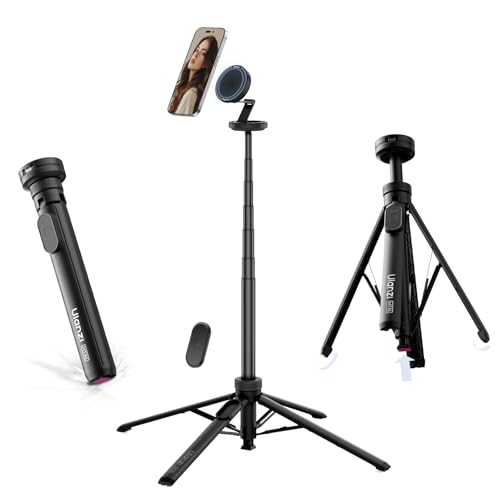


As an Amazon Associate we earn from qualifying purchases at no extra cost to you.
Top Picks at a Glance
- Best Overall: KraftGeek JustTap 66-inch, for auto-open legs and a tall reach.
- Best Value: EUCOS 62-inch Magnetic Tripod, for a full-height tripod with remote at a mid-range cost.
- Best Budget Desk Stand: COOPER MagStand, for a simple weighted stand that holds the camera steady at desk height.
- Best Premium Travel Pick: ULANZI MT85, for four-leg stability and strong rated magnets.
- Best Flexible Mount: OMOTON TP02, for a clamp, magnetic back and small tabletop tripod in one body.
- Best Pocket Size: Lamicall Ultra-Compact MagSafe Tripod, for carry-everywhere portability.
- Best for Maximum Height: UBeesize 72-inch, for a pole that reaches 6 feet.
Comparison Table
| Product | Best for | Key specs | Watch for | Price tier |
|---|---|---|---|---|
| KraftGeek JustTap 66 in | All-round calls and travel | 13 to 66 in; about 455 g; N52 mount rated 2.5 kg; Bluetooth remote about 10 m | Light tripod with a heavy phone; keep out of breezes | Premium |
| ULANZI MT85 | Stable travel setup | 11.2 to 60 in; about 385 g; 20N and 25N magnets; four legs | Higher cost than basic tripods | Premium |
| OMOTON TP02 | Clamping and desks | About 158 g; tripod height up to 9 in; clamp opens to 1.57 in; keep setup under 400 g | Low height; not a stand-alone tall tripod | Mid-range |
| Lamicall Ultra-Compact | Pocket carry | About 90 g; up to 11 in; 1/4 in and Arca-Swiss mounts; hook | No stated load limit | Mid-range |
| COOPER MagStand | Fixed desk calls | About 8 or 9 to 13 in; 360 degree rotation; weighted base; holds about 2 lb | Not portable; desk-only | Budget |
| UBeesize 72 in | Tall reach, group shots | Up to 72 in; about 454 g; Bluetooth remote about 33 ft | Listings disagree on load limit and folded size | Premium |
| EUCOS 62 in | Value full-height tripod | 12 to 62 in; about 495 g; 1/4 in screw; Arca-Swiss compatible; remote | Magnet strength not published | Mid-range |
1. KraftGeek JustTap 66-inch Magnetic Phone Tripod: Best Overall
- Height: about 13 to 66 inches
- Weight: about 455 g (15.8 oz) per the maker; some retailer pages list slightly less
- Magnet: N52 mount rated for up to 2.5 kg (5.5 lb)
- Head: 180 degree neck tilt, 360 degree phone rotation
- Remote: detachable Bluetooth, about 10 m (33 ft) range, USB-C rechargeable
Best for: people who want one tripod for desk calls, kitchen-counter calls and travel. Skip if: you only ever call from one desk, where a cheaper stand does the same job.
The feature that matters for video calls is the “auto-open” design. You tap the base on a surface and the legs open, which means you can set the phone down on a table, a shelf or a stack of books within seconds. Because the pole reaches 66 inches, it can lift the camera to eye level when you are standing, and the minimum of around 13 inches lets it sit on a desk for a seated call.
A phone on a thin pole is naturally a top-heavy object, and one reviewer noted a lightweight tripod carrying a comparatively heavy phone is a trade-off. On a flat, indoor surface it holds steady; outdoors in wind it needs a spread of the legs and a lower extension. For a call, keep the pole short and the legs wide. The remote triggers the camera shutter rather than call controls, so treat it mainly as a photo and recording accessory.
Pros: auto-open legs; tall reach; strong rated magnet; rechargeable remote; includes an adhesive metal ring for non-magnetic phones. Cons: premium cost; weight and height figures vary slightly between retailer pages; light for a big phone in wind.
2. ULANZI MT85 60-inch Magnetic Tripod: Best Premium Travel Pick
- Height: about 11.2 to 60 inches
- Weight: about 385 g; load limit given as 6.6 lb
- Magnets: dual-sided mount, 20N on the front and 25N on the back, N52 grade
- Legs: four, with anti-slip rubber pads, opening automatically
- Remote: detachable, rechargeable, up to about 10 m; one-year warranty
Best for: frequent travellers who take calls from hotel desks and want a four-leg base. Skip if: you want a cheaper stand or never leave your desk.
A four-leg base is a practical upgrade over three. The extra leg spreads the footprint, which is helpful on small hotel desks, and the “enhanced 4-leg” design is the main reason this model is the better pick for stability. The maker’s published figures also give clearer magnet strengths than most competitors (20N front, 25N back), which makes it easier to judge how securely a heavier phone will hold.
For a call, a 60-inch maximum is plenty. The Z-shaped top extension and 315 degree tilt let you angle the lens down to your face from a standing height, or use it low and flat on a table. Note that listings for the MT85 vary on small details such as minimum height, so verify against the maker’s page. A sibling model, the MT44M, is a lighter option we cover below.
Pros: four stable legs; stated magnet strengths; light for its height; one-year warranty. Cons: higher cost; a few listing inconsistencies; the remote’s range is typical, not exceptional.
3. OMOTON TP02 Magnetic Phone Tripod: Best Flexible Mount
- Weight: about 158 g, aluminum alloy
- Modes: clamp, magnetic back for metal surfaces, and a folding tabletop tripod up to 9 inches
- Clamp: grips surfaces up to 1.57 inches thick
- Limit: keep phone, case and accessories within 400 g when clamped or stuck on metal
- Mounts: 1/4 inch screw holes
Best for: gym, kitchen and workspace calls where you want to clamp the phone to a shelf, a desk edge or a cabinet. Skip if: you need a tall pole.
This is the most versatile product in the group because it is three mounts in one. The clamp bites onto a desk edge or a shelf up to roughly 1.6 inches thick, the magnetic back sticks to a refrigerator or steel surface, and the foldable legs form a short tripod. The 400 g cap is worth respecting. An iPhone 17 Pro weighs about 206 g per Apple’s specs and a Pro Max about 231 to 233 g, so with a case you are within the limit, but a heavy rugged case plus a battery pack would not be.
For video calls, think of it as the setup for a standing desk or a cluttered table: clamp it to the edge, point the lens at eye level, and you are done. It will not give you height. At 9 inches in tripod mode it is a desk stand, not a floor tripod.
Pros: clamp plus magnet plus tripod; lightweight; 1/4 inch threads for accessories. Cons: limited height; load limit applies to clamp and magnetic-back use; magnet count described differently between listings.
4. Lamicall Ultra-Compact MagSafe Tripod Stand: Best Pocket Size
- Weight: about 90 g, aluminum
- Height: up to 11 inches, with a ball head
- Mounts: 1/4 inch screw and Arca-Swiss, plus an accessory thread on the arm
- Extras: a mantis-style hook for railings and chair backs
- Fit: attaches directly to MagSafe iPhones from the 12 through 17 series; other phones use the included ring
Best for: commuters and travellers who want a stand that disappears in a bag. Skip if: you want a standalone tripod that reaches eye level when you stand.
At roughly 90 g, this is the lightest stand in the roundup, and the hook lets you hang the phone from a chair back, a tray table or a railing, which is a genuinely useful trick for a call from an airport lounge. The maker describes a “20x” super-strong magnet, but that is a marketing multiple, not a force rating, and the listing gives no weight limit. We would treat it as suitable for a bare iPhone or one in a slim MagSafe case, and not for a large phone with a heavy case.
It is a stand rather than a pole, so for calls you set it on a desk and angle the ball head. The 11-inch ceiling gets the lens slightly above many laptop screens, and stacking it on a book gets the camera closer to eye level.
Pros: very light; hook mount; Arca-Swiss and screw mounts; flexible ball head. Cons: no stated load limit; short reach; only 12 through 17 series connect directly without the ring.
5. COOPER MagStand Magnetic Phone Stand: Best Budget Desk Stand
- Height: about 9 to 13 inches in the listing title; the maker’s own page says 8 to 13
- Rotation and tilt: 360 degree rotation, about 55 degree tilt
- Build: aluminum alloy rod, weighted base, non-slip padding
- Magnet: holds up to about 2 lb per one retailer
- Includes: two steel rings for non-MagSafe phones
Best for: remote workers who take calls at a desk and want the simplest, steadiest setup. Skip if: you need something you can fold into a bag and carry.
For desk-based calls a weighted base beats a tripod’s legs, because it takes up a small footprint and does not shake when you bump the table. The height range of 8 or 9 to 13 inches puts the lens somewhere between a bare desk and the top of many monitors, which is about where a webcam sits, and the 360 degree rotation lets you switch between landscape for meetings and portrait for a quick personal call.
This is the only non-tripod in the list, and it is the one we would put on a work desk. The trade-off is that nothing about it is portable: a stand with a weighted base is, by design, a stand for one place. Cooper sells related stands, including a clip-style model and a different rotating model, so check the listing to be sure you are looking at the tall-rod MagStand.
Pros: very stable; low cost; tidy footprint; includes steel rings. Cons: heavy for travel; fixed range of height; some size details differ between pages.
6. UBeesize 72-inch Magnetic Tripod: Best for Maximum Height
- Height: telescopic pole up to 72 inches
- Weight: about 454 g on the original 72-inch model
- Remote: Bluetooth with up to about 33 ft range, built in on the original
- Head: 180 degree neck, 360 degree rotation
- Note: a newer 72-inch model exists with a phone clip and 1/4 inch screw mount
Best for: tall users and standing presentations where the camera has to sit at head height from a few feet away. Skip if: you want an exact spec to rely on, because listings disagree on weight limit and folded size.
The UBeesize reaches the highest of the seven, which helps when you want the camera above eye level for a flattering angle on a standing call or want to frame two people. The caveat is the listings. One version lists a weight limit of 0.7 lb, another describes a more recent model with a clip and screw mount, and folded lengths of 11 and 15 inches both appear. That does not mean the product is bad, only that you should check the specific variant.
A tall pole needs a wide stance. Keep the legs fully open and extend only as far as you need. For calls, 40 to 50 inches is usually enough, which leaves the thinner upper sections folded and reduces wobble.
Pros: tallest reach; built-in remote on the original; light for its height. Cons: inconsistent listing details; the top sections are thin; premium cost.
7. EUCOS 62-inch Magnetic Phone Tripod: Best Value
- Height: about 12 to 62 inches
- Weight: about 495 g, aluminum with modified nylon
- Mount: standard 1/4 inch screw; the holder detaches and fits Arca-Swiss plates
- Grade: N52 magnet in the title; strength not published
- Remote: wireless, included; the maker advertises lifetime coverage
Best for: anyone who wants a full-height tripod without paying the premium prices of KraftGeek or ULANZI. Skip if: you need a published magnet rating.
EUCOS is a known name in phone tripods, and independent reviewers have called this model a compact travel stand. The detachable holder is a sensible design touch: you can pull it off the pole and use it on a standard tripod or an Arca-Swiss plate, which gives your investment a longer life if you change phones. The weight is about 495 g, the heaviest of the full-height options here, and that mass helps stability.
The one missing number is magnet strength. N52 describes a magnet grade, not a holding force. With a bare iPhone or a slim MagSafe case it should be fine, but we would use the supplied ring approach and keep the phone case slim if you have a large phone.
Pros: full height at a modest cost; detachable holder; Arca-Swiss compatible; remote included. Cons: magnet strength not stated; heaviest of the group.
Also Consider
- COMAN DP58 Magnetic iPhone Tripod: a compact aluminum stand with a carabiner, Arca-Swiss compatibility and modes for selfie, video call or tabletop use.
- ULANZI MT44M 59-inch Tripod: an auto-open tripod with a dual mount and 1/4 inch screw, for creators who also use a camera.
- TONEOF 68-inch Magnetic Tripod: a taller tripod with a rechargeable remote and a rotatable head at a mid-range cost.
- Victiv 70-inch Magnetic Tripod: a long extendable pole with a rechargeable remote, for budget shoppers who want height.
How We Chose
We began with magnetic phone tripods and stands currently sold with MagSafe compatibility, then narrowed to products with enough published information to compare: height range, weight, magnet details and mounting options. For each, we read the manufacturer pages where available and retailer specification text, and we consulted independent coverage, including reviews of the KraftGeek JustTap from Digital Camera World and The Gadgeteer and a travel review of the EUCOS tripod. We limited each brand to two products and covered three tiers: stands, mid-range tripods and premium tripods.
We have not used these products ourselves, and we did not run drop or wobble checks. When listings conflicted, such as the UBeesize folded length, we flagged it. The MagSafe magnet itself is a design from Apple, and all of these products rely on the magnet ring in your phone or case.
Buying Guide
Choose the right height for eye-level calls
For a good video call, the lens should sit at or slightly above your eye line. A typical seated eye height is about 40 to 45 inches from the floor, and a standard desk is around 29 to 30 inches tall, so a camera 12 to 16 inches above the desk surface is a good target. That is why a 13-inch stand like the COOPER MagStand works, and why a pole tripod that starts at 12 or 13 inches is fine on a desk. If you call while standing, you need 55 inches or more, so look for 60 inches and up.
Check the magnet and case
MagSafe uses a ring of magnets in the phone. Cases without magnets weaken the hold or break it, so use a MagSafe-compatible case or the metal ring supplied with these tripods. A good rule is to check the stated load limit against your phone and case. An iPhone 17 Pro is about 206 g, and a Pro Max about 231 to 233 g per Apple and reference specs, so a tripod rated at 400 g (OMOTON clamp use) or 2.5 kg (KraftGeek mount) has headroom, but a product with no stated limit deserves more caution.
Stability beats height
Wobble ruins a video call because the other person sees your picture shake every time you touch the desk. Look for a wide leg spread, rubber feet and a weight above 350 g. Four legs (ULANZI MT85) and a weighted base (COOPER) are the most stable layouts. Extend the pole only as high as you need.
Remote and ports
Most of these include a Bluetooth shutter remote, which is good for photos and recording but does not control your call app. Check that the remote charges by USB-C or uses a replaceable battery, and that the tripod’s tether does not block the charging port if you need to charge while on a call.
Mounting versatility
A 1/4 inch thread or an Arca-Swiss plate lets you reuse the head on other tripods, light stands or camera rigs. If you plan to use the product for more than calls, look at the OMOTON, Lamicall, EUCOS and ULANZI MT44M.
Common Mistakes to Avoid
- Buying for height you will not use. For desk calls, a 13-inch stand is often better than a 70-inch pole.
- Ignoring the case. A thick case without magnets can make a strong magnet feel weak.
- Extending every section. The top sections are the thinnest and wobble first.
- Putting the tripod at the edge of a desk, where a bump can send the phone to the floor.
- Trusting a marketing multiple such as “20x” as a force rating.
Frequently Asked Questions
Do I need a MagSafe case to use a magnetic phone tripod?
You need either a MagSafe-compatible case or a metal ring attached to the case or phone. A plain case without magnets creates a gap and weakens the hold. Most of these tripods include a ring for exactly that situation.
What height should a phone tripod be for video calls?
Aim to place the lens at eye level or slightly above, about 12 to 16 inches above a desk for a seated call. For a standing call, you will need roughly 55 inches or more. A tripod with a range of about 13 to 66 inches covers both.
Are magnetic phone tripods stable enough for a heavy iPhone?
They can be, if the magnet rating and load limit allow it. An iPhone 17 Pro weighs about 206 g, and the Pro Max about 231 to 233 g. KraftGeek lists a 2.5 kg mount, and OMOTON gives a 400 g total limit for clamp use. If a listing gives no limit, use a bare phone or slim case.
Can I use these tripods with non-iPhone phones?
Yes, using the included metal ring that attaches to the phone or case. Check the product description for compatibility with your specific model.
Is a desk stand better than a tripod for video calls?
For a single desk, yes: a weighted stand is cheaper and steadier. A tripod is better if you move around, call while standing, or travel. If you want both, an auto-open tripod with a short minimum height covers desk and standing use.
Does the Bluetooth remote work for answering a call?
Generally no. The remote triggers the camera shutter or recording, not the call controls. Treat it as a photo and video accessory.
How do I keep a tall tripod from tipping?
Open the legs fully, keep the pole only as tall as you need, and hang no weight from the top. Place the tripod on a flat surface away from foot traffic, and avoid letting the legs overhang a table edge.
Which One Should You Buy?
If you want the most flexible all-round choice for calls, travel and photos, buy the KraftGeek JustTap. If you travel frequently and want a four-leg base, choose the ULANZI MT85. If you spend your day at a desk, the COOPER MagStand does the job for the lowest cost. If you want to clamp the phone to a shelf or desk edge, choose the OMOTON TP02. The Lamicall suits commuters who want a pocketable stand, UBeesize suits tall users who want maximum reach, and EUCOS offers a full-height tripod at a friendlier cost. Check the exact variant on the listing before you order, particularly for UBeesize and COOPER, where listings vary.
Sources
- KraftGeek product page for the JustTap magnetic tripod
- ULANZI product page for the MT85 automatic pop-up tripod
- Digital Camera World, KraftGeek JustTap review
- The Gadgeteer, KraftGeek JustTap review
- Apple Support, iPhone 17 Pro technical specifications
- Manufacturer and retailer specification pages for OMOTON, Lamicall, COOPER, UBeesize and EUCOS
Last updated: October 2026