The best phone tripod mount for most people is a metal screw-down clamp such as the Ulanzi ST-02S. It is cheap and rigid, and it has a cold shoe for a microphone or light. For long time-lapses or heavy phones, the Manfrotto PIXI Clamp’s locking lever stops the slow slip that spring clamps allow. For iPhones on tripods with an Arca-Swiss head, a MagSafe mount such as the Ulanzi MA38 or SmallRig’s magnetic adapter is the fastest to set up.
A tripod mount is the small adapter between your phone and the 1/4″-20 screw on a tripod, selfie stick or light stand. It matters more than it seems, because it decides how firmly the phone is held, whether you can switch quickly between portrait and landscape, and whether you have somewhere to put a mic.
Our top picks
 ULANZI ST-27 Metal Phone Tripod Mount
- 【Updated Metal Phone Tripod Mount】Features a 360° rotatable…
- 【Rear Cold Shoe & Dual 1/4" Expansion Holes】The…
- 【Standard Arca Mount Base】The ULANZI phone holder for…
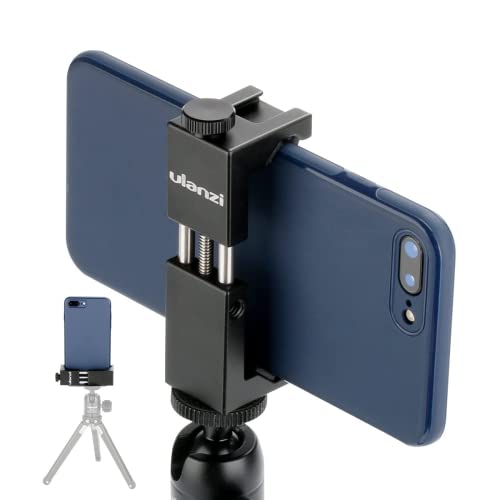 ULANZI ST-02S Aluminum Phone Tripod Mount w
- 【Attention】Phone Clip Only, Tripod Not Included
- 【Angel Adjustable】All Metal Phone Holder with Cold Shoe…
- 【Quick Release】Add Spring Design for Quick Mounting
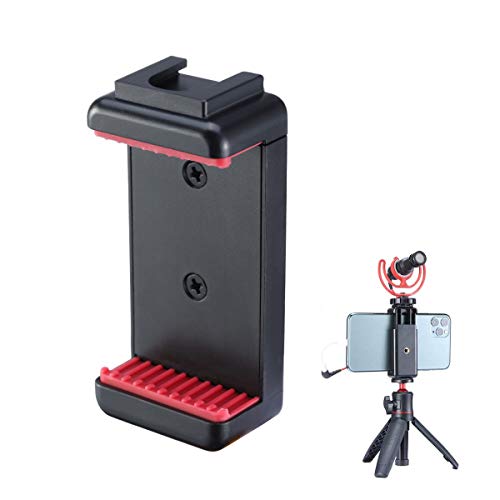 ULANZI ST-07 Phone Tripod Mount with Cold
- Cold Shoe Mount on Top --- ST-07 has…
- 1/4'' Screw on Bottom --- There is a…
- Wide Compatibility --- The phone tripod mount can…
| Product | Key specs | |
|---|---|---|
| ULANZI ST-27 Metal Phone Tripod Mount | 【Updated Metal Phone Tripod Mount】Features a 360° rotatable… 【Rear Cold Shoe & Dual 1/4" Expansion Holes】The… 【Standard Arca Mount Base】The ULANZI phone holder for… | Check price |
| ULANZI ST-02S Aluminum Phone Tripod Mount w | 【Attention】Phone Clip Only, Tripod Not Included 【Angel Adjustable】All Metal Phone Holder with Cold Shoe… 【Quick Release】Add Spring Design for Quick Mounting | Check price |
| ULANZI ST-07 Phone Tripod Mount with Cold | Cold Shoe Mount on Top --- ST-07 has… 1/4'' Screw on Bottom --- There is a… Wide Compatibility --- The phone tripod mount can… | Check price |
 ULANZI MA61 Metal Phone Tripod Mount with | 【Versatile Mounting Options】 Features both a 1/4" threaded… 【Broad Device Compatibility】 Adjustable clamp fits smartphones 2.56–3.54… 【Durable & Secure Protection】 Crafted from robust aluminum… | Check price |
As an Amazon Associate we earn from qualifying purchases at no extra cost to you.
The three clamp designs
| Design | How it grips | Strengths | Weaknesses |
|---|---|---|---|
| Screw-down clamp | A threaded knob closes the jaws | Rigid, no spring pressure on side buttons, cheap | Slower to mount, limited maximum width |
| Spring clamp with lock | A spring pulls the jaws closed, then a lever locks them | Fast, fits a wide range, secure once locked | Springs can press side buttons, more parts to wear |
| Magnetic (MagSafe or Qi2) | A magnet ring on the phone or case | Fastest, one-handed portrait and landscape change | Less hold than a clamp, needs a magnetic phone or case |
Mount comparison
| Mount | Type | Phone width range | Accessory mounts | Arca-Swiss base | Typical price |
|---|---|---|---|---|---|
| Ulanzi ST-02S | Screw-down, aluminum | About 55–85 mm | Cold shoe, two 1/4″-20 | No | Check on Amazon |
| Manfrotto PIXI Clamp | Spring with locking lever | 60–104 mm | Cold shoe, side and bottom 1/4″-20 | No | Check on Amazon |
| JOBY GripTight Pro | Spring, portrait and landscape rotation | 56–91 mm | Tilt head | No | Check on Amazon |
| JOBY GripTight Smart | Spring with Y-lock lever | 60–104 mm | Side and bottom 1/4″-20 | No | Check on Amazon |
| Neewer SP-02 | Spring with locking button | Wide-phone range | Cold shoe | Yes | Check on Amazon |
| Ulanzi MA38 | MagSafe magnetic | Any MagSafe phone or ring | Varies | Yes | Check on Amazon |
| SmallRig MagSafe Arca mount | Magnetic | Any MagSafe phone or ring | 1/4″-20 | Yes | Check on Amazon |
Width ranges come from manufacturer specs. Measure your phone in its case across the short side. A 6.9-inch phone in a rugged case can be close to 82 to 85 mm wide, which is at the top of some screw clamps’ range.
Picks by use
Everyday video and travel: Ulanzi ST-02S
The all-metal body and screw jaw make it the most rigid low-cost option. The cold shoe on top takes a small LED or wireless mic receiver, and the second thread on the back lets you mount the phone in portrait without a rotating head. The jaw is close to its limit with the largest phones in thick cases.
Time-lapse and long recordings: Manfrotto PIXI Clamp
Spring clamps can let a phone creep slowly when it is tilted, which ruins time-lapses and stop-motion shots. The PIXI’s lever locks the jaw after the spring closes. That double hold is the reason to choose it, and its 104 mm maximum width handles almost any phone, even in a case.
Switching orientation often: JOBY GripTight Pro
The clamp rotates between portrait and landscape without taking the phone off, and it tilts. That suits creators who post the same clip vertically and horizontally.
Arca-Swiss tripod owners: Neewer SP-02 or a MagSafe Arca mount
If your tripod has an Arca-Swiss head, a mount with an Arca dovetail slides straight in without a separate plate. The Neewer SP-02 does this with a clamp. The Ulanzi MA38 and SmallRig magnetic mounts do it with MagSafe, so you can attach the phone in a second.
How much can a magnetic mount hold?
Magnetic mounts are convenient, but the force holding the phone is limited. Here is a worked example:
- A large phone in a case weighs about 230 to 290 g.
- SmallRig rates its magnetic Arca mount for up to 500 g (17.6 oz), which leaves about 40 to 50 percent headroom.
- Add a 30 to 60 g wireless mic receiver or light on the phone’s case and the margin shrinks to about 30 percent.
- Pointing the phone steeply up or down uses even more of that margin, because the magnet must resist sliding as well as pulling.
For a static shot, that is fine. For a mount on a moving vehicle, a gimbal, or a tripod in wind, use a clamp, or a clamp plus a MagSafe case with a strong ring.
Setup checklist
- Center the phone in the jaw. Off-center mounting adds leverage and makes small tripods tip.
- Keep the clamp clear of side buttons. Screw clamps can be placed exactly. Spring clamps often press the volume rocker, which starts or stops recording on some phones.
- Tighten the tripod screw by hand only. Over-tightening strips the aluminum threads on cheap mounts.
- If you use the cold shoe, put the heaviest accessory on the side nearest the tripod column to balance it.
- For MagSafe, remove thick non-magnetic cases and check the phone sits flat on the ring.
What wears out
- Rubber jaw pads: they compress and peel over time. Replacement is not usually possible, so the mount gets replaced.
- Springs: they lose tension, especially if stored clamped open. Store spring clamps closed.
- Magnet coatings: the rubber ring on some magnetic heads can peel and scratch the case.
- Threads: brass inserts last longer than threads cut directly into aluminum.
What to Look For in a Phone Tripod Mount
Clamp Opening Versus Your Phone and Case
Every clamp lists a maximum opening, and the figure that matters is your phone’s width with the case on, measured where the jaws will close. Thick protective cases, wallet cases and stick-on grip rings are the usual reasons a phone that “should fit” does not. Leave some margin: a clamp stretched to its limit puts the most strain on its spring or screw and usually holds less securely than one working in the middle of its range. If you swap between a slim phone and a rugged case, choose a mount whose range covers both.
Thread and Mounting Interface
Most tripods, monopods and small tabletop stands use the 1/4-inch camera thread, and nearly every phone clamp is built around it. Heavier tripod heads sometimes use a 3/8-inch thread, which normally needs a small reducer bushing. Arca-Swiss is a separate system: a dovetail plate that slides into a matching clamp on the tripod head. Confirm which interface your tripod actually has before narrowing the list, because a mismatch makes a good clamp useless.
Rotation, Balance and Accessory Mounts
If you switch between portrait and landscape, look for a mount that rotates without loosening the tripod screw. Rotating by hand on the thread slowly backs the mount off, and a loose joint is where wobble starts. A cold shoe on the clamp matters only if you plan to add a microphone or small light, and those accessories change the balance, which the next section quantifies.
Tripod Head and Leg Stability
A strong clamp only helps if what it sits on is steady. Fully extended thin legs, a loose ball head or a lightweight tabletop stand will all shake or drift long before the clamp gives up. Keep the centre column low, spread the legs wide, and hang nothing heavy from the mount itself unless the tripod is built for it.
A Worked Balance Example
Tipping forces come from weight multiplied by distance, so a heavier setup that sits far from the tripod’s centre is harder on a mount than a light one held close. Assume a phone-and-case combination of 0.25 kg whose centre of mass is 3 cm from the mounting screw, and a 0.1 kg microphone sitting 6 cm out on a cold shoe. The phone produces roughly 0.25 x 9.81 x 0.03, or about 0.07 N-m, and the microphone adds roughly 0.1 x 9.81 x 0.06, or about 0.06 N-m. Together that is close to 0.13 N-m, nearly double the phone alone.
These numbers are illustrative assumptions, not manufacturer limits, but the pattern holds: accessories mounted away from the screw add leverage quickly. Keep heavy add-ons close to the tripod axis, tighten the head’s tilt lock fully, and treat any clamp that visibly sags at the pivot as one that is already near its limit.
Matching the Mount to the Shot
The same clamp can be fine for one job and a poor fit for another, mostly because gravity pulls on the phone in different directions. Use this chart to decide what to prioritise.
| Shot type | Main stress on the mount | What to prioritise |
|---|---|---|
| Desk or live-stream setup | Light, steady load | Rigid joints and a stable base |
| Walking vlog on a short grip | Repeated bumps and twisting | A positive lock and a snug case fit |
| Long time-lapse | Hours of constant load | A locking mechanism that cannot creep |
| Overhead or flat-lay shot | Phone hangs below the clamp | Strong jaws; confirm the phone cannot slide out downward |
| Quick pick-up and put-down | Frequent handling | Fast release, or a magnetic mount with a secure case |
The overhead row deserves extra attention. When the phone faces the floor, the clamp has to resist gravity alone with the jaws, so a spring clamp that feels fine upright can feel much looser. Place something soft underneath the first few times you try it.
Which One Should You Buy?
| If you… | Choose… |
|---|---|
| Shoot everyday video or travel clips and want a rigid clamp with a cold shoe | Ulanzi ST-02S |
| Record long time-lapses or interviews where slow slipping would ruin the take | Manfrotto PIXI Clamp |
| Flip between vertical and horizontal frames throughout a session | JOBY GripTight Pro |
| Already own a tripod head with an Arca-Swiss clamp | Neewer SP-02 or a MagSafe Arca mount |
| Own a MagSafe iPhone and value the fastest on and off | A MagSafe Arca mount, with a clamp as backup for heavier add-ons |
A Short Pre-Purchase Checklist
- Measure the width and thickness of your phone with its case on.
- Note whether your tripod uses a 1/4-inch thread, a 3/8-inch thread or an Arca-Swiss clamp.
- List every accessory you want on top, such as a microphone or small light.
- Decide whether you need quick orientation changes or a fixed frame.
- Compare those answers with each mount’s listed opening, interface and accessory options.
Common Mistakes When Buying a Phone Tripod Mount
- Measuring the bare phone, not the cased phone. Case thickness is the number most often forgotten, and it decides whether the jaws close fully.
- Ignoring the tripod’s own limit. A solid clamp on a lightweight tabletop stand still tips if the stand is too light or the legs are not spread.
- Assuming every magnetic mount works with every phone. Magnetic holds depend on a magnet ring in the phone or case; a thick non-magnetic case can weaken the grip badly.
- Buying for the thread you hope to own. Match the mount to the tripod you have now, not a future upgrade.
- Over-tightening plastic parts. Hand-tight plus a small extra turn is usually enough; cranking a screw against plastic risks stripped threads or cracked jaws.
- Blocking the camera or buttons. Check that the jaws leave the lens, microphone ports and charging socket clear before committing to a model.
FAQ
Do I need a separate mount if my selfie stick has a clamp?
Built-in selfie stick clamps work for handheld use but are usually less rigid on a full-size tripod. A separate metal mount gives sharper time-lapses and long exposures.
Will a clamp damage my phone?
Not with padded jaws and normal tightness. Avoid placing the jaws over the camera bump or over a button.
More from Amazon
Programs that pair well with the guide above. Offers and eligibility are set by Amazon and may change.
Free shipping on eligible items, Prime Video and more. Eligible new members can start with a free trial.
Start a Prime free trialAd-free music streaming. Eligible new subscribers can start with a free trial.
Try Music Unlimited freeA Prime membership for ages 18-24 with a trial period. Eligibility is set by Amazon.
See Prime for Young AdultsAudiobooks and podcasts to listen to on the go. Eligible new members can start with a free trial.
Try Audible freeAs an Amazon Associate we earn from qualifying purchases.