Key takeaways
- Ten USB-C cables for 100W fast charging compared from listing details: UGREEN, Anker, INIU, Baseus and 240W-rated options, plus how to read the ratings.
For 100W laptop and phone charging, the safest picks in this group are the cables that clearly state the rating and the length you need: the UGREEN two-pack names an E-marker chip, the Anker is a plain single 10 foot cable, and the Baseus lists 5A support. The 240W options from INIU, LISEN and the UGREEN display model give headroom, not extra speed. Below, all ten listings are compared from their titles and the specifications they publish, with the unclear ones flagged so you know what to confirm before ordering.
Quick picks
Our top picks
![INIU USB C Cable, [6.6ft+6.6ft] 100W PD Fast Charging USB C to USB C Cable | Nylon Braided, Type C to C Charger Cord, Data Cable for MacBook Pro iPad Air, iPhone 18 17 16 15 Pro Max, Samsung S26 S25 etc](https://m.media-amazon.com/images/I/41MKftNzlnL._SL500_.jpg)

![INIU 240W USB C to USB C Cable, [6.6ft+6.6ft] Fast Charging Type C Cord | Nylon Braided, Fast Charging, LED Indicator, USB-C Data Transfer, for iPhone 18 17 16 Pro, MacBook Pro, iPad, Samsung S26 etc](https://m.media-amazon.com/images/I/41r3DXOHFvL._SL500_.jpg)

![JSAUX for iPhone 18 Pro Charger Cable, USB C to USB C Cable [2-Pack 6.6FT] | 100W Type C Fast Charging Cord for iPhone Duo/18 Pro Max/17/16/15 Series, Galaxy S26/S25, MacBook and iPad, Gray](https://m.media-amazon.com/images/I/51nuU9gvFIL._SL500_.jpg)
![USBC to USBC 100W [10ft/2 Pack] USB C to USB C Fast Charging Cable Braided C to C Charger Cord for MacBook Pro/Air, iPhone 17 16 15 Pro Plus,iPad Pro,Samsung Galaxy S26 S25 Ultra S24,Pixel,PS5,Switch](https://m.media-amazon.com/images/I/518zT1n-R9L._SL500_.jpg)
As an Amazon Associate we earn from qualifying purchases at no extra cost to you.
- Named E-marker chip: UGREEN 100W two-pack.
- One long cable: Anker 100W, 10 ft.
- Two long cables: Durcord or Yosou, 10 ft.
- Extra headroom: INIU or LISEN 240W.
The ten cables side by side
| Model | Key point from title | Best for |
|---|---|---|
| INIU 100W Braided Cable, 6.6ft Two-Pack | 100W, nylon braided, two 6.6 ft cables | Everyday phone and laptop |
| UGREEN 100W Cable, 3.3ft Two-Pack | 100W, 3.3 ft two-pack, E-marker chip | Desk and bag |
| INIU 240W Cable with LED Indicator | 240W, two 6.6 ft cables, LED indicator | Headroom and visibility |
| Durcord 100W 10ft Two-Pack | 100W, 10 ft two-pack | Far-off outlets |
| LISEN 240W 6.6ft Two-Pack | 240W, 6.6 ft two-pack | 240W headroom |
| JSAUX 100W 6.6ft Two-Pack | 100W, 6.6 ft two-pack, gray | Matched pairs |
| Yosou 100W 10ft Braided Two-Pack | 100W, 10 ft braided two-pack | Laptops and consoles |
| Anker 100W 10ft Single Cable | 100W, 10 ft, single cable | One long cable |
| Baseus 100W Zinc Alloy Braided Cable | 100W PD 5A, zinc alloy, braided | Tougher feel |
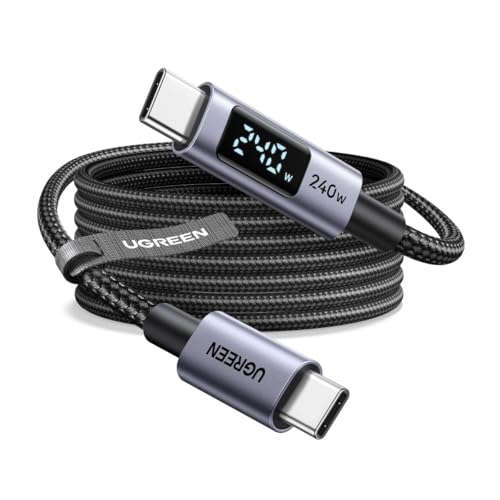
| UGREEN 240W Cable with Digital Display | Digital display, 10 ft, 240W or 100W unclear | Power readout |
Each cable explained
INIU 100W Braided Cable, 6.6ft Two-Pack
INIU lists a 100W power delivery cable in a 6.6 foot plus 6.6 foot arrangement, which reads as two cables in the box. The title says nylon braided, type C at both ends, and compatible with MacBook Pro, iPad Air, recent iPhones and Samsung phones. It also mentions data transfer, but no data speed, so treat it as a charging-first cable. Because the title says 100W, it covers typical laptop charging for many thin-and-light machines, if your charger can supply the wattage. Check whether the second cable is the same length as the first, and whether any cable ties come in the box.
Pros
- Two 6.6 foot cables in the listing
- Nylon braided and broadly compatible per the title
Cons
- No data speed stated
- Real charging speed depends on your charger
Who it’s for: buyers who want a pair of everyday cables for a phone and a thin laptop.
UGREEN 100W Cable, 3.3ft Two-Pack
UGREEN offers a two-pack of 100W USB-C to USB-C cables at 3.3 feet each, in black, and the title specifically mentions a built-in E-marker chip. That chip is what lets a cable carry the higher current needed for 100W, so it is the most technical detail in any of these titles. The short length suits a desk, power bank or car, and it is shorter than every other option here. The title lists many devices including the Switch, which is a plain charging use. Look at buyer comments on how the connectors hold up in a bag.
Pros
- E-marker chip mentioned in the title
- Short, tidy length for desks and bags
Cons
- 3.3 feet may be too short for a bedside outlet
- No data speed given in the title
Who it’s for: people who want short cables for a power bank, desk or laptop bag.
INIU 240W Cable with LED Indicator
This INIU listing is a 240W USB-C cable sold as a 6.6 foot plus 6.6 foot pair, with nylon braiding, an LED indicator and data transfer. The 240W figure is a cable rating, not what your charger delivers, and almost no phone or tablet will draw anywhere near that. It matters mainly if you want future-proof headroom. The LED indicator is a rare feature, so check what it signals and whether it can be switched off at night. As with other listings, check the data speed on the product page. Look for a stated charger requirement before expecting top speed, and read what the LED actually signals on the product page.
Pros
- LED indicator mentioned in the title
- 240W rating gives headroom beyond 100W
Cons
- Rating exceeds what most devices draw
- Data speed not stated
Who it’s for: buyers who want extra headroom or a visual power indicator.
Durcord 100W 10ft Two-Pack
Durcord’s listing is a two-pack of 10 foot USB-C chargers rated 100W, for Android phones, iPads and iPhones listed in the title. Ten feet is long, which suits a couch or bed, but longer cables can be bulkier and may drop a little voltage over distance. The title says fast charging but gives no mention of braiding, E-marker chips or data speed. That makes it a charging-focused cable, and you should check the product page for build details before assuming anything more. Read return terms, since a long cable is easy to snag and damage, and check whether the pair is sold as matching lengths.
Pros
- Ten feet of reach in a two-pack
- 100W rating stated in the title
Cons
- No braiding or data speed mentioned
- Long cables are bulkier to carry
Who it’s for: people who charge from a far-off outlet at home or in a hotel.
LISEN 240W 6.6ft Two-Pack
LISEN markets this as a 240W USB-C to USB-C cable, 6.6 feet long, sold as a two-pack. The title is crowded with phone model names, including a Duo variant, and does not mention braiding, an LED or a data rating. Its 240W label is a cable rating. Your phone will not charge faster just because the cable allows more, and the charger limits actual speed. It shares the 240W label with the INIU and UGREEN display listings, so compare all three if you want headroom. Use a charger that actually outputs 140W or more if you want to see higher wattage.
Pros
- Two cables in a 240W-rated listing
- 6.6 foot length covers most outlets
Cons
- Title is dense with model names and short on build details
- No data speed given
Who it’s for: buyers who want 240W headroom in a two-pack without extra features.
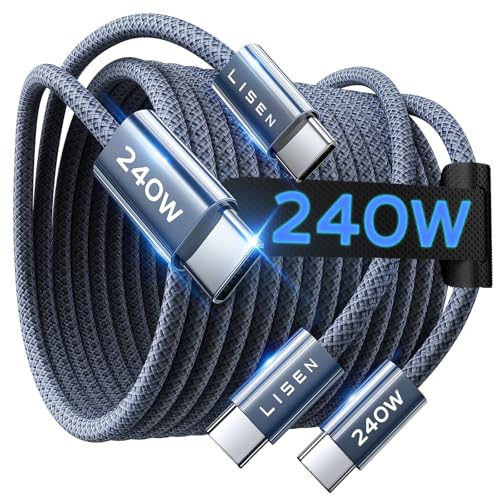
JSAUX 100W 6.6ft Two-Pack
JSAUX sells a two-pack of 6.6 foot USB-C cables in gray, rated 100W, with a title that mentions iPhone Duo and 18 Pro Max alongside Galaxy and iPad models. Gray is a small distinction, but it helps tell it apart from a black charger cable at a glance. The title says nothing about braiding, E-markers, LEDs or data speed. As with other listings, confirm those on the product page, especially if you plan to run it with a laptop at higher wattage. Check the product page for the length of each cable in the pack, and for any stated charger requirement.
Pros
- Gray color helps tell it apart
- Two cables at a useful 6.6 foot length
Cons
- No build details in the title
- No data speed stated
Who it’s for: households that want matched pairs to keep in different rooms.
Yosou 100W 10ft Braided Two-Pack
The brand field says Yosou, and the title reads USBC to USBC 100W with a 10 foot, two-pack, braided design. It lists MacBook Pro and Air, iPhone, iPad Pro, Galaxy, Pixel, PS5 and Switch. That is a wide list for a charging cable, but no data speed or E-marker is mentioned. The PS5 and Switch mentions are compatibility claims, and consoles do not need 100W. Check the product page before using it for anything beyond charging. Confirm the pack count on the product page before ordering, and look for any note on data speed, braiding or the exact connector build.
Pros
- Ten feet and braided in a two-pack
- Wide device list includes consoles
Cons
- No E-marker or data speed mentioned
- Brand is not stated in the title text
Who it’s for: buyers who charge laptops, phones and gaming gear from one pair.
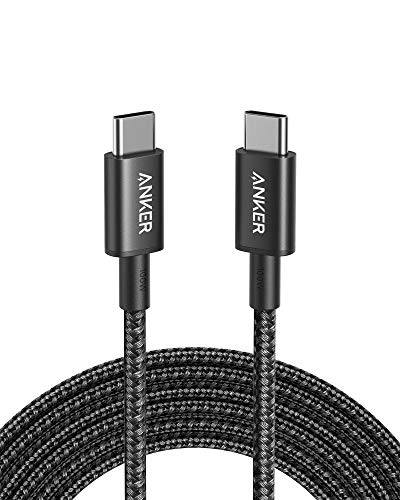
Anker 100W 10ft Single Cable
Anker lists a single 10 foot USB-C to USB-C cable in black rated 100W, aimed at recent iPhones and MacBooks. This is the only one-pack in the group, so you get one long cable instead of two. The title is short, with no braiding, no LED and no data-speed detail, and it relies on brand recognition. If you want several cables for different rooms, a two-pack elsewhere is better value; if you want one dependable long cable, this is the cleanest listing. Pair it with a charger that supports the wattage you need, and check what pack size is sold.
Pros
- Well-known brand in a plain one-cable listing
- Ten foot reach for a couch or bed
Cons
- Only one cable in the pack
- No data speed or braiding mentioned
Who it’s for: buyers who want one long cable from a familiar brand.
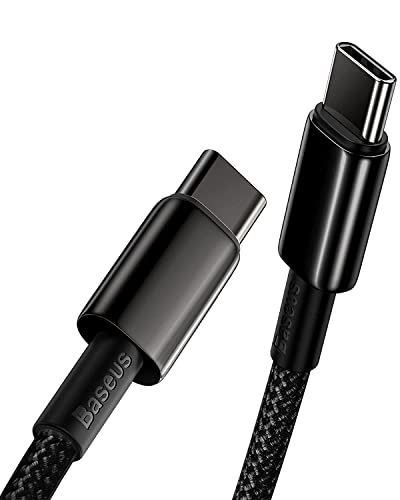
Baseus 100W Zinc Alloy Braided Cable
Baseus lists a USB-C cable with 100W power delivery, 5A and Quick Charge 4.0 support in the title, built with zinc alloy connectors and nylon braiding. The title does not state a length or pack size, so check the listing carefully. The 5A figure indicates it is meant for higher-current laptop charging, and metal ends are often chosen for durability, though the title gives no durability rating. Quick Charge 4.0 is a separate phone standard, so make sure your charger supports the fast-charge mode you want. Verify the length on the listing before you order, and confirm the rated wattage in the description.
Pros
- 5A and PD 100W named in the title
- Zinc alloy ends and nylon braiding
Cons
- Length and pack size not given
- Quick Charge claim depends on your charger
Who it’s for: people who want a tougher-feeling cable for laptop charging.
UGREEN 240W Cable with Digital Display
This UGREEN listing is a 10 foot nylon braided cable with a digital display and a 240W label, yet the title also says PD 100W fast charging. The two numbers conflict: it is unclear whether the cable is rated for 240W or 100W, so read the product description carefully. The title mentions a digital display, which could show power information, so check what it reports. It is the most feature-heavy cable here, and the title lists gaming laptops and XPS. Check whether the display shows watts, volts or both, and which rating the seller treats as the true one.
Pros
- Digital display shows what is being delivered
- Ten foot braided design
Cons
- Title conflicts: 240W label but PD 100W text
- Display adds a point of failure
Who it’s for: tinkerers who want to see the charging numbers on the cable.
How we picked these
We looked at listings whose titles mention USB-C to USB-C with a 100W or 240W rating, and noted length, pack size, build details and any conflicting wording. Prices and star ratings change often, so they are left out. Nobody on the team used or measured these units. The basis is published specifications, manufacturer documentation and buyer reviews, and every claim is the seller’s, so confirm anything important on the product page before you buy. Where a title is silent, we say so.
What to look for in a 100W USB-C cable
Wattage and the charger
A 100W cable only matters if your charger and device can speak 100W power delivery. A phone that accepts 25W gains nothing from the extra rating. A laptop that wants 90W does, and a charger below that wattage will fall short no matter which cable you use. Check the label on the charger for its maximum output at each voltage step, because a 100W charger may only deliver that at one setting.
E-marker chips and 5A
Power of 100W at 20 volts means 5 amps, and USB-C cables need an embedded chip to carry more than 3 amps. If a title does not say 5A or E-marker, find confirmation in the description before using it on a laptop.
Length and pack size
Three feet suits a power bank and a desk, six feet reaches most outlets, and ten feet suits a couch. Longer cables are bulkier and can lose a little power, so choose the shortest that works for you. Two-packs usually cost less per cable, and having a matched spare in a bag is a quiet convenience. A bundled second cable is only useful if it carries the same rating as the first.
Data speed and build
Fast charging does not imply fast data. Braiding and metal ends may last longer but do not affect speed. A digital display or LED is a convenience, not a requirement. If you plan to charge from a car or power bank, short lengths and sturdy strain relief at the plug matter more than any readout.
Worked example: reading a title
- “100W” with no chip mention: confirm 5A on the product page.
- “240W” with “PD 100W” in the same title: ask which is correct.
- “6.6ft+6.6ft” or “2 Pack”: confirm how many cables you receive.
- Long device list: compatibility is a claim, not a guarantee.
Mistakes buyers make
The most common mistake is buying a 240W cable to speed up a phone, when the phone’s limit decides the speed. Another is pairing a 100W cable with a weak charger and blaming the cable. Some buyers choose the longest cable by default, then wonder why it feels slow with a laptop. Others ignore damage: a frayed jacket or warm plug is a reason to replace the cable, not keep using it. Finally, many people assume every cable carries fast data, which is rarely true. A last slip is mixing up a charging cable with a display or dock cable, which needs a stated video or data rating that none of these titles gives.
Verdict
For the clearest technical claim, pick UGREEN’s two-pack. For one long dependable cable, choose Anker. For two long cables, Durcord or Yosou fit a couch setup. For extra headroom, INIU or LISEN 240W work, but check the charger first, and confirm the UGREEN display model’s rating before buying. Whichever you choose, pair it with a charger that matches your device’s wattage and retire any cable that runs hot.
Frequently asked questions
Is a special cable needed for 100W charging?
Yes, usually. USB-C cables that carry more than about 60 watts need a built-in chip that tells the charger the cable can handle higher current. A cable without it may cap charging at a lower wattage. Of these titles, only the first UGREEN names the chip, so look for a stated 100W or 5A rating and the charger requirement on the product page.
Will a 240W cable charge a phone faster?
No. Charging speed is set by the lowest limit among the charger, cable and device. A phone that accepts 25W to 45W gains nothing from a 240W cable. The extra rating only matters for rare devices and chargers built for that level, so treat 240W as headroom and not as a speed boost.
Is a longer USB-C cable slower?
A little, in principle. A longer cable has more electrical resistance, so it can drop a bit of voltage under heavy load, and a poorly made one can overheat. For phones the difference is usually small. For laptops at high wattage, shorter cables from established makers are usually the safer choice, and the ten-foot options here give no electrical details in their titles.
Can these cables transfer data as well as charge?
Some titles mention data transfer, but none states a speed in the titles we read. Many charging cables carry only slow USB 2.0 data. If you move large files or drive a monitor, find a cable with a stated data rate on the product page and do not assume a fast-charging cable is also fast for data.
When should a charging cable be retired?
Retire it if the jacket is cracked, wires are visible, a connector is bent, or the plug gets very hot while charging. Damaged cables can short or overheat. Replace them instead of taping them, avoid pinching or sharply bending them, and use a quality charger that matches the cable rating.