Key takeaways
- Compare five USB-C adapters for iPhone 17, from a 3.5 mm audio dongle to a 2.5 gigabit Ethernet adapter, with speed and fit notes to check before you buy.
The iPhone 17 has one port that does everything, and that is exactly the problem. A single USB-C connector handles charging, data, video, and audio, so the moment you need a second job done, you need an adapter. Wired headphones, an old flash drive, a camera card, a hotel TV, or a wired office network all ask for a different plug, and the phone cannot grow one on its own.
This guide is for iPhone 17 owners who still plug things in: people who edit photos from a camera card, carry wired earbuds, move files to a thumb drive, or show slides on a TV. Each adapter below was chosen from its name and listed specs on the Amazon product page, measured against the phone’s real limits: a 10 gigabit per second ceiling, 4K at 60 hertz video out, and no analog audio on the port.
Quick Picks
As an Amazon Associate we earn from qualifying purchases.
| Product | Best for | Key spec from title |
| Apple USB-C to 3.5 mm Headphone Jack Adapter | Wired headphones and calls | 3.5 mm jack with a built-in DAC |
| UGREEN USB C to USB Adapter (4 Pack) | Old USB-A drives and sticks | 10 Gbps USB 3.2 |
| Anker USB-C to HDMI Adapter (4K@60Hz) | A TV or monitor | 4K at 60 Hz |
| Anker USB-C and USB 3.0 SD Card Reader | Camera cards on the go | Dual USB-C and USB-A plugs |
| Cable Matters USB-C to 2.5 Gigabit Ethernet Adapter | Wired office internet | 2.5 Gbps plus 100 W charging |
How to Choose
Start With the Port You Need
An adapter is only useful if it ends in the plug your gear already has. Before you buy, look at the thing you want to connect and name its port: a USB-A stick, an HDMI cable, an SD card, an Ethernet cable, or a 3.5 mm headphone plug. Each of the five adapters below ends in exactly one of those, so the fastest way to choose is to match the adapter to the job and ignore the rest. A card reader will not help a headphone, and an Ethernet adapter will not read a camera card. Buy the adapter for the job you do most often. Keep a spare only if you switch jobs during the day.
Check the Real Speed, Not the Shape
Every USB-C plug looks the same, but the speed behind it is not. The iPhone 17 port tops out at 10 gigabits per second, so a good adapter should reach that ceiling instead of dragging you back to USB 2 speeds of 480 megabits per second. The trap is that adapters use the same USB-C shape with a slow USB 2 chip inside, and nothing on the outside gives it away. Read the listing for a number: 10 Gbps or USB 3.2 for data adapters, 4K at 60 hertz for video adapters, and 2.5 gigabits for Ethernet. If the listing hides the speed or says fast, treat that as a warning and pick a different one.
Remember the Audio Needs a DAC
The iPhone 17 has no analog audio on its USB-C port, which is the detail that ruins most headphone plans. A plain wire adapter cannot carry sound, because the phone sends digital audio and something has to turn it into the analog signal your headphones expect. That something is a DAC, a small digital to analog converter built into the adapter itself. Apple sells one, and a few third party adapters include one too, but a bare cable with no chip inside will stay silent. Before you buy any 3.5 mm adapter, check the listing for the words DAC or digital audio. If neither appears, the adapter will not make a sound.
Plan Around the One Port
The phone has exactly one USB-C port, so every adapter you plug in takes the only charging port with it. An adapter with no charging pass-through means the phone runs on battery while you use it, which is fine for a short call and a problem for a long movie. If you plan to watch video or move large files for an hour, pick an adapter that adds a charging input, such as a 100 watt pass-through, or accept that you will charge after. Also check the fit: a wide adapter body can block a case, and a cable can pull on the port. A short, flexible body is kinder to the port and easier to carry.
The 5 Best Options
Apple USB-C to 3.5 mm Headphone Jack Adapter
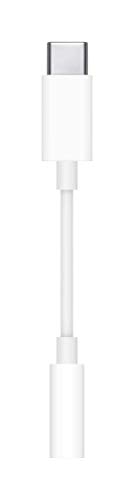
Apple’s own adapter is the simplest way to keep wired headphones alive on the iPhone 17. It is a short white dongle with a USB-C plug on one end and a 3.5 mm jack on the other, and the DAC inside does the digital to analog work the phone cannot do on its own. It works with any standard 3.5 mm headphones, earbuds, or speakers, and it also carries microphone audio, so wired earbuds still work for calls. There is no charging pass-through, so the phone runs on battery while you listen, and the small size makes it easy to lose.
Specs
- USB-C male to 3.5 mm female
- Built-in DAC for digital audio
- Works with USB-C devices that support iOS 10 or later
- Model MU7E2AM/A
- Weight 0.352 oz
Best for: Wired headphones and calls on the go.
Watch out for: No charging pass-through, and the small dongle is easy to lose; confirm the listing still has a seller before ordering.
ASIN: B07K25P3N1
UGREEN USB C to USB Adapter (4 Pack)

UGREEN’s four-pack solves the oldest problem in the drawer: every flash drive, keyboard, and card reader you own still ends in a USB-A plug. Each adapter is a small USB-C male to USB-A female block that runs at USB 3.2 speeds up to 10 gigabits per second, so it matches the phone’s port instead of slowing it down. Four in the pack means one for the desk, one for the bag, one for the car, and one spare for the day you lose the first three. The slim gray shell works with Thunderbolt 4 ports too.
Specs
- USB-C male to USB-A female
- USB 3.2, up to 10 Gbps
- 4-pack, space gray
- Thunderbolt 4 compatible
- OTG compatible
Best for: Old USB-A drives, keyboards, and card readers.
Watch out for: The adapter only adds one USB-A port, so a second drive needs a hub instead.
ASIN: B0DSK82JK8
Anker USB-C to HDMI Adapter (4K@60Hz)

Anker’s 310 adapter is the one to grab when the meeting room TV or the hotel screen is the next step. It turns the phone’s USB-C port into a full-size HDMI output that runs 4K video at 60 hertz, which is the phone’s own ceiling for an external display, with 4K at 30 hertz, 2K at 60 hertz, and 1080p as fallbacks. The body is a compact aluminum block with a short cable, so it travels well in a laptop bag. It needs no driver and no power of its own, and it works with Thunderbolt 3 ports as well.
Specs
- USB-C to HDMI
- 4K at 60 Hz, plus 4K at 30 Hz, 2K at 60 Hz, 1080p at 60 Hz
- Model A8312
- Thunderbolt 3 port compatible
- No driver needed
Best for: Showing slides and video on a TV or monitor.
Watch out for: No charging pass-through, so long sessions run the battery down; bring your own HDMI cable.
ASIN: B07THJGZ9Z
Anker USB-C and USB 3.0 SD Card Reader
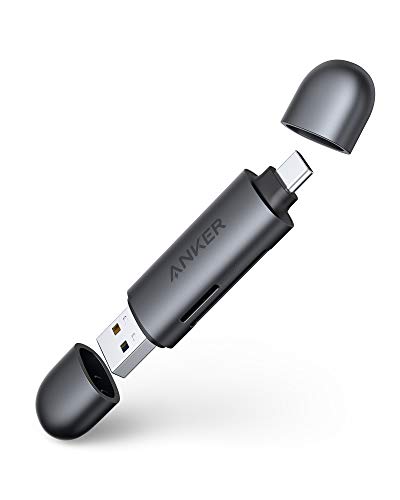
Photographers will reach for this Anker reader before anything else in this guide. It has two plugs built into one body, USB-C and USB 3.0, so it works with the phone, a laptop, or an older desktop without a second adapter. The slots take full-size SD and microSD cards, including SDXC and SDHC, with UHS-I support for fast reads from a camera card. The reader is small enough to live in a camera bag pocket, and it draws power from the host device, so there is no battery to charge and no cable to forget. Move the card, copy the files, and put the reader away.
Specs
- Dual connectors: USB-C and USB 3.0
- SDXC, SDHC, microSD, MMC, RS-MMC
- UHS-I support
- Model A8326
- PowerExpand+ series
Best for: Moving photos and video off camera cards.
Watch out for: The reader draws power from the phone, so long transfers use battery.
ASIN: B08VDWFSSX
Cable Matters USB-C to 2.5 Gigabit Ethernet Adapter

This Cable Matters adapter is the fix for hotel rooms and offices where the Wi-Fi is crowded or simply absent. It plugs into the phone’s USB-C port and gives you a wired RJ45 Ethernet link at up to 2.5 gigabits per second, more than twice the speed of a standard gigabit adapter. The aluminum body sheds heat during long transfers, and the braided pigtail cable survives daily bag life better than a stiff stick adapter. It also adds a 100 watt charging input, so the phone charges while it works. It does not support Android devices or Chromecast, so check your other gear first.
Specs
- USB-C male to RJ45 female
- Up to 2.5 Gbps Ethernet
- 100 W charging input
- Model 201363-BLK
- Thunderbolt 4 compatible
- Does not support Android or Chromecast
Best for: Wired internet where Wi-Fi is weak or crowded.
Watch out for: You need an Ethernet cable and a free wall outlet for charging; the adapter does not support Android or Chromecast.
ASIN: B0CFGBNYX8
Which One Fits Your Situation
Your Desk Drawer Is Full of Old USB Sticks
Pick the UGREEN four-pack if most of your gear still ends in USB-A. A flash drive, an old keyboard, or a card reader from a previous laptop all plug straight in, and the 10 gigabit speed means the adapter is not the slow part. Keep one adapter on the desk and one in the bag, and the other two are spares for the day one goes missing.
Your Favorite Headphones Still Have a Wire
Pick the Apple adapter if wired earbuds are part of your daily routine. The built-in DAC handles the digital to analog conversion the phone cannot do itself, and the short cable disappears into a pocket or a bag. It also carries microphone audio, so calls work exactly as they did on older phones. The trade is the missing charging port, so charge first and clip the dongle to the headphone cable.
Your Wi-Fi Drops in the Middle of a Call
Pick the Cable Matters adapter if your work depends on a connection that never drops. A wired Ethernet link skips the crowded airwaves in hotels, offices, and conference rooms, and 2.5 gigabits leaves room for video calls and large downloads at the same time. The 100 watt charging input matters here too, because the phone charges while you work instead of dying mid-call. Bring an Ethernet cable; this pick suits a desk more than a pocket.
Your Camera Card Needs a Fast Way In
Pick the Anker card reader if you shoot photos or video on a real camera. The dual USB-C and USB 3.0 plugs mean the same reader works with the phone and with a laptop, and the UHS-I slots read full-size SD and microSD cards without a second adapter. Copy the files to the phone, edit on the bigger screen, and put the reader back in the camera bag.
Common Mistakes
- Buying a USB 2 adapter by mistake and wondering why a file transfer crawls at 480 megabits per second.
- Assuming any 3.5 mm adapter carries sound, when only one with a DAC works on the iPhone 17.
- Plugging a wide adapter into a cased phone and finding the plug cannot seat fully.
- Forgetting the single port: using an adapter with no charging input during a long video session.
- Expecting 4K at 60 hertz from an adapter whose listing only promises 4K at 30 hertz.
Frequently Asked Questions
What is the difference between a USB-C adapter and a USB-C hub?
A hub is a small box that turns one USB-C port into several ports at once, with HDMI, USB-A, a card reader, and charging together. An adapter does one job only, such as HDMI out or Ethernet, and it is smaller and lighter. Pick a hub when you work at a desk with many devices, and pick an adapter when you need one specific port on the go.
What is the difference between a USB-C adapter and a USB-C to HDMI adapter?
A USB-C to HDMI adapter is one kind of USB-C adapter, built for one job: video out to a TV or monitor. A general adapter can end in almost anything: USB-A, Ethernet, a card reader, or a 3.5 mm audio jack. If your only goal is a larger screen, the HDMI adapter is the right call. If you need several ports, buy the adapter per job.
Can the iPhone 17 use any USB-C to 3.5 mm adapter?
No. The phone sends digital audio only, so the adapter must include a DAC to turn it into analog sound for wired headphones. Apple sells one, and a few third party adapters include one too, but a bare cable with no chip will stay silent. Check the listing for the words DAC or digital audio before you buy, and confirm the adapter works with USB-C phones.
Will a USB-C adapter charge the phone while I use it?
Only if the adapter has a charging input of its own. Most single-purpose adapters take the only USB-C port and leave no way to plug in a charger. The Cable Matters Ethernet adapter in this guide is the exception, with a 100 watt pass-through that charges the phone while it works. For a long session, pick an adapter with charging built in, or charge the phone first.
More from Amazon
Programs that pair well with the guide above. Offers and eligibility are set by Amazon and may change.
Free shipping on eligible items, Prime Video and more. Eligible new members can start with a free trial.
Start a Prime free trialAd-free music streaming. Eligible new subscribers can start with a free trial.
Try Music Unlimited freeA Prime membership for ages 18-24 with a trial period. Eligibility is set by Amazon.
See Prime for Young AdultsAudiobooks and podcasts to listen to on the go. Eligible new members can start with a free trial.
Try Audible freeAs an Amazon Associate we earn from qualifying purchases.