Our Top Picks


A plain rubber cable frays where it meets the plug, usually right when you need it most. The real decision is not whether to buy a braided cable but which braid, wattage, length, and data speed fit the way you actually use the phone. A braid that survives thousands of bends means nothing if the cable caps your charging at a slow trickle, and a 240W cable is wasted money if your charger only puts out 25W.
This guide is for Galaxy S25 FE owners who are tired of replacing frayed cables, for commuters who yank a cable out of a bag ten times a day, and for anyone who wants one cable that also works with a laptop or a monitor. Every cable below was chosen from its name and specs on the Amazon product page, with the braid construction and wattage taken straight from the listing.
Quick Picks
As an Amazon Associate we earn from qualifying purchases.
| Product | Best for | Key spec from title |
|---|---|---|
| Anker 333 USB-C to USB-C Cable 100W | A spare cable in every room | 100W, 6 ft, double-braided nylon |
| Belkin BoostCharge Braided USB-C Cable | The longest-lasting everyday cable | 100W, 6.6 ft, double-braided nylon |
| UGREEN USB-C Cable 240W with LED Display | Watching the watts in real time | 240W, 6.6 ft, LED display |
| UGREEN USB4 Gen4 USB-C Cable 240W | Full-speed data and a monitor | 240W, 3.3 ft, USB4 Gen4 80 Gbps |
| Silkland USB4 USB-C Cable 240W | A certified USB4 cable for desk setups | 240W, 4 ft, USB4 40 Gbps |
How to Choose
Match the Wattage to the Charger, Not Just the Phone
The Galaxy S25 FE tops out at 45W wired charging through PD 3.0 with PPS, so a 45W or stronger PPS charger is what actually decides your speed. A 100W cable paired with a 25W charger still charges at 25W, and a 240W cable does not push the phone past its 45W ceiling. What the higher wattage buys is headroom: the same cable can fast charge a laptop later without becoming the bottleneck. For example, if your charger is the Samsung 45W adapter, any cable in this guide reaches the full 45W, but a 60W cable leaves nothing in reserve for a tablet or a laptop.
Braid Quality Beats Braid Looks
Every cable here has a nylon braid, yet the braids are not equal. A double-braided jacket with a tight weave resists fraying at the strain relief, which is where most cables die, while a loose single braid can snag and unravel. Bend lifespan figures tell the story: Anker lists 5,000 bends for its 333 cable, while Belkin lists 25,000 bends for its BoostCharge cable. Strand count matters too, and Silkland uses a 48-strand braid on its USB4 cable. Check the listing for a bend figure and for strain relief at both ends before you buy, because a pretty braid with a weak neck still fails early.
Length and Flexibility for Daily Use
A 3.3-foot cable keeps a desk tidy but leaves you tethered to the wall, while a 10-foot cable reaches the couch and then tangles in a bag. Six feet is the sweet spot for most people: long enough to use the phone while it charges, short enough to coil without a knot. Braided cables are stiffer than rubber ones, so a short braided cable can feel rigid in a car cup holder. If the cable lives in a backpack, pick a 6-foot length with a hook-and-loop tie, and if it stays on a nightstand, a 3.3-foot cable keeps the clutter down.
Data Speed and Video: What the Port Actually Supports
The S25 FE has a USB Type-C 3.2 port that tops out at 5 Gbps, so even a 40 Gbps USB4 cable moves files at 5 Gbps when plugged into this phone. That does not make USB4 cables pointless: the same cable runs a monitor through DeX and transfers files at full speed on a laptop, which a 480 Mbps USB 2.0 cable cannot do. If you only charge the phone and sync photos now and then, a 100W USB 2.0 cable is enough. If you plug the phone into a dock or a monitor, pick a USB4 cable so the cable never limits the setup.
The 5 Best Options
Anker 333 USB-C to USB-C Cable 100W

The Anker 333 is the practical pick for anyone who wants a braided cable in more than one place. It comes as a two-pack of 6-foot cables, so one lives on the nightstand and the other goes in a bag, and the double-braided nylon exterior is listed for a 5,000-bend lifespan. It carries up to 100W with an E-Marker chip that negotiates power safely with the charger, which is more than enough for the S25 FE at 45W. Data moves at 480 Mbps, so it handles photo syncs and small file transfers without fuss.
Specs
- 100W max power delivery
- 6 ft length, 2-pack
- Double-braided nylon exterior
- 5,000-bend lifespan
- 480 Mbps data transfer
- E-Marker chip
- USB-C to USB-C
Best for: Keeping a braided cable at home and another in a bag without buying twice.
Watch out for: It does not support video output, so it cannot run DeX on a monitor; also, one crawl showed no featured offers for the red variant, so confirm the listing has a seller before ordering.
Belkin BoostCharge Braided USB-C to USB-C Cable 100W

The Belkin BoostCharge is the durability leader in this group. Its double-braided nylon jacket is listed for 25,000 bends, five times the Anker figure, and the cable is USB-IF certified, which means an independent lab checked that it meets the USB spec. It supports up to 100W with 5A at 20V, moves data at 480 Mbps, and comes in 6.6-foot and 10-foot lengths with an anodized aluminum housing at each end. Belkin backs it with a 2-year limited coverage period.
Specs
- 100W max power delivery, up to 5A at 20V
- 6.6 ft length, also available in 10 ft
- Double-braided nylon exterior
- 25,000-bend lifespan
- USB-IF certified
- 480 Mbps data transfer
- 2-year limited coverage
Best for: A single cable you plan to use every day for years without a replacement.
Watch out for: It is a USB 2.0 cable, so large file transfers run at 480 Mbps and it cannot carry video to a monitor.
UGREEN USB-C to USB-C Cable 240W with LED Display
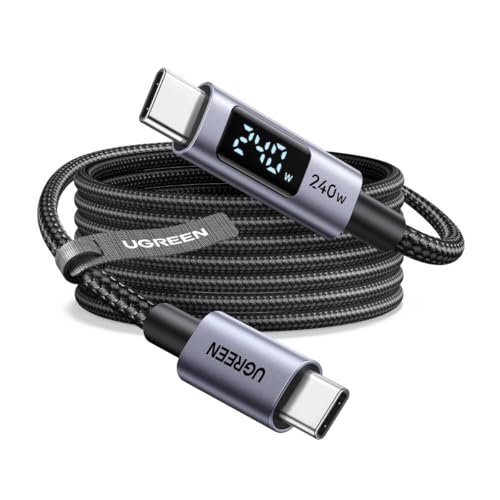
The UGREEN LED cable is the one to pick when you want proof that charging is working. A small display on the connector shows the real-time watts, voltage, and current, refreshing every few seconds, so you can see at a glance whether the phone is pulling its full 45W or stuck at a lower speed. The cable supports up to 240W through PD 3.1 with a 5A E-Marker chip, and the 24-strand braided jacket resists tearing and abrasion. At 6.6 feet it reaches from a wall outlet to a couch without strain.
Specs
- 240W max power delivery
- 6.6 ft length
- LED display with real-time watts, voltage, and current
- 24-strand braided jacket
- 5A E-Marker chip
- PD 3.1 support
- Aluminum connector housings
Best for: Checking on the spot whether your charger and cable are delivering full speed.
Watch out for: The display adds a small rigid section at the connector, so confirm it fits your case opening; the listing title also mentions PD 100W support, so read the listing to confirm the 240W ceiling for your setup.
UGREEN USB4 Gen4 USB-C to USB-C Cable 240W
The UGREEN USB4 Gen4 cable is the most capable cable here, and it shows in the spec sheet. It is a braided USB4 Gen4 cable with up to 80 Gbps bandwidth, 240W charging through PD 3.1, and support for 17K, dual 8K, or triple 4K displays, plus Thunderbolt 4 and 3 compatibility. On the S25 FE the port caps data at 5 Gbps, but the cable still runs DeX on a monitor and moves files at full speed on a laptop or a dock. At 3.3 feet it suits a desk, where the short run keeps the setup neat.
Specs
- 240W max power delivery, PD 3.1
- 3.3 ft length
- USB4 Gen4, up to 80 Gbps bandwidth
- Braided jacket
- 17K, dual 8K, and triple 4K display support
- Thunderbolt 4 and 3 compatible
- E-Marker chip
Best for: A desk setup where the phone drives a monitor through DeX and the cable also serves a laptop.
Watch out for: At 3.3 feet it is too short for couch charging, so measure the distance from your outlet before ordering.
Silkland USB4 USB-C to USB-C Cable 240W
The Silkland USB4 cable is the certified option for a desk that needs both speed and toughness. It is USB-IF certified, with certification identifier 11328, and it carries up to 240W at 48V and 5A with an E-Marker chip, plus 40 Gbps data and 8K at 60Hz video. The 48-strand braided nylon jacket and aluminum shell protect the connector and the chip inside from heat and wear. At 4 feet it is a touch longer than the UGREEN USB4 cable, which helps when the dock sits a little farther from the phone.
Specs
- 240W max power delivery, 48V and 5A
- 4 ft length
- USB4, up to 40 Gbps data
- 48-strand braided nylon jacket
- USB-IF certified, TID 11328
- 8K at 60Hz video support
- Aluminum connector shell
- E-Marker chip
Best for: A USB-IF certified USB4 cable that covers charging, fast file transfers, and a monitor in one purchase.
Watch out for: The listing prints a garbled bend figure, so judge durability by the 48-strand braid and aluminum shell rather than a bend number.
Which One Fits Your Situation
You Want One Cable for Everything at Home
Pick the Belkin BoostCharge cable. Its 25,000-bend braid and USB-IF certification make it the hardest to wear out, and 100W covers the phone at 45W plus a tablet or a laptop later. The 6.6-foot length reaches from a wall outlet to a bed or a couch, and the aluminum housing survives drops that crack plastic ends. If you only buy one cable, this is the one that stays in service longest.
You Charge in the Car or on the Go
Pick the Anker 333 two-pack. Two cables mean one stays in the car and one stays in the bag, and the 6-foot length is long enough to use the phone while it charges without dangling. The double braid handles being coiled and uncoiled every day, and the 5,000-bend lifespan is plenty for a cable that sits still once plugged in. Keep the second cable as a spare for the day the first one gives out.
You Move Big Files or Use DeX on a Monitor
Pick the UGREEN USB4 Gen4 cable or the Silkland USB4 cable. Both carry 40 Gbps or faster data and video, so they run DeX on a monitor and move large video files at speeds a 480 Mbps cable cannot match. The UGREEN cable reaches 80 Gbps and suits a short desk run, while the Silkland cable adds USB-IF certification and an extra foot of reach. Either one turns the phone into a desktop machine without a second cable.
You Want to See the Watts While Charging
Pick the UGREEN LED display cable. The display shows live watts, voltage, and current, so you can tell in seconds whether a hotel charger or a car adapter is actually delivering fast charging or just trickling. That feedback is worth more than a higher wattage ceiling on a cable you cannot inspect. Pair it with a 45W PPS charger and the S25 FE should show its full speed on the display.
Common Mistakes
- Buying a 240W cable and expecting the phone to charge past its 45W ceiling
- Choosing a cable by braid looks alone and ignoring the bend lifespan in the listing
- Using a 3.3-foot cable for couch charging and then straining the connector every night
- Picking a USB 2.0 cable for DeX and wondering why no video appears on the monitor
- Forgetting that the S25 FE needs a PD 3.0 PPS charger for 45W, not just a thick cable
Frequently Asked Questions
Does the Galaxy S25 FE need a 5A cable to reach 45W?
No. Samsung support and GSMArena confirm that the S25 series supports Super Fast Charging 2.0 with the 3A cable, so the phone reaches 45W without a 5A cable. A 5A cable is the safest pick because it removes the cable as a possible bottleneck and covers laptops and tablets too. Pair any cable here with a 45W PD 3.0 PPS charger to get the full speed.
Can these braided cables damage the phone’s USB-C port?
A braided cable does not damage the port, but a stiff braid can lever against the connector if you yank the cable sideways. Pull from the plug housing, not the cord, and avoid letting a heavy braided cable hang from the phone. The aluminum housings on the Belkin and Silkland cables protect the plug, yet they add weight, so support the cable on soft surfaces.
Why does my braided cable charge slowly even though it says 100W?
The cable is only one part of the chain. A 100W cable with a 15W charger still charges at 15W, and a charger without PPS caps the S25 FE at 25W even with a perfect cable. Check the charger first, then the cable, and confirm the phone shows fast charging on screen. A cable with an LED display, like the UGREEN pick, makes this check instant.
How do I clean a braided cable that has picked up dirt?
Wipe the braid with a slightly damp cloth and a drop of mild soap, then dry it fully before use. Do not soak the cable or run it under a tap, because water can wick into the braid and reach the connector. A light-colored braid shows dirt sooner than a black one, so pick a dark color if the cable rides in a bag with keys and coins.
More from Amazon
Programs that pair well with the guide above. Offers and eligibility are set by Amazon and may change.
Free shipping on eligible items, Prime Video and more. Eligible new members can start with a free trial.
Start a Prime free trialAd-free music streaming. Eligible new subscribers can start with a free trial.
Try Music Unlimited freeA Prime membership for ages 18-24 with a trial period. Eligibility is set by Amazon.
See Prime for Young AdultsAudiobooks and podcasts to listen to on the go. Eligible new members can start with a free trial.
Try Audible freeAs an Amazon Associate we earn from qualifying purchases.