Key takeaways
- Graphics card: VR demands high frame rates at high resolutions. Read the maker’s minimum and recommended specs; higher-resolution headsets want newer, more powerful GPUs.
- Ports: tethered headsets may need DisplayPort or USB-C DisplayPort Alt Mode; check your GPU outputs and available USB ports.
- Wi-Fi: wireless play benefits from a Wi-Fi 6, 6E or 7 router located in the same room as the headset.
- Software: SteamVR supports most PC headsets. Meta headsets use the Meta app and can access SteamVR through it.
- Tracking: inside-out tracking needs no base stations; lighthouse tracking offers precise tracking but needs wall-mounted stations.
For most people the best VR headset for PC is a Meta Quest 3 or Quest 3S used wirelessly or by cable with a gaming PC, because it covers both standalone and PC games; choose a high-resolution PC-focused headset such as the Bigscreen Beyond 2, Pimax Crystal series or HTC Vive Focus Vision if you want sharper visuals for simulators, and look at Valve’s newer Steam Frame if you want a headset built around the Steam library. Your graphics card, play space and tolerance for setup should drive the choice.
Our top picks


As an Amazon Associate we earn from qualifying purchases at no extra cost to you.
VR Headsets for PC at a Glance
| Headset | Best for | Key stated specs | Limits |
|---|---|---|---|
| Meta Quest 3 | Most users who want standalone plus PC play | Meta lists a standalone headset with colour passthrough, with PC play through Meta Quest Link or Air Link and Steam via a streaming app | Compression in wireless mode; not as sharp as dedicated PC headsets |
| Meta Quest 3S | Lower-cost entry to PC streaming | Meta lists a standalone headset that supports the same PC link options as Quest 3 with a different lens and display design | Lower visual clarity than Quest 3 |
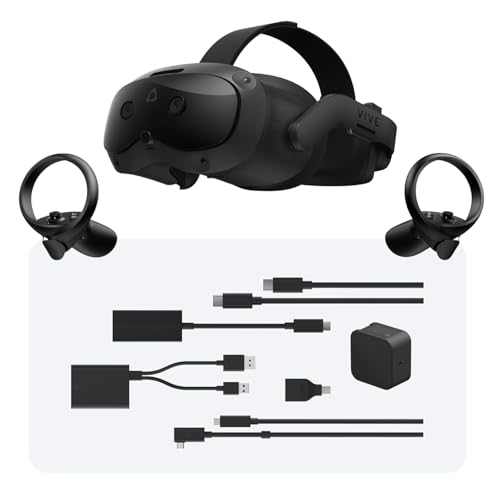
| HTC Vive Focus Vision | Business and PC users who want wired and wireless options | HTC lists a standalone headset with a DisplayPort-based PC mode and eye tracking | Premium cost tier; narrower software ecosystem |
| Bigscreen Beyond 2 | Enthusiasts wanting a lightweight, high-resolution tethered headset | Bigscreen lists a small, lightweight design with micro-OLED displays and a custom fit process | Needs external tracking base stations; premium tier |
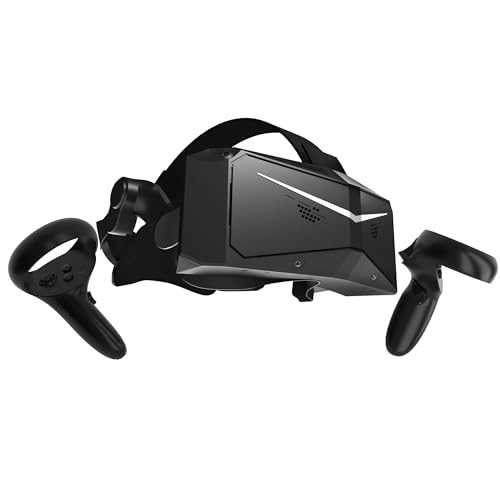
| Pimax Crystal series | Wide field of view and high clarity for simulators | Pimax lists high-resolution displays, wide-view options and PC connection | Needs a powerful GPU; heavier; software can need tuning |
| Valve Index | Previous-generation PC VR with excellent controllers | Valve listed a wide field of view, high refresh rate and finger tracking controllers | Availability is limited and the base stations are older tech |
| Valve Steam Frame | Steam-focused buyers watching the new generation | Valve has announced a headset designed for the Steam ecosystem; read Valve’s pages for final specs | New release; limited track record |
| Pico 4 Ultra and similar | Alternative standalone with PC streaming | Pico lists a standalone headset with PC streaming support | Regional availability varies |
This market changes quickly, so read the makers’ pages for the current versions. Reviewers such as UploadVR, Road to VR and Tom’s Hardware cover each release in detail.
Standalone With PC Link Versus Dedicated PC Headsets
Standalone headsets with PC modes
Quest-style headsets run games on their own and can connect to a PC by cable or Wi-Fi. This gives flexibility: you can play standalone games in the living room and PC games at your desk. The trade-off is that wireless streaming compresses video, and cable quality depends on your cable and PC port. A good router on a dedicated 5 GHz or 6 GHz connection helps wireless play considerably.
Dedicated PC headsets
Tethered headsets from Bigscreen, Pimax, HTC and Valve offer better optical clarity and no compression, and they usually have wider field of view or better displays. They need a PC with a capable graphics card and often external tracking base stations. Setup takes longer, and the headset is limited to PC use.
PC Requirements and Compatibility
- Graphics card: VR demands high frame rates at high resolutions. Read the maker’s minimum and recommended specs; higher-resolution headsets want newer, more powerful GPUs.
- Ports: tethered headsets may need DisplayPort or USB-C DisplayPort Alt Mode; check your GPU outputs and available USB ports.
- Wi-Fi: wireless play benefits from a Wi-Fi 6, 6E or 7 router located in the same room as the headset.
- Software: SteamVR supports most PC headsets. Meta headsets use the Meta app and can access SteamVR through it.
- Tracking: inside-out tracking needs no base stations; lighthouse tracking offers precise tracking but needs wall-mounted stations.
Fit, Comfort and Safety Notes
Clear a play space free of furniture, pets and fragile objects, and use the boundary system. Take breaks, especially if you feel dizzy, sick or have eye strain; if symptoms persist, speak to a doctor. Makers commonly set minimum age recommendations, so follow the manual and parental guidance. People who wear glasses should look for headsets with adjustable lens spacing or glasses spacers, and prescription inserts are sold for many models. Weight balance matters: front-heavy headsets can strain the neck, and aftermarket straps with a rear battery are common. Clean the face interface and lenses as the maker instructs, and avoid direct sunlight on the lenses, which can damage displays.
Budget Tiers
Budget: Quest 3S is the entry point for people who want PC streaming plus standalone games. It is good for casual play and learning VR.
Mid-range: Quest 3 gives sharper lenses and a larger library of mixed-reality features. It is the common choice for flexible use.
Premium: Bigscreen Beyond 2, Pimax Crystal, HTC Vive Focus Vision and similar. You pay for clarity, comfort or specialist features, and need a high-end PC to match.
Pick X If … Decision Table
| Pick this | If you want |
|---|---|
| Meta Quest 3S | The lowest entry cost with PC streaming |
| Meta Quest 3 | One headset for standalone, mixed reality and PC play |
| HTC Vive Focus Vision | Wired PC clarity with standalone options |
| Bigscreen Beyond 2 | A compact, lightweight high-resolution PC headset |
| Pimax Crystal | A wide view and clarity for simulation games |
| Valve Index | Excellent controllers if you can find it new or used |
| Valve Steam Frame | A Steam-first design as availability expands |
Alternatives
Playing on a monitor with a sim rig: for racing and flight, triple-screen or ultrawide setups avoid motion discomfort.
Console VR: PlayStation VR2 can connect to a PC through an adapter that Sony sells, though support and game compatibility are limited and described on Sony’s pages.
Used headsets: pre-owned Quest 2, Index or Reverb G2 units exist, but check software support and warranty status.
Tracking Technologies Explained
Inside-out tracking uses cameras on the headset to map your surroundings and follow your controllers, so no external hardware is needed. It is convenient and works well in typical rooms, though controllers can lose tracking when they leave the cameras’ view, for example behind your back or in tight, dark spaces. Outside-in tracking, such as Valve’s lighthouse base stations, uses fixed stations on walls and offers precise tracking in a defined play area but takes longer to set up and requires mounting points and power outlets.
Eye tracking and face tracking are appearing on newer headsets. They can enable foveated rendering, which reduces GPU load by rendering sharp detail only where you are looking, and they can animate avatar expressions in social apps. Support depends on the headset, the driver and the individual game, so read the maker’s feature list rather than assuming it works everywhere.
Display Types and Clarity
LCD panels are common and affordable. OLED and micro-OLED panels deliver deeper blacks and richer colours, and micro-OLED headsets are very compact. Pancake lenses allow a slimmer, lighter headset than older Fresnel lenses, but they can lose some brightness. Resolution matters most in simulators where you read small gauges and text. A refresh rate of 90 Hz or higher is widely regarded as comfortable, and some headsets offer modes up to 120 Hz or beyond.
Audio and Controllers
Built-in speakers keep setup simple and avoid cable clutter, while headphone jack or USB audio options let you use your own headset. Controllers differ: Quest controllers are compact and track well, Index controllers add finger tracking and a strap that frees your hand, and some enthusiast headsets rely on separate controllers. If you play flight or racing games, you may use a joystick, wheel or HOTAS instead, so confirm that your devices work with the headset’s software.
Setting Up a Good Play Space
Aim for a clear area roughly two metres by two metres for room-scale games, or a seated or standing space for simulators. Remove cables and rugs that could trip you, keep pets out of the area, and be aware of ceiling fans and lights. Set the boundary every time you move to a new space. Do not play near stairs, balconies or sharp furniture. If you are pregnant, have a medical condition or are unsure whether VR is suitable for you or a child, consult a doctor and follow the manufacturer’s health and safety guidance.
Frequently Asked Questions
Do I need a powerful PC for VR?
For PC VR, yes, more than for flat gaming, because the GPU renders two high-resolution images at high frame rates. Check the headset maker’s recommended specs. Standalone-only play on Quest does not need a PC.
Can a Quest headset play Steam games?
Yes, through a PC connection using the Meta Link cable or Air Link wirelessly, and through third-party apps. Visual quality depends on your PC, router and compression settings.
Is wireless or wired better?
Wired is generally more consistent and sharper, while wireless is freer and more comfortable for movement. A strong Wi-Fi connection narrows the gap. Many users try both.
Will VR make me feel sick?
Some people experience motion discomfort, especially in games with artificial movement. Start with short sessions, use comfort options and stop if you feel unwell. Consult a doctor if symptoms continue.
Can I wear glasses in VR?
Many headsets accommodate glasses, and lens inserts are available for several models. Check lens spacing and glasses compatibility on the maker’s page. Avoid scratching lenses with frames.
What is the best headset for flight and racing simulators?
Reviewers often point to high-clarity PC headsets such as the Pimax Crystal series and Bigscreen Beyond 2 for readable instruments. They need a strong GPU. Quest 3 remains a capable and cheaper alternative.
More from Amazon
Programs that pair well with the guide above. Offers and eligibility are set by Amazon and may change.
Free shipping on eligible items, Prime Video and more. Eligible new members can start with a free trial.
Start a Prime free trialAd-free music streaming. Eligible new subscribers can start with a free trial.
Try Music Unlimited freeA Prime membership for ages 18-24 with a trial period. Eligibility is set by Amazon.
See Prime for Young AdultsAudiobooks and podcasts to listen to on the go. Eligible new members can start with a free trial.
Try Audible freeAs an Amazon Associate we earn from qualifying purchases.