
The best wireless gaming headset depends on your platform and priorities: the SteelSeries Arctis Nova 7 Wireless and Arctis Nova Pro Wireless suit buyers who switch between PC and consoles, the Logitech G Pro X 2 Lightspeed and Razer BlackShark V2 Pro suit competitive PC players who want a light, accurate headset, the HyperX Cloud III Wireless and Corsair HS80 Max Wireless suit comfort-first buyers, and the Turtle Beach Stealth 700 line suits console players. Wireless range, battery life and microphone quality matter more in daily use than headline driver size.
Our top picks



As an Amazon Associate we earn from qualifying purchases at no extra cost to you.
What to Check Before You Buy
- Platform compatibility: A 2.4 GHz USB dongle works on PC and often on PlayStation and Switch, while Xbox generally needs a headset licensed for Xbox wireless. Read the maker’s platform table carefully.
- Connection type: 2.4 GHz wireless gives the lowest latency; Bluetooth adds convenience for phones. Many headsets offer both.
- Battery life: Makers list figures from roughly a day of play to well over a day and a half. Hot-swappable batteries and fast-charge features are useful if you play for long sessions.
- Comfort and weight: Clamp force, earcup depth and headband padding matter, especially if you wear glasses.
- Microphone: Detachable booms, noise reduction and sidetone make it easier to communicate with teammates.
- Software: Equalizers, spatial audio and profiles are handled by apps such as SteelSeries GG, Logitech G HUB, Razer Synapse, HyperX NGENUITY and Corsair iCUE.
At a Glance
| Headset | Best for | Key stated features | Limits |
|---|---|---|---|
| SteelSeries Arctis Nova Pro Wireless | Premium multi-platform setups | Dual-battery base station, active noise cancellation, 2.4 GHz and Bluetooth per the maker | Premium tier; larger accessories |
| SteelSeries Arctis Nova 7 Wireless | All-round value on PC and console | 2.4 GHz plus Bluetooth, long battery life listed by the maker | Check the maker’s platform table for Xbox support |
| Logitech G Pro X 2 Lightspeed | Competitive PC play | Graphene drivers, 2.4 GHz and Bluetooth, detachable boom mic | Premium tier |
| Razer BlackShark V2 Pro | Light, esports-style fit | 2.4 GHz wireless, detachable mic, lightweight design | Fewer extras than premium multi-platform headsets |
| HyperX Cloud III Wireless | Comfort and long battery life | 2.4 GHz wireless, memory-foam cushions, long listed battery life | Bulkier look; no Bluetooth on some versions, so confirm the model |
| Corsair HS80 Max Wireless | PC and PlayStation users who like comfort | 2.4 GHz and Bluetooth, spatial audio via iCUE | Software-dependent features |
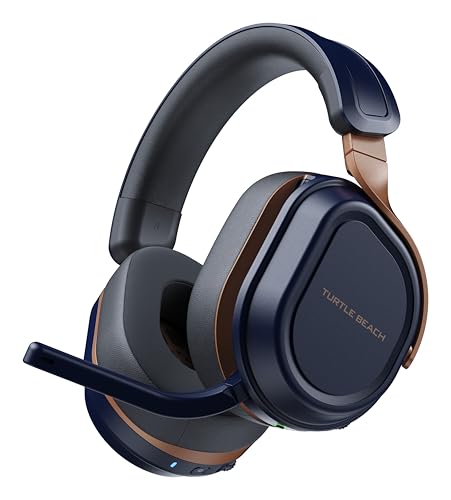
| Turtle Beach Stealth 700 Gen 3 | Console players | Dual wireless, Bluetooth and variant models for Xbox and PlayStation | Choose the correct platform version |
The features above are those makers advertise on their product pages; actual performance varies by room, interference and firmware.
SteelSeries Arctis Nova Series
SteelSeries sells the Arctis Nova line in several tiers. The Nova Pro Wireless is the premium member, pairing the headset with a base station that holds a spare battery and lets you switch between sources, with active noise cancellation described by the maker. The Nova 7 Wireless is the mid-to-premium workhorse, with 2.4 GHz and Bluetooth available at the same time and a battery life that the maker lists as very long. Reviewers repeatedly praise the comfort and the clear, balanced sound while noting that the software is required for the most polished tuning.
Logitech G Pro X 2 Lightspeed
Aimed at competitive players, the G Pro X 2 uses graphene-coated drivers according to Logitech, provides a detachable boom microphone and adds Bluetooth for phone audio. It is a premium-tier choice that suits PC players and those who use a PlayStation or Switch via the USB dongle. Reviewers describe the sound as precise and the fit as supportive, though some find the clamp firm for long sessions.
Razer BlackShark V2 Pro
The BlackShark V2 Pro is Razer’s light, esports-style wireless headset. It is positioned for people who want clear positional audio and a detachable microphone without much bulk. The maker lists support for PC, PlayStation and Switch via the wireless dongle. Some versions or newer revisions add features such as Bluetooth, so check the product page for the exact model year.
HyperX Cloud III Wireless
HyperX positions the Cloud III Wireless on comfort, durability and long battery life. It has memory-foam earcups and a metal frame per the maker. It is a mid-range to premium option well suited to long gaming sessions and to those who want a solid build. As with many headsets, check which platforms the dongle supports.
Corsair HS80 Max Wireless
Corsair’s HS80 Max Wireless offers 2.4 GHz and Bluetooth connectivity, spatial audio features through iCUE and a design that reviewers often call comfortable and sturdy. It is a sensible mid-range to premium choice for PC players already in the Corsair ecosystem.
Turtle Beach Stealth 700 Gen 3
Turtle Beach sells platform-specific versions of the Stealth 700 for Xbox and PlayStation, plus multi-system dongles. This matters, because buying the wrong version can limit compatibility. The headset line is known for console-friendly controls and a straightforward setup.
Wireless Versus Wired
Modern 2.4 GHz wireless headsets have latency low enough for most players, and they free you from a cable. A wired headset still wins on price and never needs charging. If you value a wireless setup, keep the dongle close to the headset by using a USB extension cable on a desktop PC.
Pick X If You Need Y
| Pick this | If you need |
|---|---|
| Arctis Nova Pro Wireless | Hot-swap batteries and a premium base station |
| Arctis Nova 7 Wireless | A balanced, comfortable all-rounder across platforms |
| Logitech G Pro X 2 | Precise audio for competitive PC play |
| Razer BlackShark V2 Pro | A light, esports-focused fit |
| HyperX Cloud III Wireless | Comfort and a long listed battery life |
| Corsair HS80 Max | PC play with Bluetooth and spatial audio |
| Turtle Beach Stealth 700 | A console-specific headset with simple setup |
Alternatives
- Astro A50 X: A premium base-station headset aimed at console and PC switching.
- Wired open-back headphones with a clip-on microphone: Useful for players who care more about sound quality than convenience.
- Budget wireless headsets: The Logitech G435 and Razer Barracuda X are lower-tier options, covered in the budget guides on this site.
Care and Safety Tips
- Keep listening volume moderate. Prolonged loud sound can damage hearing, and persistent ringing is a reason to see a doctor.
- Charge the headset with the cable and adapter the maker provides, and stop using it if the battery swells or becomes unusually hot.
- Wipe the cushions with a dry or slightly damp cloth, and replace worn earpads if available.
- Update firmware through the maker’s app when new versions appear.
Choosing Between the Options
Start with where you play. PC-only players can choose almost any model on this list, while console players need to match the headset to the console, especially on Xbox. Players who split time across several devices benefit from models that combine a 2.4 GHz dongle with Bluetooth, because they can listen to a phone while keeping game audio running.
Next, consider comfort. Long sessions expose small differences in weight and clamp force, and headsets with memory-foam cushions and adjustable bands tend to suit a wider range of head sizes. Glasses wearers should look for soft, deep earcups. If you live in a noisy home, active noise cancellation, where the maker offers it, can reduce distractions, though it is not a substitute for sensible volume.
Finally, weigh the microphone and software. A detachable boom microphone often sounds clearer for team chat than an integrated one, and companion apps unlock equalizers and spatial audio. Keep in mind that some features depend on the maker’s software and may not be available on consoles.
Fit Tips
Adjust the headband so the earcups sit centred over your ears. A headset that slides when you look down is too loose, and one that presses behind the ears after an hour is too tight. People with very small or very large heads should read the maker’s size notes and reviewer comments, because comfort is personal and hard to judge from specifications alone.
Frequently Asked Questions
Are wireless gaming headsets laggy?
Headsets using a 2.4 GHz dongle generally have latency low enough that most players do not notice it. Bluetooth usually has higher latency, so it is better for music and calls than for fast-paced games.
Which wireless gaming headset works on Xbox?
Xbox typically needs a headset licensed for its own wireless protocol or one that connects by cable. Makers such as SteelSeries, Turtle Beach and Astro sell Xbox-specific versions, so read the platform table before ordering.
How long do wireless gaming headsets last on a charge?
Makers list battery life from about a day of play up to several days for the best models. Actual time depends on volume, lighting and noise-cancellation features, and batteries degrade over years of use.
Can I use a wireless gaming headset with my phone?
Many models include Bluetooth, which makes them usable with a phone for calls or music. Headsets with only a USB dongle do not connect to phones this way.
Is a more expensive headset always better?
Not necessarily. Premium headsets add features such as noise cancellation, hot-swap batteries and better materials, but many mid-range models deliver similar sound and comfort for most players.
What is the best wireless gaming headset for glasses wearers?
Look for soft, deep earcups and light clamp force. Reviewers often point to models with memory foam and flexible headbands, but fit is personal, so check the return policy if you can.





