Key takeaways
- Weight and comfort: Switch sessions can be long, and handheld play means you are often moving. Light headsets reduce fatigue.
- Microphone type: a detachable or boom microphone is generally clearer than a built-in one.
- Volume limiting: children should use headsets with volume limits. Several makers list this feature on kids’ models.
- Battery life: for wireless models, look at the stated hours of use per charge.
- Cable length and plug: for wired models, a short cable and a straight or right-angle plug suit handheld play.
- Switch 2 compatibility: read the maker’s page for current guidance, because accessory support was still developing after the console launched.
For most Nintendo Switch players, a simple wired headset with a 3.5 mm plug, such as the HyperX Cloud Stinger or Cloud III wired version, is the safest, cheapest fit; a USB-C dongle headset such as the SteelSeries Arctis Nova 7 or the Logitech G435 suits those who want wireless play in handheld, tabletop or docked mode; and a true Bluetooth model suits those who mainly want audio without voice chat. Always check the headset’s stated Switch compatibility, because chat features work differently on each console model.
Our top picks


As an Amazon Associate we earn from qualifying purchases at no extra cost to you.
At a Glance: Headsets for Nintendo Switch
| Model | Best for | Connection (as listed by the maker) | Limits |
|---|---|---|---|
| HyperX Cloud III (wired) | Comfort and simple setup | 3.5 mm wired with a detachable microphone | Cable can get in the way in handheld mode |
| HyperX Cloud Stinger | Budget wired play | 3.5 mm wired | Basic features |
| SteelSeries Arctis Nova 7 | Wireless play with a USB-C dongle and Bluetooth | 2.4 GHz dongle and Bluetooth listed by the maker | Check which dongle version works with your console |
| Logitech G435 Lightspeed | Lightweight wireless at a budget level | Lightspeed dongle and Bluetooth | Built-in mic rather than a boom |
| Turtle Beach Recon series | Console-friendly wired models | 3.5 mm wired | Compatibility varies by model |
| Razer Barracuda X | Multi-platform wireless | USB-C dongle and Bluetooth | Confirm console support in the maker’s list |
Compatibility and features differ by model and revision, so read the maker’s current page for the exact version you plan to buy.
How Switch Audio Works
The original Nintendo Switch and Switch Lite include a 3.5 mm headphone jack, and Nintendo has added support for Bluetooth audio devices through system updates. The Switch 2 also includes a headphone jack and supports USB-C accessories. In practical terms, three connection routes exist: a wired plug, a USB-C dongle (which works in handheld mode and, with a dock or adapter, in docked mode), and Bluetooth.
Voice chat is the complicated part. Many Switch games rely on the Nintendo Switch Online phone app for voice chat on older titles, while newer games and the Switch 2 offer built-in game chat features. Because this varies by game and console, wired headsets with a built-in microphone and a dongle headset from a maker that lists Switch support are the least troublesome. Bluetooth headsets often cannot use their microphone on a Switch, so reviewers generally treat Bluetooth as an audio-only option. Read Nintendo’s current guidance for your console model and game before buying.
Wired vs Wireless on Switch
Wired
A wired headset plugs into the jack, works instantly, never needs charging, and has no audio delay. The downside is the cable, which can be awkward when you play handheld on a couch or on the move. A short cable or a right-angle plug helps.
USB-C dongle
A dongle headset connects wirelessly to a small receiver. In handheld mode you plug it into the console’s USB-C port; in docked mode you plug it into a dock USB port or use a short USB-C adapter, depending on the model. Some dongles are designed for several platforms, so look for a specific mention of Switch in the maker’s specifications. Plugging a dongle into the bottom port blocks charging in handheld mode, which is a point to consider on long trips.
Bluetooth
Bluetooth is convenient and works with phones and laptops too. Reviewers note audio delay can be noticeable in rhythm or action games. It generally does not support the headset’s microphone with the Switch, so game chat would need a separate solution.
Individual Picks
HyperX Cloud III (wired)
The wired Cloud III has memory foam ear cushions, a detachable microphone and a 3.5 mm connection. It suits players who want comfort for long sessions at a mid-range level, without worrying about batteries or dongles.
HyperX Cloud Stinger
This is a simpler wired headset in the budget tier. It suits young players, casual use and anyone who wants a no-fuss option with a built-in microphone.
SteelSeries Arctis Nova 7
The Nova 7 is a multi-platform wireless headset, with both a 2.4 GHz dongle and Bluetooth listed by SteelSeries. It suits players who move between a console, a PC and a phone. Confirm that the version you buy lists Switch support, since SteelSeries sells variants for different platforms.
Logitech G435 Lightspeed
The G435 is a lightweight wireless headset with a USB dongle and Bluetooth. Logitech positions it as a budget-friendly choice and highlights its low weight. It uses built-in microphones rather than a boom, so voice pickup is less targeted.
Turtle Beach Recon series
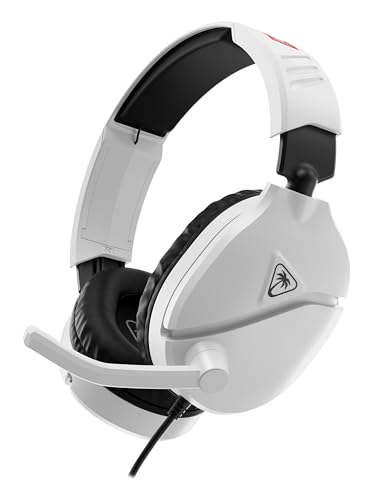
Turtle Beach makes several wired console headsets that are commonly used with a Switch. Compatibility depends on the model, so look for the Switch label on the box or product page.
Razer Barracuda X
This wireless headset uses a USB-C dongle and can also connect via Bluetooth. Razer lists support for several platforms, so confirm the Switch listing before buying.
Features That Matter
- Weight and comfort: Switch sessions can be long, and handheld play means you are often moving. Light headsets reduce fatigue.
- Microphone type: a detachable or boom microphone is generally clearer than a built-in one.
- Volume limiting: children should use headsets with volume limits. Several makers list this feature on kids’ models.
- Battery life: for wireless models, look at the stated hours of use per charge.
- Cable length and plug: for wired models, a short cable and a straight or right-angle plug suit handheld play.
- Switch 2 compatibility: read the maker’s page for current guidance, because accessory support was still developing after the console launched.
Budget Tiers
| Tier | What to expect |
|---|---|
| Budget | Wired headsets or lightweight dongle models with a basic microphone |
| Mid-range | Comfort-focused wired headsets or wireless models with a boom microphone |
| Premium | Multi-platform wireless headsets with software control and longer battery life |
Pick X If …
| If you … | Pick |
|---|---|
| Want the simplest setup | HyperX Cloud III wired or Cloud Stinger |
| Want wireless play with voice chat | SteelSeries Arctis Nova 7 (Switch-listed version) |
| Want a light wireless headset on a budget | Logitech G435 Lightspeed |
| Also use a PC and phone | Razer Barracuda X or Arctis Nova 7 |
| Buy for a child | A wired headset with a volume limiter |
Alternatives
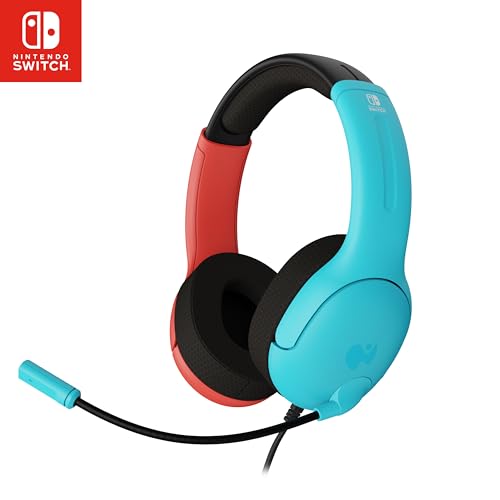
- Official licensed headsets: some makers sell models designed specifically for Nintendo consoles.
- Wired earbuds with a microphone: light and cheap for handheld play.
- Bluetooth earbuds: suitable for audio only, if you can accept some delay.
Practical Tips for Using a Headset With a Switch
Start with the simplest connection and add complexity only if you need it. For a first headset, a wired model with a 3.5 mm plug confirms the audio path works, and you can then decide whether the convenience of a wireless dongle is worth the cost. If a wireless headset has no sound, re-seat the dongle, check the console’s sound output settings and update the headset firmware using a computer if the maker offers it.
Think about where you play. If you mostly play docked in the living room, a dongle in the dock’s USB port is out of the way and the headset’s battery is the only consideration. If you play handheld on trips, a wired set or a very small dongle headset keeps things light, and a headset with a long stated battery life avoids charging stops.
Protect hearing, especially for children. Handheld speakers sit close to the ears with some headsets, and game audio can jump in volume during cutscenes. Use the console’s volume controls or a headset with a built-in limiter, take breaks, and stop if ears feel sore or ringing begins. See a doctor for any lasting symptoms.
Finally, keep the headset clean, store it in a case, and avoid bending the boom microphone sharply, since broken wiring there is a common failure. If you plan to use the same headset with a phone or laptop, a model with both a dongle and Bluetooth gives the most flexibility. Wipe ear cushions with a slightly damp cloth, never soak them, and let them dry fully before storing.
Frequently Asked Questions
Does the Nintendo Switch support Bluetooth headsets?
Nintendo added Bluetooth audio through system updates, but microphone support is generally not offered over Bluetooth. If you need to chat, use a wired headset or a dongle headset that lists Switch support.
Can I use a USB-C dongle headset in docked mode?
Many dongle headsets work when connected to the dock’s USB port or via a USB-C adapter. Look at the maker’s instructions for the specific model.
How does voice chat work on Switch?
It depends on the game. Some use the Nintendo Switch Online phone app, others have built-in chat. Check the game’s documentation and Nintendo’s guidance.
Will a PlayStation or Xbox headset work on Switch?
A 3.5 mm headset usually works for audio. Console-specific wireless models may not, so confirm Switch support with the maker.
Is a headset safe for kids?
Choose a model with volume limiting, keep the volume low and encourage breaks. If a child reports discomfort or ringing, see a doctor.
Do I need a headset with a boom microphone?
Not for solo play. For online chat, a boom or detachable microphone gives clearer voice pickup than a built-in one.
More from Amazon
Programs that pair well with the guide above. Offers and eligibility are set by Amazon and may change.
Free shipping on eligible items, Prime Video and more. Eligible new members can start with a free trial.
Start a Prime free trialAd-free music streaming. Eligible new subscribers can start with a free trial.
Try Music Unlimited freeA Prime membership for ages 18-24 with a trial period. Eligibility is set by Amazon.
See Prime for Young AdultsAudiobooks and podcasts to listen to on the go. Eligible new members can start with a free trial.
Try Audible freeAs an Amazon Associate we earn from qualifying purchases.