For most homes on a typical broadband plan, a mid-range Wi-Fi 6 router such as the Asus RT-AX86U family or the TP-Link Archer AX55 is the sensible choice, while budget buyers in small flats can get by with the TP-Link Archer AX21 or Archer AX10, and people who want advanced settings and multi-gig ports should look at the GL.iNet Flint 2. Wi-Fi 6 (802.11ax) is now a mature standard, which means the hardware is well understood, widely supported by phones and laptops, and often cheaper than newer Wi-Fi 7 gear that many households cannot yet exploit.
Our top picks
 TP-Link AX1800 WiFi 6 Router
- Wi-Fi 6(802.11ax) technology achieves faster speeds, greater capacity…
- Enjoy smoother and more stable streaming and gaming…
- Wi-Fi 6 technology communicates more data to more…
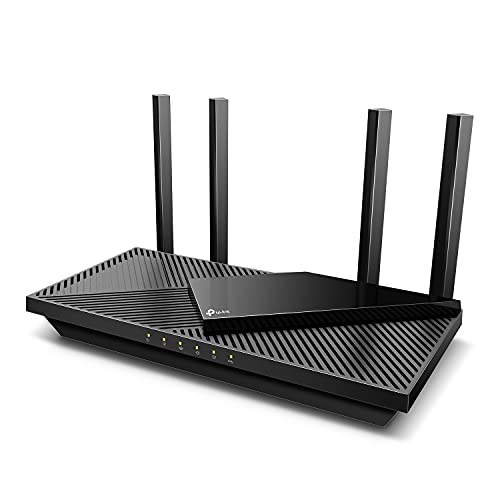 TP-Link Dual-Band AX3000 Wi-Fi 6 Wireless Gigabit
- Wi-Fi 6 Speeds: Up to 2402 Mbps on…
- A More Responsive Experience: Enjoy smooth gaming, video…
- Expanded Wi-Fi Coverage: 4 high-gain external antennas and…
 TP-Link AXE5400 Tri-Band WiFi 6E Router
- Tri-Band WiFi 6E Router - Up to 5400…
- WiFi 6E Unleashed
- Connect More Devices—True Tri-Band and OFDMA technology increase…
| Product | Key specs | |
|---|---|---|
| TP-Link AX1800 WiFi 6 Router | Wi-Fi 6(802.11ax) technology achieves faster speeds, greater capacity… Enjoy smoother and more stable streaming and gaming… Wi-Fi 6 technology communicates more data to more… | Check price |
| TP-Link Dual-Band AX3000 Wi-Fi 6 Wireless Gigabit | Wi-Fi 6 Speeds: Up to 2402 Mbps on… A More Responsive Experience: Enjoy smooth gaming, video… Expanded Wi-Fi Coverage: 4 high-gain external antennas and… | Check price |
| TP-Link AXE5400 Tri-Band WiFi 6E Router | Tri-Band WiFi 6E Router - Up to 5400… WiFi 6E Unleashed Connect More Devices—True Tri-Band and OFDMA technology increase… | Check price |
 NETGEAR Nighthawk WiFi 6 Router R6700AX | FAST, RELIABLE WIFI: Delivers fast, reliable WiFi across… Pairs with your existing modem or gateway via… Download the free Nighthawk app on iOS or… | Check price |
As an Amazon Associate we earn from qualifying purchases at no extra cost to you.
Why Wi-Fi 6 Is Still a Smart Buy in 2026
Wi-Fi 7 routers get the headlines, but several outlets point out that a Wi-Fi 6 or 6E router remains good value if your internet plan and devices do not need the newest standard. Tom’s Guide makes exactly that point in its Wi-Fi 6 roundup. Wi-Fi 6 brought better handling of many simultaneous devices (through OFDMA), improved battery behaviour on client devices through Target Wake Time, and higher efficiency than Wi-Fi 5. For a household with a dozen phones, tablets, TVs and smart-home gadgets, those gains matter more than a headline speed number.
It is also worth knowing that some well-regarded models are being phased out in favour of newer ones. TechGearLab notes, for example, that Asus has moved on from the RT-AX86U Pro toward the Wi-Fi 7 RT-BE86U. Stock of older models can still be found, and they are generally supported with firmware updates for years, but it is sensible to check the maker’s support page for the firmware history before you commit.
At a Glance: Wi-Fi 6 Routers Reviewers Keep Naming
| Model | Best for | Key stated specs | Limits |
|---|---|---|---|
| Asus RT-AX86U / RT-AX86U Pro | Enthusiasts, gamers, busy homes | AX5700-class dual-band; 2.5G port; extensive software features per the maker | Being succeeded by Wi-Fi 7 models; larger body |
| TP-Link Archer AX55 | Best budget-to-mid choice per Tom’s Guide | AX3000-class dual-band; Gigabit LAN ports | No multi-gig WAN |
| TP-Link Archer AX73 | All-round performer for medium homes | AX5400-class dual-band; six antennas | Gigabit WAN only |
| TP-Link Archer AX21 / AX10 | Small homes and tight budgets | AX1800 (AX21) and AX1500 (AX10) class dual-band | Fewer features; limited capacity for many devices |
| GL.iNet Flint 2 (GL-MT6000) | Tinkerers, VPN users, fast wired links | Two 2.5 Gbps ports and four 1 Gbps LAN ports, as listed by RTINGS | Interface is more technical than mainstream routers |
| eero 6 | Simple app-driven setup, easy mesh growth | Dual-band AX1800-class mesh node | Fewer advanced settings; subscription features are optional |
| TP-Link Deco XE75 | Large homes wanting mesh with 6 GHz | Tri-band Wi-Fi 6E mesh | Mesh systems cost more than a single router |
Budget Tier: Small Homes and Simple Needs
TP-Link Archer AX21 and Archer AX10
Reviewers repeatedly point to the TP-Link Archer line when the goal is to spend as little as possible while still getting Wi-Fi 6. Gaming PC Guru names the Archer AX21 (AX1800 class) as its top pick, and RTINGS recommends the Archer AX10 as a cheap router. These are dual-band designs, meaning they use 2.4 GHz and 5 GHz but not 6 GHz. They suit a flat or small house, a handful of devices, and an internet plan in the low-to-mid hundreds of megabits.
The trade-off is capacity. When many devices stream or game at once, budget silicon has less headroom, and you will usually find fewer advanced controls. If you share the connection with several people who stream in different rooms, step up a tier.
Asus RT-AX1800S
TechGearLab lists the Asus RT-AX1800S as its budget pick. Asus generally includes a mature web interface and security features even on entry-level models, which can be a deciding factor if you value more than the bare minimum.
Mid-Range Tier: The Sweet Spot for Most Households
TP-Link Archer AX55 and AX73
Tom’s Guide names the Archer AX55 as its best budget Wi-Fi 6 router, while a separate roundup calls the Archer AX73 its best overall. Both are dual-band designs aimed at medium homes with a dozen or so devices. The AX73 is the stronger of the two on paper, with more antennas and a higher rated throughput class, but, as with every router, the rated figure is a combined theoretical total across bands, not what a single device will see.
Asus RT-AX86U and RT-AX86U Pro
Tom’s Guide picks the RT-AX86U as best overall, and TechGearLab describes the Pro variant as among the very best Wi-Fi 6 routers. These models are popular with gamers because of traffic-prioritisation tools and a 2.5 Gbps port that lets you connect a fast NAS or take advantage of a multi-gig internet plan. The caveat is availability: because Asus is steering buyers toward newer Wi-Fi 7 models, you may find the AX86U family harder to source or price-competitive only while stock lasts.
eero 6
RTINGS names the eero 6 as its best mid-range Wi-Fi 6 option. Its appeal is simplicity: an app guides setup, and extra nodes can be added if one is not enough. The compromise is a more limited settings menu than Asus or TP-Link offer, and some extras sit behind an optional subscription.
Premium Tier: Power Users and Large Homes
GL.iNet Flint 2
RTINGS rates the GL.iNet Flint 2 as the best Wi-Fi 6 router it has evaluated. The listed port layout, two 2.5 Gbps and four 1 Gbps, is unusually generous in this class, and the firmware is built on OpenWrt, which suits people who want VPN clients, ad blocking or custom network segments. It is less friendly for someone who simply wants to plug in and forget it.
Mesh with 6 GHz: Deco XE75
Tom’s Guide lists the TP-Link Deco XE75, a Wi-Fi 6E mesh, for large homes. Wi-Fi 6E adds the 6 GHz band, which is less crowded and works well for devices close to a node. If your home has thick walls or several floors, a mesh system often beats one powerful router.
What to Look For When Choosing
Speed class labels (AX1800, AX3000, AX5400)
These numbers describe the sum of theoretical maximums across bands. They are useful for ranking models from the same brand, but not for predicting what your laptop will achieve. Walls, distance and client capability matter more.
Band count
Dual-band routers (2.4 and 5 GHz) are fine for most. Tri-band models add a second 5 GHz or a 6 GHz band, which helps in congested apartments or when a mesh uses a dedicated link between nodes.
Ports
If you pay for an internet plan above one gigabit, check that the WAN port is 2.5 Gbps. Otherwise a Gigabit port caps your wired speed. Also count LAN ports for consoles, desktops and network storage.
Placement and size
Place the router centrally and as high as practical, away from microwaves and thick metal objects. In a flat under about 80 square metres, a single router is typically enough; larger or multi-storey homes are where mesh helps. Check the maker’s coverage claims but treat them as optimistic.
Security and updates
Choose a brand with a track record of firmware updates, enable automatic updates if offered, change the default admin password, and use WPA2 or WPA3 security with a strong passphrase. Follow the maker’s setup manual for any mains-powered equipment, and keep the router in a ventilated spot.
Setup Tips for a Better Result
Whichever router you choose, placement and settings decide much of the outcome. Put the unit near the centre of the home, raised off the floor and away from microwaves, metal shelves and thick masonry. Update the firmware on first boot, change the default admin password, and use WPA2 or WPA3 security with a long passphrase. If the router offers a guest network, use it for visitors and for low-trust smart-home gadgets.
If you use your provider’s combined modem and router, you may need to put it in bridge mode or disable its Wi-Fi before adding your own router; the provider’s manual or support line can explain how. Wired connections remain the most reliable choice for desktops, consoles and televisions, so use Ethernet where you can and keep Wi-Fi capacity for phones and laptops. Finally, resist the urge to chase the largest speed rating. A well-placed mid-range router usually beats a flagship hidden in a cupboard.
Pick X If You Need Y
| Pick this | If you |
|---|---|
| TP-Link Archer AX21 or AX10 | Live in a small home, have few devices and want the lowest-cost route into Wi-Fi 6 |
| TP-Link Archer AX55 or AX73 | Want a dependable mid-range router for a family home without advanced tinkering |
| Asus RT-AX86U family | Game online, want detailed controls and a 2.5G port, and can find stock |
| eero 6 | Prefer app-based setup and may add nodes later |
| GL.iNet Flint 2 | Have a multi-gig connection or want OpenWrt-style flexibility |
| Deco XE75 | Need whole-home mesh coverage with 6 GHz support |
Alternatives to Consider
- A Wi-Fi 7 entry model. The TP-Link Archer BE550 and similar routers are frequently named by reviewers as value picks. If your phone or laptop already supports Wi-Fi 7, the premium can be small.
- A Wi-Fi 6 extender. If your existing router is fine but one room is weak, an extender can fix a dead spot more cheaply than replacing everything. Note that extenders share bandwidth, so they are a patch, not an upgrade.
- Powerline or wired access points. Where Ethernet cabling exists, wired access points deliver the most stable results, particularly for gaming and video calls.
Frequently Asked Questions
Is Wi-Fi 6 still worth buying now that Wi-Fi 7 is available?
Yes, for many households. If your internet plan is modest and your devices are mostly Wi-Fi 6 or older, you will see little benefit from Wi-Fi 7. Several reviewers state that Wi-Fi 6 and 6E remain good value.
What is the difference between Wi-Fi 6 and Wi-Fi 6E?
Wi-Fi 6E uses the same standard but adds the 6 GHz band. That band is less congested, which helps in crowded buildings, though its range through walls is shorter than 5 GHz.
Do I need a mesh system or a single router?
A single good router is usually enough for a small or medium single-storey home. Mesh makes sense for large, multi-storey or thick-walled houses where one unit cannot reach everywhere.
Will a new router make my internet plan faster?
No. Your plan sets the maximum speed arriving at the house. A better router improves how that speed is shared and delivered over Wi-Fi, and removes bottlenecks if your old router could not keep up.
What does AX3000 or AX5400 actually mean?
It is a combined theoretical figure across the router’s bands. No single device will reach it, so use it only to compare models within a brand.
How often should I replace a router?
Many people keep a router for several years. Replace it when the maker stops issuing security updates, when it can no longer handle your connection speed, or when your household outgrows its capacity.
More from Amazon
Programs that pair well with the guide above. Offers and eligibility are set by Amazon and may change.
Free shipping on eligible items, Prime Video and more. Eligible new members can start with a free trial.
Start a Prime free trialAd-free music streaming. Eligible new subscribers can start with a free trial.
Try Music Unlimited freeA Prime membership for ages 18-24 with a trial period. Eligibility is set by Amazon.
See Prime for Young AdultsAudiobooks and podcasts to listen to on the go. Eligible new members can start with a free trial.
Try Audible freeAs an Amazon Associate we earn from qualifying purchases.