Key takeaways
- Tighten the clamp and check that the desk surface can bear the load; thin or fragile desks may flex.
- Adjust spring tension per the maker’s instructions so the arm stays in place without strain.
- Route cables with slack at the joints so the arm moves freely and silently.
- Use a shock mount to isolate the microphone from knocks and desk vibration.
- Keep the arm away from monitor stands and keyboards to avoid accidental knocks during recording.
- Do not overload the arm; if it droops, reduce the weight or choose a stronger model.
For most home studios, the Rode PSA1+ is the strongest all-round boom arm for heavier large-diaphragm microphones, the Rode PSA1 and Blue Compass suit similar setups with different looks and mounting styles, the Neewer and Tonor budget arms handle lightweight USB microphones, and the Elgato Wave Mic Arm LP or Wave Mic Arm suits streamers who want a clean desk and low-profile cable management. The right pick depends mainly on your microphone’s weight, your desk setup and whether you need the arm to stay quiet when you move it. This guide explains what to check and compares well-known options using maker-stated specifications.
Our top picks
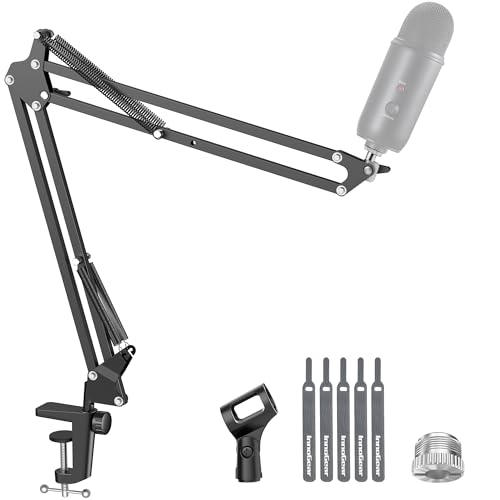

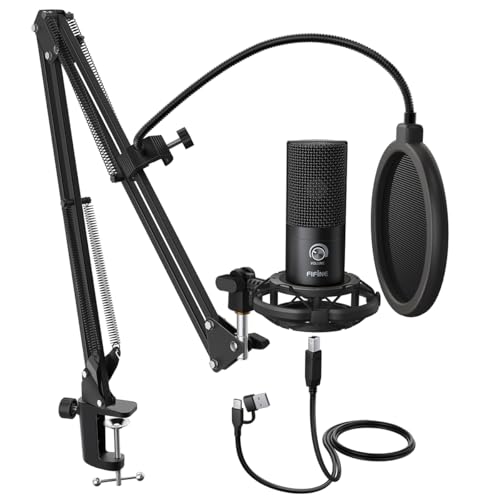

As an Amazon Associate we earn from qualifying purchases at no extra cost to you.
What a boom arm does
A boom arm holds a microphone on an adjustable articulated arm, clamped to a desk or mounted to a stand. It keeps the microphone close to your mouth without taking up desk space and lets you swing it out of the way. Because the arm is mechanical, it can transmit vibrations from the desk, so a good arm uses internal springs, rubber and quiet cable routing. Quality varies widely, and weak springs are the main complaint among reviewers.
At a glance
| Arm | Best for | Key stated specs | Limits |
|---|---|---|---|
| Rode PSA1+ | Studio vocalists, podcasters using heavier microphones | Maker lists an improved version with a stated higher load capacity, internal springs and a cable management system | Large and heavy; needs desk clearance |
| Rode PSA1 | Standard large-diaphragm microphones | Maker lists a rotating mount, adjustable arm and a typical stated load capacity for common studio microphones | Older design; the PSA1+ improves on some points |
| Blue Compass | Podcasters who like a streamlined look | Maker lists a tension-adjustable design and a premium finish | Mostly aimed at lighter to medium microphones |
| Elgato Wave Mic Arm | Streamers with clean desk setups | Maker lists a sturdy build, internal cable routing and compatibility with common microphones | Larger microphones may need extra adjustment |
| Elgato Wave Mic Arm LP | Low-profile setups below monitors or cameras | Maker lists a low-profile design that keeps the microphone out of the shot | Reach is shorter than a full-size arm |
| Neewer or Tonor budget arms | Lightweight microphones on a budget | Makers list scissor-style arms, desk clamp and basic cable clips | Springs can sag and squeak with heavy microphones |
Key factors
Weight capacity
Match the arm to the microphone. Makers publish a maximum load; a lightweight USB microphone is fine on most arms, but heavier large-diaphragm condensers with shock mounts can stress budget models. Remember to include the shock mount and pop filter when adding up weight. Using an arm near its limit leads to drooping and noise.
Reach and height
Check the stated reach, since a short arm may not extend over a large desk or a keyboard tray. Full-size studio arms reach around 80 to 90 centimeters in many listings, while low-profile arms are shorter by design.
Mounting: clamp or stand
Most arms clamp to a desk edge. Check your desk thickness against the maker’s stated clamp range, and note that glass or curved desks may need a different mount. A floor or desk stand base is an alternative if you cannot clamp.
Spring versus scissor design
Spring-loaded arms hold position by tension and can be noisy if poorly made. Scissor arms use a crossing frame and are often quieter and more stable, though bulkier. Reviewers frequently favor internal-spring designs for studio use.
Cable management
Good arms route the microphone cable inside or along the arm with clips. A tidy cable prevents it from rattling against the frame, a common source of unwanted noise.
Thread size
Most arms use a 5/8-inch thread with a 3/8-inch adapter. Check your microphone or shock mount for compatibility, and confirm the adapter is included.
Budget tier guidance
Budget
Neewer, Tonor and similar brands cover lightweight USB microphones and casual calls. The trade-offs are sag over time, louder springs and less precise adjustment.
Mid-range
Elgato and Blue offer cleaner designs and stronger cable management, suitable for streaming and podcasting with typical microphones.
Premium
The Rode PSA1+ and other studio-grade arms target heavier microphones and frequent adjustment, with steadier holding and quieter operation.
Setup and care notes
- Tighten the clamp and check that the desk surface can bear the load; thin or fragile desks may flex.
- Adjust spring tension per the maker’s instructions so the arm stays in place without strain.
- Route cables with slack at the joints so the arm moves freely and silently.
- Use a shock mount to isolate the microphone from knocks and desk vibration.
- Keep the arm away from monitor stands and keyboards to avoid accidental knocks during recording.
- Do not overload the arm; if it droops, reduce the weight or choose a stronger model.
Pick X if…
| If you want… | Pick | Why |
|---|---|---|
| A heavy studio condenser held steadily | Rode PSA1+ | Higher stated load and internal springs |
| A reliable standard arm | Rode PSA1 | Proven design for common microphones |
| A sleek podcast setup | Blue Compass | Streamlined look with adjustable tension |
| A clean streaming desk | Elgato Wave Mic Arm | Good cable routing and strong build |
| A microphone below a camera or monitor | Elgato Wave Mic Arm LP | Low-profile design |
| Cheap and light | Neewer or Tonor | Inexpensive and fine for lightweight microphones |
Alternatives
- Desktop microphone stands: simple, but they take desk space and pick up vibration.
- Tripod or boom floor stands: good for vocals or instruments in a studio where desk clamping is impractical.
- Overhead mounts: hold the microphone above and in front of you, useful for video work.
- Gooseneck mounts: small and light, suited to compact microphones and calls.
Common mistakes when buying a boom arm
The most frequent error is choosing an arm by looks and ignoring weight. A heavy large-diaphragm condenser with a shock mount can exceed what a budget scissor arm can hold, and the result is slow drooping during a take. A second mistake is forgetting desk geometry: if the clamp cannot reach the desk edge because of a monitor riser, shelf or lip, the arm will not seat properly. Measure the available clamp depth and compare it with the maker’s stated range before ordering.
A third mistake is leaving no slack in the cable. If the cable is pulled tight across the joints, the arm fights it and becomes stiff or noisy. Leave a gentle loop at each pivot. Finally, many buyers overlook the position of the arm relative to the speaker or keyboard. Mounting the arm so its base sits behind the monitor, with the microphone swinging in from the side, keeps the hardware out of the way and reduces the chance of knocking it during a take.
It also helps to think about how often you move the arm. If you fold it away after every session, smooth joints and clear tension adjustment matter more than raw load capacity. If the arm stays in one position for months, stability and a solid clamp matter most. Reviewers frequently mention that metal joints and a thicker clamp screw outlast plastic parts, so inspect the material list the maker provides. A short test with the microphone attached, before you cut cable ties or trim anything, shows quickly whether the arm holds position at full extension.
Finally, consider future upgrades. If you may later move from a light USB microphone to a heavier studio condenser, buying an arm with spare capacity now avoids a second purchase. Check that the arm’s mounting thread, adapter and cable clips will still suit the new microphone, and keep the original box and manual for adjustment guidance.
Frequently Asked Questions
How do I know if a boom arm can hold my microphone?
Add the weight of the microphone, shock mount and pop filter, then compare it with the maker’s stated load range. Stay comfortably below the maximum so the arm does not droop. Heavier large-diaphragm microphones need a stronger studio arm.
Why does my boom arm make noise?
Noise often comes from spring squeaks, a cable rattling against the arm or a loose clamp. Tighten the clamp, secure the cable with slack at the joints and adjust tension. A shock mount reduces bumps reaching the microphone.
Can I use a boom arm on a glass desk?
Clamping to glass can crack or slip, so use only if the maker allows it and the desk is rated for it. Otherwise, choose a stand base or a desk-mounted bracket. Check your desk manual if you are unsure.
Do I need a shock mount as well?
A shock mount helps isolate the microphone from vibrations and bumps. Many large-diaphragm microphones come with one, while USB microphones may not. It is worth having for recording voice.
What thread size do boom arms use?
Most use a 5/8-inch thread with a 3/8-inch adapter. Check your microphone’s mount and the arm listing to confirm compatibility, as some microphones use proprietary mounts.
Is a low-profile arm better for streaming?
It keeps the microphone out of camera view and below monitors, which many streamers like. The trade-off is a shorter reach and less adjustment range than full-size arms.
More from Amazon
Programs that pair well with the guide above. Offers and eligibility are set by Amazon and may change.
Free shipping on eligible items, Prime Video and more. Eligible new members can start with a free trial.
Start a Prime free trialAd-free music streaming. Eligible new subscribers can start with a free trial.
Try Music Unlimited freeA Prime membership for ages 18-24 with a trial period. Eligibility is set by Amazon.
See Prime for Young AdultsAudiobooks and podcasts to listen to on the go. Eligible new members can start with a free trial.
Try Audible freeAs an Amazon Associate we earn from qualifying purchases.