Key takeaways
- Huddle rooms for two to four people: a personal or small-room speakerphone is enough.
- Medium rooms for four to eight people: look at the Poly Sync 60, Jabra Speak2 75 or similar.
- Boardrooms for eight or more people: look for a model with expansion microphones, such as the Yealink CP965 or Poly Trio C60.
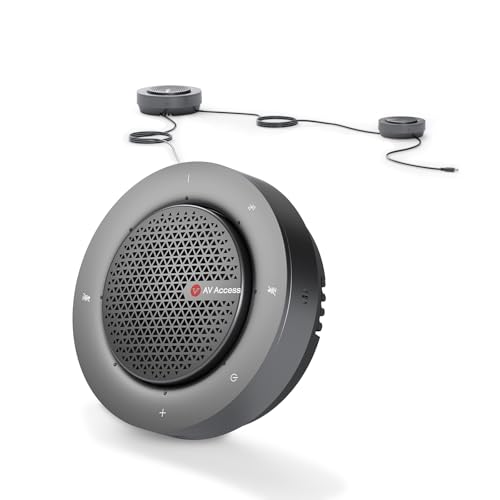
For a small huddle room, a USB and Bluetooth speakerphone such as the Jabra Speak2 75 or the Poly Sync 60 is the simplest fit; for a mid-sized boardroom that needs a real phone line or a dedicated device, a SIP conference phone such as the Yealink CP965 or the Poly Trio C60 is the better choice; and for a lower-cost portable option, the Anker PowerConf range suits occasional use. The right answer depends on room size, how many people speak at once, and whether you dial from a desk phone system or a laptop.
Our top picks

As an Amazon Associate we earn from qualifying purchases at no extra cost to you.
At a Glance: Conference Phones Compared
| Model | Best for | Connection type (as listed by the maker) | Main limits |
|---|---|---|---|
| Jabra Speak2 75 | Small to medium rooms with laptop-based calls | USB and Bluetooth; designed for several people around a table | Not a SIP phone; depends on a computer or phone |
| Poly Sync 60 | Mid-sized rooms with a laptop and phone together | USB and Bluetooth; designed for larger rooms than the smallest speakerphones | Pairs with a computer; not a standalone phone |
| Yealink CP965 | Boardrooms using a desk phone system | SIP phone with a touchscreen; supports expansion microphones | Needs a compatible phone system; premium tier |
| Poly Trio C60 | Larger rooms using a mix of calling platforms | Conference phone with expandable microphone options | Setup is more complex; premium tier |
| Anker PowerConf S3 | Portable use and tight budgets | USB and Bluetooth | Best for small groups only |
| Jabra Speak2 55 | Medium groups wanting a step down in price | USB and Bluetooth with a stated wireless link option | Check the maker’s room-size guidance |
Specifications such as microphone count, stated pickup range, speaker output and battery life vary by revision, so read the maker’s current data sheet before buying.
First, Decide Which Type of Conference Phone You Need
USB and Bluetooth speakerphones
These plug into a laptop or pair with a phone. They suit rooms where calls are made through a video platform. They are simple to set up, portable and usually cheaper. The compromise is that the call is controlled from the computer, and they rarely match the audio coverage of a ceiling system or a large table device.
SIP conference phones
These connect to a business phone system directly and work like a desk phone for the whole room. They are better for permanent installs, for rooms where IT manages the calling platform, and for companies that do not want calls to depend on a laptop. Some also support extra wired or wireless microphones to cover a longer table.
Video bars and room systems
Products such as the Logitech Rally Bar or Poly Studio series combine a camera, speakers and microphones in one device. They cost more and suit rooms that need video as well as audio. They are not conference phones in the strict sense, so treat them as an alternative if the room runs video meetings.
Room Size and Microphone Pickup
Makers publish a stated pickup range or a recommended number of participants for each model. Treat those numbers as a guide, not a guarantee. A hard-surfaced room with glass walls produces more echo, and a narrow table pushes some talkers farther from the microphones than the stated range implies. As a rule of thumb, reviewers suggest choosing a model rated for a slightly larger group than the one you usually have.
- Huddle rooms for two to four people: a personal or small-room speakerphone is enough.
- Medium rooms for four to eight people: look at the Poly Sync 60, Jabra Speak2 75 or similar.
- Boardrooms for eight or more people: look for a model with expansion microphones, such as the Yealink CP965 or Poly Trio C60.
Individual Picks
Jabra Speak2 75: a flexible speakerphone for medium groups
The Speak2 75 is a USB and Bluetooth speakerphone aimed at several people in one room. Jabra lists a multi-microphone array and a Link-style wireless dongle option for connecting to a computer. Reviewers praise ease of use. It suits teams who run most calls from a laptop.
Poly Sync 60: for larger shared rooms
The Sync 60 is a USB and Bluetooth speakerphone in the Poly range, now part of HP. It is designed to cover larger rooms than the smallest personal models, and Poly lists features such as echo cancellation. It suits mid-sized rooms with laptop-based calling.
Yealink CP965: a SIP phone with a touchscreen
The CP965 is a conference phone that works with IP phone systems, with a color touchscreen and support for expansion microphones. It suits permanent installations and organizations with a managed phone platform. IT staff should confirm compatibility with the company’s calling service before purchase.
Poly Trio C60: scalable room coverage
The Trio C60 is designed for larger rooms where audio coverage matters. Poly lists optional extra microphones for bigger tables. Setup and management are more involved than for a USB speakerphone, which suits teams with IT support.
Anker PowerConf S3: portable and budget-minded
The PowerConf range is aimed at small groups and mobile use, with USB and Bluetooth connection and a rechargeable battery. It is a sensible option for occasional use or a shared home office, though it is not built for large boardrooms.
Features Worth Comparing
- Echo cancellation and noise reduction: essential in rooms with hard walls or air conditioning noise.
- Full-duplex audio: lets two people talk at once without cutting each other off. Makers list it when supported.
- Expansion microphones: extend coverage down a long table.
- Platform certification: several makers state compatibility or certification with Microsoft Teams or Zoom. Confirm that the model works with the platform your company uses.
- Mute control: a clear, visible mute button reduces mistakes.
- Cable and power: a USB device draws power from the computer, while a SIP phone needs network and power, either through Power over Ethernet or an adapter.
- Firmware updates: makers release updates for security and bug fixes, so choose a model with a clear update tool.
Budget Tiers
| Tier | What to expect | Suits |
|---|---|---|
| Budget | Portable USB or Bluetooth speakerphone, small-room coverage | Home offices, small meeting nooks |
| Mid-range | Better microphone arrays, platform certification, stronger speakers | Medium meeting rooms |
| Premium | SIP phones with expansion microphones and management tools | Boardrooms and managed phone systems |
Pick X If …
| If you … | Pick |
|---|---|
| Run most calls from a laptop in a medium room | Jabra Speak2 75 or Poly Sync 60 |
| Need a standalone phone on a business phone system | Yealink CP965 |
| Have a long table and IT support | Poly Trio C60 with extra microphones |
| Need something portable at a modest tier | Anker PowerConf S3 |
| Want video and audio in one | A video bar such as the Logitech Rally Bar |
Alternatives
- Video bars: Logitech, Poly and Yealink make all-in-one devices for video meetings.
- Ceiling and table microphone arrays: better for large rooms, installed by an integrator.
- Personal headsets: if only one or two people take calls, a headset avoids room acoustics completely.
Setup and Everyday Use Tips
Placement changes results as much as the model. Put a speakerphone in the center of the table, away from laptops with loud fans, projectors and air vents. Keep it at least an arm’s length from the nearest speaker so voices do not sound clipped. Walk the room during a test call and ask a remote participant how each seat sounds, since the far end of a long table is where most complaints start.
Plan the cabling early. A USB speakerphone needs a free port and a cable long enough to reach the center of the table without becoming a trip hazard, while a SIP phone needs a network drop and either Power over Ethernet or a power adapter. Cable covers, table boxes or a wireless dongle can keep the table tidy.
Also think about maintenance. Assign someone to apply firmware updates, replace worn batteries on portable models, and keep a short guide near the device so new users know how to mute, adjust volume and switch inputs. A small habit like this prevents most failed meetings.
Finally, consider who is joining remotely. If remote colleagues mostly hear one or two voices, a smaller device is fine. If a whole team gathers around a long table and a client dials in, investing in expansion microphones or a bar-style system gives that client a better experience. Room acoustics deserve a second look too: carpet, curtains and soft seating reduce echo for every model, and they cost far less than upgrading to a larger device.
Frequently Asked Questions
How many people can a conference phone cover?
It depends on the model. Makers publish a stated range or a recommended group size, and smaller speakerphones cover a handful of people while SIP phones with extra microphones cover larger tables. Pick a model rated slightly above your usual group size.
Can I use a conference phone with Microsoft Teams or Zoom?
Many models list compatibility or certification with common platforms. Look for the platform name in the maker’s specifications, and check that your phone system or software version is supported.
Do I need a SIP conference phone or is a USB speakerphone enough?
A USB speakerphone is enough if calls happen through a laptop. A SIP phone suits rooms that need a standalone device on the company phone system, especially if IT manages the platform.
Why does my room sound echoey on calls?
Hard walls, glass and bare tables create reflections. Echo cancellation helps, but soft furnishings, rugs or acoustic panels improve the result more.
Can I add more microphones later?
Some SIP phones, such as those from Yealink and Poly, support expansion microphones. Most compact USB speakerphones do not, so choose accordingly.
How do I keep a conference phone secure?
Install firmware updates released by the maker, change default passwords on network devices, and ask IT to follow the maker’s security guidance.
More from Amazon
Programs that pair well with the guide above. Offers and eligibility are set by Amazon and may change.
Free shipping on eligible items, Prime Video and more. Eligible new members can start with a free trial.
Start a Prime free trialAd-free music streaming. Eligible new subscribers can start with a free trial.
Try Music Unlimited freeA Prime membership for ages 18-24 with a trial period. Eligibility is set by Amazon.
See Prime for Young AdultsAudiobooks and podcasts to listen to on the go. Eligible new members can start with a free trial.
Try Audible freeAs an Amazon Associate we earn from qualifying purchases.