For most homes with a Wi-Fi 6 router and one weak room, the TP-Link RE715X (or the similar RE700X) is the extender reviewers name most often; tight budgets are better served by the TP-Link RE315 or Mercusys ME30; and owners of a Wi-Fi 7 router who want to keep that speed in a far room should look at a tri-band Wi-Fi 7 model such as the TP-Link RE655BE or RE653BE. An extender is a patch for a dead spot, not a substitute for a better router, and the best results come from matching its Wi-Fi generation to the router it repeats.
Our top picks
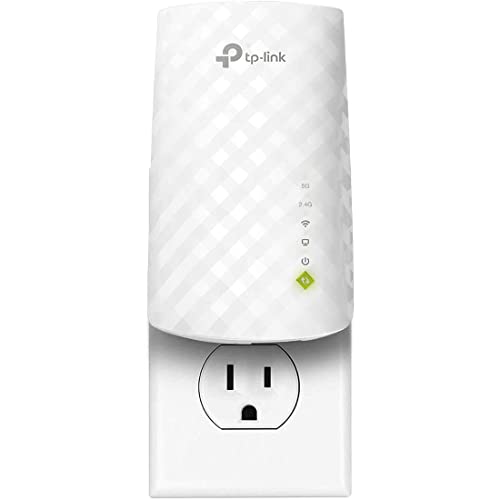 TP-Link WiFi Extender
- 𝐃𝐮𝐚𝐥-𝐁𝐚𝐧𝐝 𝐖𝐢𝐅𝐢 𝟓 𝐄𝐱𝐭𝐞𝐧𝐝𝐞𝐫 𝐰𝐢𝐭𝐡 𝟕𝟓𝟎 𝐌𝐛𝐩𝐬 𝐓𝐨𝐭𝐚𝐥…
- 𝐌𝐚𝐱𝐢𝐦𝐢𝐳𝐞𝐝 𝐂𝐨𝐯𝐞𝐫𝐚𝐠𝐞 𝐮𝐩 𝐭𝐨 𝟏𝟐𝟎𝟎 𝐒𝐪
- 𝐏𝐥𝐞𝐚𝐬𝐞 𝐍𝐨𝐭𝐞 - The range extender creates a…
 TP-Link AC1900 WiFi Range Extender RE550
- 𝐃𝐮𝐚𝐥-𝐁𝐚𝐧𝐝 𝐖𝐢𝐅𝐢 𝐄𝐱𝐭𝐞𝐧𝐝𝐞𝐫 𝐰𝐢𝐭𝐡 𝟏.𝟗 𝐆𝐛𝐩𝐬 𝐓𝐨𝐭𝐚𝐥 𝐁𝐚𝐧𝐝𝐰𝐢𝐝𝐭𝐡…
- 𝐌𝐚𝐱𝐢𝐦𝐢𝐳𝐞𝐝 𝐂𝐨𝐯𝐞𝐫𝐚𝐠𝐞 𝐮𝐩 𝐭𝐨 𝟐𝟏𝟎𝟎 𝐒𝐪
- 𝐎𝐮𝐫 𝐂𝐲𝐛𝐞𝐫𝐬𝐞𝐜𝐮𝐫𝐢𝐭𝐲 𝐂𝐨𝐦𝐦𝐢𝐭𝐦𝐞𝐧𝐭 - TP-Link is a signatory…
| Product | Key specs | |
|---|---|---|
| TP-Link WiFi Extender | 𝐃𝐮𝐚𝐥-𝐁𝐚𝐧𝐝 𝐖𝐢𝐅𝐢 𝟓 𝐄𝐱𝐭𝐞𝐧𝐝𝐞𝐫 𝐰𝐢𝐭𝐡 𝟕𝟓𝟎 𝐌𝐛𝐩𝐬 𝐓𝐨𝐭𝐚𝐥… 𝐌𝐚𝐱𝐢𝐦𝐢𝐳𝐞𝐝 𝐂𝐨𝐯𝐞𝐫𝐚𝐠𝐞 𝐮𝐩 𝐭𝐨 𝟏𝟐𝟎𝟎 𝐒𝐪 𝐏𝐥𝐞𝐚𝐬𝐞 𝐍𝐨𝐭𝐞 - The range extender creates a… | Check price |
| TP-Link AC1900 WiFi Range Extender RE550 | 𝐃𝐮𝐚𝐥-𝐁𝐚𝐧𝐝 𝐖𝐢𝐅𝐢 𝐄𝐱𝐭𝐞𝐧𝐝𝐞𝐫 𝐰𝐢𝐭𝐡 𝟏.𝟗 𝐆𝐛𝐩𝐬 𝐓𝐨𝐭𝐚𝐥 𝐁𝐚𝐧𝐝𝐰𝐢𝐝𝐭𝐡… 𝐌𝐚𝐱𝐢𝐦𝐢𝐳𝐞𝐝 𝐂𝐨𝐯𝐞𝐫𝐚𝐠𝐞 𝐮𝐩 𝐭𝐨 𝟐𝟏𝟎𝟎 𝐒𝐪 𝐎𝐮𝐫 𝐂𝐲𝐛𝐞𝐫𝐬𝐞𝐜𝐮𝐫𝐢𝐭𝐲 𝐂𝐨𝐦𝐦𝐢𝐭𝐦𝐞𝐧𝐭 - TP-Link is a signatory… | Check price |
 WiFi Extender | Check price | |
 WiFi Extender Signal Booster for Home 5G | Check price |
As an Amazon Associate we earn from qualifying purchases at no extra cost to you.
How a Wi-Fi Extender Works, and Its Limits
An extender receives your router’s signal and rebroadcasts it, which fills a gap in coverage. The catch is that on a standard dual-band extender, the same radio that listens to the router also talks to your devices, so the usable speed through the extender can be roughly halved. Tri-band extenders add a dedicated radio for the link back to the router, which reduces that penalty. Some models also have an Ethernet port so you can connect a console, TV or desktop by cable, which is often the most reliable way to use them.
Several current models also support mesh-style behaviour with the same brand’s routers (TP-Link OneMesh, for example), so the extender shares the router’s network name and devices move between them more smoothly. Check the maker’s compatibility list before buying, since this only works with supported routers.
At a Glance: Extenders Named by Reviewers
| Model | Best for | Key stated specs | Limits |
|---|---|---|---|
| TP-Link RE715X | Best overall per HighSpeedInternet and BroadbandNow | Wi-Fi 6, AX3000 class, coverage listed up to about 1,500 sq ft | Dual-band; shares bandwidth between link and clients |
| TP-Link RE700X | Trusted Reviews’ best overall | Wi-Fi 6 AX3000 class with Ethernet port | Needs a Wi-Fi 6 router to shine |
| TP-Link RE315 | Budget pick | Wi-Fi 5 class (AC1200) | Older standard; modest speeds |
| Mercusys ME30 | Budget pick per Trusted Reviews | Compact plug-in design | Basic features |
| Linksys RE7350 | Tom’s Guide budget Wi-Fi 6 pick | Wi-Fi 6 plug-in unit | Dual-band |
| Netgear EAX15 / EAX12 | Mesh-like behaviour, features for the money | Wi-Fi 6, plugs into the wall | Best with supported Netgear setups |
| Netgear Nighthawk EAX80 | Maximum speed on Wi-Fi 6 | AX6000 class per HighSpeedInternet | Large and pricey |
| Asus RP-AX58 | Range with a Wi-Fi 6 router | Wi-Fi 6 repeater with AiMesh support | Works best with Asus routers |
| TP-Link RE655BE / RE653BE | Wi-Fi 7 homes | Tri-band Wi-Fi 7; RE653BE reported with 2.5 Gbps Ethernet | Needs Wi-Fi 7 router and devices for full value |
| Devolo WiFi 6 Repeater 5400 | Speed per Trusted Reviews | Wi-Fi 6, high rated throughput | Availability varies by region |
Budget Tier
TP-Link RE315 and Mercusys ME30
HighSpeedInternet and BroadbandNow both name the RE315 as the budget choice, while Trusted Reviews prefers the Mercusys ME30. These compact plug-in units are fine for lifting a signal in a bedroom or hallway where you mainly browse, check email or stream in standard definition. They are not designed for gaming or heavy 4K streaming at the edge of coverage. If your router is Wi-Fi 6, a Wi-Fi 5 extender will limit what your newest devices can do in the repeated zone.
Linksys RE7350
Tom’s Guide names the RE7350 as a budget Wi-Fi 6 pick. It is a sensible choice if you want to stay on the current standard without spending much, though it remains a dual-band design.
Mid-Range Tier: Where Most Buyers Should Look
TP-Link RE715X and RE700X
The RE715X is the most commonly cited top pick in 2026 roundups. HighSpeedInternet lists AX3000 throughput and coverage up to around 1,500 square feet, though makers’ coverage claims are best-case, and walls will reduce them. Trusted Reviews picks the closely related RE700X as best overall. Both are well suited to a family home with a Wi-Fi 6 router and one or two weak rooms, and they offer a gigabit Ethernet port for wired devices.
Netgear EAX15 and EAX12
Smart Home Perfected picks the EAX15 because it behaves more like mesh than a bolt-on, with devices roaming under one network name. Trusted Reviews rates the EAX12 for its mix of features, price and performance. They plug directly into an outlet, so check that nearby sockets and furniture do not block them.
Asus RP-AX58
Tom’s Guide picks the Asus RP-AX58 for range. If you own an Asus router that supports AiMesh, it integrates neatly, but it is a better fit within the Asus ecosystem than with other brands.
Premium Tier
Netgear Nighthawk EAX80 and Devolo Repeater 5400
These are the highest-speed Wi-Fi 6 options named by reviewers. They add stronger hardware and extra ports, which helps if you stream a lot of 4K video or move big files, but they cost noticeably more and take more space.
Wi-Fi 7 extenders
Tom’s Guide’s top pick is a premium Wi-Fi 7 extender in the BE11000 class, which appears to be the TP-Link RE655BE. Another roundup calls the RE653BE the strongest in 2026, listing tri-band Wi-Fi 7 and a 2.5 Gbps Ethernet port. Netgear’s EXS27 also supports Wi-Fi 7. Reviewers caution that full value requires a Wi-Fi 7 router and Wi-Fi 7 devices; with a Wi-Fi 6 router, a cheaper extender makes more sense.
Outdoor and Special Cases
For a garage, shed or patio, one roundup picks the Wavlink 573HX3 as its best outdoor extender. Outdoor equipment should be weather-rated by the maker, and any mains wiring or outdoor power installation should be done according to the manual and local rules, by a qualified electrician if needed.
Placement and Setup Tips
- Halfway rule. Put the extender where it still receives a strong signal from the router, typically about halfway between the router and the dead spot. If it sits in the dead spot itself, it only repeats a weak signal.
- Match generations. Choose an extender with the same or newer Wi-Fi standard than your router.
- Use Ethernet when possible. Models with an Ethernet port can serve a desktop, TV or console by cable.
- Keep firmware current. Update through the maker’s app or web page and change default passwords.
- Power. Follow the manual; do not use damaged outlets or overload adapters.
Signs an Extender Is the Wrong Fix
Extenders are not a cure-all. If your whole home has slow Wi-Fi, the problem is more likely an old router, a congested channel or an internet plan that is too slow, and a repeater will not change that. Run a speed test next to the router. If speeds there are poor, fix the router or plan first. If speeds near the router are good but fall off sharply in one area, an extender is a reasonable next step.
Interference is another factor. Microwaves, baby monitors and neighbouring networks can crowd the 2.4 GHz band, while thick walls, brick, concrete and metal block 5 GHz and 6 GHz more strongly. In such homes, a wired solution, such as a mesh system with Ethernet backhaul or a wired access point, usually works better than any plug-in unit. Also, if you have many weak spots, adding several extenders in a chain compounds speed loss, which is why mesh is typically suggested instead.
When you do choose an extender, make sure it has a button for easy pairing (WPS) or a good app, and check whether it supports your router’s security mode, such as WPA3. Place it away from large metal objects, and keep the status light visible so you can read the connection quality. Always use outlets in good condition and follow the maker’s instructions; if an outlet is loose, scorched or warm, stop using it and have a qualified electrician check it.
Pick X If You Need Y
| Pick this | If you |
|---|---|
| TP-Link RE315 or Mercusys ME30 | Need basic coverage in a room for browsing and light streaming |
| Linksys RE7350 | Want a budget Wi-Fi 6 extender |
| TP-Link RE715X or RE700X | Have a Wi-Fi 6 router and want the common all-round choice |
| Netgear EAX15 | Want mesh-like roaming |
| Asus RP-AX58 | Own an Asus router |
| RE655BE or RE653BE | Have Wi-Fi 7 gear and need to extend it |
Alternatives
- A mesh system. For several weak rooms, a mesh set such as a TP-Link Deco or eero gives smoother roaming and a dedicated link between nodes.
- Powerline adapters with Wi-Fi. They send the network over home wiring and can work where walls block radio signals, although results depend on your wiring.
- A wired access point. If you can run Ethernet to the weak area, an access point gives the best performance and avoids the halving penalty.
Frequently Asked Questions
Will an extender slow down my Wi-Fi?
Speeds through a dual-band extender are often lower than directly from the router because the unit uses the same radio to receive and rebroadcast. Tri-band models and Ethernet backhaul reduce this effect.
Where should I plug in the extender?
Place it between the router and the weak area, in a spot where it still shows a good signal from the router. Plugging it directly into the dead zone will not help.
Do I need the same brand as my router?
Not required, but same-brand pairs often support mesh-style features such as shared network names and easier roaming. Check the maker’s compatibility list.
Is an extender or a mesh system better?
An extender is cheaper and simple for one dead spot. A mesh system suits larger homes with several weak areas because it manages roaming and backhaul more intelligently.
Can I use an extender with a Wi-Fi 7 router?
Yes, but a Wi-Fi 6 extender will limit speeds in the repeated area. A Wi-Fi 7 extender is worthwhile only if your devices also support Wi-Fi 7.
Can an extender improve gaming?
Not usually. Wireless repeating adds delay, so for gaming use an Ethernet port on the extender or run a cable to the console.
More from Amazon
Programs that pair well with the guide above. Offers and eligibility are set by Amazon and may change.
Free shipping on eligible items, Prime Video and more. Eligible new members can start with a free trial.
Start a Prime free trialAd-free music streaming. Eligible new subscribers can start with a free trial.
Try Music Unlimited freeA Prime membership for ages 18-24 with a trial period. Eligibility is set by Amazon.
See Prime for Young AdultsAudiobooks and podcasts to listen to on the go. Eligible new members can start with a free trial.
Try Audible freeAs an Amazon Associate we earn from qualifying purchases.