Key takeaways
- Screen size: 6 to 7 inches for novels; 10 inches or more for PDFs and note-taking.
- Colour or monochrome: Monochrome is sharper for text; colour helps comics and highlighting.
- Front light: Warm and cold adjustable lighting makes night reading easier on the eyes. If you have eye health concerns, speak to an optometrist.
- Android version: Newer versions improve app compatibility and security support.
- Battery and storage: Smaller readers have smaller batteries, so check the maker’s stated figures.
- Stylus and notes: Only some models include a stylus and note apps.
- Waterproofing: Many models have no rating; follow the manual.
The Boox Go 6 is the sensible pick for most readers who want an Android e-reader at the lowest cost, the Palma 2 suits people who want a phone-sized pocket reader, the Go Color 7 suits comic and colour-highlight fans, and the Note Air4 C or its newer successor suits anyone who wants a larger colour e-ink tablet for reading, handwriting and light productivity.
Boox, made by Onyx, differs from Kindle and Kobo in one key way: its devices run Android, so you can install reading apps from several stores, use library apps and add note-taking tools. That flexibility comes with trade-offs in battery life, software polish and price tier. This guide compares the main Boox lines by what the maker lists and what reviewers report, and flags where information is dated.
Our top picks

As an Amazon Associate we earn from qualifying purchases at no extra cost to you.
Boox E-Readers at a Glance
| Model | Best for | Key stated or reported specs | Limits |
|---|---|---|---|
| Boox Go 6 (Gen II) | Budget Android reader | 6-inch monochrome 300 ppi screen, warm and cold front light, about 160 g, Android 11, 3 GB RAM, 1,500 mAh battery as reported | Oldest Android version in the line; ghosting reported; no waterproof rating listed |
| Boox Go 7 / Go Color 7 | Readers wanting a larger screen, or colour for comics | Reported as the pick for one device across stores; the colour version suits comics and highlights | Colour e-ink is less sharp than monochrome; mid-range tier |
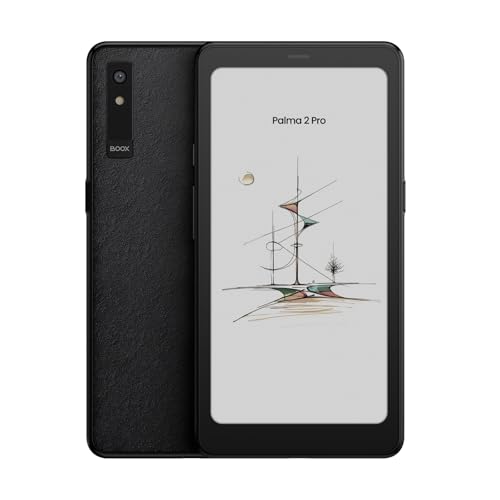
| Boox Palma 2 / Palma 2 Pro | Pocketable reading | About 6.1-inch phone-shaped screen, fingerprint reader on the Palma 2, newer Android; the Pro adds colour and 5G according to a review outlet | Reported as expensive for what it is; availability has been patchy |
| Boox Note Air4 C | Large colour screen, notes and PDFs | 10.3-inch Kaleido 3 colour screen, 6 GB RAM and 64 GB storage, Android 14, included stylus as reported | Heavier; colour e-ink looks muted; some shortcomings noted by reviewers |
| Boox Note Air6 C | Laptop-light use with a keyboard | Described by one reviewer as the newer successor to the Air4 C | Check the maker’s specification for current details |
Why Choose Boox Over Kindle or Kobo?
Kindle and Kobo are tightly integrated with their own stores, which makes buying and reading simple. Boox takes a different approach. Because it runs Android, you can install several reading apps, borrow books through library apps in regions where Kindle and Kobo borrowing is limited, and use cloud storage and note apps. Reviewers specifically point to library borrowers outside the US as a good fit for the Go 6.
The cost of that freedom is a more complex experience. Battery life is typically shorter than a basic Kindle, the screen refresh settings require some tuning, and software updates vary. If you only want a simple reading experience, a Kindle or Kobo may suit you better. If you want flexibility, Boox is the clear alternative.
Boox Go 6: The Budget Entry
The Go 6 is the lowest-cost Android Boox reported in recent roundups, with the second-generation version replacing a sold-out first model. Specifications cited by reviewers include a 6-inch monochrome screen at 300 ppi, an adjustable warm and cold front light, a weight of about 160 g, 3 GB of RAM, a 1,500 mAh battery and Android 11.
It fits one hand well and is easy to carry. Its limits are a small battery, older Android and reports of ghosting, where traces of a previous page remain. It does not have a waterproof rating listed in the sources used, so avoid bath or beach use unless the maker says it is allowed.
Boox Go 7 and Go Color 7: A Larger Screen
Roundups suggest the Go 7 for readers who want a single device that works across many bookstores, while the Go Color 7 is aimed at comics and colour highlights. Colour e-ink screens show fewer colours than a tablet and have lower sharpness than monochrome panels, so expect muted images. If you read mostly text, the monochrome model gives crisper type.
Boox Palma 2 and Palma 2 Pro: Pocket Reading
The Palma line looks like a small phone, and CNN Underscored named the Palma its best pocket-friendly e-reader, with a 6.13-inch screen and a weight of about six ounces. A roundup describes the Palma 2 as a polished pocket choice with a fingerprint sensor, faster processor and newer Android than earlier models, but also expensive and best as a second device. A review outlet describes the Palma 2 Pro as a colourful 5G e-reader. Supply has varied, so check availability with the maker or authorised sellers.
It is a good fit for commuters who want a reader that fits in a jacket pocket. It is less suited to long PDF reading because of the small screen.
Boox Note Air4 C: Colour and Productivity
The Note Air4 C is a 10.3-inch colour e-ink tablet. Sources list a Kaleido 3 colour screen, 6 GB RAM, 64 GB storage, Android 14 and an included stylus. One guide picked it as the best overall Boox for book lovers for its colour, performance and reasonable price within the Boox range. Notebookcheck found it more versatile than a Kindle, while also noting shortcomings. One reviewer pairs it with a Bluetooth keyboard as a light laptop substitute and says the newer Note Air6 C is now their pick.
It suits students and professionals who read PDFs, annotate and take handwritten notes. It is bulkier than 6-inch readers and costs more.
Which Boox Features Matter
- Screen size: 6 to 7 inches for novels; 10 inches or more for PDFs and note-taking.
- Colour or monochrome: Monochrome is sharper for text; colour helps comics and highlighting.
- Front light: Warm and cold adjustable lighting makes night reading easier on the eyes. If you have eye health concerns, speak to an optometrist.
- Android version: Newer versions improve app compatibility and security support.
- Battery and storage: Smaller readers have smaller batteries, so check the maker’s stated figures.
- Stylus and notes: Only some models include a stylus and note apps.
- Waterproofing: Many models have no rating; follow the manual.
Pick X If… Decision Table
| If you want… | Pick | Why |
|---|---|---|
| The lowest-cost Android e-reader | Boox Go 6 | Compact, light, budget tier |
| A slightly larger screen for books | Boox Go 7 | Roundups suggest it for multi-store reading |
| Comics and coloured highlights | Boox Go Color 7 | Colour e-ink at mid-range tier |
| A pocketable reader | Boox Palma 2 | Phone-shaped, light |
| PDFs, notes and a large screen | Boox Note Air4 C | 10.3-inch colour, stylus included |
| A laptop-light workflow | Boox Note Air6 C with keyboard | Newer successor to the Air4 C |
Alternatives to Boox
- Kindle Paperwhite: Simple reading and a deep book store, but less open than Android.
- Kobo readers: Strong library borrowing support and open formats.
- E-ink note tablets from other makers: Choose these if handwriting matters more than reading.
Software, Apps and Everyday Use
Boox devices use a customised Android interface with their own reader, note and library apps, and you can usually add other reading apps from an app store. The built-in reader supports many formats such as EPUB, PDF and comic archives, according to the maker. Because Android runs more than a book reader, you can keep a browser or cloud sync app on board, though e-ink refresh speeds make video and fast scrolling awkward.
Refresh modes are a key setting. Faster modes reduce lag but may increase ghosting, while slower modes give cleaner text. Reviewers suggest experimenting with the refresh options for each app. Regular full-screen refreshes clear ghosting at the cost of a brief flash.
Battery Life and Charging
E-ink screens only draw power when the image changes, but Android, Wi-Fi and the front light all add drain. Small devices such as the Go 6 have small batteries, so heavy use of Wi-Fi and background apps shortens the time between charges. Larger devices such as the Note Air4 C have bigger batteries but also larger screens and often more active use. Use the charger and cable listed in the maker’s manual, and avoid leaving the device in hot places such as a parked car.
Budget Tiers
Budget: The Go 6 is the entry point in current roundups. Mid-range: The Go 7, Go Color 7 and Palma 2 sit around the middle of the range. Premium: The Palma 2 Pro, Note Air4 C and Note Air6 C are the higher-tier devices in the lineup, with colour screens, more memory and in some cases stylus support.
Cases and Accessories
A folio case protects the screen and can double as a stand, especially on larger Note models. Check the case is designed for the exact model, as dimensions and button positions differ. Some owners add a Bluetooth keyboard for typing and a spare stylus tip for writing. Use only accessories that the maker lists as compatible.
Frequently Asked Questions
Can a Boox read Kindle books?
Yes, usually through the Kindle app installed on the device, subject to what the app supports. Check the maker’s Google Play and app-store notes for your region.
Is the Boox Go 6 good for library books?
Reviewers say it is a practical choice, especially outside the US, since you can install library apps. Availability of apps depends on your region and library service.
Do Boox readers have good battery life?
Battery life is often shorter than on a basic Kindle, particularly on devices running Android apps or Wi-Fi often. Check the maker’s stated figures and adjust refresh settings for longer use.
Is colour e-ink worth it?
It helps for comics, charts and highlights, but images look muted and text is less sharp than on monochrome panels. If you mostly read novels, monochrome is usually better.
Is the Boox Palma 2 a good main reader?
One roundup calls it best as a second device alongside a larger reader. It is excellent for portability but the small screen makes long documents harder.
Are Boox devices waterproof?
Many are not rated, including the Go 6 in the sources used. Follow the maker’s manual and keep the reader away from water.
More from Amazon
Programs that pair well with the guide above. Offers and eligibility are set by Amazon and may change.
Free shipping on eligible items, Prime Video and more. Eligible new members can start with a free trial.
Start a Prime free trialAd-free music streaming. Eligible new subscribers can start with a free trial.
Try Music Unlimited freeA Prime membership for ages 18-24 with a trial period. Eligibility is set by Amazon.
See Prime for Young AdultsAudiobooks and podcasts to listen to on the go. Eligible new members can start with a free trial.
Try Audible freeAs an Amazon Associate we earn from qualifying purchases.