Key takeaways
- Compare five gaming controllers for the iPhone 17 Pro Max, from USB-C clamp pads to a Bluetooth Xbox pad, with fit, charging, and lag notes to check.
The real choice is not which controller looks best on a shelf. It is how the controller talks to the phone. A clamp pad that plugs straight into the USB-C port gives the lowest lag and the most direct feel, but it covers the only charging port. A Bluetooth pad leaves that port free so the phone can charge while you play, yet every wireless hop adds a small delay. The iPhone 17 Pro Max makes fit matter too: its 6.9-inch screen and 233-gram body need a clamp that stretches wide enough.
This guide is for players who run Apple Arcade, Xbox Cloud Gaming, or PS Remote Play on a 17 Pro Max, for commuters who want real buttons instead of glass, and for anyone who bought a clamp pad before and found it would not fit. The five controllers below were chosen from the names and specs on their Amazon product pages, so you can match each one to the way you play.
Quick Picks
As an Amazon Associate we earn from qualifying purchases.
| Product | Best for | Key spec from title |
|---|---|---|
| Backbone One 2nd Gen | Lowest-lag clamp play | USB-C direct connection |
| Razer Kishi V3 | Full-size sticks with back buttons | TMR thumbsticks |
| GameSir G8 Galileo | Hall Effect sticks and wired audio | 3.5mm audio jack |
| GameSir X5 Lite | Light travel controller | 135.4-gram body |
| Xbox Wireless Controller (2025) | Couch cloud gaming | Up to 40 hours of battery life |
How to Choose
USB-C Clamp or Bluetooth Pad
A clamp pad plugs into the USB-C port and talks to the phone over a wire, so inputs land with almost no delay and the pad needs no battery of its own. The trade is that the port is covered while you play, so the phone runs on its own battery unless the pad has a passthrough charging port. A Bluetooth pad pairs wirelessly and leaves the port free for a charger, yet it adds a small delay and needs its own power. For fast competitive games, pick a direct USB-C clamp. For relaxed cloud play on a couch, a Bluetooth pad is fine and far more flexible.
Fit for a 6.9-Inch Phone
The 17 Pro Max is one of the largest phones Apple sells, so check the stretch range before you order. The GameSir G8 fits phones from 110 to 185 mm long, and the GameSir X5 Lite stretches from 105 to 213 mm, so the 17 Pro Max sits inside both ranges. The Backbone One and the Razer Kishi V3 name the iPhone 17 series on their listings, which is the clearest sign of a fit. Cases add thickness, so measure the phone with its case on. The G8 also sets a camera depth limit of 5 mm, so check the camera plateau before you buy.
Sticks, Triggers, and Back Buttons
Stick drift ruins a controller long before the buttons wear out, so look for Hall Effect or TMR sticks, which use magnets instead of rubbing parts and hold their aim far longer. The G8 and the X5 Lite use Hall Effect sticks, and the Kishi V3 uses full-size TMR thumbsticks. Back buttons matter too: the Kishi V3 and the G8 put two of them under your middle fingers for jumps, reloads, or crouches without moving your thumbs. Membrane buttons feel soft and quiet, while clicky buttons feel sharp and loud, so pick the feel that suits long sessions.
Battery, Charging, and Audio
Clamp pads draw power from the phone, so a passthrough charging port is the feature that keeps a long session alive. The Backbone One, the Kishi V3, the G8, and the X5 Lite all have one, which means you can plug a charger into the pad and keep playing. Bluetooth pads carry their own power instead: the Xbox pad runs up to 40 hours on AA batteries, so keep spares or a rechargeable pack nearby. For audio, the G8 and the Xbox pad have a 3.5mm jack for wired earbuds, while Bluetooth earbuds on an iPhone fall back to AAC.
The 5 Best Options
Backbone One 2nd Gen

The Backbone One is the compact clamp to buy when low lag matters most. It plugs straight into the USB-C port, so inputs feel instant, and its passthrough charging port keeps the phone topped up during long sessions. Magnetic adapters click in to fit most cases, and the reshaped D-pad on this second generation feels sharper than the first. Analog triggers and high-precision thumbsticks cover shooters and racers alike, and the listing names the iPhone 17 series, so the 17 Pro Max is a stated fit.
Specs
- USB-C direct connection
- Pass-through charging port
- Magnetic adapters for case fit included
- Reshaped D-pad, 2nd Gen
- Analog triggers and high-precision thumbsticks
- Works with iPhone 15, 16, 17, and 18 series
- 3 months of Apple Arcade included
Best for: Players who want the lowest lag in the smallest clamp.
Watch out for: The pad draws power from the phone, so plug in the passthrough charger for long sessions. Some app features need a Backbone+ subscription. Confirm the 2nd Gen model BB-51-P-BR before ordering, since the 1st Gen looks similar.
Razer Kishi V3

The Kishi V3 is the full-size pick for players who want console-class sticks on a phone. Its full-size TMR thumbsticks resist drift, and two back buttons sit under your middle fingers for actions that would otherwise need a thumb. The USB-C plug connects straight to the phone, and a second USB-C port passes charging through while you play. The listing names the iPhone 17 Pro Max by name and says it fits most phone cases, so the big phone is a stated fit rather than a guess.
Specs
- USB-C plug for phone connection
- USB-C port for passthrough charging
- Full-size TMR thumbsticks
- Dual back buttons
- Fits most phone cases
- Works with iPhone 15, 16, and 17 series, including iPhone 17 Pro Max
- 3 free months of Apple Arcade
- Model RZ06-03550100-R3U1
Best for: Players who want full-size sticks and back buttons on a clamp pad.
Watch out for: The base V3 listing shows no 3.5mm jack, so audio comes from the phone speakers or Bluetooth earbuds. Confirm the model number RZ06-03550100-R3U1 before ordering. Check thick cases against the fit, since most cases is not all cases.
GameSir G8 Galileo

The G8 Galileo is the pick for players who want pro-grade sticks plus wired audio in one clamp. Hall Effect joysticks and Hall triggers resist drift, and the movable Type-C port tilts so the phone slides in without stress on the plug. A passthrough charging port keeps the phone alive, and the 3.5mm audio jack takes wired earbuds for lag-free sound. Two back buttons round out the layout, and the stated fit range of 110 to 185 mm covers the 17 Pro Max with room to spare.
Specs
- Hall Effect joysticks and Hall triggers
- Movable Type-C port
- Pass-through charging
- 3.5mm audio jack
- Fits phones 110 to 185 mm long, 13 mm or less deep
- Phone camera depth 5 mm or less
- 2 back buttons
- Size 217 x 107 x 54 mm
Best for: Players who want drift-proof sticks and a wired headset jack.
Watch out for: Older crawls of this listing have shown no featured offers, so confirm the listing still has a seller before ordering. The listing recommends no case or a case within 1 mm. The GameSir app works on Android only, and the camera plateau must stay within the 5 mm limit.
GameSir X5 Lite

The X5 Lite is the light travel pick that still brings serious sticks. It weighs just 135.4 grams, so it disappears in a bag, yet its Hall Effect sticks give the same drift resistance as far heavier pads. The movable Type-C port plugs straight into the phone, and passthrough charging keeps sessions going. A Turbo function repeats inputs for you, and cushioned membrane buttons keep play quiet. The stretch range runs from 105 to 213 mm, so the 17 Pro Max fits with room on both ends.
Specs
- Hall Effect sticks
- 135.4-gram body
- Fits devices 105 to 213 mm long
- Movable Type-C port
- Pass-through charging
- Turbo function
- Cushioned membrane buttons and triggers
- Model GAMESIR-X5 LITE
Best for: Travelers who want a light pad with drift-proof sticks.
Watch out for: The listing names the iPhone 15 and 16 series, not the 17 Pro Max by name, so confirm the fit against the 105 to 213 mm range before ordering. There are no back buttons on this model. Membrane buttons feel softer than clicky ones, so try the feel if you can.
Xbox Wireless Controller (2025)
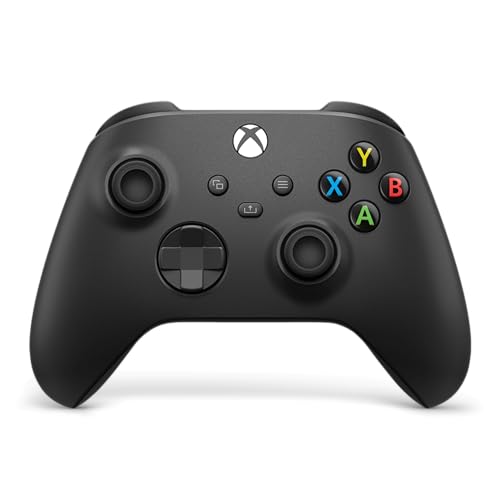
The Xbox pad is the pick for players who want a full-size console controller and a free charging port. It pairs over Bluetooth, so the phone keeps its USB-C port open for a charger, and it also connects over USB-C to a PC or console. Battery life runs up to 40 hours on AA batteries, which is the longest in this set. The hybrid D-pad, Share button, and 3.5mm headset jack cover chat and clips, and the sculpted surfaces with textured grips stay comfortable through long cloud sessions.
Specs
- Bluetooth and Xbox Wireless
- USB-C port
- Up to 40 hours of battery life
- Runs on AA batteries
- Hybrid D-pad
- Share button
- 3.5mm headset jack
- Sculpted surfaces with textured grips
Best for: Couch cloud gaming with a full-size console pad.
Watch out for: No phone mount comes in the box, so buy a clip or rest the phone on a stand. Keep spare AA batteries or a rechargeable pack nearby. Bluetooth adds a little lag next to a direct USB-C clamp, and some Xbox features such as impulse triggers do not work on iOS.
Which One Fits Your Situation
Lowest Lag for Competitive Play
Pick the Backbone One or the Razer Kishi V3 when every millisecond counts. Both plug straight into the USB-C port, so inputs land with almost no delay, and both pass charging through while you play. The Backbone is smaller and lighter for travel, while the Kishi V3 brings full-size TMR sticks and back buttons for shooters. Either one beats a Bluetooth pad for ranked matches and fast arcade games.
Cloud Gaming from the Couch
Pick the Xbox Wireless Controller when the phone sits on a stand and the game streams from the cloud. Bluetooth leaves the charging port free, the 40-hour battery outlasts any single session, and the full-size grips feel like a console pad. The 3.5mm jack takes a wired headset for chat. Buy a phone clip or a small stand, since none comes in the box.
Long Sessions Without a Dead Battery
Pick the GameSir G8 Galileo or the GameSir X5 Lite when you play for hours and the phone must stay charged. Both have passthrough charging, so a charger plugs into the pad and the phone keeps playing. The G8 adds a 3.5mm jack and back buttons for wired audio and extra inputs, while the X5 Lite is lighter and cheaper to carry. Either one removes the dead-battery worry.
A Light Pad for Travel
Pick the GameSir X5 Lite when the controller rides in a bag all day. At 135.4 grams it weighs less than the phone it holds, yet its Hall Effect sticks resist drift and its stretch range covers the 17 Pro Max with room to spare. Passthrough charging and a Turbo function cover long trips, and the cushioned buttons stay quiet on a train or a plane.
Common Mistakes
- Buying a Lightning controller for a USB-C phone, since the plug will not fit at all.
- Assuming any clamp fits the 17 Pro Max without checking the stretch range on the listing.
- Forgetting the USB-C port is covered while a clamp pad is attached, unless the pad has passthrough charging.
- Expecting full rumble and trigger feedback on iOS, since many advanced haptics stay quiet on iPhone.
- Forcing a clamp over a thick case instead of removing the case or using the included adapters.
Frequently Asked Questions
How is a gaming controller different from a cooling fan?
A controller gives you buttons, sticks, and triggers to play with, while a cooling fan only blows air over the phone to keep it cool during long sessions. They solve different problems: the controller changes how you play, and the fan changes how hot the phone gets. You can use both at once, since the fan clips to the back of the phone and the controller holds the sides.
How is a gaming controller different from Bluetooth headphones?
Headphones carry game audio to your ears, while a controller carries your inputs to the game. One does not replace the other, and most players use both. The G8 and the Xbox pad add a 3.5mm jack, so wired earbuds can plug straight into the pad. Bluetooth earbuds on an iPhone fall back to AAC, so a wired connection through a jack is the way to dodge that limit.
Can I charge the phone while I play?
Yes, with the right setup. Every clamp pad in this guide has passthrough charging, so a charger plugs into the pad and the phone charges while you play. A Bluetooth pad leaves the USB-C port free, so a charger plugs straight into the phone. A clamp pad without passthrough charging would leave the phone running on its own battery, so check the listing before you buy.
Does a Bluetooth pad lag more than a USB-C clamp?
Yes, a little. A direct USB-C clamp sends inputs over a wire, while a Bluetooth pad sends them over the air, which adds a small delay. For casual games, cloud streaming, and turn-based play, the difference is hard to notice. For fast shooters and ranked matches, a USB-C clamp is the safer pick, so match the connection to the games you play most.
More from Amazon
Programs that pair well with the guide above. Offers and eligibility are set by Amazon and may change.
Free shipping on eligible items, Prime Video and more. Eligible new members can start with a free trial.
Start a Prime free trialAd-free music streaming. Eligible new subscribers can start with a free trial.
Try Music Unlimited freeA Prime membership for ages 18-24 with a trial period. Eligibility is set by Amazon.
See Prime for Young AdultsAudiobooks and podcasts to listen to on the go. Eligible new members can start with a free trial.
Try Audible freeAs an Amazon Associate we earn from qualifying purchases.