Our Top Picks
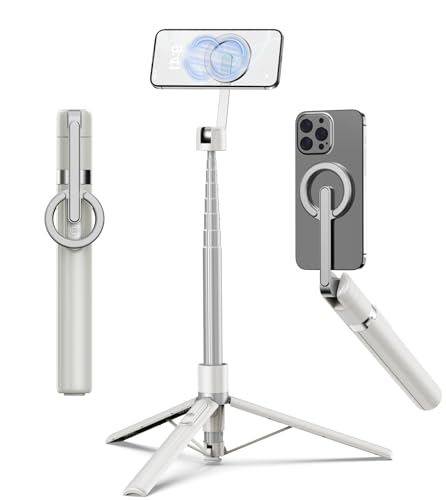 TONEOF 68" Magnetic Aluminum Phone Tripod Selfie Stick68"13.58 x 13.58 x 68 Inches0.7 PoundsCheck on Amazon
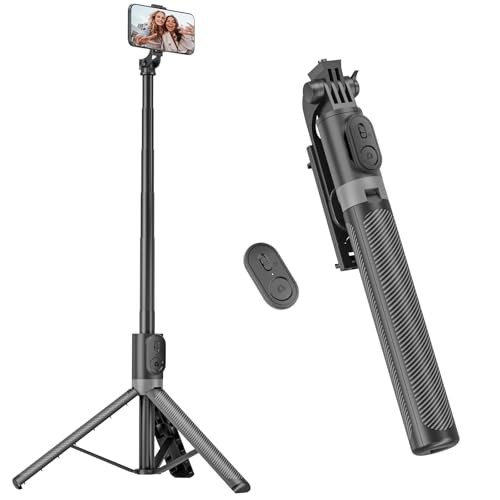

The best overall pick for most people here is the RISEOFLE 71-inch tripod and selfie stick, because one extendable unit works as a handheld selfie stick, a table-height stand and a full-height tripod, and it comes with a wireless remote. If you only need a pocketable desktop stand, the 10-inch flexible tripod with a remote is the lighter choice. A phone tripod with a remote lets you start and stop photos or videos from a distance without touching the phone, which keeps shots steady and puts you in the frame.
Quick List
- RISEOFLE 71-Inch Tripod and Selfie Stick – best all-in-one for travel, vlogging and group shots
- 50-Inch Selfie Stick Tripod with Remote – best for a compact, carry-anywhere stick that still stands on its own
- 10-Inch Flexible Tripod with Remote and Clamp – best for desks, railings, branches and tight spaces
- XXZU 75-Inch Aluminum Tripod with Ball Head – best for a sturdier stand with a ball head and tall reach
- 46-Inch Selfie Stick Tripod with LED Fill Light – best for low-light selfies and video calls
- TONEOF 68-Inch Magnetic Tripod with Rechargeable Remote – best for snap-on magnetic mounting and a rechargeable remote
Which One Is Right for You?
| If you… | Choose |
|---|---|
| want one stand for selfies, group shots and travel | RISEOFLE 71-Inch Tripod and Selfie Stick |
| need extra light for dim rooms and evening selfies | 46-Inch Selfie Stick Tripod with LED Fill Light |
| shoot from desks, railings and odd spots | 10-Inch Flexible Tripod with Remote and Clamp |
| want magnetic snap-on mounting for a compatible phone | TONEOF 68-Inch Magnetic Tripod |
| need a taller, steadier stand with a ball head | XXZU 75-Inch Aluminum Tripod |
| want a mid-length stick that stows small | 50-Inch Selfie Stick Tripod with Remote |
The right choice depends on where you shoot. Tall tripods suit rooms, events and landscapes; flexible tripods suit clutter and rough surfaces; selfie-stick hybrids are best for travel. A remote matters more than most people expect, since pressing the screen shakes the phone and ruins low-light and long-exposure shots.
All 6 Picks in Detail
1. RISEOFLE 71-Inch Tripod and Selfie Stick – Best All-in-One for Travel and Vlogging
As an Amazon Associate we earn from qualifying purchases at no extra cost to you.

This listing describes a portable, extendable all-in-one that works as both a 71-inch phone tripod stand and a selfie stick, with a wireless remote for iPhone and Samsung phones. It suits creators and travelers who want a single piece of kit that handles handheld selfies, sitting-height video and standing-height wide shots. The height range is the largest here apart from the XXZU, so it works for group shots and event recording.
To use it as a tripod, open the legs on a flat surface, extend the center section only as high as you need and attach the phone before you lift the stand into position. For handheld selfies, fold the legs together and use the base as a grip, keeping the extension short so the phone does not flex at the top.
- Extends to 71 inches per the listing name
- Works as a tripod stand and a selfie stick
- Includes a wireless remote control
- Phone compatibility: iPhone and Samsung named; confirm other brands on the product page
- Weight, leg material and clamp width: confirm on the product page
Pros:
- Tall enough for standing-height shots
- Two uses in one carry item
Cons:
- Tall, thin legs can wobble in wind or on soft ground
- Heavier phones in large cases may need a check of the clamp width
Compared with the 50-inch stick, it gives more height, and compared with the XXZU, it is more of a selfie-stick hybrid than a ball-head camera tripod.
2. 50-Inch Selfie Stick Tripod with Remote – Best Compact Carry-Anywhere Stick

This black 50-inch extendable selfie stick has tripod legs and a remote, intended for travel and video use with iPhone and Android phones. At 50 inches it fits shoulder height for a group selfie and collapses short enough to slip into a bag. It suits people who take pictures while traveling and want something simpler and lighter than a full-height tripod.
A stick this size is a good match for city walks, day trips and hotel rooms. Set it on a ledge or table to record a group video, then fold it flat to pack away. Because the listing name is brief about materials and weight limits, check those on the product page if you carry a large phone in a heavy case.
- Extends to 50 inches per the listing name
- Tripod legs fold out for a free-standing position
- Wireless remote control included
- Black finish, built for travel
- Collapsed length, weight and remote battery type: confirm on the product page
Pros:
- Compact for backpacks and carry-ons
- Simple to deploy for quick photos
Cons:
- Not tall enough for standing-height wide shots
- Light legs may tip with a heavy phone
Next to the 46-inch LED model, it offers a little more height but no built-in light.
3. 10-Inch Flexible Tripod with Remote and Clamp – Best for Desks and Tight Spaces

This house-brand portable flexible tripod from the retailer’s basics line is 10 inches tall, comes with a wireless remote and includes a smartphone clamp. Flexible legs can wrap around a pole, a railing or a branch, and also stand on a desk. It suits someone who wants hands-free calls, time-lapses or tabletop shots without lugging a full-height tripod.
Common ways to use a flexible tripod include wrapping the legs around a handrail for a video call, propping the phone on a desk for a time-lapse, standing it on a kitchen counter for a recipe video and wedging it between branches on a hike. If you use a heavy phone, keep the legs spread and lean the phone slightly back so the center of gravity stays over the base.
- 10 inches tall, flexible bendable legs
- Wireless remote included
- Smartphone clamp included
- Black finish
- Clamp opening width and remote range: confirm on the product page
Pros:
- Wraps around objects and fits small spaces
- Easy to pack in a pocket or bag
Cons:
- Short height limits shots to tabletops and low angles
- Flexible legs can sag under a heavy phone
Compared with the tall options, it trades reach for versatility, and compared with the 46-inch LED stick, it fits tighter spaces.
4. XXZU 75-Inch Aluminum Tripod with Ball Head – Best for a Taller, Sturdier Stand

The XXZU is described as a 75-inch aluminum camera tripod usable with phones and as a monopod, with a remote and a ball head. This is closer to a camera tripod than a selfie-stick hybrid, and the ball head makes it easy to level the phone or switch between portrait and landscape. It suits users who want a steadier stand for events, family photos and video, and who might also use it with a small camera.
Many camera tripods include a quick-release plate and a standard mounting screw, which gives you the option to use a small camera later; confirm whether this one has them. The monopod mode helps when you need to shoot over a crowd or walk with a stable rod, and the ball head lets you lock the angle with a single knob.
- 75 inches maximum height per the listing name
- Aluminum construction
- Ball head for quick adjustments
- Converts to a monopod per the listing
- Included phone holder, remote type and weight capacity: confirm on the product page
Pros:
- Tallest option and sturdier build
- Ball head helps with framing
Cons:
- Bulkier to carry than a selfie stick
- Phone-holder details are not stated in the listing name
Compared with the RISEOFLE, it is the sturdier, less handheld-friendly option, so pick it for stationary shooting.
5. 46-Inch Selfie Stick Tripod with LED Fill Light – Best for Low-Light Selfies

This 46-inch stick adds an LED fill light and a wireless remote, with iPhone models named in the listing. The light is useful for selfies in dim rooms, dinners, video calls and evening shots where the phone’s flash is harsh. It stands on a tripod base, so you can set it on a table and shoot hands-free.
A fill light is most useful when you are indoors with a window behind you or at night. Keep the light a little above eye level and avoid pointing it straight at close-up faces at full brightness. Charge the light before travel and remember that the extra electronics add a little weight to the top of the stick.
- 46 inches maximum length per the listing name
- Built-in LED fill light
- Wireless remote included
- Tripod base for free-standing use
- Light brightness levels, battery type and charging method: confirm on the product page
Pros:
- Adds soft light for dim scenes
- Handy for video calls and vlogs
Cons:
- The light adds weight and needs charging
- Shorter than the other sticks
Against the 50-inch stick, you gain a light but lose a few inches of height.
6. TONEOF 68-Inch Magnetic Tripod with Rechargeable Remote – Best for Snap-On Magnetic Mounting

TONEOF markets this 68-inch aluminum tripod and selfie stick as magnetic, with a rechargeable remote, a 360-degree rotatable head and a foldable design for iPhone and Android phones. The magnetic mount lets compatible phones snap on and off quickly, and the rechargeable remote avoids button batteries. It suits people who change phones, shoot in portrait and landscape, and want fast setup.
Magnetic mounts are fast, but give the phone a gentle shake of your own: attach it, tilt the head and watch whether it slips before you walk away from the stand. A rechargeable remote is handy for trips because it can charge from the same cable as your phone, though you should confirm the charging port type on the product page.
- 68 inches maximum height per the listing name
- Aluminum construction, foldable
- Magnetic phone mount
- Rechargeable remote and 360-degree rotatable head
- Magnet strength and phone case compatibility: confirm on the product page
Pros:
- Quick snap-on mounting
- Rechargeable remote
Cons:
- Magnetic mounting may not suit all cases
- Heavy phones need a strong magnet
Compared with the RISEOFLE, it is slightly shorter but adds magnetic mounting and a rechargeable remote.
Specs Compared
| Product | Max height / length | Type | Material | Remote | Phone mount |
|---|---|---|---|---|---|
| RISEOFLE 71-Inch | 71 in | Tripod and selfie stick | Confirm on listing | Wireless remote | Confirm on listing |
| 50-Inch Selfie Stick Tripod | 50 in | Selfie stick with tripod legs | Confirm on listing | Remote control | Holder included |
| 10-Inch Flexible Tripod | 10 in | Flexible tabletop | Confirm on listing | Wireless remote | Smartphone clamp |
| XXZU 75-Inch | 75 in | Tripod and monopod, ball head | Aluminum | Remote | Confirm on listing |
| 46-Inch with LED Light | 46 in | Selfie stick tripod with fill light | Confirm on listing | Wireless remote | Confirm on listing |
| TONEOF 68-Inch | 68 in | Tripod and selfie stick | Aluminum | Rechargeable remote | Magnetic |
How We Chose These
We built this guide from research on listing titles and general knowledge of how phone tripods and Bluetooth remotes work, rather than from using each tripod. We looked for a mix of heights and styles, from a 10-inch flexible tripod to a 75-inch aluminum stand, and included hybrids that serve as selfie sticks. We favored models that include a wireless remote and name their maximum height. Where a listing does not state clamp width, weight limits or remote battery type, we flag it to confirm. If you shoot with a very large phone or a thick case, check the clamp and magnet specifications before buying.
What to Look For
Height, stability and leg design
Choose a height that matches how you shoot. Ten inches is for tabletop and clamp-on use, 46 to 50 inches suits selfies and sitting-level video, and 68 to 75 inches suits standing-height shots and events. Taller stands are more prone to wobble, especially at full extension, so extend the thicker sections first and keep the legs spread wide. A hook at the bottom of the center column, if present, lets you hang a bag to weigh it down.
How the remote works
Most phone-tripod remotes connect over Bluetooth and act like a volume-button press, which triggers the camera shutter in the phone’s camera app. Typical range is around 30 feet or 10 meters. You pair the remote once in the phone’s Bluetooth settings, open the camera app and press the button. Some remotes only work in the camera app and not in every video app, and some pair with one device at a time. A rechargeable remote saves on button batteries, while a coin-cell remote is easy to replace.
Phone mount: clamp or magnetic
A spring clamp fits most phones and cases, but check that the opening is wide enough for large phones in thick cases and that the pads do not cover buttons. A magnetic mount snaps on quickly but needs a compatible phone or a metal plate, and its strength matters when the stand is extended. A mount that rotates lets you switch between portrait and landscape without removing the phone.
Materials, weight and portability
Aluminum legs are stiffer and tend to feel more solid than plastic ones, but add weight. Plastic and light alloy stands are easier to carry. If you pack the stand in a bag, check the collapsed length; a stick that collapses below 20 inches fits most backpacks. Rubber feet help grip smooth surfaces.
Extras: lights, ball heads and monopod mode
A built-in LED fill light helps in dim rooms but must be charged. A ball head gives fine control over framing. A monopod mode is useful for crowds and uneven ground where a tripod would not fit.
Worked example: say you want to film a family gathering at standing height. Extend a 68- to 75-inch tripod to about 60 inches, place it a few steps from the group, tilt the phone slightly down, pair the remote and press record. Keep the center of gravity low by extending the thicker sections first and avoid extending the top section more than you need.
Shooting tips that make any tripod better
Even the best stand needs good technique. Place the tripod on a firm, level surface, and spread the legs fully before you extend the center section. For video, turn on the phone’s stabilization if it has one, but note that it may crop the frame slightly. For photos, use the remote or the phone’s timer so the shutter press does not shake the phone. In low light, keep the phone still and let the phone’s night mode take a longer exposure, which only works if the stand does not move.
Think about framing before you step away. Set the phone to the lens you intend to use, turn on grid lines in the camera settings and make sure the horizon is level. If you are shooting vertical video for social platforms, rotate the head or clamp to portrait and keep your subject in the center third of the frame. For group shots, step back far enough that everyone fits with room around the edges, and use the remote from behind the camera to start a short countdown.
When you shoot outdoors, wind is the main enemy of a tall, light stand. Lower the extension, spread the legs wide and hang a small bag from the hook if the stand has one. Avoid setting up on slopes, wet rocks or sand where the legs can sink. At events, keep the stand out of walkways so people do not trip over the legs, and watch children and pets around the base.
Finally, look after the equipment. Wipe off dust and sand before collapsing the sections, because grit can scratch the tubes and make the locks hard to use. Do not overtighten the twist locks or the clamp; snug is enough. Store the remote with its battery out if you will not use it for months, and charge a rechargeable remote or light every couple of months so the battery does not drain completely.
Choosing between a selfie stick and a true tripod
A selfie-stick tripod is a compromise: the thin center rod that makes it comfortable in the hand also makes it less stiff than a heavier camera tripod. If most of your shots are handheld selfies, a stick-style model is the better fit. If you mostly set the phone down and walk away, a stand with thicker legs and a ball head will hold position longer and resist drift when you tilt the phone. Many people end up wanting both a short flexible tripod for a bag and one taller stand at home, and the models in this guide cover either end of that range.
Questions
How does a phone tripod remote connect?
It pairs over Bluetooth, usually through the phone’s Bluetooth settings, and then acts like a volume-button press in the camera app. Pair once and it typically reconnects automatically.
What is the range of a Bluetooth remote?
Many remotes list about 30 feet or 10 meters in open space. Walls, crowds and interference reduce the range, so keep the remote in line of sight for the most reliable response.
Will the tripod fit my large phone and case?
Check the clamp opening on the product page and compare it with your phone’s width with the case on. A magnetic mount depends on the case being magnet-friendly.
Is a taller tripod always better?
No. Taller stands are less stable and bulkier, so choose the shortest height that gets the shots you want. A shorter tripod resists wobble better and is easier to carry.
Can I use these tripods with a camera?
Some can hold a small camera, but weight limits vary and many phone-oriented stands are light duty. Check the weight capacity and mounting screw on the product page before using anything heavier than a phone.
Why does the remote not trigger my camera?
The camera app must be open in the foreground, and some phones need the volume-button shutter setting enabled. Re-pair the remote if it only changes the volume.
Update History
- October 20, 2026 – Initial publication; product set drawn from current catalog listings.
- Check the product page for current specifications and availability before buying.
Sources
- Retailer listing titles and specification fields for each product named above
- Published explainers and accessory-maker pages on how Bluetooth camera remotes pair and their typical range