
Our Top Picks
 ANNKE 3K Lite Wired Security Camera System Outdoor8CH DVR+8 Bullet Camera17.32 x 13.39 x 7.09 inches6.5 poundsCheck on Amazon
 SimpliSafe 8 Piece Wireless Home Security System8 Piece Bundle12.13 x 4.44 x 12.38 inches0 poundsCheck on Amazon
 SimpliSafe 9 Piece Wireless Home Security System w/HD9 Piece Bundle12.13 x 12.38 x 4.4 inches0.35 poundsCheck on Amazon

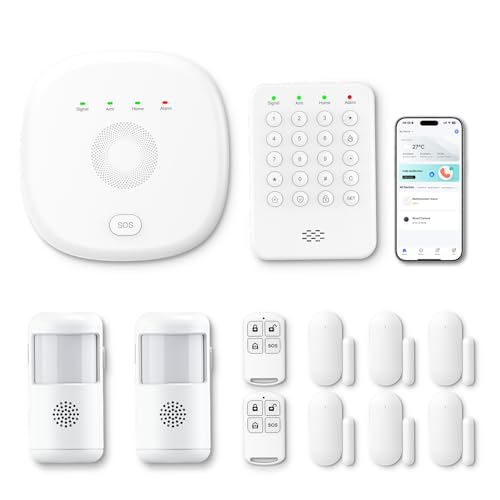

The best Cyber Monday home security system deal for most households in 2026 is the SimpliSafe 8 Piece Wireless Home Security System. It covers a typical two- to three-bedroom home out of the box, runs on a no-contract model, and lets you pay for professional monitoring month-to-month or skip it entirely and self-monitor for free. If your budget is the deciding factor, the PGST 12-Piece Kit delivers door, window and motion coverage with zero monthly bill. If you would rather own your footage and never pay a subscription, the ANNKE 3K Lite Wired Security Camera System with its 1TB hard drive is the strongest premium pick. Renters who cannot drill or fish cable should start with the Hapippofa GEN 2 16-Piece Kit, a touchscreen panel system with both WiFi and 4G backup.
Cyber Monday discounts on security hardware are real, but the sticker price is the least important number on the page. Three variables decide what you actually pay over five years: whether the system requires a contract, the resolution of the cameras and how much storage that resolution consumes, and whether recording lives on a drive you own or in a cloud plan you rent forever. This guide breaks every pick down along those three axes so you can compare a $180 alarm kit and a $500 camera system on the same footing.
Top 3 Picks
Best overall: SimpliSafe 8 Piece Wireless Home Security System. The cleanest answer for a house or large apartment, because the hardware is genuinely complete, the monitoring is optional and cancellable at any time, and the ecosystem has a clear upgrade path to cameras, glassbreak sensors and extra entry sensors. You are buying a platform, not a one-off kit.
Best budget: PGST Home Security Systems 12-Piece Kit. Dual-path WiFi plus GSM/4G signalling, app control and alerts, and no monitoring contract required. For a flat or a small house where you want loud local deterrence and phone notifications rather than a professional dispatch service, this is where the money goes furthest.
Best premium: ANNKE 3K Lite Wired Security Camera System. Eight outdoor cameras, a wired recorder and a 1TB surveillance drive pre-installed. There is no monthly fee for local recording, and the recorder’s 3K-class recording capability leaves headroom above the bundled 2MP cameras if you upgrade later.
Quick Comparison
| Product | Best for | Key specs | Price tier |
|---|---|---|---|
| Hapippofa GEN 2 16-Piece DIY Kit | Renters and apartments | 16 pieces; touchscreen panel; WiFi + 4G; app alerts; adhesive/DIY mounting | Mid-range |
| ANNKE 3K Lite Wired Camera System | Whole-property outdoor coverage | 8-channel wired recorder; 8 × 2MP cameras; 1TB HDD pre-installed; IR night vision; weather-rated housings | Premium |
| SimpliSafe 8 Piece Wireless System | Best overall, no contract | Base station, keypad, 4 entry sensors, motion sensor, key fob; optional 24/7 monitoring; cellular + WiFi | Premium |
| PGST 12-Piece Kit (Newest Model) | Budget alarm coverage | 12 pieces; WiFi + GSM/4G; mobile app control and alerts; siren; no contract | Budget |
| SimpliSafe 9 Piece System w/ HD Camera | Video-first no-contract setups | Same core kit plus an indoor HD camera; optional monitoring; no contract | Premium |
| Gianteye 2K Solar Wireless Cameras | Wire-free outdoor installs | 2K video; solar panels + rechargeable batteries; 5 GHz & 2.4 GHz WiFi; no cable runs | Mid-range |
| RenseCum Home Security Systems (24 PCS) | Large homes, maximum sensor count | 24-piece kit; wide sensor spread across doors and windows; hub and siren; app control | Mid-range |
| Hapippofa 21 Pcs WiFi Alarm System | Alexa households on a budget | 21 pieces; WiFi hub; Alexa-compatible; no monthly fees; siren and remotes | Budget |
| YISEELE Wireless Smart Alarm Kit | Ultra-budget starter kit | 120 dB siren; door/window sensors; remote controls; WiFi app alerts; DIY install | Budget |
How We Chose
This roundup is built from published specifications, manufacturer documentation and the structural realities of each product category, not from hands-on use. Four filters did most of the work. First, specification completeness: a system that does not state its sensor count, signalling paths or storage capacity cannot be compared honestly against one that does, so vague listings were pushed down the list. Second, category fit — an alarm kit and a camera system solve different problems, and a good pick in one category is not automatically a good pick in the other. Third, use-case match: renters, detached-house owners, flat dwellers and small-business operators have different constraints on drilling, cabling and power, so each pick is tied to a situation rather than a generic “best” label.
Fourth, upgrade path. A security system is a five-year purchase, and the ones worth buying are the ones you can extend with more sensors, more cameras or better recording without replacing the hub. We also weighed the long-term cost structure heavily — contract versus no-contract, local storage versus subscription cloud — because that is where the true price of a “cheap” Cyber Monday deal is decided. Nothing here is described as tested, benchmarked or personally owned, and no performance claim goes beyond what the listing and the brand’s own published materials state.
1. Hapippofa GEN 2 Wireless Home Security System – Best for Renters and Apartments
As an Amazon Associate we earn from qualifying purchases at no extra cost to you.

The GEN 2 kit from Hapippofa is aimed squarely at the person who rents, moves every couple of years, and is not allowed to drill into door frames or run cable through a wall. It is a 16-piece DIY alarm kit built around a touchscreen control panel, with both WiFi and 4G connectivity so the system keeps reporting if the broadband drops. For an apartment or a small rental house, that combination — no tools, no contract, no landline — is the whole pitch.
Key specs
- Kit size: 16 pieces, spanning the control panel, entry sensors, motion detection and remote control
- Panel: touchscreen control panel acting as the hub and local interface
- Connectivity: WiFi primary with 4G as a secondary signalling path
- App: mobile app control and push alerts for arm, disarm and sensor events
- Installation: adhesive and screw-free mounting options suitable for rented property
- Contract: self-monitored by default, no long-term commitment attached to the hardware
The touchscreen panel matters more than it sounds. Budget alarm systems often reduce the hub to a plastic box with three buttons, which means every arming and disarming action has to happen through a phone. A panel with a screen gives you a local way to arm, check which zone triggered, and manage users without depending on an app that may be updated, paywalled or abandoned. In a rental, where you might hand a spare key to a neighbour or a cleaner, local user management is genuinely useful.
The dual-path WiFi plus 4G design is the other meaningful spec. A WiFi-only alarm kit becomes decorative the moment someone unplugs your router or your ISP has an outage — which is exactly the moment a break-in is most likely. Cellular backup does not make a system unjammable, but it removes the single most common failure point in a self-installed setup. If you buy this system, put the panel somewhere with a decent mobile signal and test the 4G path once a quarter.
Pros
- 16 pieces covers a flat or small house without buying add-ons immediately
- WiFi plus 4G signalling gives you a fallback when broadband fails
- Touchscreen panel keeps day-to-day control off the phone
- Renter-friendly mounting avoids permanent damage and deposit disputes
- No contract, so the recurring cost is zero if you self-monitor
Cons
- No bundled cameras, so you get alarm coverage but no video evidence
- Hapippofa is a smaller brand than SimpliSafe, so long-term app support is less predictable
- 4G backup typically requires a SIM and, depending on the plan, a small ongoing data cost
- Self-monitoring means nobody calls you at 3 a.m. — you have to see the alert yourself
Compared with the nearest alternative in this list, the Hapippofa 21-piece WiFi kit, the GEN 2 is the more capable of the two: the touchscreen panel and 4G path are the differentiators, and the 21-piece kit trades those for a larger sensor count and Alexa integration at a lower price. If you rent and want the better hub, buy the GEN 2. If you own your home, have a lot of windows, and already run Alexa, the 21-piece kit stretches further per pound. Against the PGST 12-Piece Kit, the GEN 2 wins on panel quality and cellular redundancy while the PGST wins on signalling flexibility for larger properties.
2. ANNKE 3K Lite Wired Security Camera System – Best for Whole-Property Outdoor Coverage

The ANNKE 3K Lite system is the pick for anyone who wants cameras on every corner of a house and does not want to pay a subscription to keep the footage. It ships with eight 2MP cameras and a wired recorder with a 1TB hard drive already installed, so recording starts the day you plug it in. This is the opposite philosophy from a cloud camera: you own the storage, you own the retention, and the only recurring cost is electricity.
Key specs
- Cameras: 8 × 2MP (1080p-class) outdoor cameras
- Recorder: 8-channel wired DVR, fully populated by the bundled cameras
- Recording capability: the “3K Lite” designation refers to the recorder’s recording class, which sits above the bundled cameras’ native 2MP
- Storage: 1TB surveillance-grade hard drive pre-installed
- Night vision: infrared LEDs; long-throw class, typically 60–100 ft for this camera style
- Weather resistance: outdoor-rated housings for year-round exterior mounting
- Wiring: each camera needs a video cable and a power run back to the recorder
The storage maths is where this system earns its place. Eight 1080p cameras recording continuously generate roughly 20 GB per camera per day, or about 160 GB across the set — meaning a 1TB drive holds only around six days of continuous footage. Switch the recorder to motion-triggered recording, which is the correct setting for a home, and that same drive stretches to several weeks because most cameras see nothing for most of the day. Set it to continuous and you will be overwriting last week’s footage every week, which defeats the purpose of buying a big drive in the first place.
The wired design is both the strength and the cost. BNC and power cabling to eight camera positions is a real installation job — plan a weekend, a drill, a cable stapler and either a lot of patience or an electrician. In exchange you get a signal that does not drop when the WiFi gets busy, no battery to recharge, and no dependence on a cloud service staying in business. On a detached house with accessible eaves and a loft, this is a one-time job that lasts years.
Pros
- Eight cameras cover front, back and both flanks of a typical detached house
- 1TB local storage means no monthly cloud fee and no footage held by a third party
- Wired connections are immune to WiFi congestion and jamming
- Recorder headroom above the bundled 2MP cameras leaves an upgrade path
- Surveillance-grade drive is designed for 24/7 writing, unlike a desktop hard drive
Cons
- Cable runs to eight positions are the hardest install in this roundup
- Bundled cameras are 2MP, so faces at distance are less identifiable than on 4K systems
- The 8-channel recorder is fully populated, so adding cameras means a bigger recorder
- A hard drive is a mechanical component and will eventually need replacing
- No alarm sensors — this is video coverage, not intrusion detection
Compared with the Gianteye 2K solar system, the trade is straightforward. ANNKE gives you more cameras, a bigger local drive and a rock-solid connection, at the cost of a difficult install. Gianteye gives you wire-free mounting in an afternoon and solar charging, but you are then relying on wireless links and, in most configurations, on smaller or expandable storage. If the property is yours and the eaves are reachable, ANNKE is the better five-year purchase. If you are renting the building or cannot run cable, the solar system is the only realistic option of the two.
3. SimpliSafe 8 Piece Wireless Home Security System – Best Overall

The SimpliSafe 8 Piece system is the best overall pick because it solves the two problems that sink most DIY security purchases: it is complete enough to use on day one, and it does not lock you into a contract to get professional monitoring. The kit covers a typical two- to three-bedroom home with a base station, keypad, four entry sensors, a motion sensor and a key fob, and the monitoring plan is optional and cancellable month to month.
Key specs
- Kit contents: base station, wireless keypad, 4 entry sensors, 1 motion sensor, key fob (plus signage)
- Signalling: WiFi with a cellular backup path via the base station
- Monitoring: optional 24/7 professional monitoring, no contract required
- Self-monitoring: free app-based alerts and control if you decline monitoring
- Expansion: additional entry sensors, motion sensors, glassbreak sensors and cameras
- Installation: peel-and-place adhesive mounting for sensors; no wiring
The no-contract structure is the reason this system leads the list, and it is worth doing the arithmetic. A three-year contract at $30 a month is roughly $1,080 in monitoring alone, plus whatever the hardware cost. A no-contract system at $20–$30 a month over the same period costs the same in monthly fees but you can stop at any time — after a move, after a false-alarm frustration, or after you decide the alerts are enough on their own. Optionality has real value, and it is the difference between a system you keep for ten years and one you resent by year two.
Sensor placement decides whether any alarm system works. Four entry sensors will not cover a house with eight ground-floor openings. Prioritise in this order: the front door, the back door, then the two most accessible ground-floor windows, then the garage-to-house door if you have one. Motion sensors should be mounted where an intruder must cross the field of view — a hallway junction or the top of the stairs — not pointed at a window where passing headlights or a radiator can trigger it. SimpliSafe’s adhesive mounting makes repositioning painless, which matters because almost nobody gets the layout right on the first attempt.
Pros
- Monitoring is genuinely optional and cancellable, with no long-term contract
- Kit is usable immediately without buying extra sensors
- Cellular backup in the base station removes the router as a single point of failure
- Large, well-documented ecosystem of add-on sensors and cameras
- Adhesive mounting suits renters and avoids damaging trim
Cons
- Cameras are not included in the 8-piece configuration
- Cloud video recording requires a paid plan tier
- Full coverage of a larger house needs extra sensors at additional cost
- Monitoring is billed monthly, so five-year costs climb if you keep it running
Against the SimpliSafe 9 Piece system with the HD camera, the decision is simply whether you want eyes on the inside of the house. The 9-piece adds an indoor camera, which is useful for checking on pets, watching a hallway, or getting a face on someone who has already defeated a door sensor. It is not useful in a bedroom or bathroom, and an indoor camera that is not recording to a plan gives you live view only. Buy the 8-piece and add an outdoor camera later if perimeter video matters more to you than interior video — that is the configuration most houses actually want.
4. PGST Home Security Systems 12-Piece Kit – Best Budget
PGST’s newest 12-piece kit is the budget pick because it gives you the two things that actually deter a casual intruder — sensors on the openings and a loud siren — plus app alerts, without asking for a monitoring subscription. It signals over WiFi with GSM/4G as a secondary path, so it keeps working when the broadband goes down, and it is controlled from a phone rather than a proprietary keypad.
Key specs
- Kit size: 12 pieces covering entry sensors, motion detection, remotes and the siren/hub
- Signalling: WiFi primary with GSM/4G cellular backup
- Control: mobile app for arming, disarming, zone status and alert history
- Alerts: push notifications to your phone on sensor triggers
- Contract: none required; self-monitoring is the default mode
- Installation: wireless, adhesive or screw-mounted, no cabling
The cellular path is the specification that separates this kit from the cheapest tier of alarm hardware. A WiFi-only kit stops reporting when the router is unplugged, and unplugging the router or cutting the phone line has historically been step one in a targeted burglary. GSM/4G backup does not make a system immune — a cellular jammer is a real, if uncommon, tool — but it closes the most obvious hole. For a budget product, that is a meaningful spec rather than a marketing line.
Where the budget shows is in the software and the ecosystem. PGST’s app is functional but not as polished as the major-brand alternatives, integration with smart-home platforms is limited, and the sensor range is fixed by what is in the box. On a small flat or a terraced house with four or five openings, 12 pieces is enough. On a detached house with a garage, a conservatory and eight windows, you will run out of sensors before you run out of doors, and expansion options are thinner than on the premium platforms.
Pros
- Genuinely low entry price with no monitoring contract
- WiFi plus GSM/4G dual signalling at a budget price point
- App-based control and alert history without a subscription
- Wireless installation takes an afternoon with no tools beyond a screwdriver
- Loud local siren provides deterrence even if nobody sees the phone alert
Cons
- 12 pieces will not cover a large house with many ground-floor openings
- App and smart-home integration are less developed than premium brands
- Cellular backup may need a SIM and a data plan in some configurations
- Self-monitoring means no professional dispatch — alerts go only to you
- Expansion options and long-term firmware support are less certain
Against the YISEELE kit, the PGST is the better system and the YISEELE is the cheaper one. YISEELE leads with a 120 dB siren and a small sensor set; PGST leads with cellular backup and more pieces in the box. If your threat model is “I want a loud noise and a phone notification”, YISEELE covers it for less. If you want the system to keep reporting when the WiFi is down, PGST is worth the extra. Against the Hapippofa 21-piece kit, PGST wins on signalling redundancy and Hapippofa wins on sensor count and Alexa compatibility.
5. SimpliSafe 9 Piece Wireless Home Security System w/ HD Camera – Best for Video-First No-Contract Setups

The 9 Piece SimpliSafe system is the same core platform as the 8-piece kit with an indoor HD camera added, which makes it the right choice if you want alarm coverage and interior video from a single no-contract system. It suits a flat or a small house where the front door is the only realistic entry point and you want to see the hallway or living room when an alert fires.
Key specs
- Kit contents: base station, keypad, entry sensors, motion sensor, key fob, plus an indoor HD camera
- Camera: HD indoor camera with night vision and motion detection
- Signalling: WiFi with cellular backup via the base station
- Monitoring: optional 24/7 professional monitoring, no contract
- Video recording: cloud recording tied to a paid plan tier
- Installation: wireless sensors with adhesive mounting; camera needs a power outlet
There is an important distinction between alarm video and camera video that the listing name does not spell out. The camera in this kit is an indoor camera: it sees the inside of your home. It does not watch the driveway, the side gate or the back garden. If your main concern is knowing who is approaching the front door, an outdoor camera is what you want, and it is sold separately. Buy this kit when the question you are trying to answer is “did someone get inside, and where did they go” — not “who is standing on my path”.
The camera also changes the economics. Live view and alerts are one thing; recorded clips are another, and cloud video recording on a subscription platform requires a paid tier. That is the honest long-term cost of a video-first setup: the hardware is a one-time purchase, but the ability to review last night’s footage depends on a monthly plan. If you want recorded video without a subscription, a local-storage camera system such as the ANNKE wired kit or the Gianteye solar system is the structurally cheaper path over five years.
Pros
- Alarm and interior video in one system with a single app
- No contract; monitoring can be started and stopped month to month
- Cellular backup keeps alerts flowing if broadband fails
- Camera adds visual verification, which reduces false-alarm frustration
- Same expansion ecosystem as the 8-piece kit
Cons
- The camera is indoor-only; perimeter coverage costs extra
- Recorded video needs a paid plan — live view alone is limited
- Camera placement requires a nearby power outlet
- Higher upfront cost than the 8-piece kit for one extra device
- Indoor cameras raise privacy questions if placed in bedrooms or shared spaces
Against the 8-piece kit, the 9-piece is the better buy if interior video is a priority and the worse buy if it is not. The upgrade path is cleaner than it looks: buy the 8-piece, add an outdoor camera, and you have perimeter video for roughly the same money as the 9-piece — with the camera pointing at something more useful than a hallway. Buy the 9-piece when you specifically want to check on pets, an elderly relative, or a hallway that every intruder must cross.
6. Gianteye 2K Solar Wireless Camera System – Best for Wire-Free Outdoor Installs

The Gianteye solar camera system exists for one reason: to put cameras outside without running cable or climbing a ladder to swap batteries every few weeks. Each camera carries its own solar panel and rechargeable battery, communicates over 5 GHz and 2.4 GHz WiFi, and records 2K video. For a rented house, a listed building, or any property where cable runs are impractical, this is the category that actually works.
Key specs
- Resolution: 2K (roughly 4MP-class) video
- Power: solar panel plus rechargeable battery per camera; no mains wiring
- Wireless: dual-band 5 GHz and 2.4 GHz WiFi support
- Installation: wire-free mounting; screws or brackets only, no cable routing
- Night vision: infrared for low-light recording
- Typical extras: two-way audio and motion-triggered recording, as is standard for this class
Dual-band WiFi is a spec worth understanding rather than skimming. The 2.4 GHz band travels further and penetrates walls better but is crowded with every smart plug, doorbell and microwave in the neighbourhood. The 5 GHz band is faster and cleaner but has shorter range and struggles through masonry. A camera that supports both lets you put the nearest cameras on 5 GHz for bandwidth and the far ones on 2.4 GHz for reach. In a house where the router sits at one end, that flexibility is the difference between a reliable feed and one that drops every evening.
Solar power has one real constraint, and it is seasonal. A camera that gets four hours of direct sun a day in summer will stay topped up indefinitely; the same camera in a northern winter, mounted under a deep eave, may not. The practical answer is to mount panels where they catch the most light — usually above the eave rather than tucked beneath it — and to accept that a heavily shaded camera may need a manual recharge a few times a year. A 2K camera recording motion events only, rather than continuously, draws far less power, which is the setting to choose if you are worried about winter runtime.
Pros
- No cable runs, so installation is a same-day job with basic tools
- Solar charging removes routine battery swaps in good light conditions
- 2K resolution is a genuine step up from 1080p for identifying faces and plates
- Dual-band WiFi lets you balance range and bandwidth per camera
- Suitable for rented property and awkward mounting positions
Cons
- Winter and shade can leave a camera needing manual recharging
- Wireless links are more vulnerable to interference than wired cameras
- Storage configuration varies — check whether recording is local or cloud-based before buying
- 2K is below the 4K class, so distant detail is limited
- Solar panels need occasional cleaning; dust and bird droppings cut charging noticeably
Against the ANNKE wired system, the trade is installation effort versus reliability and storage. ANNKE gives you eight cameras, a 1TB drive and wired connections, but you must run cable to every position. Gianteye gives you an afternoon’s install and no cables, but fewer cameras and a wireless link that depends on your WiFi quality. If you can run cable and you own the building, wire it. If you cannot, this is the compromise that actually gets cameras onto the wall instead of onto a to-do list.
7. RenseCum Home Security Systems (24PCS) – Best for Large Homes and Maximum Sensor Coverage

The RenseCum 24-piece kit is the outlier in this roundup because it optimises for quantity of coverage rather than cameras or software polish. Twenty-four pieces spread across doors, windows and interior zones means you can protect a detached house with a garage, a conservatory and a dozen ground-floor openings without buying expansion sensors on day one. For a large property on a mid-range budget, that arithmetic is compelling.
Key specs
- Kit size: 24 pieces, the largest sensor count in this roundup
- Coverage: wide spread of entry sensors plus motion detection for interior zones
- Control: hub with app-based arming, disarming and alert history
- Alerting: local siren plus push notifications to your phone
- Installation: wireless, adhesive or screw-mounted, no cabling
- Contract: self-monitored; no subscription required to use the hardware
Sensor count is the most commonly oversold specification in home security, and it is worth being precise about what 24 pieces actually buys you. If a kit contains four remote controls, a hub, a siren and a keypad, that is seven pieces before a single door is protected. The number that matters is how many contact sensors are left over for openings. When you compare kits, count contact sensors rather than total pieces, then count the accessible openings in your home — every ground-floor door and window, plus any basement or garage access. That comparison is the only one that predicts whether a kit will actually fit your house.
What a large sensor set does not give you is video, professional monitoring, or a premium app. RenseCum is a mid-range DIY brand rather than an established security platform, so the sensible approach is to buy it for coverage and treat the software as a means to arm and disarm. If you want recorded evidence after an incident, pair it with a separate camera system — which is exactly how many households end up structured anyway, with one system for detection and another for video.
Pros
- Largest sensor count here, so a large house can be covered in one purchase
- Wireless installation keeps the job to a single afternoon
- No contract and no mandatory subscription
- Local siren plus phone alerts covers both deterrence and notification
- Good value per protected opening compared with buying expansion sensors individually
Cons
- Total piece count includes hub, remotes and keypad, so contact sensors are fewer than 24
- No cameras and no video recording
- Software and app polish are below the major-brand platforms
- No professional monitoring option
- Larger sensor counts mean more batteries to track and replace over time
Against the Hapippofa 21-piece kit, the RenseCum wins on raw coverage and the Hapippofa wins on hub quality and Alexa integration. Against the PGST 12-piece kit, RenseCum gives you roughly double the openings protected for a mid-range rather than budget price, and PGST gives you cellular signalling. For a four-bedroom detached house, RenseCum plus a camera system is a coherent two-part setup. For a flat, it is more sensors than you have doors.
8. Hapippofa WiFi Wireless Home Alarm System, 21 Pcs – Best Budget Pick for Alexa Households

The 21-piece Hapippofa kit is the budget option for homes already built around Alexa. It is a WiFi alarm system with no monthly fees, a large sensor count, and voice compatibility that lets you arm or check status without opening an app. If your household already runs smart speakers, the marginal cost of integrating a security system into that routine is close to zero, and that convenience is what keeps a system armed instead of forgotten.
Key specs
- Kit size: 21 pieces, covering entry sensors, motion detection, remotes and the hub
- Connectivity: WiFi hub with app control
- Voice: Alexa-compatible for voice arming and status checks
- Fees: no monthly fees for core functionality
- Alerting: local siren plus app push notifications
- Installation: fully wireless DIY mounting
Voice control is a small feature with a disproportionate effect on whether a system gets used. The most common failure mode for a DIY alarm is not hardware failure — it is that the household stops arming it because arming requires finding a phone, opening an app, waiting for it to connect, and tapping twice. Being able to say “Alexa, arm the security system” while walking out of the door with your hands full is the difference between a system that runs daily and one that runs for three weeks. If you have an Echo device in the hallway, this kit is materially more useful than a cheaper one without voice support.
The trade-off for the low price is redundancy. This is a WiFi-based system, and the listing does not lead with cellular backup in the way the Hapippofa GEN 2 or the PGST kit does. That means a router outage or a broadband failure takes the reporting path with it. The mitigation is straightforward and worth doing: keep the siren loud and the sensors armed regardless of connectivity, so the local deterrent still works when the network does not.
Pros
- Large 21-piece kit at a budget price
- No monthly fees for the core alarm functions
- Alexa compatibility makes daily arming far more likely
- Wireless installation with no cabling or drilling required
- Good sensor-to-price ratio for a mid-sized home
Cons
- WiFi-only signalling means no cellular fallback when the router is down
- No cameras or video verification
- No professional monitoring option
- Smaller brand with less predictable long-term app support
- Budget sensor hardware can be more prone to false triggers if mounted carelessly
Against the Hapippofa GEN 2 16-piece kit, the choice is hub quality versus sensor count. The GEN 2 gives you a touchscreen panel and a 4G path; the 21-piece gives you five more pieces and Alexa, at a lower price. If you have a large number of windows and a strong WiFi setup, the 21-piece is the better value. If you want the system to survive a broadband outage, spend the extra on the GEN 2. Against the YISEELE kit, Hapippofa wins on sensor count and voice control; YISEELE wins on price and siren volume.
9. YISEELE Wireless Smart WiFi Alarm System DIY Kit – Best Ultra-Budget Starter Kit

The YISEELE kit is the cheapest credible entry point in this roundup, built around a 120 dB siren and a set of door and window sensors with remote controls and WiFi app alerts. It is the right purchase for a first flat, a studio, a single-room let or a shed and garage that needs monitoring without a subscription. It does one job — make a very loud noise and tell your phone — and does it for the least money here.
Key specs
- Siren: 120 dB, loud enough to be physically uncomfortable in an enclosed space
- Sensors: door and window contact sensors plus motion detection
- Control: remote controls and a WiFi-connected mobile app
- Alerting: push notifications to your phone on trigger events
- Installation: adhesive and screw mounting, no wiring, no hub cabling
- Contract: none; self-monitored with no recurring fee
120 dB deserves a moment of context because it is not a marketing number. A vacuum cleaner runs around 70 dB, a busy restaurant around 85 dB, and sustained exposure above 85 dB is where hearing-protection guidance begins. At 120 dB, an indoor siren is genuinely painful to stand next to, which is exactly what you want from a deterrent — and also why siren placement matters. Do not mount it at head height beside a doorway where a family member will set it off by accident at close range, and do not put it in a room where a pet is shut in. Ceiling height in a central hallway is the classic position.
The honest limitation is scope. This is a small-footprint kit: it will cover a flat’s front door, a couple of windows and a hallway. It has no cellular backup, no camera, no professional monitoring and a smaller brand ecosystem. What it does have is the lowest barrier to entry, and a system that exists is worth more than a better system you keep postponing. Buy it, arm it, and upgrade later if you move somewhere bigger.
Pros
- Lowest-cost way to get a working alarm system with a loud siren
- 120 dB siren is a serious local deterrent
- No monthly fees and no contract
- Wireless installation takes under an hour in a small flat
- Phone alerts give you remote awareness without a monitoring bill
Cons
- Small sensor count; not suitable for a large house
- No cellular backup if the WiFi goes down
- No cameras or video verification
- 120 dB indoors demands careful siren placement around pets and children
- Limited expansion and integration options
Against the PGST 12-piece kit, the YISEELE is the cheaper and simpler product and PGST is the more capable one, with more pieces and cellular signalling. If you want a siren and phone alerts for the least money, YISEELE is the pick. If you want the system to keep reporting during a broadband outage, the PGST’s 4G path is worth the step up. Against the Hapippofa 21-piece kit, the difference is coverage: Hapippofa protects a whole house, YISEELE protects a flat.
How to Choose
Choosing a home security system on Cyber Monday is a five-year decision disguised as a one-day purchase. Four questions decide almost everything: do you want a contract or not, how much resolution do you actually need, where does the footage live, and how much of your home needs protecting. Work through them in that order and the shortlist narrows itself.
Contract versus no-contract: the five-year maths
A contract and a no-contract system can have identical hardware and wildly different total costs. The difference is not the monthly fee — it is who controls whether the fee continues.
| Ownership path | Typical upfront hardware | Typical monthly | Approximate 5-year total |
|---|---|---|---|
| Self-monitored DIY alarm, no fees | $120–$300 | $0 | $120–$300 |
| DIY alarm + cloud camera storage | $200–$400 | $5–$15 | $500–$1,300 |
| DIY system + no-contract professional monitoring | $250–$500 | $20–$30 | $1,450–$2,300 |
| Contract system, 36-month term | $0–$100 | $30–$50 | $1,800–$3,000 |
| Local-storage camera system (recorder + drive) | $300–$600 | $0 | $300–$600 |
The pattern is obvious once it is written down. A no-contract plan and a contract plan cost roughly the same per month; the no-contract version just lets you stop. Over five years, the ability to pause monitoring for six months while you travel, or cancel entirely after a false-alarm-heavy winter, is worth several hundred pounds. If a Cyber Monday bundle offers free hardware in exchange for a 36-month agreement, calculate the total monthly commitment first — the hardware is rarely as free as it looks.
Resolution and storage: what you actually pay for
Resolution is sold as an image-quality number but it is really a storage-cost number. Every step up in resolution roughly doubles the bitrate, and therefore roughly halves how long a fixed-size drive retains footage.
| Resolution class | Typical bitrate | Storage per camera per day (continuous) | Days on a 1TB drive, 1 camera | Days on a 1TB drive, 8 cameras |
|---|---|---|---|---|
| 1080p / 2MP | ~2 Mbps | ~21 GB | ~43 days | ~5 days |
| 2K / 4MP | ~4 Mbps | ~43 GB | ~21 days | ~2.5 days |
| 3K–4K / 8MP | ~8 Mbps | ~86 GB | ~11 days | ~1.5 days |
Two conclusions follow. First, motion-triggered recording is not a compromise — it is the correct configuration for a home. If your cameras only record when something moves, real-world retention on a 1TB drive stretches from days to weeks, because most cameras see nothing for the vast majority of the day. Second, if you want high resolution and long retention simultaneously, you need either a bigger drive or a cloud plan, and both cost money. A 4K camera recording continuously to a 1TB drive is a configuration that overwrites itself before you notice a problem.
Local storage versus cloud subscriptions
Local storage means a recorder and a hard drive you own. Upfront cost is higher, monthly cost is zero, and the footage never leaves your house — which matters to people who do not want video of their family stored on someone else’s server. The catch is physical: a surveillance hard drive writes continuously and typically lasts three to five years before it needs replacing, and if a burglar takes the recorder, they take the evidence with it.
Cloud storage means a monthly fee, usually per camera or per plan tier, with retention windows commonly ranging from a week to 60 days. It survives theft and fire because the footage is off-site. Over five years, a $10-per-month plan costs around $600 — often more than the cameras themselves. The pragmatic answer for many homes is hybrid: local recording for day-to-day review, plus a cheap cloud tier for a handful of critical cameras covering the main entrances.
Wired, wireless or solar
Wired cameras are the most reliable and the hardest to install. Each camera needs a video and power run, which for eight positions is a full day’s work or an electrician’s bill. Wireless cameras install in minutes but depend on your WiFi, and a camera on the far side of a thick wall will drop frames. Solar cameras split the difference: no cable runs, but charging depends on sunlight, and a shaded winter mounting point may need manual recharging a few times a year.
The rule of thumb that holds up: if you own the building and can reach the eaves, wire the cameras. If you rent, or the building is listed, or the mounting positions are awkward, go solar or battery. If you cannot decide, start with one wireless camera, test the signal where you actually want it, and expand once you know the WiFi reaches.
How many sensors and cameras do you need
| Your situation | Recommended configuration | Suggested pick |
|---|---|---|
| Studio or one-bed flat, renting | Entry sensors on front door and 2 windows, 1 motion sensor, loud siren, no contract | YISEELE kit |
| Two-bed flat, Alexa household, tight budget | 12–21 sensors, WiFi hub, voice arming, no fees | Hapippofa 21 Pcs |
| Rented house, cannot drill or cable | Touchscreen panel, cellular backup, adhesive sensors | Hapippofa GEN 2 |
| Small house, budget-first, wants cellular backup | 12-piece kit, WiFi + GSM/4G, app alerts | PGST
Affiliate disclosure. As an Amazon Associate we earn from qualifying purchases at no extra cost to you. Prices accurate as of the date shown. Best Cyber Monday Home Security System Deals 2026Check price on Amazon More ways to save on Amazon 
Best TCL TV Deals: QLED & Mini LED on Sale NowIf you want the short answer: the TCL 55-Inch QM6K Series Mini... 
Best Over Ear Headphones Deals: Save on Top BrandsThe best over ear headphones deal for most people right now is... 
Best Cyber Monday Sony TV Deals: OLED & LED SavingsShort answer: the Sony 65-Inch BRAVIA 6 OLED (K-65A60) is the best... 
Best Clothes Steamer Deals: Top Discounts Right NowThe best clothes steamer deal for most people right now is the... 
Best Black Friday Stand Mixer DealsThe best Black Friday stand mixer deal for most people is the... 
Best Black Friday Gaming PC DealsThe best Black Friday gaming PC deal overall for most buyers is... 
Best Black Friday Bed Frame DealsThe best Black Friday bed frame deal in 2026 for most people... 
Best Wifi Deals in 2026: What to Know Before You BuyBuying a wireless upgrade used to mean choosing between a router that... 
Best SUV Lease Deals in 2026: Top Picks ComparedIf you are searching for an SUV lease deal in 2026, the... |