Our Top Picks

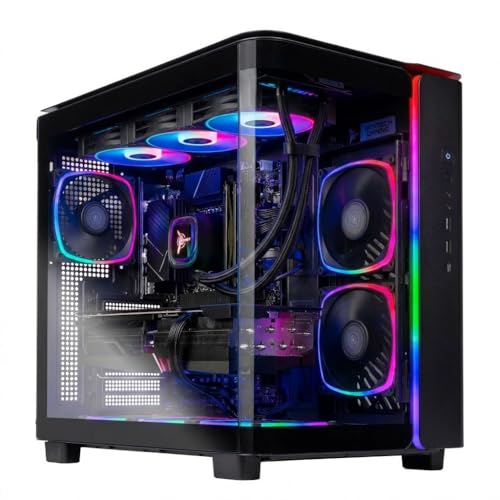


The best Black Friday gaming PC deal overall for most buyers is the Skytech Gaming PC Desktop with a Ryzen 7 9850X3D and Radeon RX 9070 XT, with 32GB of RAM and a 2TB SSD. It is the strongest all-round combination in this roundup: a current-generation eight-core X3D processor, a 16GB-class graphics card, and enough memory and storage that you are not shopping for upgrades within the first year. It suits anyone who owns a 1440p high-refresh monitor or plans to move to one, and who wants a realistic path to 4K on a living-room television.
If that is more machine than you need, the right answer changes with your situation rather than with your budget alone. A 1080p monitor at 144Hz cannot use a flagship card, a 512GB drive fills up in a season, and a full tower will not fit on a narrow desk. Every pick below is ranked by graphics card class, processor, memory, storage, upgrade headroom and the resolution it can genuinely drive, so you can match the discount to the display you already own.
Top 3 Picks
Best Overall: Skytech Gaming PC Desktop (Ryzen 7 9850X3D, RX 9070 XT)
The only build here that pairs an X3D processor with a 16GB-class current-generation GPU, 32GB of DDR5 and a 2TB SSD at the same time. It is the configuration that needs the least compromise: fast enough for competitive shooters at 1440p, comfortable in demanding single-player titles, and capable of 4K output with upscaling enabled. If you want to buy once and stop thinking about hardware for several years, this is the one.
Best Budget: Skytech Gaming Azure 3 (Core i5 14400F, RTX 5060 Ti 8GB)
The lowest-cost route into a current-generation graphics card with a real desktop processor behind it. It is built for a 1080p panel, where the 8GB card class is genuinely at home, and it will hold high frame rates in esports titles and comfortable frame rates in modern AAA games at medium-to-high settings. This is the pick when the monitor is 1080p and staying that way.
Best Premium: STORMCRAFT Phantom (RTX 5080, Ryzen 7 9800X3D)
Flagship-class graphics with a top-tier X3D processor, 32GB of DDR5 and a 2TB SSD — the combination that makes a 4K high-refresh display worth owning. It costs the most and draws the most power, but it is the only build in this list that will not need to compromise settings in demanding titles for a long time. For 4K at 120Hz and above, it is the reference point.
Quick Comparison
| Product | Best for | Key specs | Price tier |
|---|---|---|---|
| Skytech Gaming PC Desktop (Ryzen 7 9850X3D, RX 9070 XT) | High-refresh 1440p and entry 4K | 8-core X3D CPU, 16GB-class RDNA 4 GPU, 32GB DDR5, 2TB SSD, AM5 | Premium |
| Skytech Gaming Azure 3 (Ryzen 7, RTX 5070) | Balanced 1440p with Nvidia features | 8-core Ryzen 7, 12GB-class RTX 5070, 24GB RAM, 1TB SSD, AM5 | Mid-range |
| Skytech Gaming King 95 (Ryzen 7 7800X3D, RX 9070 XT) | Competitive play and long upgrade runway | 8-core X3D CPU, 16GB-class RDNA 4 GPU, AM5 platform | Mid-range |
| Skytech Gaming PC Shadow 5 (Ryzen 7, RTX 5060 Ti 8GB) | 1080p value with DLSS headroom | Ryzen 7, 8GB RTX 5060 Ti, 16GB RAM, 1TB SSD | Mid-range |
| STORMCRAFT Phantom (RTX 5080, Ryzen 7 9800X3D) | 4K high-refresh flagship | 8-core X3D CPU, 16GB-class RTX 5080, 32GB DDR5, 2TB SSD | Premium |
| The Horizon Autherium Dragon RGB i9 | Creators needing RAM and storage volume | Core i9 up to 5.4GHz, RTX 5070-class GPU, 64GB RAM, 5TB storage | Premium |
| Skytech Gaming Azure 3 (Core i5 14400F, RTX 5060 Ti 8GB) | Entry 1080p gaming | 10-core i5 (6P+4E), 8GB RTX 5060 Ti, LGA1700 platform | Budget |
| suevery Pre Built Gaming Computer Bundle (Ryzen 7) | First gaming PC on a tight budget | Ryzen 7, integrated or entry discrete graphics, bundle peripherals | Budget |
| ACEMAGICIAN S3A Gaming Mini PC (Ryzen 7 H 255) | Small spaces and light gaming | 8C/16T up to 4.9GHz, Radeon 780M integrated, 16GB RAM, 512GB SSD | Budget |
How We Chose
Selection here is based on published specifications, platform architecture and publicly available third-party benchmark data — not on physical testing. Every build was assessed against five criteria. First, graphics card class: what resolution and refresh rate the GPU can realistically drive, and how much video memory it carries, because VRAM capacity determines texture settings and longevity more than raw speed does. Second, processor fit: core count, cache layout and socket, with X3D parts noted separately because their stacked cache changes gaming performance in ways a core count does not reveal.
Third, memory and storage headroom: 16GB is the floor, 32GB is the current comfort point, and 64GB is a creator requirement rather than a gaming one. Fourth, upgrade path: whether the motherboard socket is still receiving new processors, whether the power supply has spare capacity, and whether the case accepts a longer graphics card. Fifth, category fit: mini PCs and bundles solve different problems than towers, so they are judged against the job they are meant to do. Prices are described as general market tiers only, because discount pricing moves daily during the Black Friday window.
1. Skytech Gaming PC Desktop (Ryzen 7 9850X3D, RX 9070 XT) – Best for High-Refresh 1440p and Entry 4K
As an Amazon Associate we earn from qualifying purchases at no extra cost to you.

This is the build to choose when you want one machine to serve both a desk monitor and a living-room television. The Ryzen 7 9850X3D belongs to AMD’s X3D family, which stacks additional cache directly on the compute die; the practical effect is a large lift in games that are sensitive to memory latency, including simulators, strategy titles, and large open worlds where frame rates dip in dense areas. Combined with a Radeon RX 9070 XT — a 16GB-class RDNA 4 card — the result is a system that stays comfortable at 1440p with high refresh rates and remains playable at 4K with upscaling enabled.
The 32GB of DDR5 is the part of the specification people underrate. A modern AAA title with high-resolution textures, a browser with a dozen tabs, a voice chat client and a capture utility can collectively push past 16GB. The 2TB NVMe SSD means you are not deciding which three games to keep installed. And because the machine is built on the AM5 platform, the processor socket has a published upgrade path, which is not something every prebuilt in this price tier offers.
- Processor: AMD Ryzen 7 9850X3D, eight cores with stacked 3D V-Cache, AM5 socket
- Graphics: AMD Radeon RX 9070 XT, 16GB-class GDDR6, RDNA 4 architecture
- Memory: 32GB DDR5, dual-channel
- Storage: 2TB NVMe SSD
- Platform: AM5 motherboard, standard tower chassis
- Realistic target: 1440p at high refresh rates; 4K at 60fps-class with upscaling
- Upgrade path: GPU, memory, storage and CPU all serviceable
The strongest argument for this configuration is balance. Many builds at this level spend everything on the graphics card and leave the processor, memory or storage as a bottleneck. Here, none of the four core components is the obvious weak link. The X3D cache also means the processor will remain competitive for a long time, because the advantage it provides does not disappear when newer non-X3D chips arrive.
The honest trade-offs are heat, noise and power draw. A 16GB-class current-generation graphics card and an eight-core X3D processor together produce a meaningful thermal load, so case airflow matters. This is a full-size tower, not a compact build — measure your desk or shelf before ordering. And if your monitor is 1080p at 60Hz, you are paying for capability you cannot see.
- Pros
- X3D processor and 16GB-class GPU in the same build — no obvious bottleneck
- 32GB DDR5 and 2TB SSD remove immediate upgrade pressure
- AM5 socket gives a documented future CPU upgrade path
- Covers both 1440p high refresh and entry-level 4K
- Cons
- Premium tier — the most expensive pairing of CPU and GPU here after the flagship
- Full tower size needs real desk or floor space
- Overkill for a 1080p 60Hz display
Against the nearest alternative in this list, the Skytech King 95 uses the same graphics card class but pairs it with the previous-generation Ryzen 7 7800X3D and a smaller memory and storage configuration. The King 95 is the value play; this build is the one you buy when you want the storage and memory already settled. Against the STORMCRAFT Phantom, this machine gives up roughly a tier of graphics performance — the Phantom’s RTX 5080 is a 4K-first card — but costs considerably less and draws less power.
2. Skytech Gaming Azure 3 (Ryzen 7, RTX 5070) – Best for Balanced 1440p With Nvidia Features
This is the pick for the buyer whose monitor is 1440p, who plays a mix of competitive shooters and story-driven titles, and who specifically wants Nvidia’s feature set — DLSS upscaling, frame generation, and the broadest driver support for older titles and indie releases. The RTX 5070 is a 12GB-class Blackwell card positioned squarely at 1440p, and pairing it with a Ryzen 7 processor keeps the frame rate ceiling high enough that the GPU, not the CPU, is the limiting factor in most games.
The interesting part of this configuration is the 24GB of system memory. That is an unusual capacity, and it is worth confirming the module arrangement before you buy: 24GB is typically delivered as two 12GB modules in dual channel, but some builds ship a single 24GB module, which halves memory bandwidth and can cost meaningful frame rate in CPU-limited scenarios. It is a reasonable question to ask before purchase, and it is the kind of detail a listing photo will answer.
- Processor: AMD Ryzen 7, eight cores, AM5 socket
- Graphics: Nvidia GeForce RTX 5070, 12GB-class GDDR7, Blackwell architecture
- Memory: 24GB DDR5 (confirm dual-channel configuration)
- Storage: 1TB NVMe SSD
- Platform: AM5 motherboard, tower chassis
- Realistic target: 1440p at high settings and high refresh rates; 1080p with very large frame-rate margins
The 1TB drive is the specification most likely to become a limitation first. Modern AAA installs commonly occupy 100-150GB each once patches and shader caches are included, so a 1TB drive realistically holds six to eight large titles alongside the operating system. That is manageable — but plan on adding a second NVMe drive during a future sale, and check that the motherboard has a spare M.2 slot.
Where this build wins is flexibility. DLSS and frame generation extend the useful life of a 12GB card considerably, because upscaling lets you reduce internal resolution without a proportional loss in image quality. In titles that support the full feature set, the 1440p experience is closer to what you would expect from a card a tier above. In titles that do not, you are relying on raw rasterisation, which is respectable but not class-leading.
- Pros
- Nvidia feature set — DLSS, frame generation and mature driver support
- 24GB of memory is generous for a mid-range build
- AM5 platform keeps the CPU upgrade door open
- Well matched to a 1440p 144Hz-class monitor
- Cons
- 1TB storage fills quickly with modern titles
- 12GB of VRAM is the practical ceiling for high-resolution texture packs
- 24GB is an odd capacity — verify dual-channel operation
Compared with the Skytech Gaming PC Desktop above, this build trades graphics memory capacity and raw rasterisation for Nvidia’s upscaling ecosystem and a lower price. Compared with the Shadow 5 below, it is a genuine step up: the RTX 5070 has more memory and more compute than the RTX 5060 Ti, and the difference shows at 1440p rather than 1080p. If your monitor is 1440p, the Azure 3 is the more sensible of the two.
3. Skytech Gaming King 95 (Ryzen 7 7800X3D, RX 9070 XT) – Best for Competitive Play and Long Upgrade Runway

The King 95 is the value-focused route to the same graphics card class as the best-overall pick, using the Ryzen 7 7800X3D. That processor is a previous generation, but its gaming performance remains excellent because the X3D cache advantage does not expire when a successor launches. For anyone whose priority is frame rate per dollar rather than having the newest part number, this is arguably the smartest configuration in the list.
It suits the competitive player first: esports titles at 1440p with very high frame rates, minimal frame-time variance, and enough headroom to run a capture or streaming pipeline on the same machine. It also suits the buyer who plans to upgrade in stages — the AM5 socket means a future processor drop-in is realistic, and the graphics card can be replaced independently when a substantially faster card arrives at a sensible price.
- Processor: AMD Ryzen 7 7800X3D, eight cores with 3D V-Cache, AM5 socket
- Graphics: AMD Radeon RX 9070 XT, 16GB-class GDDR6
- Platform: AM5 motherboard, mid-tower chassis
- Realistic target: 1440p at very high frame rates; 4K playable with upscaling
- Upgrade path: CPU, GPU, memory and storage all replaceable
The practical difference between this build and the flagship processor option is smaller than the price gap suggests. In GPU-limited scenarios — which is most gaming at 1440p with high settings — the graphics card is doing the work, and the two X3D processors deliver similar results. The gap widens mainly in CPU-bound situations: very high frame rate esports play at reduced settings, large strategy and simulation titles, and heavy multitasking during gameplay.
What you give up is memory and storage volume. This configuration is typically offered with less system memory and a smaller drive than the premium builds, so budget for a second SSD or a memory kit at some point. Neither is difficult to add, and both are cheaper to add yourself than to buy pre-installed at the top of the range.
- Pros
- Same 16GB-class GPU as the best-overall pick for less money
- X3D cache still delivers excellent frame-time consistency
- AM5 platform with a genuine future CPU upgrade path
- Strong fit for high-refresh 1440p competitive play
- Cons
- Previous-generation processor — slightly lower peak than the newest X3D parts
- Memory and storage configuration is typically leaner than premium builds
- AMD feature set lacks the Nvidia-specific upscaling and frame-generation options
Against the Azure 3 with the RTX 5070, this build favours raw rasterisation and frame-time consistency over upscaling features. Against the Skytech Gaming PC Desktop, it is the same graphics class with an older processor and less memory and storage — a straightforward trade of peak specification for price. If you cannot see the difference on your monitor, take the savings.
4. Skytech Gaming PC Shadow 5 (Ryzen 7, RTX 5060 Ti 8GB) – Best for 1080p Value With Upscaling Headroom

The Shadow 5 is aimed at the 1080p gamer who wants current-generation graphics features without paying for 1440p capability they will not use. The RTX 5060 Ti with 8GB sits in the heart of the 1080p class: strong in esports titles, comfortable in modern AAA games at high settings, and able to lean on DLSS and frame generation when a demanding title needs help. The Ryzen 7 processor is more than the graphics card needs, which is a deliberate and useful imbalance — it means the CPU will not be the limiting factor if you upgrade the GPU later.
The 16GB of memory is the current minimum for comfortable gaming, and it is a real consideration. With a game, a browser, a chat client and background services running, 16GB fills up. It will not crash, but it will cause the system to page, and paging shows up as stutter. Adding another 16GB later is inexpensive and straightforward, and this is the single upgrade that most improves the day-to-day feel of a 16GB machine.
- Processor: AMD Ryzen 7, eight cores
- Graphics: Nvidia GeForce RTX 5060 Ti, 8GB GDDR7-class memory
- Memory: 16GB DDR5
- Storage: 1TB NVMe SSD
- Realistic target: 1080p at high settings and high refresh rates; 1440p at reduced settings with upscaling
The 8GB of video memory is the specification that will define this machine’s useful life. At 1080p with high textures it is fine. At 1440p with ultra textures and ray tracing enabled, 8GB becomes the constraint before the GPU’s compute does, and the symptom is frame-time spikes rather than low average frame rates. If you plan to stay at 1080p, this is a non-issue. If you plan to move to 1440p, it is the reason to look at the Azure 3 instead.
Storage is the other practical limit. A 1TB drive holds roughly six to eight large modern installs once the operating system and utilities are accounted for. That is workable, but it means actively managing your library — uninstalling what you are not playing rather than keeping everything installed.
- Pros
- Current-generation GPU with DLSS and frame generation support
- Processor has headroom for a future graphics card upgrade
- Comfortably priced for a 1080p 144Hz monitor
- Efficient — lower power draw and less heat than 1440p-class builds
- Cons
- 8GB VRAM is the limiting factor at 1440p and with ultra textures
- 16GB system memory fills quickly with a browser and chat client open
- 1TB storage requires active library management
Against the Skytech Gaming Azure 3 with the Core i5 14400F, the Shadow 5 is the same graphics card class with a stronger processor and a newer platform — you are paying for CPU headroom and a better upgrade path. Against the Azure 3 with the Ryzen 7 and RTX 5070, the Shadow 5 gives up GPU memory and compute in exchange for a lower price. The deciding question is simple: what resolution is your monitor?
5. STORMCRAFT Phantom (RTX 5080, Ryzen 7 9800X3D) – Best for 4K High-Refresh Flagship Performance

The Phantom is the only build here positioned for 4K at high refresh rates without qualification. The RTX 5080 is a 16GB-class Blackwell card built for exactly that job, and the Ryzen 7 9800X3D is the current top of AMD’s gaming processor line. Together with 32GB of DDR5 and a 2TB SSD, this is a configuration with no obvious compromise anywhere in the chain.
It suits the buyer with a 4K 120Hz-or-higher display, or someone driving a large-format TV at 4K with high frame rates. It also suits anyone who wants the machine to remain at the top of the performance curve for the longest possible time — a flagship bought at a discount generally stays useful longer than a mid-range build bought twice. If you also do video editing, 3D rendering or local AI work, the combination of a 16GB-class GPU and a fast eight-core X3D processor is genuinely productive outside of games.
- Processor: AMD Ryzen 7 9800X3D, eight cores with 3D V-Cache, AM5 socket
- Graphics: Nvidia GeForce RTX 5080, 16GB-class GDDR7, Blackwell architecture
- Memory: 32GB DDR5
- Storage: 2TB NVMe SSD
- Realistic target: 4K at high refresh rates; 1440p with very large frame-rate margins
- Upgrade path: AM5 CPU upgrade available; GPU and storage replaceable
The practical advantages over a 1440p build are not just resolution. At 4K you can run native rendering with high settings and skip upscaling entirely in many titles, which avoids the small image-quality compromises upscalers introduce. Ray-traced lighting becomes genuinely usable rather than a settings-screen curiosity. And the 16GB of video memory means high-resolution texture packs are not a trade-off against frame rate.
The trade-offs are power, heat and physical size. A flagship graphics card draws several hundred watts under load and needs a well-ventilated case and a high-capacity power supply; that is a specification to check rather than assume. The machine is also large and heavy — this is not a build for a small desk. And if your monitor is 1440p, you are spending flagship money on performance you cannot display.
- Pros
- Genuine 4K high-refresh capability, not a compromise target
- Top-tier X3D processor and 32GB DDR5 — no weak link in the chain
- 16GB-class GPU memory removes texture-setting limits
- Substantial headroom for creative and GPU-compute workloads
- Cons
- Highest cost in this roundup
- High power draw and heat output; needs strong case airflow
- Large, heavy chassis — check your space before ordering
- Wasted capability on a 1440p or 1080p display
Against the Skytech Gaming PC Desktop, this build is a clear tier above in graphics performance and processor generation, at a higher price and power draw. Against the Horizon Autherium Dragon, the Phantom has the stronger graphics card and the more gaming-focused processor, while the Horizon counters with double the memory and more than double the storage. If your work is games, choose the Phantom. If your work is video and 3D, read the next section.
6. The Horizon Autherium Dragon RGB i9 – Best for Creators Who Need Memory and Storage Volume

The Horizon Autherium Dragon is the outlier in this list, and deliberately so. Its headline specifications are 64GB of RAM and 5TB of total storage, with a Core i9 processor boosting up to 5.4GHz and an RTX 5070-class graphics card. That combination is aimed at people who work on the same machine they game on: video editors, 3D artists, music producers, and anyone running virtual machines or large local datasets.
One specification needs checking before purchase. The product name lists the graphics card as “RTX 507,” which is a truncated designation — it could refer to more than one card in that family, and the difference between them matters at 1440p and above. Confirm the exact model before ordering. Everything else in the listing is stated plainly, and the RGB lighting is a cosmetic feature rather than a performance one.
- Processor: Intel Core i9, boost clock up to 5.4GHz
- Graphics: Nvidia RTX 5070-class (confirm exact model — listing name is truncated)
- Memory: 64GB RAM
- Storage: 5TB total capacity
- Realistic target: 1440p gaming with strong margins; heavy multitasking and content creation
- Case: RGB-lit tower, full size
The 64GB of memory is the reason to buy this machine. For gaming alone it is far more than necessary — 32GB covers gaming comfortably and 16GB is workable. But for 4K video timelines, large photo catalogues, 3D scenes with high polygon counts, or running several virtual machines, 64GB removes the constant background worry about closing applications. It is also the specification that is most annoying to upgrade later, because matching an existing kit exactly is fiddlier than installing from scratch.
The 5TB of storage is delivered across multiple drives in a build like this, which is useful: it usually means a fast system drive plus a larger capacity drive for project files and archives. That split is better for both performance and data safety than one enormous single drive, since a project archive on a separate volume survives a system reinstall.
The gaming trade-off is the processor. A Core i9 with a very high boost clock is excellent for multi-threaded work and perfectly good for games, but it does not carry the large stacked cache that X3D chips use, so frame rates in latency-sensitive titles will be a little lower than the equivalent X3D build at the same graphics tier. For a creator who games on the side, that is a reasonable exchange.
- Pros
- 64GB of memory — genuinely useful for video, 3D and virtualisation
- 5TB of storage across drives means no immediate expansion needed
- High-clock Core i9 handles heavy multi-threaded workloads well
- One machine covers both professional work and gaming
- Cons
- GPU designation is truncated in the listing — verify before buying
- No X3D-class cache, so slightly lower frame rates in cache-sensitive games
- Higher power draw and heat than a gaming-only build
- Premium price tier
Against the STORMCRAFT Phantom, this machine trades gaming peak performance for twice the memory and more than twice the storage. Against the Skytech Gaming PC Desktop, it wins clearly on memory and storage volume and loses on gaming-specific processor architecture. The decision comes down to how many hours a week you spend rendering versus playing.
7. Skytech Gaming Azure 3 (Core i5 14400F, RTX 5060 Ti 8GB) – Best Budget Entry Into 1080p Gaming

This is the most affordable way into a current-generation graphics card with a real desktop processor, and it is the right answer for a specific buyer: someone with a 1080p monitor, a firm budget, and no plans to move to 1440p in the near future. The Core i5 14400F is a ten-core part — six performance cores and four efficiency cores — which is more than sufficient for gaming, and the RTX 5060 Ti with 8GB is well matched to 1080p.
Where this build differs from the Shadow 5 is the platform. The Core i5 14400F uses Intel’s LGA1700 socket, which is at the end of its upgrade cycle rather than the beginning. That does not matter if you intend to keep the machine as-is for several years, which is exactly how a budget build should be treated. It matters a great deal if you were planning to drop in a faster processor in two years — on this platform, that path is effectively closed.
- Processor: Intel Core i5 14400F, 10 cores (6 performance + 4 efficiency), 16 threads
- Graphics: Nvidia GeForce RTX 5060 Ti, 8GB GDDR7-class memory
- Platform: LGA1700 motherboard
- Realistic target: 1080p at high settings and high refresh rates in most titles
- Note: “F” suffix means no integrated graphics — a discrete GPU is required
At 1080p this configuration does what it needs to do. Esports titles run at very high frame rates. Modern AAA games run comfortably at high settings, and DLSS extends that further in demanding releases. The processor is not a bottleneck at this resolution, which means the machine has more usable life in it than the price suggests.
The constraints are the same as any 8GB, 16GB, 1TB build, with one addition: the platform. Storage management becomes routine — expect to keep six to eight large titles installed. Memory upgrades are simple if the motherboard has free slots. Graphics card upgrades are possible, though a significantly faster card would be held back by the older platform and by the power supply that ships with a budget build. Treat this as a complete machine rather than a project.
- Pros
- Lowest-cost entry to current-generation graphics features
- Ten-core processor handles gaming and everyday multitasking well
- Efficient and quiet compared with 1440p-class builds
- Ideal match for a 1080p 144Hz monitor
- Cons
- LGA1700 platform has no meaningful future CPU upgrade path
- 8GB VRAM limits texture settings at higher resolutions
- 16GB memory and 1TB storage will need attention within a year
- No integrated graphics — if the GPU fails, the system will not display
Against the Shadow 5, this build has a weaker processor and an older platform but a similar graphics card, and it usually costs less. Against the suevery bundle, it is a substantial step up in graphics capability and is the better choice if your budget can stretch. If it cannot, the bundle is covered next.
8. suevery Pre Built Gaming Computer Bundle (Ryzen 7) – Best Ultra-Budget Starter Bundle

The suevery prebuilt is aimed at the first-time buyer: a complete bundle rather than a bare tower, built around a Ryzen 7 processor. For someone moving up from a laptop or a console, the appeal is straightforward — everything arrives together, and there is no separate shopping list of monitor, keyboard and mouse. That convenience is a real part of the value at this price point.
Because listings in this tier vary, the specification details worth confirming before purchase are the graphics solution, the memory and storage capacities, and the power supply rating. Budget prebuilts sometimes rely on integrated graphics rather than a discrete card, which changes what the machine can do entirely. If the listing names a discrete graphics card, note which one — that single component determines gaming performance more than anything else in the build.
- Processor: AMD Ryzen 7
- Graphics: confirm discrete GPU model — varies by listing configuration
- Form: prebuilt desktop tower, bundle configuration
- Realistic target: 1080p at moderate settings for esports and older titles; everyday desktop work
- Best suited to: first gaming PC, light and mid-weight titles, homework and office use
The Ryzen 7 processor is the strongest part of the specification and gives this build more headroom than its price suggests. A capable multi-core processor means everyday tasks feel fast, and it means the machine is not immediately obsolete for work, browsing and lighter games. What limits it is everything downstream of the CPU: the graphics card, the memory amount and the storage speed.
Buying advice for this tier is simple and worth repeating. Set expectations at 1080p with moderate settings. Check the power supply rating, because budget units are frequently the first component to limit a future graphics card upgrade. Confirm the memory is dual-channel rather than a single module. And check whether the storage is an SSD or a mechanical drive — if it is mechanical, budget for an SSD immediately, because it is the single change that most affects how responsive the machine feels.
- Pros
- Lowest entry price of any complete system in this roundup
- Ryzen 7 processor gives genuine everyday performance
- Bundle format means no separate peripheral shopping
- Good fit for a first gaming PC or a family machine
- Cons
- Graphics capability varies by configuration — verify before buying
- Memory, storage and power supply are typically the minimum viable tier
- Limited upgrade headroom compared with mid-range builds
- Not suited to demanding AAA titles at high settings
Against the ACEMAGICIAN S3A mini PC, this bundle offers a full tower with more conventional upgrade options, while the mini PC wins on footprint and power efficiency. Against the Azure 3 with the Core i5 14400F, this build costs less but gives up a discrete current-generation graphics card — and that is the difference between playing modern titles at high settings and playing them at reduced settings.
9. ACEMAGICIAN S3A Gaming Mini PC (Ryzen 7 H 255) – Best for Small Spaces and Light Gaming
The S3A is a different category of product, and it should be judged that way. It is a mini PC built around an eight-core, sixteen-thread Ryzen 7 H 255 processor running up to 4.9GHz with Radeon 780M integrated graphics, plus 16GB of RAM and a 512GB SSD. Its case occupies a fraction of the volume of any tower here, and it draws a fraction of the power.
It suits a specific set of buyers: someone with a small desk, a shared living space, a dorm room, or a secondary machine for a TV. It also suits anyone whose gaming is mostly esports titles, older releases, indie games and cloud streaming. Radeon 780M integrated graphics are genuinely capable in that context — comparable to a modest discrete card from a few generations ago — but they are not in the same class as any of the dedicated graphics cards elsewhere in this list.
- Processor: AMD Ryzen 7 H 255, 8 cores / 16 threads, up to 4.9GHz
- Graphics: AMD Radeon 780M integrated
- Memory: 16GB
- Storage: 512GB SSD
- Realistic target: 1080p esports titles at high frame rates; older and indie games at high settings; modern AAA titles at low-to-medium settings and reduced resolution
- Form factor: mini PC — check whether memory and storage are user-upgradable
The 512GB of storage is the most immediate limitation. After the operating system, that leaves roughly 400GB for games — enough for three or four large modern titles, or a much larger library of smaller ones. If the unit accepts a second drive or a larger one, that is the first upgrade to plan. If it does not, storage discipline becomes a permanent part of using the machine.
Because mini PCs use integrated graphics that share system memory, the 16GB figure is doing double duty: some of it is allocated to the GPU. That makes memory upgrades more valuable here than on a tower with a discrete card, assuming the unit allows them. Some mini PCs use soldered memory that cannot be changed, which is worth confirming before purchase — it is the difference between a machine you can extend and one you cannot.
- Pros
- Very small footprint — fits where no tower will
- Low power draw and near-silent operation under light load
- Eight-core processor handles everyday work and multitasking well
- Straightforward setup with no separate monitor stand or cable management
- Cons
- Integrated graphics cannot match any discrete card in this list
- 512GB storage fills quickly with large modern titles
- Memory may be soldered and not upgradable — verify first
- No path to a future graphics card upgrade
Against the suevery bundle, the S3A wins on size, power efficiency and processor capability, and loses on storage capacity and on the option to fit a discrete graphics card. Against the Azure 3 with the Core i5 14400F, there is no comparison in gaming terms — the tower is far more capable. Choose the mini PC only if space or power draw genuinely rules out a tower.
How to Choose
The single most useful thing you can do before buying is identify your monitor’s resolution and refresh rate. Everything else in a gaming PC purchase follows from that number. A machine that is perfectly matched to a 1080p 144Hz panel is a waste of money behind a 1080p 60Hz panel, and it is hopelessly outclassed behind a 4K 144Hz display. Start with the screen, then work backwards.
| Your display | GPU memory to aim for | Realistic settings target | Where to look in this list |
|---|---|---|---|
| 1080p, 60-75Hz | 6-8GB | High settings, no upscaling needed | Azure 3 (i5), suevery bundle |
| 1080p, 144Hz+ | 8GB | High settings with upscaling in demanding titles | Shadow 5, Azure 3 (i5) |
| 1440p, 144Hz | 12-16GB | High settings, upscaling recommended for newer AAA | Azure 3 (Ryzen 7), King 95, Horizon Dragon |
| 1440p, 240Hz | 16GB | High settings with upscaling; competitive titles at low settings | Skytech Desktop (9850X3D), King 95 |
| 4K, 60Hz | 16GB | High settings with upscaling | Skytech Desktop (9850X3D) |
| 4K, 120Hz+ | 16GB flagship class | High settings, native or light upscaling | STORMCRAFT Phantom |
| TV or shared space, occasional play | Integrated or 8GB | Esports and older titles at high settings | ACEMAGICIAN S3A |
Video memory is the specification that ages fastest
Graphics card memory capacity determines how long a card stays comfortable, often more than raw compute does. An 8GB card at 1080p is fine today and will remain fine for a while, because 1080p simply does not require enormous texture buffers. That same card at 1440p with high-resolution textures and ray tracing will run out of memory before it runs out of processing power, and the symptom is stutter — brief frame-time spikes — rather than a low average frame rate. If you are buying for 1440p, treat 12GB as the sensible floor and 16GB as comfortable. If you are buying for 4K, 16GB is the minimum worth considering.
Processor: cache matters more than core count for gaming
For games, a fast eight-core processor with a large cache will outperform a slower processor with more cores. This is why X3D parts appear repeatedly in this list: the stacked cache reduces the time the processor spends waiting on memory, and games are unusually sensitive to that. If you also stream, edit video, or run virtual machines, more cores start to pay off — which is where a Core i9 with a very high boost clock becomes the better choice despite its lower gaming peak.
Memory: 16GB is the floor, 32GB is the comfort point
Sixteen gigabytes is enough to play games if you close other applications. Thirty-two gigabytes is enough to play games while a browser, a chat client and a capture tool run in the background — which is how most people actually use a PC. Sixty-four gigabytes is a creator requirement, not a gaming one, unless you run virtual machines or very large simulation workloads. Two smaller modules in dual channel will outperform a single larger module, so check the configuration rather than just the total.
Storage: do the arithmetic before you decide 1TB is enough
A 2TB drive is advertised as 2TB but reports roughly 1.82TB in the operating system, because drive manufacturers count in decimal and operating systems count in binary. Subtract around 40GB for the operating system and core applications, and you have about 1.78TB of usable space. At an average modern AAA install of around 120GB — including patches and shader caches — that is roughly 14 to 15 large games before the drive is 90% full. A 1TB drive gives you about half that: six to seven large titles. Neither is wrong; you just need to know which one you are buying.
Power supply, cooling and case size
These three items are the least exciting specifications and the most common source of disappointment. A high-end graphics card needs a power supply with enough capacity and the right connectors; budget prebuilts frequently ship with a unit that leaves no headroom for a future card upgrade. Airflow matters more than fan count — a case with restricted front intake will run hot regardless of how many fans are fitted. And size is non-negotiable: a typical full tower is roughly 450-500mm deep and 450mm tall, which will not fit on a narrow desk or inside a low shelf. Measure the space before you order, not after.
Upgrade path: buy the platform, not just the parts
A machine on AMD’s AM5 socket has a documented path to future processor generations. A machine on Intel’s LGA1700 socket