Key takeaways
- Compare five microphones for the iPhone 17, from two-person wireless lavaliers to a stereo video kit, with USB-C fit and battery notes to check.
The iPhone 17 records crisp 4K video, but the mics built into the phone still catch wind, room echo, and every step between the camera and the person talking. The real choice is not whether to add a mic but which shape fits the way you film: a wireless lavalier that rides on the speaker, or a directional mic that stays on the phone and aims at the scene. Get the connection wrong and the mic stays silent, because this phone has no headphone jack and no analog audio over USB-C.
This guide is for vloggers, teachers, musicians, and anyone filming solo clips or two-person chats on the iPhone 17. The five microphones below were picked from the names and specs on their Amazon product pages, so you can match each one to the way you record, from a walk-and-talk chat to a seated music session.
Quick Picks
As an Amazon Associate we earn from qualifying purchases.
| Product | Best for | Key spec from title |
|---|---|---|
| DJI Mic Mini | Two-person wireless chats | 2 TX + 1 RX + charging case |
| RØDE Wireless GO II | Pro two-person audio with backup | Dual-channel, 200 m range |
| Hollyland Lark M2S | Plug-and-play phone filming | USB-C plug, 300 m range |
| Shure MV88+ Video Kit | Stereo music and field sound | Stereo condenser + PIXI tripod |
| RØDE VideoMic Me-C+ | Directional sound on the phone | USB-C plug, headphone monitor jack |
How to Choose
USB-C Digital or Nothing
The iPhone 17 drops the headphone jack entirely, and its USB-C port carries no analog audio, so any mic you buy must speak digital or stay silent. A wireless set works when its receiver plugs into USB-C, and a wired mic works when it packs its own digital converter, as every USB-C model here does. A mic with only a 3.5 mm plug will not make a sound unless you add a separate USB-C adapter with a converter built in. Read the listing before you buy: the connector field should name USB-C, and the listing should name iPhone 15 or later, because Lightning plugs do not fit this phone.
Wireless Lavalier or On-Phone Directional
Two shapes dominate this guide, and the right one depends on who moves. A lavalier rides on the speaker’s collar, so the voice stays close to the mic even when the camera stands far back. A directional mic rides on the phone, so it hears what the lens sees, which fits concerts, street scenes, and any shot where the sound sits in front of the camera. The trade is effort: a lavalier needs a charge and a pairing step, while a plug-in directional mic works the moment it clicks into the port. Match the shape to the scene, not to the spec sheet.
Battery Life and Run Time
Two numbers decide how long a wireless set lasts: the hours a single transmitter gives per charge, and the extra hours the charging case adds on top. Seven hours per transmitter covers a full day of short clips, and a case that triples that total gets you through a weekend without a wall outlet. A plug-in receiver sips a little power from the phone, and the phone itself spends battery while it records video, so start long sessions with a full charge. A wired plug-in mic skips the whole question, because it carries no battery of its own.
Wind, Noise, and Monitoring
Outdoor audio dies fastest in the wind, so a furry windscreen in the box is worth more than a spec line. A noise-cancelling switch helps on a busy street, yet it can thin out a guitar or a room tone, so musicians should pick a mic that lets them turn it off. Monitoring is the other half: a headphone jack on the mic lets you catch a problem while the scene is still in front of you, while a system with no monitoring makes you find the flaw after the moment is gone. For loud locations, treat wind protection and monitoring as must-haves, not extras.
The 5 Best Options
DJI Mic Mini

Two transmitters that weigh 10 g each make the DJI Mic Mini the lightest two-person system in this guide, and each one clips to a collar with a magnet or a clip. A single transmitter runs for about 11.5 hours, while the charging case lifts the total to about 48 hours, enough for a full weekend of clips without a wall outlet. The receiver links to both transmitters at once and holds a signal up to 400 m in open space, and the box includes USB-C and Lightning phone adapters, so the receiver plugs straight into the iPhone 17.
Specs
- 2 transmitters + 1 receiver + charging case
- Transmitter run time about 11.5 hours, receiver about 10.5 hours
- Total about 48 hours with a fully charged case
- Max transmission range 400 m in open space
- Omnidirectional pickup pattern
- Transmitter weight 10 g each
Best for: Two-person chats and vlogs where both voices need to stay clear while moving.
Watch out for: This kit has no transmitter-local recording, so a dropped wireless link means lost audio with no backup file. Confirm the listing still has a seller before ordering.
RØDE Wireless GO II
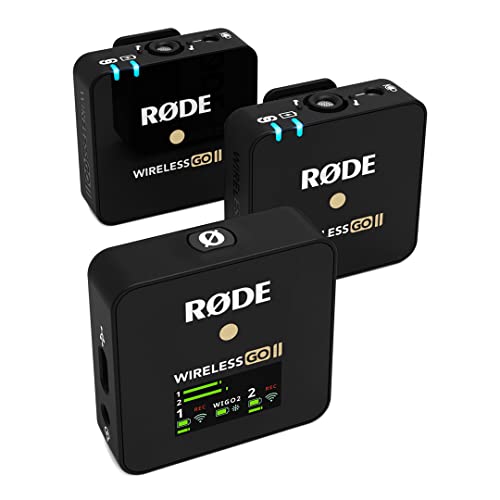
For two-person shoots where a lost take hurts, the Wireless GO II is the pro choice, because each transmitter records on-board as a safety backup. Its Series IV 2.4 GHz link holds up to 200 m in open space, and each transmitter runs for up to 7 hours per charge. Digital audio reaches the phone through the receiver’s USB-C output, which matches what the iPhone 17 needs, while a 3.5 mm output serves cameras. At 31 g per unit, the set stays light on a collar, and the transmitters pair on their own, so you can start filming in seconds.
Specs
- Dual-channel receiver + 2 transmitters
- Series IV 2.4 GHz digital transmission, up to 200 m range
- On-board recording on each transmitter
- Transmitter run time up to 7 hours
- USB-C digital audio output to phones
- Transmitter and receiver weight 31 g each
Best for: Two-person shoots where a backup recording matters more than the smallest possible clip-on.
Watch out for: The receiver has no pass-through charging port, so the phone runs on battery while you record. Confirm the listing still has a seller before ordering.
Hollyland Lark M2S

Nothing here starts faster than the Lark M2S, whose receiver is a small USB-C plug that slides straight into the iPhone 17 with no cable in between. The listing names iPhone 15, 16, and 17, and the 7 g transmitter grips a collar or lapel with a titanium clip. Range reaches up to 300 m, and the charging case lifts the total run time to up to 27 hours, enough for a full day of short clips. Noise cancelling comes built in, and the whole kit slips into a pocket, which suits creators who film the moment they think of it.
Specs
- Wireless lavalier with USB-C plug receiver
- Listed for iPhone 15, 16, and 17
- Max transmission range 300 m
- Total run time up to 27 hours with charging case
- Transmitter weight 7 g
- Titanium clip, noise cancelling built in
Best for: Solo creators who want to plug in and start filming with no cables and no setup.
Watch out for: The plug-in receiver fills the only USB-C port, so you cannot plug in a charger at the same time unless the receiver itself offers a charging passthrough. Confirm the listing still has a seller before ordering.
Shure MV88+ Video Kit

Music, room tone, and street ambience need width, and the MV88+ Video Kit is the only stereo mic in this set. A mid-side condenser design captures a real stereo image, and the free MOTIV app adds five DSP presets plus EQ, compression, and a limiter to shape the tone. The box holds a Manfrotto PIXI tripod, a phone clamp, and 15 in USB-C and Lightning cables, so the mic reaches the iPhone 17 through its digital USB-C cable. A windscreen rides along for outdoor takes.
Specs
- Digital stereo condenser microphone, mid-side design
- Manfrotto PIXI tripod, phone clamp, and mic clip included
- USB-C and Lightning cables included, 15 in each
- Five DSP presets via the free MOTIV app
- Windscreen included
- Model MV88+DIG-VIDKIT
Best for: Musicians and field recordists who want a wide stereo image instead of a single voice.
Watch out for: The mic connects through a cable rather than plugging in directly, so it sits less neatly on a phone in a thick case. Confirm the listing still has a seller before ordering.
RØDE VideoMic Me-C+

The VideoMic Me-C+ plugs straight into the USB-C port and asks for nothing else: no battery, no app, no pairing. Its cardioid pattern picks up sound in front of the phone and softens noise from the sides and behind, which fits street scenes, events, and outdoor clips. MFi certification means the stock Camera app and Voice Memos both accept it at once, and a 3.5 mm headphone jack on the mic lets you hear the take while you film. With nothing to charge and nothing to pair, it is the simplest mic in this guide.
Specs
- Directional cardioid condenser microphone
- USB-C plug, MFi certified for iOS
- 3.5 mm headphone jack for live monitoring
- No battery needed, no app needed
- Works with the stock Camera app and Voice Memos
- Model VMMC+
Best for: Run-and-gun filming where the sound comes from in front of the phone and setup must take seconds.
Watch out for: The mic points where the phone points, so it cannot follow a speaker who walks off-camera. Confirm the listing still has a seller before ordering.
Which One Fits Your Situation
Two-Person Chat on the Move
Pick the DJI Mic Mini when two people talk while walking, because both transmitters stay clipped on and the receiver follows the phone. The 11.5-hour transmitter run time and the 48-hour case total mean you will not stop mid-walk to charge, and the 10 g transmitters vanish on a collar. If a backup track matters more than weight, look at the RØDE Wireless GO II instead.
Solo Creator Who Wants Zero Setup
Pick the Hollyland Lark M2S when you film alone and want to start in seconds. The USB-C plug receiver slides in with no cable, the transmitter clips on, and you are recording. The 27-hour case total covers a day of short clips, and the 7 g transmitter is easy to forget you are wearing. This is the pick for filming on impulse rather than on a plan.
Music or Ambient Sound in Stereo
Pick the Shure MV88+ Video Kit when the sound itself is the subject, from a guitar session to street ambience. Its stereo image gives music a width that a single lavalier cannot match, and the MOTIV app presets let you shape the tone before you press record. The tripod and phone clamp hold the whole rig steady for seated sessions.
Run-and-Gun Filming With No Charging
Pick the RØDE VideoMic Me-C+ when you want a mic that is always ready, because it draws power from the phone and carries no battery of its own. Point the phone at the scene and the cardioid pattern does the rest, and the headphone jack lets you catch wind noise before the take is lost. It is the lightest lift in this set for quick outdoor clips.
Common Mistakes
- Grabbing a mic with only a 3.5 mm plug, which stays silent on this phone unless you add a USB-C adapter with a converter built in.
- Ordering a Lightning-only mic for a USB-C phone and finding the plug will not fit.
- Forgetting that a plug-in receiver fills the only USB-C port, so the phone runs on battery until the take ends.
- Leaving noise cancelling switched on for music, which can thin out instruments and room tone.
- Filming outdoors with no windscreen, then finding wind noise buried the voices.
Frequently Asked Questions
How is a microphone different from a Bluetooth speaker?
A speaker plays sound out, while a microphone captures sound in, so the two do opposite jobs. A speaker’s built-in mic only handles calls, with a small capsule and no wind or noise controls. A dedicated microphone has a larger capsule, a pickup pattern aimed at the scene, and controls for wind and noise. If the audio is the point of the clip, use a mic from this guide.
How is a microphone different from a selfie stick?
A selfie stick holds the phone steady and extends your reach, but it records nothing at all. A microphone captures audio and sends it to the phone digitally through USB-C. The two complement each other: the stick steadies the shot, and the mic cleans up the sound. Many creators use both at once, with a lavalier on the speaker while the stick holds the phone still.
Can I use a microphone with only a 3.5 mm plug?
Not directly, because this phone has no 3.5 mm jack and no analog audio over USB-C. You would need a separate USB-C adapter with its own digital converter, and even then the sound depends on that adapter. A mic with a USB-C plug or a USB-C wireless receiver is the cleaner choice for this phone, because it sends digital audio straight to the Camera app.
Does a wireless mic drain the phone battery?
A plug-in receiver draws a small amount of power from the phone, and the phone itself runs on battery while it records video, so a long session needs a full charge first. The transmitters run on their own batteries and do not touch the phone. Charge the phone between takes, and carry a power bank for a full day of filming, because a dead phone ends the shoot.
More from Amazon
Programs that pair well with the guide above. Offers and eligibility are set by Amazon and may change.
Free shipping on eligible items, Prime Video and more. Eligible new members can start with a free trial.
Start a Prime free trialAd-free music streaming. Eligible new subscribers can start with a free trial.
Try Music Unlimited freeA Prime membership for ages 18-24 with a trial period. Eligibility is set by Amazon.
See Prime for Young AdultsAudiobooks and podcasts to listen to on the go. Eligible new members can start with a free trial.
Try Audible freeAs an Amazon Associate we earn from qualifying purchases.