Key takeaways
- Compare five Bluetooth mice for the iPhone 17 Pro Max, from a full-size MX Master 3S to a slim Pebble, with AssistiveTouch and pairing notes to check.
A Bluetooth mouse changes how an iPhone 17 Pro Max feels in the hand, but not in the way a laptop owner expects. iOS does not give you a full desktop cursor. Instead, a paired mouse drives a small round pointer through AssistiveTouch, Apple’s accessibility feature, and that pointer can tap, scroll, and open menus. The setup shines when the phone drives an external display, where the big screen finally gives the pointer room to move, and it stays useful for long reading sessions, spreadsheets, and remote desktop apps on the phone itself.
This guide is for iPhone 17 Pro Max owners who want a pointer for desk work, travel, or an external display, and who want to know which mouse actually pairs well over Bluetooth. Every mouse below was chosen from the name and specifications listed on its Amazon product page, and each one connects by Bluetooth, the only wireless path the phone offers for a mouse.
Quick Picks
As an Amazon Associate we earn from qualifying purchases.
| Product | Best for | Key spec from title |
|---|---|---|
| Logitech MX Master 3S | Full-size desk work with an external display | 8K DPI sensor, tracks on glass |
| Logitech MX Anywhere 3S | Compact travel with desktop-grade tracking | 8K DPI sensor, up to 70 days per charge |
| Logitech Pebble Mouse 2 M350s | Slim, silent mouse for a small bag | Bluetooth only, pairs with 3 devices |
| Logitech M720 Triathlon | Multi-device switching on a long battery | 2-year battery, 6 programmable buttons |
| Logitech Signature M650 | Contoured comfort for small to medium hands | SmartWheel, silent clicks, 2-year battery |
How to Choose
AssistiveTouch Is the Only Path
An iPhone 17 Pro Max does not show a mouse pointer until you turn on AssistiveTouch, found under Settings, Accessibility, Touch. Once on, a paired Bluetooth mouse moves a round dot around the screen, a click taps, and the scroll wheel moves through web pages and lists. A right click can be assigned to actions such as Home, App Switcher, or Control Center, but there is no full desktop cursor with hover menus or a text caret. Before you compare mice, accept this shape: the pointer is a helper for tapping and scrolling, not a replacement for touch. Test the setup on the phone itself before judging a mouse, because every mouse in this guide uses the same pointer.
Bluetooth Is the Only Connection That Matters
Every mouse below connects to the iPhone 17 Pro Max over Bluetooth. The phone has no USB-A port, so the receiver bundled with many mice has nowhere to plug in, and it stays in the box when the mouse is used with the phone. That receiver is still useful on a laptop or desktop, for a dedicated link, but it adds nothing to the phone. Check the listing before you buy: a mouse sold as 2.4 GHz only, with no Bluetooth, cannot pair with the phone. Multi-device pairing earns its keep here, because a mouse that remembers the phone, a laptop, and a tablet lets you switch with one button instead of repairing every time.
Size, Shape, and Hand Fit
A mouse that feels right for an hour at a desk can feel wrong after three. Full-size mice such as the MX Master 3S and the Signature M650 fill the palm and rest the thumb on a ledge, which suits long sessions but adds weight to a bag. Compact mice such as the MX Anywhere 3S trade palm support for a shape that slips into a jacket pocket, while slim mice such as the Pebble sit flat and suit smaller hands and short sessions. Left-handed buyers should check the shape first, because most contoured mice are built for the right hand.
Battery, Charging, and the Phone’s Own Battery
Every mouse here runs on its own battery, so it never drains the phone, and Bluetooth uses so little power that a day of pointing barely moves the battery gauge. The split that matters is how the mouse refills. Rechargeable mice such as the MX Master 3S and MX Anywhere 3S charge over USB-C and run for up to 70 days, so a single cable covers phone and mouse on a trip. Mice on an AA cell, such as the M720, Pebble M350s, and Signature M650, run for up to two years and keep going with a cell from any drawer. Pick the habit you will keep: a cable you carry, or a spare cell in the drawer.
The 5 Best Options
Logitech MX Master 3S

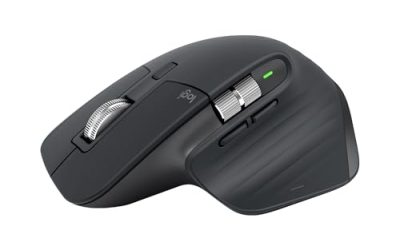
The MX Master 3S is the full-size desk mouse in this guide, built for long sessions with an external display. Its sculpted right-hand shape rests the thumb on a side ledge, the MagSpeed wheel spins freely through long documents, and the 8K DPI sensor tracks on glass, so a glass desk or a train tray table works as a surface. It pairs with three devices over Bluetooth, and the side buttons switch between the phone, a laptop, and a tablet. The trade-off is size: at 141 g it is the heaviest mouse here, and the shape suits a desk more than a jacket pocket.
Specs
- 8K DPI sensor tracks on glass and other surfaces
- MagSpeed electromagnetic scroll wheel
- Quiet Clicks
- USB-C rechargeable, up to 70 days on a full charge
- Bluetooth and Logi Bolt, pairs with up to 3 devices
- 141 g, ergonomic right-hand shape
- 7 buttons including a gesture button
Best for: Desk work with an external display and long sessions.
Watch out for: Largest and heaviest pick here; buttons cannot be remapped from the phone, only from a computer with Logi Options+.
Logitech MX Anywhere 3S

The MX Anywhere 3S packs the Master line’s tracking into a compact body that fits a jacket pocket. The same 8K DPI sensor tracks on glass, the MagSpeed wheel spins through long pages, and quiet clicks keep it polite in a library or a shared office. It pairs with three devices and charges over USB-C, with a one-minute charge giving about three hours of use, so a dead battery rarely ends a work session. The smaller body trades palm support for portability, so buyers with large hands should check the listed dimensions before ordering.
Specs
- 8K DPI sensor tracks on glass
- MagSpeed scroll wheel
- Quiet Clicks
- USB-C rechargeable, up to 70 days per charge
- 1-minute charge gives about 3 hours of use
- Bluetooth and Logi Bolt, pairs with up to 3 devices
- 99 g, compact shape
Best for: Travel and small bags without giving up desktop-grade tracking.
Watch out for: Small body gives less palm support on long sessions; confirm the Graphite model 910-006925 before ordering.
Logitech Pebble Mouse 2 M350s

The Pebble Mouse 2 M350s is the lightest and slimmest pick here, a flat pebble shape that slips into a bag pocket beside the phone. It connects by Bluetooth only, with no receiver in the box, which is no loss on a phone, and the Easy-Switch button jumps between three paired devices. Quiet clicks make it the polite choice for a library or a night train, and a single AA cell runs for up to 24 months. The flat shape suits short sessions and small hands, and buyers who want a palm-filling grip should look at the contoured picks instead.
Specs
- Bluetooth only, no receiver in the box
- Easy-Switch pairs with up to 3 devices
- Quiet clicks
- 1 AA battery, up to 24 months of battery life
- 100 g, slim portable shape
- Customizable middle button
Best for: Quiet rooms and a bag pocket beside the phone.
Watch out for: Bluetooth only, so there is no receiver for a computer; flat shape suits short sessions best.
Logitech M720 Triathlon
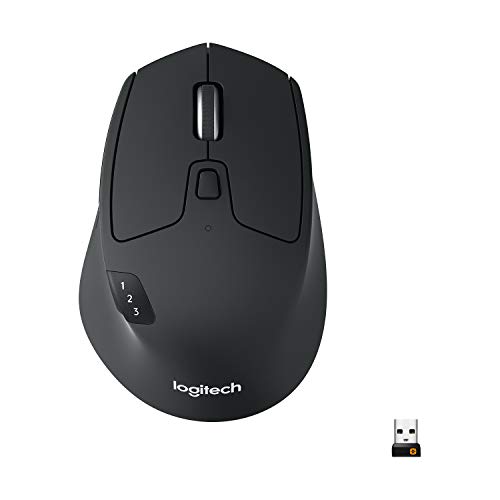
The M720 Triathlon is the workhorse of this guide, a full-size mouse built for switching between devices all day. It pairs with three devices over Bluetooth or its included receiver, and a dedicated button jumps between them without repairing. Six programmable buttons, a hyper-fast scroll wheel, and a two-year run on a single AA cell make it a set-and-forget desk mouse. The 1000 DPI sensor is modest next to the 8K sensors above, but AssistiveTouch sets pointer speed in iOS, so the extra sensor headroom adds little on a phone. The right-hand shape suits long sessions at a desk.
Specs
- 1000 DPI optical sensor
- Bluetooth and Unifying receiver
- Hyper-fast scroll wheel
- 6 programmable buttons
- 1 AA battery, up to 2 years of battery life
- 135 g, full-size right-hand shape
Best for: Switching between phone, laptop, and tablet all day.
Watch out for: 1000 DPI sensor is modest next to the 8K picks; the receiver is for computers, not the phone.
Logitech Signature M650

The Signature M650 is the comfortable middle ground: a contoured right-hand shape for small to medium hands, silent clicks, and a SmartWheel that shifts between line-by-line and free-spin scrolling. It connects over Bluetooth or its included receiver, pairs with more than one device, and runs for up to two years on a single AA cell, so the battery rarely needs a thought. Customizable side buttons add shortcuts on a computer, though they cannot be remapped from the phone itself. The shape is the draw here: a palm-filling grip at a weight that still travels well.
Specs
- SmartWheel scroll wheel
- Silent clicks
- Bluetooth and Logi Bolt receiver
- 1 AA battery, up to 2 years of battery life
- Customizable side buttons
- 101 g, contoured shape for small to medium hands
Best for: Small to medium hands that want a contoured grip.
Watch out for: Right-hand shape only; side buttons need a computer to remap.
Which One Fits Your Situation
Desk Work With an External Display
Plug the iPhone 17 Pro Max into a monitor over USB-C and the phone can drive a display up to 4K at 60 Hz, which is where a mouse earns its keep. The MX Master 3S is the pick here: full-size comfort, a free-spinning wheel for long documents, and three-device pairing for the phone and a laptop. Add a Bluetooth keyboard and the phone becomes a light workstation for documents, spreadsheets, and remote desktop apps.
Travel Light With One Small Bag
When the bag holds only the phone, a charger, and a notebook, the mouse has to disappear into a pocket. The Pebble M350s is the pick: flat, light, silent, and Bluetooth only, so nothing extra rides along. The MX Anywhere 3S is the step up when the trip includes laptop work, since the same mouse tracks on glass and charges over the same USB-C cable as the phone.
One Mouse for Phone, Laptop, and Tablet
Switching devices all day calls for a mouse that remembers more than one pairing. The M720 Triathlon is the pick, with a dedicated button that jumps between three devices and a two-year battery that never interrupts the habit. The MX Master 3S and MX Anywhere 3S offer the same three-device pairing with quieter clicks and faster sensors, so choose the M720 for the longest battery and the MX picks for the smoother wheel.
Quiet Rooms and Late Nights
Libraries, shared offices, and night trains punish a loud click. The Pebble M350s and the Signature M650 are the picks, both built around quiet clicks that keep typing and pointing polite. The Pebble suits a small bag and short sessions, while the M650 adds a contoured grip for longer stretches. Skip the M720 here: its clicks are the loudest of the five, and the sound carries in a silent room.
Common Mistakes
- Expecting a full desktop cursor: the iPhone shows a round AssistiveTouch pointer, not a laptop cursor with hover menus.
- Buying a receiver-only mouse: a 2.4 GHz mouse without Bluetooth cannot pair with the phone at all.
- Assuming buttons remap on the phone: Logitech’s Options software does not run on iOS, so remap buttons from a computer first.
- Pairing the mouse and stopping there: without AssistiveTouch turned on, no pointer appears, even though the mouse is connected.
- Chasing the highest DPI: AssistiveTouch sets pointer speed in iOS, so an 8K sensor adds little on the phone itself; comfort and battery matter more.
Frequently Asked Questions
Can a Bluetooth mouse replace a Bluetooth keyboard on an iPhone 17 Pro Max?
No. A mouse points and taps, while a keyboard types, and the two cover different jobs. A mouse helps with scrolling, selecting text, and driving an external display, but typing a long message or a document still needs a keyboard. The two pair well together: a Bluetooth keyboard for words and a Bluetooth mouse for pointing turn the phone into a light workstation.
Is a Bluetooth mouse the same as a Bluetooth tracker?
No. A mouse controls the phone through AssistiveTouch, moving a pointer and tapping on your behalf. A tracker, such as the tags in the batch 140 guide, is a tag that helps you find lost keys or a bag through a finding network. The two share only the Bluetooth radio: one is an input device you hold, and the other is a tag you attach to things you might lose.
Can I use a Bluetooth mouse with an external display?
Yes, and that is where a mouse is most useful. The iPhone 17 Pro Max can drive an external display up to 4K at 60 Hz over USB-C, and the AssistiveTouch pointer moves across the big screen just as it does on the phone. A full-size mouse such as the MX Master 3S suits this setup, and a Bluetooth keyboard completes it.
Do I need the USB receiver that comes with the mouse?
No, not for the phone. The iPhone 17 Pro Max has no USB-A port, so the receiver bundled with most Logitech mice has nowhere to plug in, and the mouse pairs over Bluetooth instead. Keep the receiver for a laptop or desktop, where it gives a dedicated link. The only mouse here with no receiver at all is the Pebble M350s, which connects by Bluetooth only.
More from Amazon
Programs that pair well with the guide above. Offers and eligibility are set by Amazon and may change.
Free shipping on eligible items, Prime Video and more. Eligible new members can start with a free trial.
Start a Prime free trialAd-free music streaming. Eligible new subscribers can start with a free trial.
Try Music Unlimited freeA Prime membership for ages 18-24 with a trial period. Eligibility is set by Amazon.
See Prime for Young AdultsAudiobooks and podcasts to listen to on the go. Eligible new members can start with a free trial.
Try Audible freeAs an Amazon Associate we earn from qualifying purchases.