Our Top Picks

A Galaxy Z Fold 7 can turn into a small desktop computer when you plug it into the right hub. Samsung DeX opens a desktop-style workspace on an external monitor, and a single USB-C hub adds the monitor connection, a keyboard and mouse, a flash drive, and charging at the same time. The catch is that the phone has only one USB-C port, and that port tops out at 5 Gbps, so the hub you pick decides how smooth the whole setup feels.
This guide is for Fold 7 owners who want a desk setup, a travel kit, or a living-room screen without buying a laptop. It also suits students and office workers who carry the phone as their only computer. Every hub below was picked from the names and listed details on its Amazon product page, with the focus on DeX support, HDMI output, pass-through charging, and ports that stay useful on a phone.
Quick Picks
As an Amazon Associate we earn from qualifying purchases.
| Product | Best for | Key spec from title |
|---|---|---|
| UGREEN Revodok Pro 9-in-1 | A full desk setup with wired internet | 4K@60Hz HDMI, 100W PD charging |
| uni USB C Hub 8-in-1 | Travel with a detachable cable | 4K HDMI, 1Gbps Ethernet, 100W PD |
| Anker 341 USB-C Hub 7-in-1 | A simple, well-known hub for DeX | 4K HDMI, 85W Power Delivery |
| GKEAPZA USB C to HDMI DeX Dock 5-in-1 | DeX on a budget with wired audio | 4K HDMI, PD 60W, 3.5mm audio jack |
| Dockteck 7-in-1 USB C Hub | Smooth 4K video plus Ethernet | 4K@60Hz HDMI, 100W Power Delivery |
How to Choose
Start with DeX and the HDMI port
DeX is the reason most Fold 7 owners buy a hub, so check the HDMI port first. The phone sends video over DisplayPort Alt Mode, and every hub here takes that signal and turns it into HDMI for a monitor or TV. A 4K at 60Hz port keeps mouse movement and scrolling smooth, while a 4K at 30Hz port still works fine for documents, video calls, and slides. Note that DeX only drives one external screen, so a hub with two HDMI ports will not give you two separate DeX screens. Pick the refresh rate that matches your monitor and the work you do most.
Check pass-through charging first
DeX drains the 4,400 mAh battery fast, so pass-through charging matters more than it does on a laptop. Look for a USB-C PD input port on the hub and plug your charger into it, not into the phone. Most hubs here accept up to 100W input, which is far above the 25W the Fold 7 draws, so even a 30W or 45W charger keeps the phone topped up while DeX runs. One warning: some hubs only pass power to laptops and will not charge a phone at all, so read the listing before you buy. If your hub cannot charge the phone, keep a separate cable handy for long sessions.
Match data speed to your files
The Fold 7 USB-C port runs at USB 3.2 Gen 1 speed, which tops out at 5 Gbps, so a 10 Gbps hub will not move files any faster than a 5 Gbps hub when the phone is the source. That cap still matters: a 5 Gbps USB-A port copies photos and documents quickly, while a USB 2.0 port at 480 Mbps crawls with large video files. Use the fast ports for flash drives and external SSDs, and save the slow ports for a keyboard and mouse, which need almost no bandwidth. If you move camera cards often, pick a hub with SD and microSD slots and check the listed card speed.
Mind the fit, heat, and cable
A hub hangs off the bottom of the phone, so size and cable length shape daily use. A short tethered cable keeps the hub close to the phone on a desk, while a detachable cable lets you swap in a longer one for a TV across the room. Thick cases can block the hub plug, so check that the connector reaches the port with your case on, or remove the case before you plug in. Hubs also warm up when they drive a display and charge at once, which is normal, but a hot hub next to a folded phone deserves airflow. Keep the phone folded while DeX runs, since the inner screen stays off and the hinge stays shut.
The 5 Best Options
UGREEN Revodok Pro 9-in-1

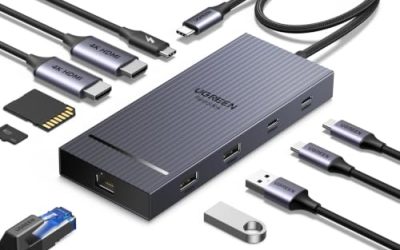
The UGREEN Revodok Pro is the most complete hub in this roundup, and it fits a Fold 7 owner who wants a real desk setup. Its HDMI port reaches 4K at 60Hz, so DeX feels smooth on a large monitor, and the gigabit Ethernet port gives a wired connection that hotel and office Wi-Fi cannot match. Two USB-C and USB-A data ports run at up to 10Gbps, though the phone itself caps at 5 Gbps, and the SD and TF readers move camera files at up to 170MB/s. It is the pick for a desk that stays put.
Specs
- Ports: 4K@60Hz HDMI, gigabit Ethernet, USB-C and USB-A data, SD/TF card readers, USB-C PD
- Data speed: USB-C and USB-A data up to 10Gbps
- Card readers: SD/TF up to 170MB/s
- Charging: 100W PD input
- Model: 75028
Best for: a fixed desk with a monitor and wired internet.
Watch out for: the PD port is charging only, with no data or video through it, and the phone still caps data at 5 Gbps.
uni USB C Hub 8-in-1

The uni hub is the travel pick of this group because its cable detaches, so you can pack the small body flat and swap in a longer cable when the TV sits far from the couch. The listing names Galaxy S24 and S23 phones among its compatible devices, which is a good sign for a Fold 7, and the HDMI port reaches 4K at 30Hz for documents and video. Two USB 3.0 ports run at 5 Gbps for drives, a USB 2.0 port suits a mouse, and the gigabit Ethernet port covers wired hotel internet.
Specs
- Ports: 4K HDMI, 1Gbps Ethernet, 2 USB 3.0, 1 USB 2.0, SD/microSD card reader, 100W PD
- Data speed: USB 3.0 up to 5 Gbps, USB 2.0 up to 480 Mbps
- Card reader: SD/microSD up to 104 Mbps
- Charging: 100W PD input
- Model: 27-23
Best for: travel and hotel desks with a detachable cable.
Watch out for: HDMI tops out at 4K@30Hz, and the Ethernet port needs a CAT6 or better cable to reach 1 Gbps.
Anker 341 USB-C Hub 7-in-1
The Anker 341 is the plain, well-known choice for a Fold 7 owner who wants a hub from a familiar brand without extra ports to learn. It gives a 4K HDMI port for DeX, one USB-C data port and two USB-A ports at 5 Gbps, plus SD and microSD slots for camera cards. The 8.27-inch body weighs 3.52 ounces and the short 0.6-foot cable keeps it tidy on a desk. Anker backs it with an 18-month warranty, which suits a hub that will be plugged in and unplugged every day.
Specs
- Ports: 4K HDMI, 1 USB-C data, 2 USB-A, SD/microSD card readers, USB-C PD
- Data speed: USB-C and USB-A data up to 5 Gbps
- Charging: 100W PD input, up to 85W pass-through
- Size: 8.27 x 2.13 x 0.59 inches, 3.52 ounces
- Model: A8346
Best for: a simple desk setup from a familiar brand.
Watch out for: the listing says this hub is not suitable for pass-through charging phones, so DeX and data work but the phone may not charge through it.
GKEAPZA USB C to HDMI DeX Dock 5-in-1

The GKEAPZA dock is the only hub here built around DeX by name, and it shows in the listing, which lists Galaxy S25, S24, S23, and S22 phones and says plainly that DeX mode needs a power supply connected. Its HDMI port reaches 4K at 30Hz, the USB 3.0 port takes a keyboard or flash drive, and the 3.5mm audio jack with a built-in 24-bit DAC gives wired sound that the Fold 7 cannot offer on its own. With only five ports it stays small, which suits a bag or a bedside table.
Specs
- Ports: 4K HDMI, USB 3.0, USB-C PD, 3.5mm audio jack
- Video: 4K UHD 3840 x 2160 at 30Hz
- Charging: PD 60W input
- Audio: 3.5mm jack with 24-bit DAC
- Model: F402
Best for: DeX on a budget with wired headphones.
Watch out for: DeX mode needs a charger plugged in, and 60W PD is the lowest charging headroom in this roundup.
Dockteck 7-in-1 USB C Hub
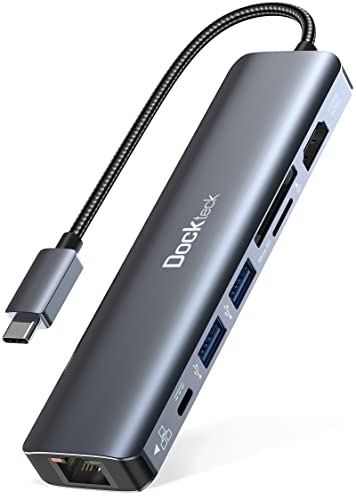
The Dockteck hub pairs a 4K at 60Hz HDMI port with a gigabit Ethernet port, which makes it the pick for a Fold 7 owner who streams video to a monitor and wants a wired connection at the same time. The 100W PD port covers charging with room to spare, the USB 3.0 data ports run at up to 5 Gbps for drives, and the SD and TF slots handle camera cards. Its model number is DD0003, and the compact body slips into a bag beside the folded phone.
Specs
- Ports: 4K@60Hz HDMI, 1Gbps Ethernet, 100W PD, SD/TF card slots, USB 3.0 data ports
- Data speed: USB 3.0 up to 5 Gbps
- Charging: 100W PD input
- Model: DD0003
Best for: smooth 4K DeX plus a wired internet connection.
Watch out for: the hub has no USB-C data port listed, so flash drives use the USB-A ports.
Which One Fits Your Situation
You want a desk that stays put
Pick the UGREEN Revodok Pro 9-in-1. Its 4K at 60Hz HDMI keeps DeX smooth, the gigabit Ethernet port replaces shaky Wi-Fi, and the card readers handle camera files without a second adapter. Plug a 45W or stronger charger into the PD port and the Fold 7 stays charged all day. Leave the hub on the desk and plug the phone in when you sit down.
You travel light and work from hotels
Pick the uni 8-in-1. The detachable cable packs flat, the 100W PD port takes any strong charger you already carry, and the Ethernet port covers wired hotel internet when Wi-Fi drops. Its 4K at 30Hz HDMI is fine for documents and calls, and the two 5 Gbps ports move files from a flash drive fast enough for a trip.
You want DeX with wired headphones
Pick the GKEAPZA DeX Dock 5-in-1. It is the only hub here with a 3.5mm audio jack, and the built-in DAC gives wired sound the Fold 7 has no jack for. The listing names Galaxy phones and DeX by name, so setup holds no surprises. Remember to plug in a charger, since DeX mode needs power connected to run.
You want the simplest hub from a known brand
Pick the Anker 341 7-in-1. It covers DeX, data, and card readers with no extra ports to sort out, and the 18-month warranty suits daily plugging. Just know the pass-through port will not charge the phone, so keep the Fold 7 charged before a long DeX session or charge it separately when you finish.
Common Mistakes
- Buying a hub that only works with laptops and never checking the listing for Galaxy or DeX support.
- Expecting 10 Gbps file transfers from a phone whose USB-C port tops out at 5 Gbps.
- Plugging the charger into the phone instead of the hub PD port, then watching the battery drain during DeX.
- Leaving the phone unfolded while DeX runs, which leaves the inner screen and hinge exposed for no reason.
- Forgetting that DeX drives only one external screen, so a second HDMI port cannot add a second desktop.
Frequently Asked Questions
Does the Galaxy Z Fold 7 support Samsung DeX through a USB-C hub?
Yes. The Fold 7 supports DeX over its USB-C port, and a hub with an HDMI port sends that desktop workspace to a monitor or TV. Plug the hub into the phone while it is folded, connect the monitor, keyboard, and mouse, and DeX starts. A charger in the hub PD port keeps the battery up during long sessions.
Can a hub charge the Fold 7 while DeX runs?
Most hubs here can, as long as you plug a charger into the hub PD port. The phone draws at most 25W, so a 30W or stronger charger holds the battery steady while DeX runs. One exception is the Anker 341, whose listing says its pass-through charging does not suit phones, so charge that phone separately.
Will a 10Gbps hub move files faster on the Fold 7?
No. The Fold 7 USB-C port runs at USB 3.2 Gen 1 speed, which tops out at 5 Gbps, so a 10Gbps hub cannot beat a 5 Gbps hub for files coming from the phone. The faster ports still help when you move files between two drives plugged into the hub, but the phone itself sets the limit.
Do I need to remove my case to use a hub?
Sometimes. A thick case can stop the hub plug from seating fully in the USB-C port, which breaks video or charging without warning. Try the hub with your case on first, and if the connection drops, take the case off before you plug in. A hub with a detachable cable also helps, since a longer cable clears a bulky case edge.
More from Amazon
Programs that pair well with the guide above. Offers and eligibility are set by Amazon and may change.
Free shipping on eligible items, Prime Video and more. Eligible new members can start with a free trial.
Start a Prime free trialAd-free music streaming. Eligible new subscribers can start with a free trial.
Try Music Unlimited freeA Prime membership for ages 18-24 with a trial period. Eligibility is set by Amazon.
See Prime for Young AdultsAudiobooks and podcasts to listen to on the go. Eligible new members can start with a free trial.
Try Audible freeAs an Amazon Associate we earn from qualifying purchases.