Key takeaways
- Compare five USB-C flash drives for the Galaxy Z Fold 7, from a tiny Samsung stick to a 1000 MB/s PNY drive, with speed, size, and app notes.
The Galaxy Z Fold 7 has no microSD slot, so extra storage has to come through its USB-C port or the cloud. That fact shapes the whole buying decision: the right flash drive must plug straight into the phone, move big photo and video files fast enough to feel useful, and then hand those files to a laptop without a dongle in between. A slow USB 2.0 stick turns a 4K video backup into a wait, while a drive with one connector leaves you hunting for an adapter at the worst moment.
This guide is for Fold 7 owners who shoot a lot of photos and video, move work files between phone and computer, or want a pocket backup that does not depend on a network connection. It covers travelers who back up shots on the road, creators who offload 4K clips, and anyone whose Fold 7 storage is nearly full. Each drive below was picked from its name and listed specs on the Amazon product page.
Quick Picks
As an Amazon Associate we earn from qualifying purchases.
| Product | Best for | Key spec from title |
|---|---|---|
| Samsung Type-C USB Flash Drive 256GB | Fastest match for the Fold 7 port | Up to 400MB/s USB 3.2 Gen 1 read speeds |
| SanDisk Ultra Dual Drive Go 256GB | Everyday carry with a keyring | Up to 400MB/s read speeds, swivel design |
| PNY DUO LINK V3 256GB | Fastest transfers on a computer | Read/Write 1000/800MB/s, USB 3.2 Gen 2 |
| SanDisk Ultra Dual Drive USB Type-C 256GB | A proven dual-connector classic | USB 3.1, up to 150MB/s read speeds |
| Kingston DataTraveler microDuo 3C 256GB | A tiny dual-connector drive | Up to 200MB/s read, USB 3.2 Gen 1 |
How to Choose
Match the speed to the phone port
The Fold 7 USB-C port runs at USB 3.2 Gen 1, which tops out at 5 Gbps, so a drive listed at 400 MB/s read can use nearly all of that link, while a 1000 MB/s drive will run at the phone port limit and only show its full pace on a faster computer. Check the read speed on the listing and treat anything under 150 MB/s as slow for moving video. Write speed matters just as much when you copy files onto the drive, yet many listings publish only the read number, so a missing write figure is a gap worth noting before you buy.
Pick dual connectors for phone-to-computer moves
A drive with both USB-C and USB-A ends lets you plug into the Fold 7, then straight into a laptop or desktop with no adapter in the middle. Single-connector USB-C sticks are smaller and lighter, but they strand your files on the phone until you find a hub or a second drive. If your workflow is mostly phone-to-phone or phone-to-cloud, a single USB-C end is fine. If you move files to a Windows or Mac computer every week, the dual-connector design saves a step on every single transfer.
Check size, weight, and case fit
A flash drive lives on a keyring or in a pocket, so its length and weight decide whether you carry it or leave it at home. The smallest sticks barely stick out of the phone port, while longer swivel drives can snag in a pocket. A thick or wide body may not seat fully when the phone wears a case with a tight port cutout, so measure the case opening or pick a slim drive with a long, narrow USB-C plug. A capless or swivel design also keeps you from losing a tiny cap on a trip.
Look at the app and the file system
Android reads common formats such as exFAT and FAT32 without extra software, and the Fold 7 Files app handles copy, move, and delete out of the box. Some makers add a free companion app that can back up photos on a schedule or sort files by type, which helps if you want hands-off backups. Check whether the drive ships formatted as exFAT, since that format accepts files larger than 4GB, while a FAT32 drive will refuse a single long 4K clip. Reformatting is possible, but it wipes the drive first.
The 5 Best Options
Samsung Type-C USB Flash Drive 256GB
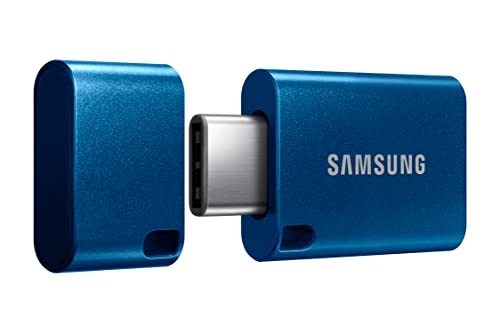
This tiny blue Samsung stick is the closest match to the Fold 7 port, with a listed read speed of up to 400 MB/s that sits just under the phone 5 Gbps ceiling, so large photo folders move in seconds rather than minutes. Its body is small enough to leave plugged in while the phone rests on a table, and Samsung lists it as waterproof, which suits a drive that travels in pockets and bags. With 256GB of room it holds thousands of photos or hours of 4K video, and it plugs into any USB-C laptop the same way.
Specs
- Capacity: 256GB
- Interface: USB 3.2 Gen 1
- Read speed: up to 400MB/s
- Model: MUF-256DA/AM
- Color: Blue
- Waterproof
- Compatible with USB 3.0 and USB 2.0
- Transfers a 4GB file in 11 seconds
Best for: Fold 7 owners who want the fastest drive the phone port can use.
Watch out for: The listing publishes no write speed, so large copies onto the drive may run slower than reads; confirm the listing still has a seller before ordering.
SanDisk Ultra Dual Drive Go 256GB
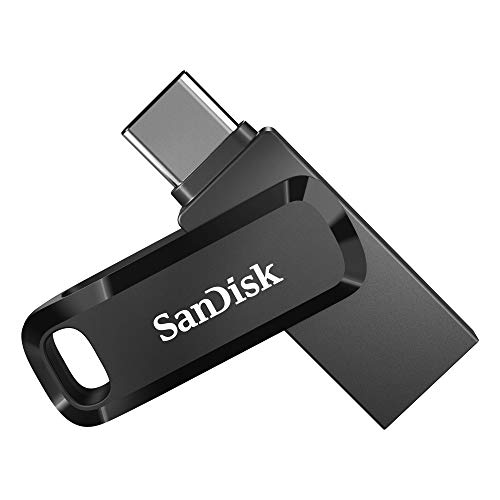
The Dual Drive Go pairs a reversible USB-C plug with a standard USB-A plug on a swivel body, so one drive covers the Fold 7 and any older laptop with no adapter needed. Its listed read speed of up to 400 MB/s matches the Samsung stick, and the swivel design shields both connectors when the drive rides on a keyring. SanDisk offers a free Memory Zone app on Android that can back up photos and videos on a schedule, which turns the drive into a pocket backup routine rather than a one-off transfer tool.
Specs
- Capacity: 256GB
- Interface: USB 3.2 Gen 1
- Read speed: up to 400MB/s
- Model: SDDDC3-256G-GAM46
- Color: Black
- Dual USB Type-C and USB Type-A connectors
- Swivel design with keyring hole
- Weight: 4.54 g
Best for: Anyone who moves files between the Fold 7 and a computer every week.
Watch out for: The swivel body is longer than a single-connector stick and can catch in a tight pocket; the listing publishes no write speed, so check the seller before ordering.
PNY DUO LINK V3 256GB

The DUO LINK V3 is the fastest drive in this roundup on paper, with listed read and write speeds of 1000 and 800 MB/s over USB 3.2 Gen 2, which makes it the best choice when the same drive also serves a fast laptop or desktop. On the Fold 7 it still works, but the phone 5 Gbps port caps its pace, so you pay for speed the phone cannot use and gain it back only on a computer. It carries both Type-C and Type-A ends, so it moves files between phone and computer with no extra adapter in the bag.
Specs
- Capacity: 256GB
- Interface: USB 3.2 Gen 2
- Read speed: up to 1000MB/s
- Write speed: up to 800MB/s
- Model: P-FDI256DULNK3TYC-GE
- Dual Type-C and Type-A OTG connectors
- Compatible with USB 3.2 Gen 1, USB 3.0, and USB 2.0
Best for: Creators who edit on a fast computer and back up on the Fold 7.
Watch out for: The Fold 7 port caps speed at 5 Gbps, so the full 1000 MB/s only shows on a Gen 2 computer; confirm the listing still has a seller before ordering.
SanDisk Ultra Dual Drive USB Type-C 256GB

This older SanDisk dual drive is the proven classic of the group, with a USB-C plug on one end and a USB-A plug on the other, plus a listed read speed of up to 150 MB/s that is slower than the newer picks but still fine for photos, documents, and music. Its small body weighs just 9.1 g and slips onto a keyring without notice, and it works with the same SanDisk Memory Zone app for scheduled Android backups. It is a sensible pick when the job is freeing space and moving everyday files rather than shuttling huge 4K clips.
Specs
- Capacity: 256GB
- Interface: USB 3.1
- Read speed: up to 150MB/s
- Model: SDDDC2-256G-G46
- Color: Black
- Dual USB Type-C and USB Type-A connectors
- Dimensions: 3.81 x 2.07 x 0.94 cm
- Weight: 9.1 g
Best for: Everyday file moves and freeing phone space on a budget of time, not speed.
Watch out for: At 150 MB/s it takes noticeably longer to move large video files than the 400 MB/s picks; the listing publishes no write speed, so check the seller before ordering.
Kingston DataTraveler microDuo 3C 256GB
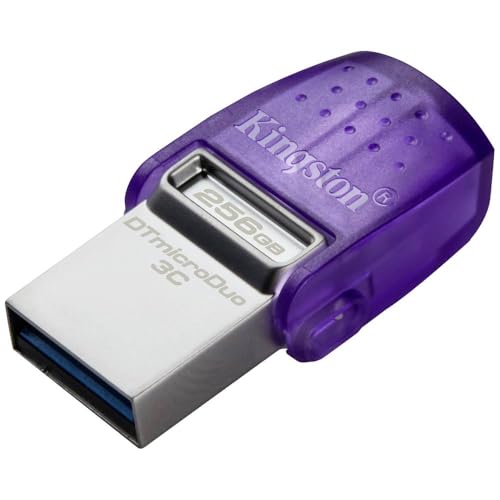
The Kingston microDuo 3C is the smallest dual-connector drive here, measuring under 30 mm long, so it barely sticks out of the Fold 7 port and rides easily on a keyring. It lists a read speed of up to 200 MB/s over USB 3.2 Gen 1, which sits between the classic SanDisk and the 400 MB/s leaders, and it carries both USB-C and USB-A ends for direct moves to a laptop. Kingston backs it with a five-year warranty, which is the longest cover in this roundup and a useful tiebreaker when two drives look alike.
Specs
- Capacity: 256GB
- Interface: USB 3.2 Gen 1
- Read speed: up to 200MB/s
- Model: DTDUO3CG3/256GB
- Dual USB Type-C and USB Type-A connectors
- Dimensions: 29.94 x 16.60 x 8.44 mm
- 5-year warranty
Best for: Travelers who want the smallest dual-connector drive that still moves files quickly.
Watch out for: Its tiny body is easy to misplace, and there is no keyring hole listed, so keep it in a pouch; the listing publishes no write speed, so check the seller before ordering.
Which One Fits Your Situation
You shoot 4K video and need fast offloads
Pick the Samsung Type-C drive or the SanDisk Dual Drive Go, since both list read speeds of up to 400 MB/s and sit near the Fold 7 port limit. Either one clears a full day of clips quickly, and the Samsung stick is the smaller of the two. Skip the 150 MB/s classic here, since moving gigabytes of video on it takes far longer and breaks the flow of a shoot day.
You move files to a laptop every day
Pick a dual-connector drive, and the SanDisk Dual Drive Go is the best all-rounder because it pairs two connectors with a 400 MB/s read speed and a keyring hole. The Kingston microDuo 3C is the compact alternative when pocket space is tight. A single-connector stick only makes sense if your laptop already has USB-C and you never touch an older USB-A port.
You want one drive for phone and fast computer
Pick the PNY DUO LINK V3, because its 1000 MB/s read and 800 MB/s write speeds only show their full pace on a USB 3.2 Gen 2 computer, while it still works on the Fold 7 at the phone port limit. It costs more speed than the phone can use, but it is the only pick here that keeps up with a fast desktop workflow and a Fold 7 backup in one device.
You want the smallest drive that just works
Pick the Kingston microDuo 3C for its sub-30 mm body and 200 MB/s read speed, or the Samsung stick if you would rather have the faster 400 MB/s pace in a slightly larger body. Both plug straight into the Fold 7 with no adapter, and both are light enough to forget on a keyring until the phone storage warning appears.
Common Mistakes
- Buying a USB 2.0 drive and then waiting through slow transfers of large video files.
- Picking a single-connector USB-C stick when your laptop still needs USB-A for file moves.
- Ignoring write speed, since many listings publish only the read number and copies onto the drive run slower.
- Choosing a drive formatted as FAT32 and then finding it refuses a single 4K clip larger than 4GB.
- Leaving a wide drive plugged in while the phone sits in a thick case, which can loosen the connector over time.
Frequently Asked Questions
Does the Fold 7 support USB-C flash drives?
Yes. The Fold 7 USB-C port supports OTG, so a USB-C flash drive plugs in and appears in the Files app for copy, move, and delete. The port runs at USB 3.2 Gen 1, which tops out at 5 Gbps, so a faster drive still works but runs at the phone limit. No extra adapter is needed, and no microSD slot exists on this phone.
Can I back up photos automatically to a flash drive?
Some drives help here. The SanDisk Memory Zone app can back up photos and videos from an Android phone to a SanDisk drive on a schedule, which suits a pocket backup routine. Other drives rely on the Files app, where you copy folders by hand. Either way, keep the drive plugged in until the copy finishes, since pulling it early can leave partial files behind.
Will a USB-C flash drive fit with a case on?
It depends on the case and the drive. A slim drive with a narrow USB-C plug fits most cases, while a wide or swivel body may not seat fully in a case with a tight port cutout. If the drive wobbles or disconnects, remove the case for the transfer or pick a slimmer drive. A loose connection during a copy can corrupt the file being written.
Can I use a 1000 MB/s drive with the Fold 7?
Yes, it works, but the phone port caps the pace at 5 Gbps, so you will not see the full 1000 MB/s from the Fold 7 itself. The extra speed only shows on a computer with a USB 3.2 Gen 2 port. Buy the faster drive when the stick also serves a fast laptop, and buy a 400 MB/s drive when the phone is its home.
More from Amazon
Programs that pair well with the guide above. Offers and eligibility are set by Amazon and may change.
Free shipping on eligible items, Prime Video and more. Eligible new members can start with a free trial.
Start a Prime free trialAd-free music streaming. Eligible new subscribers can start with a free trial.
Try Music Unlimited freeA Prime membership for ages 18-24 with a trial period. Eligibility is set by Amazon.
See Prime for Young AdultsAudiobooks and podcasts to listen to on the go. Eligible new members can start with a free trial.
Try Audible freeAs an Amazon Associate we earn from qualifying purchases.