Key takeaways
- Compare five USB-C adapters for the Galaxy S25 Plus, from DAC dongles for wired earbuds to 4K hubs for DeX, with charging and video notes before you buy.
The Galaxy S25 Plus gives you one USB-C 3.2 port and no headphone jack, so every wired job runs through that single opening: wired earbuds, a monitor for DeX, an old flash drive, a keyboard, a charger. Pick the wrong adapter and the earbuds stay silent, the monitor shows nothing, or the file transfer crawls while the battery drains. Pick the right one and the same port handles audio, video, storage, and charging without a second thought.
This guide is for S25 Plus owners who still reach for wired earbuds on a flight, run a DeX desktop from a hotel monitor, move photos off a camera card, or keep a drawer of older USB-A gear in service. Every adapter below was chosen from the name and specs on its Amazon product page, with the DAC, video, and charging details checked against the listing rather than guessed.
Quick Picks
As an Amazon Associate we earn from qualifying purchases.
| Product | Best for | Key spec from title |
|---|---|---|
| Apple USB-C to 3.5mm Adapter | Wired earbuds on the go | Built-in DAC, US A2049 version |
| UGREEN USB-C to 3.5mm Adapter | Hi-Fi wired listening | 24-bit/96kHz DAC, braided cable |
| Anker USB-C to USB-A Adapter 2-Pack | Old USB-A gear | USB 3.0, 5 Gbps, two adapters |
| Anker 7-in-1 Hub | DeX desktop with card reader | 4K@60Hz HDMI, 85W passthrough |
| Anker 5-in-1 Hub | Compact DeX and charging | 4K@30Hz HDMI, 90W passthrough |
How to Choose
Start with the job, not the port count
A single-port phone forces a choice: one adapter cannot do everything well. An audio dongle only carries sound, a small OTG adapter only links USB-A gear, and a hub adds video and charging but takes up more room in a bag. Before you compare specs, name the one job you need most — wired earbuds, a DeX monitor, a flash drive, or a card reader — and let that job pick the shape. A dongle wins when the job is audio alone, a hub wins when you need a screen and power at once, and a two-pack of tiny adapters wins when you only need to plug old gear in now and then.
Check video output before you buy
DeX turns the S25 Plus into a desktop, but only when the adapter can carry video out of the USB-C port. That means DisplayPort Alt Mode support and an HDMI port — a plain USB-C data port never carries a picture, no matter what the box implies. Both hubs below send video through HDMI, one at 4K and 60Hz and the other at 4K and 30Hz, which is smooth enough for documents and streaming. Check the listing for the words DeX or DP Alt Mode, and confirm the monitor cable you already own ends in HDMI before you order.
Mind pass-through charging and the 45W ceiling
The S25 Plus charges at up to 45W wired, and a hub never hands the phone the full wattage of the charger plugged into it. Each hub below keeps a slice for itself — the 7-in-1 keeps 15W from a 100W input and passes 85W on, while the 5-in-1 keeps 10W and passes 90W. Either way the phone still tops out at 45W, so a bigger charger does not charge the phone faster. What matters is a charger and cable that speak USB PD, because a weak or non-PD charger leaves the hub underpowered and the phone charging slowly while DeX runs.
Audio needs a DAC inside the dongle
The S25 Plus sends no analog audio through its USB-C port, so a passive adapter — one that only rewires pins — stays silent on this phone. The adapter must hold a DAC, a small chip that turns the digital stream into sound your earbuds can play. Both audio picks below carry one, and the UGREEN names its 24-bit and 96kHz ceiling on the listing. Check for mic support too if you take calls, and note the Apple dongle comes in two hardware versions: the US A2049 and the volume-limited A2155 sold elsewhere. Confirm the listing ships the US version before you buy.
The 5 Best Options
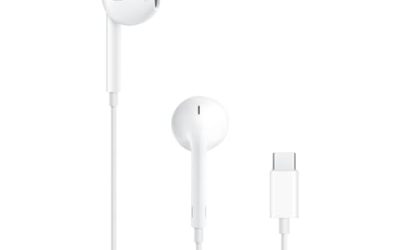
Apple USB-C to 3.5mm Adapter
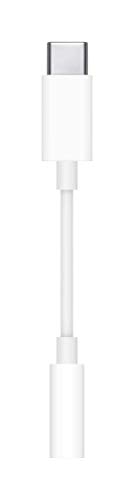
Apple’s dongle is the simplest way to get wired earbuds back on the S25 Plus, and it works because the DAC sits inside the plug rather than in the phone. The US A2049 version handles 44.1 and 48kHz sampling at 16 or 24 bits, keeps the output quiet enough for sensitive in-ear monitors, and passes microphone audio for calls. It weighs almost nothing and disappears into a pocket or a cable pouch. It carries audio only, so you cannot charge while you listen, and the cable is short — fine for earbuds, less so for a speaker across the room.
Specs
- Built-in DAC inside the USB-C plug
- US hardware version A2049
- 44.1 and 48kHz sampling, 16 or 24-bit
- Microphone audio passthrough for calls
- 0.35 oz
- White
Best for: S25 Plus owners who want the smallest dongle for wired earbuds and calls.
Watch out for: Audio only, with no charging while you listen; confirm the listing ships the US A2049 version, since the A2155 sold elsewhere is volume-limited and Android hosts can cut the output level further.
UGREEN USB-C to 3.5mm Adapter

The UGREEN dongle is the pick for listeners who want more detail than a basic adapter gives, with a Hi-Fi DAC that reaches 24-bit and 96kHz on the listing. A braided cable and aluminum housing stand up to daily pocket carry better than bare plastic, and in-line controls handle volume and calls without waking the phone. The listing names the Galaxy S25, S25 Plus, and S25 Ultra as compatible, so the fit for this phone is stated rather than assumed. It is audio only, and it does not support a standalone microphone, so streamers should look elsewhere.
Specs
- Built-in Hi-Fi DAC chip
- Up to 24-bit/96kHz audio output
- Braided cable with aluminum housing
- In-line controls for volume and calls
- TRS and TRRS headphone support
- Model 80154
Best for: S25 Plus owners who want higher-detail wired audio with in-line call controls.
Watch out for: Audio only, with no charging passthrough; does not work with a standalone microphone; confirm the grey 24-bit/96kHz variant on the listing before you order.
Anker USB-C to USB-A Adapter 2-Pack
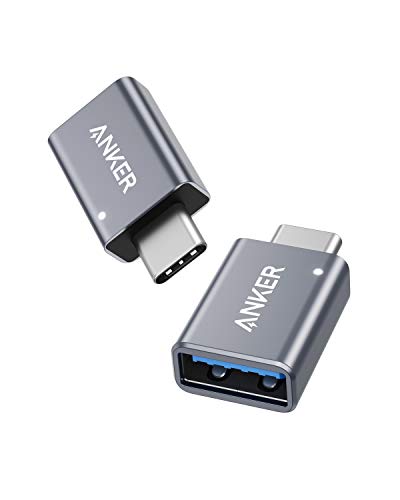
Two tiny adapters solve the oldest problem in a phone bag: the one adapter you need is always in the other bag. Anker’s pair turns the S25 Plus USB-C port into a USB-A 3.0 port at up to 5 Gbps, so flash drives, keyboards, mice, and game controllers plug in and work. The slim aluminum shell lets two adapters sit side by side in a laptop’s ports, and the connectors are built for 10,000 plug cycles. Keep one in a desk drawer and one in a travel pouch, and the old gear stays useful.
Specs
- USB-C male to USB-A 3.0 female
- Up to 5 Gbps data transfer
- 2-pack in the box
- Aluminum shell, scratch-resistant
- Connectors built for 10,000 plug cycles
- Model A8731
Best for: S25 Plus owners who still use flash drives, keyboards, and other USB-A gear.
Watch out for: Data only, with no charging passthrough and no video output, so one adapter cannot charge the phone while you use it.
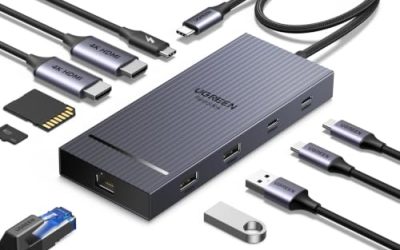
Anker 7-in-1 Hub

This is the hub to pack when the S25 Plus has to act like a desktop. Its HDMI port drives a monitor at 4K and 60Hz for DeX, two USB-A 3.0 ports and a USB-C data port move files at 5 Gbps, and SD and TF card slots take photos straight off a camera card. Plug a 100W PD charger into the PD port and up to 85W passes through to the host while the hub keeps 15W — more than the phone’s 45W ceiling, so charging never becomes the bottleneck. The whole hub is barely longer than a pen and weighs 2.35 oz.
Specs
- 4K@60Hz HDMI output
- 85W max pass-through charging (100W charger required, not included)
- 2x USB-A 3.0 ports and 1x USB-C data port, all 5 Gbps
- SD and TF card slots
- 5.17 x 1.46 x 0.47 in
- 2.35 oz
- Model A83D2
Best for: S25 Plus owners who want a DeX desktop with a card reader in one small hub.
Watch out for: Only the HDMI port carries video, since the USB-C data port has no video output; the charger is not included, so bring a 100W PD charger for full passthrough.
Anker 5-in-1 Hub

The 5-in-1 is the lighter hub for days when a card reader can stay home. Its HDMI port still runs a DeX monitor at 4K and 30Hz, which is plenty for documents, email, and streaming, and the PD port passes up to 90W through from a 100W charger while the hub keeps 10W. A USB-A 3.0 port moves files at 5 Gbps, while two USB-A 2.0 ports handle a mouse, a keyboard, or a slow flash drive. At 4.72 inches long and 2.03 oz it slips into a jacket pocket next to the phone.
Specs
- 4K@30Hz HDMI output
- 90W max pass-through charging (100W input, hub keeps 10W)
- 1x USB-A 3.0 port at 5 Gbps
- 2x USB-A 2.0 ports at 480 Mbps
- PD-IN port for charging only
- 4.72 x 1.18 x 0.46 in
- 2.03 oz
- Model A8357
Best for: S25 Plus owners who want the smallest hub for DeX and charging on the move.
Watch out for: Two USB-A ports run at USB 2.0 speed, so use the 3.0 port for hard drives; the PD-IN port carries charging only, with no data or video; not compatible with Linux.
Which One Fits Your Situation
You only want wired earbuds back
Take the Apple dongle if you want the smallest thing that works, or the UGREEN if you listen for hours and want in-line controls. Both carry a DAC, so both stay loud and clear on a phone with no analog audio. Neither charges while you listen, so carry a separate charger or switch to a hub on long days.
You want a DeX desktop on a monitor
Take the 7-in-1 hub. Its 4K and 60Hz HDMI output keeps the DeX cursor smooth, and the card slots and extra USB ports mean the monitor, keyboard, mouse, and camera card all plug in at once. The 5-in-1 works too when the bag is tight, but the 30Hz output feels slower on a big screen.
You travel light with older USB-A gear
Take the Anker two-pack. One adapter lives in the travel pouch and the other stays at the desk, so a flash drive, a presentation clicker, or a wired keyboard always has a port. The adapters weigh almost nothing and need no charger, no cable, and no setup — plug in and the gear works.
You move photos off SD cards
Take the 7-in-1 hub — it is the only pick here with SD and TF slots, so a camera card slides in and the files move at 5 Gbps. Pair it with the HDMI port and you can sort the day’s shots on a big screen through DeX while the phone charges from the same hub.
Common Mistakes
- Buying a passive USB-C to 3.5mm adapter and hearing nothing, because the S25 Plus needs a DAC inside the dongle.
- Plugging a monitor cable into a USB-C data port and wondering why DeX never appears — only the HDMI port carries video.
- Expecting a hub to charge the phone at the charger’s full wattage, when the hub keeps 10 to 15W and the phone caps at 45W.
- Copying big files through a USB-A 2.0 port on the 5-in-1 hub instead of the single 5 Gbps USB-A 3.0 port.
- Forgetting that a thick case can block a dongle’s short plug, so check the case cutout before you travel with a new adapter.
Frequently Asked Questions
Does the Galaxy S25 Plus work with any USB-C to 3.5mm adapter?
No. The phone sends no analog audio through USB-C, so only adapters with a built-in DAC make sound. Both audio picks in this guide carry one. A passive adapter stays silent, and an adapter made only for iPhone may cut the volume or drop the mic.
Can I run Samsung DeX with these hubs?
Yes, through the HDMI port. DeX runs over USB-C video output, and both Anker hubs send 4K video through HDMI — 60Hz on the 7-in-1 and 30Hz on the 5-in-1. The phone still needs a PD charger plugged into the hub for long sessions, since DeX drains the battery fast.
Will a hub charge my S25 Plus while I use it?
Yes, when a PD charger feeds the hub’s PD-IN port. The phone draws at most 45W no matter how strong the charger is, because that is the phone’s wired ceiling. The hub keeps 10 to 15W for itself, so a 45W charger leaves less headroom than a 65W or 100W one during a DeX session.
Do these adapters work with a case on the phone?
Mostly yes, but it depends on the cutout. Slim dongles like the Apple and UGREEN fit nearly any case, while a hub’s built-in cable needs a wider opening around the port. If your case has a tight or recessed cutout, test the fit at home before a trip, or pick a case with a generous port opening.
More from Amazon
Programs that pair well with the guide above. Offers and eligibility are set by Amazon and may change.
Free shipping on eligible items, Prime Video and more. Eligible new members can start with a free trial.
Start a Prime free trialAd-free music streaming. Eligible new subscribers can start with a free trial.
Try Music Unlimited freeA Prime membership for ages 18-24 with a trial period. Eligibility is set by Amazon.
See Prime for Young AdultsAudiobooks and podcasts to listen to on the go. Eligible new members can start with a free trial.
Try Audible freeAs an Amazon Associate we earn from qualifying purchases.