Key takeaways
- Compare five USB-C adapters for the Galaxy S25, from DAC audio dongles to 4K DeX hubs, with audio, video, and charging notes before you buy.
The Galaxy S25 has one USB-C port and no headphone jack, so the adapter you plug in decides what the phone can do next. A tiny audio dongle brings wired earbuds back, a video hub turns the phone into a DeX desktop on a monitor, and a small USB-A adapter lets old flash drives, keyboards, and mice work with a USB-C-only phone. The real decision is not which adapter is newest but which job you need it for, because a dongle cannot drive a monitor and a hub cannot fit in a pocket the way a dongle can.
This guide is for S25 owners who want wired audio back, a DeX desktop on a monitor, or a way to plug older USB-A gear into a phone that only has USB-C. All five picks were chosen from names and details on their Amazon product pages, with port counts, video output, charging pass-through, and audio format checked against the listing.
Quick Picks
As an Amazon Associate we earn from qualifying purchases.
| Product | Best for | Key spec from title |
|---|---|---|
| Apple USB-C to 3.5mm Adapter | Wired earbuds on a small budget | Built-in DAC, 24-bit/48kHz audio |
| UGREEN USB-C to 3.5mm Adapter | Louder wired audio with mic support | Built-in DAC, 24-bit/96kHz audio |
| Anker USB-C to USB-A Adapter 2-Pack | Plugging USB-A gear into the S25 | USB 3.0, 5 Gbps, 2-pack |
| Anker 7-in-1 Hub | DeX on a 4K monitor at 60Hz | HDMI 4K at 60Hz, 85W pass-through |
| Anker 5-in-1 Hub | DeX on a 4K monitor with three USB-A ports | HDMI 4K at 30Hz, 90W pass-through |
How to Choose
Start with the job, not the port count
One port on the phone means the adapter defines the job, so name the job before you shop. If you only want wired earbuds, a single-purpose audio dongle is smaller, cheaper, and easier to carry than any hub. If you want a monitor, a keyboard, and a drive at the same time, only a multi-port hub does that work. If you only need to plug one old USB-A device into the phone now and then, a two-pack of tiny USB-A adapters covers it for less than a hub. Count the things you will actually connect in a normal week, then buy the smallest adapter that covers all of them.
Check video output before buying a hub
DeX needs a hub that can send video out of the phone, and not every USB-C hub can do that. Look for an HDMI port on the listing and confirm the listing says the hub supports DisplayPort Alt Mode, which is how the S25 sends video through USB-C. On both Anker hubs here, only the HDMI port outputs video; the USB-C data port moves files only and cannot drive a second screen. The 7-in-1 hub reaches 4K at 60Hz, which looks smoother for mouse work and scrolling, while the 5-in-1 hub tops out at 4K at 30Hz, which is fine for documents and streaming but visibly choppier when you drag windows.
Mind charging pass-through and the 25W ceiling
A hub with a USB-C Power Delivery input can charge the phone while you use its other ports, but the numbers on the box describe the hub, not the phone. The S25 caps wired charging at 25W, so a hub that passes 85W or 90W to a laptop will still only feed the phone 25W at most. Neither Anker hub in this guide includes a wall charger in the box, so you need your own USB-C charger to use pass-through at all. Check that your charger supports USB PD, and remember that the hub keeps a small share of the incoming power for itself, so a 25W charger may deliver slightly less than 25W to the phone.
Audio needs a real DAC inside the adapter
The S25 carries no analog audio on its USB-C port, so a passive adapter that only breaks out pins cannot produce sound. The adapter must contain its own digital-to-analog converter, and both audio dongles in this guide do. The Apple dongle converts at 24-bit/48kHz, which covers standard music and calls, while the UGREEN dongle converts at 24-bit/96kHz and adds mic and in-line control support for headsets. If you use high-impedance headphones, check the dongle can drive them; the Apple dongle is known for modest output, and the UGREEN listing suits headphones up to about 64 ohms.
The 5 Best Options
Apple USB-C to 3.5mm Adapter
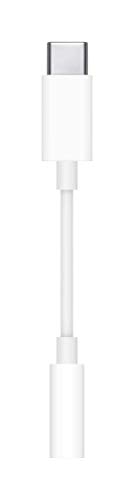
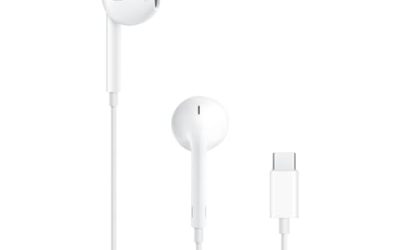
The Apple dongle is the simplest way to get wired earbuds working on the S25, and it is also the smallest adapter in this guide. Inside the white plug sits a real DAC and headphone amplifier, so it generates its own analog signal from the USB-C digital stream instead of relying on analog pins the S25 does not carry. It plugs straight into the phone, needs no software or battery, and works with any standard 3.5mm earbuds, headphones, or aux cable, including headsets with an in-line microphone for calls.
Specs
- USB-C male to 3.5mm female, white
- Built-in DAC, 24-bit/48kHz audio
- US model A2049, Cirrus Logic CS46L06 chip
- Model number MW2Q3AM/A
- Works with any device that has a USB-C port
- Best for: S25 owners who want the smallest, cheapest wired-audio fix.
- Watch out for: Confirm the listing shows the US A2049 version before ordering; the European A2155 version puts out about half the voltage and sounds quieter on the S25.
UGREEN USB-C to 3.5mm Adapter

The UGREEN dongle does the same core job as the Apple dongle but with a higher conversion ceiling and a tougher build. Its DAC handles 24-bit/96kHz audio, the cable is nylon-braided with an aluminum alloy shell, and the listing says it survives more than 15,000 bends. It also supports a headset microphone and in-line controls for volume and calls, which the Apple dongle leaves to the phone. The listing names the Galaxy S25 directly in its compatibility list, so you do not have to guess whether Samsung phones are covered.
Specs
- USB-C male to 3.5mm female, gray
- Built-in DAC, 24-bit/96kHz Hi-Fi audio
- Nylon-braided cable, aluminum alloy shell
- Model number 80154
- Supports mic and in-line control for headsets
- Lists Galaxy S25 in compatibility
- Best for: S25 owners who want louder, higher-resolution wired audio with headset controls.
- Watch out for: The listing says it does not work with Bose QuietComfort 20 and QuietComfort 25 earbuds, and volume must be adjusted on the phone, not on the headset.
Anker USB-C to USB-A Adapter 2-Pack
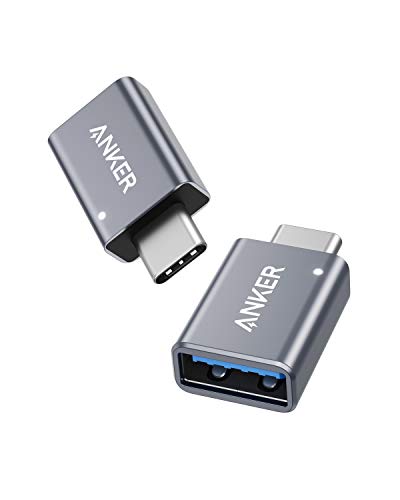
This two-pack keeps old USB-A gear useful with a USB-C-only phone. Each adapter turns the S25 port into a USB-A 3.0 port that moves data at up to 5 Gbps, so flash drives, card readers, keyboards, mice, and printers connect through the same plug you already own. The aluminum shell is slim enough that two adapters fit side by side in a laptop with two USB-C ports, and the connectors are built for up to 10,000 plug cycles. Keep one adapter in a bag and one at a desk, and the phone gains a full-size port wherever you go.
Specs
- USB-C male to USB-A 3.0 female, 2-pack
- Data speed up to 5 Gbps
- Aluminum shell, space gray
- Model number A8731
- Connectors built for up to 10,000 plug cycles
- Best for: S25 owners who only need to plug one old USB-A device into the phone now and then.
- Watch out for: This adapter carries data only; it cannot output video to a monitor and cannot pass charging power through to the phone.
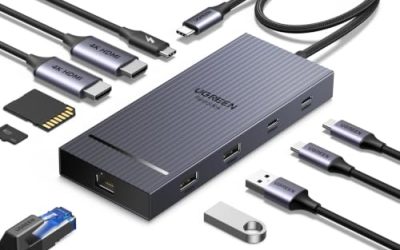
Anker 7-in-1 Hub

The 7-in-1 hub is the most complete adapter in this guide and the best pick for a DeX desktop. One plug gives you an HDMI port that outputs 4K at 60Hz, two USB-A 3.0 ports and one USB-C data port at 5 Gbps, plus SD and microSD card slots for moving photos off a camera. A USB-C Power Delivery input accepts up to 100W from a wall charger and passes up to 85W through to the host, which covers the S25 25W ceiling with room to spare. The gray metal body weighs only 67 grams and still fits in a jacket pocket.
Specs
- 7-in-1 USB-C hub, gray metal body
- HDMI port, 4K at 60Hz video output
- 2 USB-A 3.0 ports and 1 USB-C data port, 5 Gbps each
- SD and microSD card slots
- USB-C Power Delivery input up to 100W, up to 85W pass-through
- Weight 67 g, 18-month warranty
- Best for: S25 owners who want a DeX desktop with a smooth 4K monitor, fast storage, and card readers in one travel hub.
- Watch out for: Only the HDMI port outputs video; the USB-C port is data only. The listing says it is not compatible with Linux, and no wall charger is included in the box.
Anker 5-in-1 Hub

The 5-in-1 hub trades the card readers and the 60Hz video of its bigger sibling for a lower profile and stronger pass-through charging. It still drives a 4K monitor over HDMI, but at 30Hz, which suits documents, spreadsheets, and streaming even if mouse movement looks less smooth. It gives you three USB-A ports instead of two, so a keyboard, a mouse, and a flash drive can all stay plugged in at once. From a 100W wall charger it passes up to 90W through to the host, reserving only 10W for itself, which is the best charging efficiency of any hub in this guide.
Specs
- 5-in-1 USB-C hub, gray plastic body
- HDMI port, 4K at 30Hz video output
- 1 USB-A 3.0 port up to 5 Gbps, 2 USB-A 2.0 ports up to 480 Mbps
- USB-C Power Delivery input up to 100W, up to 90W pass-through
- Size 4.8 x 1.2 x 0.46 inches, 18-month warranty
- Best for: S25 owners who want a DeX desktop with three USB-A ports and the strongest pass-through charging in this guide.
- Watch out for: Only one USB-A port runs at 5 Gbps; the other two are USB 2.0 at 480 Mbps, so plug fast drives into the 3.0 port. No card reader, no Ethernet, and the listing says it is not compatible with Linux.
Which One Fits Your Situation
You only want wired earbuds back
Pick the Apple dongle if you want the smallest and simplest fix, or the UGREEN dongle if you want higher-resolution audio and headset controls. Both contain a real DAC, which the S25 needs, and both plug straight into the phone with no extra gear. Keep one in a bag and wired earbuds work on the plane, in the car, and at a desk without charging anything first.
You want a DeX desktop on a monitor
Pick the Anker 7-in-1 hub if you want the smoothest picture, since it is the only hub here that outputs 4K at 60Hz, and it adds card readers for camera photos. Pick the 5-in-1 hub if 4K at 30Hz is enough for documents and streaming and you would rather have three USB-A ports and stronger pass-through charging. Either hub needs a monitor with HDMI and a charger of your own.
You travel light with old USB-A gear
Pick the Anker 2-pack and keep one adapter in a bag and one at a desk. Each adapter turns the S25 port into a USB-A 3.0 port for flash drives, card readers, keyboards, and mice, and the pair costs less than any hub. This is the right call when you only connect one USB-A device at a time and never need a monitor.
You move photos off SD cards
Pick the Anker 7-in-1 hub, the only adapter in this guide with SD and microSD slots built in. Plug the camera card straight into the hub, copy files to the phone or a flash drive at 5 Gbps, and drive a monitor at the same time if you want a bigger screen for sorting shots. The 5-in-1 hub has no card reader, so it cannot do this job at all.
Common Mistakes
- Buying a passive 3.5mm adapter with no DAC inside, which cannot produce sound on the S25 because the phone carries no analog audio on USB-C.
- Assuming every hub runs DeX, when only hubs with an HDMI port and DisplayPort Alt Mode output video; a USB-C data port moves files only.
- Plugging a fast flash drive into one of the two USB 2.0 ports on the 5-in-1 hub instead of the single USB-A 3.0 port.
- Expecting a hub’s 85W or 90W pass-through to charge the S25 faster than its 25W wired ceiling.
- Forgetting that neither Anker hub includes a wall charger, so pass-through charging needs a charger of your own.
Frequently Asked Questions
Does the Galaxy S25 work with any USB-C to 3.5mm adapter?
No, only adapters with a built-in DAC work, because the S25 carries no analog audio on its USB-C port. A passive adapter that only breaks out pins will stay silent. Both audio dongles in this guide contain a real DAC, the Apple dongle at 24-bit/48kHz and the UGREEN dongle at 24-bit/96kHz, so either one will drive standard wired earbuds and headsets.
Can I run DeX with these hubs?
Yes, both Anker hubs output video over HDMI, and the S25 supports DisplayPort Alt Mode through USB-C, which is what DeX needs. Connect the hub, plug a monitor into the HDMI port, and DeX opens on screen. The 7-in-1 hub gives 4K at 60Hz for smoother mouse work, while the 5-in-1 hub gives 4K at 30Hz, which is fine for documents and streaming.
Will a hub charge my S25 while I use it?
Yes, if you plug a USB-C charger into the hub’s Power Delivery input, power passes through to the phone while you use the other ports. The phone still caps wired charging at 25W, so a 90W pass-through does not charge it any faster. The hub also keeps a small share of the incoming power for itself, and neither hub includes a wall charger in the box.
Do these adapters work with a case on the phone?
The two audio dongles and the USB-A 2-pack plug straight into the phone, so a thick case with a narrow port cutout can block them or leave them loose. Check the cutout before you buy, or pick a case with a wide opening around the port. The two hubs connect to the phone by cable, so case thickness matters much less once the cable is seated.
More from Amazon
Programs that pair well with the guide above. Offers and eligibility are set by Amazon and may change.
Free shipping on eligible items, Prime Video and more. Eligible new members can start with a free trial.
Start a Prime free trialAd-free music streaming. Eligible new subscribers can start with a free trial.
Try Music Unlimited freeA Prime membership for ages 18-24 with a trial period. Eligibility is set by Amazon.
See Prime for Young AdultsAudiobooks and podcasts to listen to on the go. Eligible new members can start with a free trial.
Try Audible freeAs an Amazon Associate we earn from qualifying purchases.