For most Samsung Galaxy owners, the DJI Osmo Mobile 7 or 7P is the easiest all-round gimbal, the Insta360 Flow family suits people who want strong AI tracking and a built-in tripod, the Hohem iSteady line suits buyers on a budget, and the Zhiyun Smooth series suits creators who want more physical control. The deciding factor is your phone: a large Galaxy Ultra model is heavy, so check the payload and clamp width listed by the maker before you buy.
Our top picks
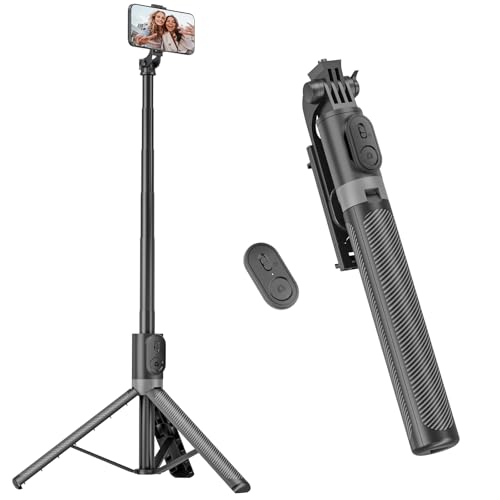 RISEOFLE 71” Phone Tripod & Selfie Stick
- [Versatile Design] RISEOFLE 71'' Phone Tripod and Selfie…
- [Extra Tall 71" Adjustable Phone Tripod] This selfie…
- [Compact & Portable Design] The RISEOFLE phone tripod…


As an Amazon Associate we earn from qualifying purchases at no extra cost to you.
What to check before buying a gimbal for a Galaxy phone
- Payload and phone weight: Large Galaxy phones, particularly Ultra models and foldables, weigh more than many compact devices. Add the weight of any case, lens or magnetic mount and compare the total with the maker’s stated payload range.
- Clamp width and thickness: Makers list a maximum phone width and a minimum and maximum thickness. A thick rugged case can push a phone beyond the clamp’s limit.
- Camera access: Galaxy phones give you the stock Camera app, Pro Video mode and third-party apps. Gimbal apps such as DJI Mimo or Insta360 can connect over Bluetooth and add tracking, but some features depend on the phone model and app version, so read the maker’s compatibility list.
- Balance and motor strength: A gimbal that is balanced correctly puts less load on the motors and lasts longer. Many modern models use magnetic phone clamps with quick-balance features, but heavy phones can still cause shaky footage if they are off centre.
- Portability: Foldable handles fit a jacket pocket, while larger ones with extension rods give a different angle but add weight.
Gimbals at a glance
| Model | Best for | Key stated features | Limits |
|---|---|---|---|
| DJI Osmo Mobile 7P | Travel and vlogging with tracking | Three-axis stabilisation, foldable body, built-in extension rod, tracking module, as listed by the maker | Premium tier of the Osmo family; some tracking features rely on the DJI app |
| DJI Osmo Mobile 7 | Everyday stabilisation at a lower tier | Three-axis stabilisation, magnetic clamp, foldable design | Fewer extras than the 7P |
| Insta360 Flow 2 Pro | Creators who want AI tracking and a compact body | Three-axis stabilisation, built-in tripod and extension, tracking features, per the maker | App-driven; check phone support list |
| Zhiyun Smooth 5S | Manual control with a handheld grip and wheels | Three-axis stabilisation, control wheel, fill-light options on some versions | Heavier and less pocketable than foldables |
| Hohem iSteady M6 / V3 | Budget buyers who still want three-axis control | Three-axis stabilisation, AI tracking on some models, as listed by Hohem | Motor strength and app polish vary; read the payload range |
| Previous-generation Osmo Mobile 6 | Value hunters | Three-axis design with magnetic clamp | Previous generation; stock varies |
DJI Osmo Mobile 7 and 7P: the default answer
DJI lists the Osmo Mobile 7 series as three-axis gimbals with a magnetic clamp, a foldable body and app-based tracking. The 7P adds a built-in extension rod and a detachable tracking module, according to the maker, which helps when you want a different angle or need subject tracking without a hand on the phone. Reviewers typically praise the quick setup and the polish of the DJI Mimo app, with the main trade-off being that some advanced features sit inside the DJI ecosystem. Because DJI states a payload range, owners of the largest Galaxy Ultra phones should compare the weight of their phone and case to the listed limit.
Insta360 Flow: for AI tracking and a built-in stand
The Flow series combines a foldable design with a built-in tripod, which means you can set the phone on a table for a time-lapse or interview without carrying a separate stand. Insta360 lists AI-driven subject tracking and gesture controls. Reviewers describe the app as capable but note that some features rely on being inside the Insta360 app rather than the native Samsung camera. It is a solid choice for solo creators who want to film themselves.
Zhiyun Smooth 5S: more physical control
Zhiyun’s handheld approach puts controls such as a focus wheel and zoom within reach. That suits people who like to adjust while recording instead of relying on automation. It is generally larger than the foldable designs, so it is less suited to someone who wants a gimbal that fits a jacket pocket.
Hohem iSteady: budget options
Hohem sells several iSteady models at a lower tier than DJI and Insta360. Hohem lists three-axis stabilisation and, on some models, tracking and fill light features. Reviewers tend to report that these gimbals deliver smooth results for casual shooting but that motor strength, build quality and app refinement are a step down. They suit beginners who want to test whether a gimbal fits their workflow.
Galaxy-specific notes
- Ultra models and cases: A thick case can exceed the clamp’s thickness limit. Remove the case if the maker’s manual allows it, or choose a slimmer case.
- Foldables: Galaxy Z Fold and Flip phones have unusual shapes and weight distribution. Some gimbals support them, but the manufacturer’s compatibility list should be the deciding source.
- Samsung features: Samsung’s Pro Video mode and video stabilisation modes can overlap with gimbal stabilisation. Many creators turn software stabilisation off or to standard when using a gimbal to avoid a floaty look, though results vary.
- Bluetooth and apps: Some gimbals need the manufacturer’s app to enable full-screen tracking or special modes, and some features work only when you shoot inside the app instead of the Samsung camera.
- Battery care: Gimbals have built-in lithium batteries. Follow the maker’s charging instructions, keep them out of high heat and do not leave a device charging unattended in a hot car.
Pick X if…
| If you… | Pick |
|---|---|
| Want a dependable all-rounder with a strong app | DJI Osmo Mobile 7 or 7P |
| Film yourself and want a built-in stand and tracking | Insta360 Flow 2 Pro |
| Like manual controls on the handle | Zhiyun Smooth 5S |
| Are on a tight budget | Hohem iSteady |
| Use a heavy Ultra with a case | Whichever model lists a payload above your phone and case together |
| Want to save on a recent design | Previous-generation Osmo Mobile 6 |
Alternatives to consider
- A compact action camera: Cameras like the DJI Osmo Pocket line have their own gimbal and avoid phone weight concerns.
- A phone tripod or stabilising grip: If you mostly want a steady phone without motors, a simple grip may be enough.
- Software stabilisation: Samsung’s built-in stabilisation modes are good for walking shots, and many people find them adequate for casual use.
Choosing by shooting style
Travel and vlogging favour a foldable gimbal that fits in a small bag, and the DJI Osmo Mobile 7 and Insta360 Flow families are built around that idea. Event and wedding shooters, who film for long stretches, tend to value comfort and battery life, and a larger handle such as the Zhiyun Smooth 5S can feel more secure over an hour of handheld work. Social creators who film themselves benefit from tracking and a built-in stand, since they can place the phone on a table and let the gimbal follow them. Budget shooters who only want smoother walking clips may find a Hohem iSteady model enough.
Getting smooth footage from a Galaxy phone
- Balance before powering on: Even with automatic balance help, make sure the phone sits centred in the clamp and the case is not tilting it.
- Use a smooth walking style: Bend the knees slightly and roll from heel to toe. A gimbal removes small shake, but large body bounce still shows.
- Pick a frame rate and resolution you can edit: High resolution and frame rates drain battery and storage faster. Choose settings that suit the final platform.
- Lock exposure and white balance: Moving between bright and dark spaces can cause the exposure to jump, so locking helps keep a consistent look.
- Calibrate when needed: If the horizon drifts, run the maker calibration routine and keep the gimbal on a flat surface while it completes.
Budget tiers explained
At the budget tier, Hohem and some older generations of DJI offer three-axis stabilisation with simpler apps and fewer extras. In the mid-range, the Osmo Mobile 7 and Insta360 Flow models add better tracking, polished apps and more refined motors. At the premium tier, the 7P and Flow 2 Pro add built-in extension rods, detachable trackers and longer battery life according to their makers. If you rarely shoot video, a lower tier is sensible; if you publish regularly, the extra stabilisation and automation can save editing time.
Frequently Asked Questions
Will any gimbal fit a Galaxy S Ultra phone?
Most current gimbals fit large phones, but payload and clamp limits differ. Add the weight of your case and any accessories, then compare the total with the maker’s stated range. If you are close to the limit, choose a slimmer case or a gimbal with a higher rating.
Can I use the Samsung Camera app with a gimbal?
Yes, you can film in the stock app, but app-based features such as subject tracking generally require the gimbal maker’s app. Many people record inside that app to get tracking.
Should I turn off video stabilisation on my Galaxy phone?
Many creators lower or turn off software stabilisation when using a gimbal, because the two can fight each other. Try both and judge the footage; results depend on the phone and the shooting style.
Do gimbals work with foldable Galaxy phones?
Some do, but fit and balance can be tricky. Rely on the maker’s compatibility notes and test a quick balance before an important shoot.
Is a three-axis gimbal worth it over built-in stabilisation?
Three-axis gimbals smooth out walking motion more than most software modes, and they add tracking and framing tools. For casual clips, built-in stabilisation may be enough; for vlogs and event footage, a gimbal is a noticeable upgrade.
How do I look after a gimbal?
Keep the motors free of sand and moisture, fold it according to the manual, and charge the battery as the maker instructs. Store it in a case and avoid leaving it in heat.
More from Amazon
Programs that pair well with the guide above. Offers and eligibility are set by Amazon and may change.
Free shipping on eligible items, Prime Video and more. Eligible new members can start with a free trial.
Start a Prime free trialAd-free music streaming. Eligible new subscribers can start with a free trial.
Try Music Unlimited freeA Prime membership for ages 18-24 with a trial period. Eligibility is set by Amazon.
See Prime for Young AdultsAudiobooks and podcasts to listen to on the go. Eligible new members can start with a free trial.
Try Audible freeAs an Amazon Associate we earn from qualifying purchases.