Key takeaways
- What wears first: the HDD. Surveillance-grade drives (WD Purple, Seagate SkyHawk) last 3–5 years under 24/7 write load. Budget to replace it — and check that your NVR supports at least 6–10TB for future upgrades.
- Consumables: IR LEDs dim over years; housings’ silicone gaskets dry out. Inspect seals annually if cameras face direct weather, even with IP66/IP67 ratings.
- Common mistakes: mounting 4K cameras too high (above ~10 ft loses face detail), pointing at direct sun which ruins daytime contrast, and enabling motion zones that trigger on trees — which fills the drive with useless footage and shortens retention.
- Subscriptions: all systems above record locally with no required fee. Cloud backup is optional on most.
The best PoE security camera system for most homes and small businesses in 2026 is a PoE NVR kit with at least 8MP (4K) cameras, 100–150 ft of infrared night vision, and a 2–4TB hard drive preinstalled — Reolink and Lorex lead the all-in-one category, while Amcrest, Hikvision, and Ubiquiti UniFi Protect suit buyers who want more control or higher capacity. The right pick depends less on camera specs than on your property size, how much footage you need to keep, and whether you can run cable yourself.
Our top picks



As an Amazon Associate we earn from qualifying purchases at no extra cost to you. Ratings are shown as listed on Amazon.
Why PoE Beats Wi-Fi for Fixed Surveillance
Power over Ethernet sends power and data through a single Cat5e/Cat6 cable. That means no batteries to recharge, no signal drops when your router is busy, and no dependence on cloud subscriptions to record. For a system that runs 24/7 for years, reliability is the whole point. The trade-off is installation: every camera needs a cable run back to the recorder, which is the single biggest factor in choosing a system size.
The Specs That Actually Matter
Resolution — 4K vs. 8MP vs. 5MP
4K (8MP, 3840×2160) is the practical standard in 2026 because it captures usable license-plate and face detail at roughly 40–60 ft. A 5MP camera is adequate for doors and driveways under 30 ft, but the price gap has narrowed enough that 5MP kits only make sense on tight budgets. Anything marketed as “2K” sits between the two and is a reasonable middle ground for indoor cameras.
Night-vision range
Manufacturer ratings like “100 ft IR” describe how far the illuminator throws light, not how far you can identify a person. Expect usable identification at about 50–60% of the rated range. Full-color night vision (spotlight-equipped cameras from Reolink, Lorex, and Annke) captures clothing and vehicle color at night — often more useful for police reports than extra IR distance.
Included storage
A single 4K camera recording continuously produces roughly 20–30 GB per day at typical H.265 bitrates. Worked out: a 2TB drive holds about 8–10 days of continuous footage for an 8-camera system, and 3–4 weeks if cameras record on motion only. Match drive size to how long you actually need to keep footage — most insurance and police requests happen within a week.
System capacity
Buy an NVR with more channels than you need today. An 8-channel NVR running 6 cameras leaves headroom for a gate or garage later; upgrading a maxed-out 4-channel recorder means replacing the core of the system. Note that PoE port count also caps total cable runs.
Comparison: Leading PoE Systems in 2026
| System | Resolution | Rated night vision | Included storage | Channels / cameras | Typical price range |
|---|---|---|---|---|---|
| Reolink RLK8-800B4 | 4K (8MP) | ~100 ft | 2TB HDD (expandable to 16TB) | 8-ch NVR / 4 cams | $350–500 |
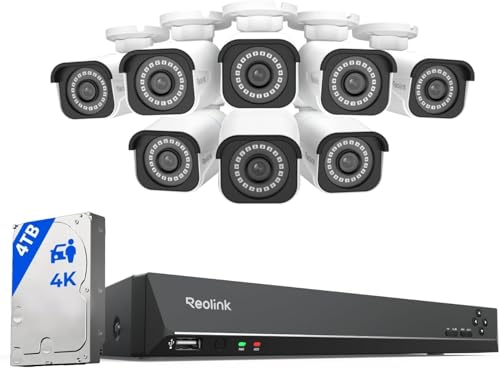
| Reolink RLK16-1200B8 | 12MP | ~100 ft color/IR | 4TB HDD | 16-ch NVR / 8 cams | $800–1,100 |
| Lorex 4K Nocturnal series | 4K (8MP) | ~130 ft IR, color night vision | 2–3TB HDD | 8–16-ch options | $600–1,200 |
| Amcrest 4K NV series kits | 4K (8MP) | ~98 ft | 1–2TB HDD | 8-ch / 4–8 cams | $400–700 |
| Annke C800 series kits | 4K (8MP) | ~100 ft | 2TB HDD | 8-ch / 4–8 cams | $300–500 |
| Ubiquiti UniFi Protect + AI cams | 4K options | ~100 ft (varies by cam) | Drive sold separately | Scales to dozens of cams | $800–2,000+ |
| Hikvision AcuSense kits | 4K (8MP) | ~98–130 ft | 2TB typical | 8–16-ch | $600–1,300 |
Decision Matrix: Match the System to Your Situation
| Your situation | Recommended setup | Why |
|---|---|---|
| Small home, DIY install, under $500 | Reolink RLK8-800B4 or Annke C800 | 4 cams cover door, driveway, backyard; 2TB stores 2+ weeks |
| Larger home, 5+ zones, plan to expand | Reolink RLK16 or Lorex 16-ch kit | 16 channels leaves room; 4TB handles more cameras |
| Small business / retail, license plates needed | Lorex Nocturnal or Hikvision AcuSense | Longer IR range, person/vehicle detection, tamper-resistant housings |
| Multi-building or rental properties | UniFi Protect | Centralized management across sites, no per-camera licensing |
| Renters who can’t drill much | PoE is a poor fit — consider Wi-Fi cams instead | Cable runs typically require drilling through walls/soffits |
Cable Requirements and Planning Your Runs
Use solid-core Cat5e or Cat6 — not CCA (copper-clad aluminum) — for outdoor runs, since CCA corrodes and loses power over distance. Standard 802.3af PoE delivers ~15W, enough for fixed cameras; pan-tilt-zoom models may need 802.3at (PoE+). Keep runs under 328 ft (100 m); beyond that, add a PoE extender or switch. Run cables through eaves and attics where possible, use conduit for exposed exterior runs, and leave a drip loop at each camera mount. A common mistake is underestimating run length — measure the actual cable path, not straight-line distance; a 30-ft camera position often needs 60–80 ft of cable.
Ownership Realities
- What wears first: the HDD. Surveillance-grade drives (WD Purple, Seagate SkyHawk) last 3–5 years under 24/7 write load. Budget to replace it — and check that your NVR supports at least 6–10TB for future upgrades.
- Consumables: IR LEDs dim over years; housings’ silicone gaskets dry out. Inspect seals annually if cameras face direct weather, even with IP66/IP67 ratings.
- Common mistakes: mounting 4K cameras too high (above ~10 ft loses face detail), pointing at direct sun which ruins daytime contrast, and enabling motion zones that trigger on trees — which fills the drive with useless footage and shortens retention.
- Subscriptions: all systems above record locally with no required fee. Cloud backup is optional on most.
Bottom Line
Reolink’s kits hit the price-to-spec sweet spot for most homes, Lorex and Hikvision serve business buyers needing range and detection accuracy, and UniFi Protect is the choice when you manage multiple sites or want a full network ecosystem. Prioritize channel headroom and drive size over marginal resolution gains — those are what actually limit a system’s lifespan.