Key takeaways
- Fits: Cases with 63mm+ top or front clearance
- Best for: Ryzen 7, Core i7 workloads where low noise matters more than RGB
- Note: The offset-mounted pump and thicker radiator can conflict with tall RAM (over 42mm) in some micro-ATX boards
The best 240mm AIO CPU cooler for most small builds is the Arctic Liquid Freezer III 240 for its slim-yet-efficient 38mm radiator and low noise at load, while the NZXT Kraken 240 and Corsair iCUE H100x RGB Elite are better fits when you need extra clearance or software-free operation.
For compact and mid-tower cases, a 240mm AIO is often the sweet spot: it cools modern CPUs like the Intel Core i5-14600K and AMD Ryzen 7 7700X effectively without the clearance headaches of a 280mm or 360mm radiator. The key trade-off is radiator thickness and fan design, which directly affect whether the cooler will actually fit and how loud it will be in a tight chassis.
Our top picks



As an Amazon Associate we earn from qualifying purchases at no extra cost to you. Ratings are shown as listed on Amazon.
240mm AIO Comparison: Thickness, Noise and Dimensions
Not all 240mm AIOs are the same size. A “240mm” only refers to the fan length (2x 120mm fans). Total thickness, which determines case compatibility, varies by up to 30mm between models.
| Model | Radiator Size (L x W) | Radiator Thickness | Total Thickness with Fans | Fans Included | Fan Speed Range | Rated Noise | Tubing Length |
|---|---|---|---|---|---|---|---|
| Arctic Liquid Freezer III 240 | 277 x 120 mm | 38 mm | 63 mm | 2x Arctic P12 PWM | 200 – 1800 RPM | 22.5 dBA max | 450 mm |
| Corsair iCUE H100x RGB Elite | 277 x 120 mm | 27 mm | 52 mm | 2x Corsair SP120 RGB Elite | 400 – 1500 RPM | 26 dBA max | 400 mm |
| NZXT Kraken 240 | 275 x 123 mm | 27 mm | 53 mm | 2x NZXT F120P | 500 – 1800 RPM | 27.5 dBA max | 400 mm |
| Lian Li Galahad II Trinity 240 | 277 x 120 mm | 27 mm | 52 mm | 2x Lian Li SL-INF 120 | 300 – 2100 RPM | 29.2 dBA max | 410 mm |
| Cooler Master MasterLiquid 240 Atmos | 275 x 120 mm | 27 mm | 52 mm | 2x Cooler Master SickleFlow Edge 120 | 400 – 2500 RPM | 27.2 dBA max | 400 mm |
| DeepCool LS520 WH | 282 x 120 mm | 27 mm | 52 mm | 2x DeepCool FT12 | 500 – 2250 RPM | 32.1 dBA max | 410 mm |
| be quiet! Pure Loop 2 240mm | 270 x 120 mm | 27 mm | 52 mm | 2x be quiet! Pure Wings 3 120 | 500 – 1600 RPM | 26.5 dBA max | 400 mm |
The takeaway is clear: Most mainstream 240mm AIOs use a standard 27mm thick radiator for a 52-53mm total stack height. The Arctic Liquid Freezer III is the outlier at 38mm thick. That thicker radiator provides more surface area and allows lower fan speeds for the same cooling, but it requires an extra 10-11mm of clearance that many compact cases do not have.
Decision Matrix: Which 240mm AIO Fits Your Build?
Choose based on your case, CPU heat output, and noise tolerance, not just brand preference.
| Your Situation | Recommended Type / Model | Why It Fits |
|---|---|---|
| Compact case (e.g., NZXT H210, Fractal Pop Mini Air, Lian Li A3-mATX) with <55mm top clearance | Slim radiator: Corsair H100x RGB Elite, NZXT Kraken 240, Lian Li Galahad II Trinity | 27mm radiator keeps total height under 53mm to avoid RAM and motherboard heatsink interference |
| Mid-tower with 60mm+ top clearance and hot CPU (i7-14700, Ryzen 9 7900) | Thick radiator: Arctic Liquid Freezer III 240 | Extra radiator thickness lowers coolant temperatures by 2-4°C at low RPM without needing higher fan speed |
| Noise-sensitive build for office or bedroom | Arctic Liquid Freezer III 240 or be quiet! Pure Loop 2 240 | Lower max RPM and fluid-dynamic bearing fans stay under 26 dBA at typical 800-1000 RPM loads |
| SFF case with front-mount only and short tubing path | Any 27mm model with 400mm tubing; avoid offset VRM fan designs | 400-410mm tubing is sufficient for front mounting and avoids kinking in tight layouts |
| Visual-focused build with tempered glass | NZXT Kraken 240, Lian Li Galahad II Trinity, DeepCool LS520 | Large LCD or infinity-mirror pump caps and ARGB fans with daisy-chain cabling |
| Budget-conscious replacement for stock air cooler | Corsair H100x RGB Elite, Cooler Master MasterLiquid 240 Atmos | Generally found in the lower general market range for 240mm AIOs, without proprietary software requirement |
Top Picks for Small and Mid-Tower Builds in 2026
Best Overall for Small Builds: Arctic Liquid Freezer III 240
The Liquid Freezer III 240 stands out because it prioritizes thermal efficiency over aesthetics. Its 38mm radiator is 41% thicker than the standard 27mm design, which increases coolant volume and fin surface area. Combined with PWM-controlled P12 fans and a dedicated VRM cooling fan on the pump housing, it can maintain sub-35 dBA operation while cooling 150W-180W CPUs. The trade-off is compatibility: you need at least 63mm of clearance above the motherboard, including RAM height. Cases that list only 55mm top radiator clearance will not accommodate it up top. It is ideal for mid-towers like the Fractal Design Define Mini C or NZXT H5 Flow where space allows.
- Fits: Cases with 63mm+ top or front clearance
- Best for: Ryzen 7, Core i7 workloads where low noise matters more than RGB
- Note: The offset-mounted pump and thicker radiator can conflict with tall RAM (over 42mm) in some micro-ATX boards
Best for Tight Clearance: Corsair iCUE H100x RGB Elite
At 27mm radiator thickness and 52mm total height, the H100x RGB Elite is designed for compatibility. It uses a standard Asetek-style pump without a bulky cap, which helps in cases where the pump head sits close to the side panel or RAM. The SP120 RGB Elite fans max out at 1500 RPM, so peak noise is lower than high-RPM competitors that spin to 2100-2500 RPM. Performance is sufficient for CPUs up to around 125W-150W sustained load without thermal throttling in a well-ventilated case. It also runs without requiring Corsair iCUE software for basic operation.
- Fits: Virtually any case that supports a 240mm radiator up top or in front
- Best for: First-time builders, compact micro-ATX cases, RAM clearance concerns
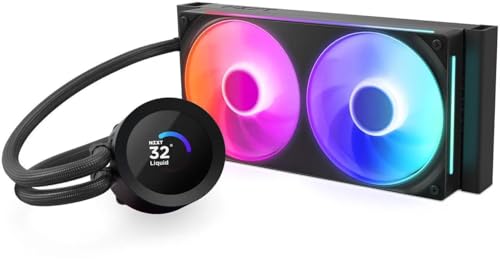
Best for Design and Quiet Software Control: NZXT Kraken 240
The Kraken 240 keeps the slim 27mm radiator profile but adds a large customizable LCD on the pump and F120P fans tuned for static pressure. Through NZXT CAM software, you can create custom fan curves that keep the system under 800 RPM during idle and web browsing, which is where small builds often sound loudest due to proximity. The 400mm tubing and rotatable pump cap make it easier to orient the tubes in compact cases without putting strain on the fittings.
- Fits: Mid-towers and compact cases that can mount 240mm up top or front
- Best for: Users who want on-pump temperature readouts and quiet idle operation
Best for Airflow-Restricted Cases: Lian Li Galahad II Trinity 240
The Galahad II Trinity uses high-static-pressure SL-INF fans (up to 2100 RPM) that maintain airflow through a 27mm radiator even when the case has a restrictive front panel or dust filter. In compact cases with solid fronts where intake is limited, this higher pressure helps prevent heat soak. The trade-off is noise at full speed, so a custom fan curve is recommended. Its pump design also separates the pump from the cold plate to reduce vibration transfer.
Best Low-Noise Alternative: be quiet! Pure Loop 2 240mm
The Pure Loop 2 focuses on acoustics with Pure Wings 3 fans capped at 1600 RPM and a doubly-decoupled pump mount to reduce vibration. Rated noise is among the lowest in the 240mm category. It also includes a refill port and included coolant bottle, which is uncommon for closed-loop coolers and extends service life.
How to Check If a 240mm AIO Will Actually Fit
Manufacturer case specs that say “supports 240mm radiator” do not guarantee top-mount clearance with your specific motherboard and RAM. Work through this quick calculation before buying.
Step 1: Measure your available height. From the top of your motherboard’s tallest RAM stick or VRM heatsink to the inner edge of the case’s top fan mount, measure in millimeters. Many compact cases allow only 50-55mm.
Step 2: Compare to total cooler thickness. Total thickness = radiator thickness + fan thickness (standard 25mm). For most models: 27mm + 25mm = 52mm. For the Arctic: 38mm + 25mm = 63mm. Add 3-5mm for screw heads and anti-vibration pads.
Step 3: Account for offset and tubing. If the case top-mount is offset toward the side panel, you may gain RAM clearance but lose motherboard heatsink clearance. Check that tubing can bend without kinking. A 90-degree bend radius tighter than 40mm can restrict flow over time.
Worked example: A compact micro-ATX case lists 55mm top clearance. A Corsair H100x (52mm total) leaves 3mm of margin, which is workable. An Arctic Liquid Freezer III (63mm total) would require 8mm more than available and would interfere with RAM or prevent the top panel from closing. In this case, front mounting the thicker radiator or choosing a slim 27mm model is the correct choice.
If top mounting fails the calculation, front mounting is the alternative. Ensure your GPU length plus front radiator and fan thickness (typically 52-63mm) does not exceed the case’s maximum GPU length specification.
Durability and Ownership Realities
A 240mm AIO is a sealed system with a finite lifespan, typically 4-6 years of regular use. Understanding what wears first helps you maintain performance and avoid common failures.
- Pump is the first failure point. Most pumps use a ceramic bearing rated for 40,000-50,000 hours. Running the pump at 100% constantly accelerates wear. Using a pump header set to 50-70% for idle and ramping only under load extends life and reduces whine.
- Permeation loss is normal. All AIO tubing slowly loses a small amount of coolant through permeation. After 3+ years you may hear gurgling or see slightly higher temperatures. The be quiet! Pure Loop 2 addresses this with a user-refillable port, while most other models are not designed to be refilled.
- Dust impacts performance faster in small builds. A 240mm radiator has tightly packed fins that clog quickly. Clean the radiator with compressed air from inside the case outward every 3-4 months. Do not use a vacuum directly on the fins, as it can bend them.
- Fan bearings matter for horizontal mounting. If you top-mount the radiator, fans are mounted horizontally. Rifle bearings and fluid-dynamic bearings handle this orientation better than sleeve bearings, which can develop noise prematurely.
- Common installation mistake: Incorrect pump orientation. The pump should not be the highest point in the loop. If tubes enter the radiator at the top and the pump sits higher than the radiator, air bubbles collect in the pump and cause noise and premature failure. Mount the radiator so its top is above the pump head, or front-mount with tubes at the bottom when possible.
- Thermal paste and cold plate: Stock pre-applied paste is adequate, but it dries over 2-3 years. When remounting, clean the cold plate with isopropyl alcohol and apply a small pea-sized amount of quality paste. Over-tightening mounting screws in a criss-cross pattern can warp the cold plate contact.
Final Recommendation
For most users building in a compact or mid-tower case in 2026, prioritize clearance first, then noise. If your case has 60mm or more top clearance and you run a CPU over 125W, the thicker Arctic Liquid Freezer III 240 delivers the best noise-to-cooling ratio. If clearance is tight or you have tall RAM, a slim 27mm model like the Corsair H100x RGB Elite, NZXT Kraken 240, or be quiet! Pure Loop 2 240 will fit without compromise and still handle mainstream gaming CPUs quietly when paired with a proper fan curve. Measure your case before choosing thickness, not just radiator length.
Frequently Asked Questions
Is a 240mm AIO enough for a Core i7 or Ryzen 9?
A 240mm AIO handles most Core i7 and Ryzen 7 CPUs within their stock power limits (125W-170W) with headroom. For overclocked Core i9 or Ryzen 9 chips that sustain over 200W, a 240mm will cool but fans will run louder than a 280mm or 360mm would. In a small case where only 240mm fits, undervolting or setting a lower power limit in BIOS is often more effective than pushing fan speed.
Is a thicker 38mm radiator always better?
Only if you have the clearance. A 38mm radiator provides more surface area, which allows similar cooling at lower fan speeds. However, in a case limited to 55mm top clearance, it will not fit correctly and a slim 27mm radiator will outperform a thick radiator that is choked by poor airflow or contacting components.
Should I mount my 240mm AIO on top or in front?
Top mount as exhaust gives slightly higher CPU temperatures but lower GPU temperatures, as it does not preheat intake air. Front mount as intake gives the CPU cooler air but raises internal case temperature by 2-5°C. In compact builds with limited exhaust, top mount is generally preferred to avoid heat buildup around the GPU.