Key takeaways
- Compare Android headrest tablets for car back seats on screen size, Android version, storage and mounting, using specs from each Amazon listing.
An Android tablet for the car is really a decision about who controls the back seat. A general tablet handed to a child works until it slides off the seat, runs flat, or needs a hotspot nobody set up. A car-focused Android tablet or headrest unit answers those problems directly: it mounts to the headrest, stays in the vehicle, runs streaming and downloaded apps on its own Android system, and turns on with the trip instead of needing to be packed, charged and argued over before every departure from the driveway.

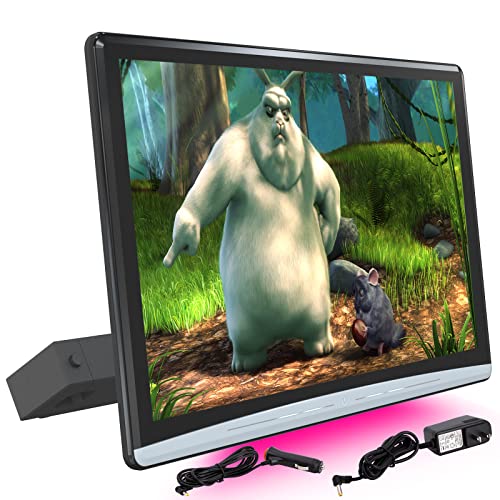
This guide is for parents equipping a back seat for school runs and long drives, rideshare and family drivers who carry rear passengers often, and anyone choosing between a big shared screen and a smaller per-seat display. Every product below is an Android tablet-style headrest entertainment unit of the same type, built for car use rather than adapted from a living room. Each pick was chosen from the name and specifications on its Amazon product page, so screen sizes, Android versions and storage figures here come straight from those listings.
Quick Picks
As an Amazon Associate we earn from qualifying purchases.
| Product | Best for | Key spec from title |
|---|---|---|
| WONNIE 13.3 Inch Car Headrest Tablet | Families who want the newest Android version and a large shared screen | Android 13, 4GB RAM and 64GB storage, 13.3 inch screen |
| Seventour 12.4 Inch Android Car Tablet | Passengers who want a slightly smaller screen with full HD resolution stated | Android 10.0, 1920 x 1080 resolution, 12.4 inch screen |
| SINYOFOX 13.3 Inch Android Car TV | Cars needing both HDMI input and output for flexible sources | Android system, 13.3 inch screen, HDMI in and out |
The quick table hides the decisions that actually shape daily use: whether the unit mounts to your headrest posts, how it receives power on a long drive, and whether your streaming apps will come from WiFi, a phone hotspot or files loaded at home. Those checks matter more than a half inch of screen, so work through the buying points below before choosing a row.
How to Choose
Start With the Headrest Mount, Not the Screen
Every unit in this guide lives or dies by its bracket. Listings describe universal metal brackets and mounting kits sized for a range of headrest post distances and post diameters, and your car has exactly one of each. Measure the gap between your headrest posts and the thickness of the posts themselves, then compare both numbers with the bracket range in the listing. A superb screen on a bracket that cannot clamp your posts is useless, and a slightly smaller screen that mounts rigidly will feel better on every mile of a rough road than one that trembles and slowly tilts downward.
Choose the Screen Size for the Seat, Not the Spec Sheet
Back seat viewing distance is short, usually well under an arm’s length for a child in a car seat and a little more for an adult passenger. At that distance, a 12.4 inch screen already fills the view comfortably, while a 13.3 inch screen gives a more shared, television-like picture when two passengers watch together. Resolution matters alongside size: a listing that states 1920 x 1080 gives you a concrete figure to compare, while a listing that leads with a marketing resolution word deserves a closer read of its specification table. Match the pair of numbers, size and resolution, to how many people will actually watch at once.
Check the Android Version, Memory and Storage Together
These are full Android devices, so the same trio that decides a tablet purchase decides this one. The Android version affects which streaming apps the unit can run and for how long they will stay supported. RAM affects how smoothly the interface and video playback respond. Storage decides how many films, shows and games can be downloaded at home for trips with no signal, which is the normal condition on rural roads. The listings in this guide state combinations such as Android 13 with 4GB of RAM and 64GB of storage, and Android 10.0 on the older unit, so compare the trio as a set rather than chasing one figure.
Plan the Power and the Connection Before the Trip
A headrest tablet needs a power plan: how it connects to the car, whether that connection suits your vehicle’s outlets, and what happens on a four hour drive. It also needs a data plan in the practical sense. Listings describe WiFi in single and dual band forms, phone mirroring and mirror link features, HDMI and USB inputs, and Bluetooth, and each one implies a different routine. Downloading at home over WiFi suits planned trips, a phone hotspot suits spontaneous ones, and HDMI suits a passenger who brings their own source. Decide which routine your family will really follow, then buy the unit whose listed connections support it.
The 3 Best Options
WONNIE 13.3 Inch Car Headrest Tablet
The WONNIE is the most current package in this group on paper. Its listing describes a 13.3 inch headrest monitor running Android 13 with over-the-air updates, 4GB of RAM and 64GB of storage, dual band 5G and 2.4GHz WiFi, phone wireless mirror link, and HDMI, USB and video player support. Streaming services are named in the listing as the intended use, and a universal metal bracket is described as fitting the large majority of vehicles with tool-free installation. For a family that wants one big, modern screen per seat and plans to download or stream the usual services, this is the natural starting point.
Specs
- Brand: WONNIE
- Screen size: 13.3 inches
- Operating system: Android 13 with OTA update support per listing
- Memory and storage: 4GB RAM and 64GB storage per listing title
- WiFi: 5G and 2.4GHz dual band per listing
- Features: Wireless phone mirror link, touchscreen, HDMI, USB and video player support per listing
- Mounting: Universal metal bracket, tool-free installation per listing
Best for: Families who want the newest Android version here on a large headrest screen.
Watch out for: Confirm your headrest post spacing against the bracket range in the listing, and plan a hotspot or downloads since streaming still needs a data source.
ASIN: B0F3891J5G
Seventour 12.4 Inch Android Car Tablet
The Seventour takes a slightly smaller 12.4 inch screen and states its resolution plainly at 1920 x 1080 on an IPS touch display. The listing describes an Android 10.0 system on which apps can be downloaded and installed, wireless connection for phones, and support for WiFi, Bluetooth, HDMI and USB, plus AirPlay-style video playback in the title. It also notes the unit can come off the headrest and serve as a large Android tablet at home. That dual role suits a household that does not want a screen living permanently in the car, or that shares one device between two vehicles and the house.
Specs
- Brand: Seventour
- Screen size: 12.4 inches
- Resolution: 1920 x 1080 per listing
- Display type: IPS touch display per listing
- Operating system: Android 10.0 per listing
- Features: Wireless phone connection, WiFi, Bluetooth, HDMI and USB support per listing title
Best for: Buyers who want a stated full HD resolution and a screen that can double as a home tablet.
Watch out for: Android 10.0 is the oldest system in this group, so check that the streaming apps you need still support it before relying on them for a long trip.
ASIN: B0CRHSTVRQ
SINYOFOX 13.3 Inch Android Car TV
The SINYOFOX is the flexible-source option. Its listing describes a 13.3 inch Android headrest video player with 2.4G and 5G WiFi, wireless phone connection with mirror link, Bluetooth and FM, USB, and unusually, both HDMI input and HDMI output, which opens options such as feeding the picture to or from another display. The package details in the listing include a headrest bracket covering a stated post distance range and mounting kits for a stated post diameter range, which makes the fit check refreshingly concrete. Choose it when your passengers bring varied devices and you want the screen to accept whatever they carry.
Specs
- Brand: SINYOFOX
- Screen size: 13.3 inches
- WiFi: 2.4G and 5G per listing title
- Connections: HDMI in and out, Bluetooth, FM, USB per listing title
- Features: Wireless phone connection and mirror link per listing title
- Mounting: Headrest bracket and mounting kits with stated size ranges in listing package details
Best for: Cars where passengers bring different phones and sources and need HDMI flexibility.
Watch out for: The listing’s headline resolution wording and its detailed specification table should be read together; rely on the specification table figures when you compare it with the other units.
ASIN: B088WTMGRV
Read side by side, the three units agree on the job and differ on emphasis. The WONNIE leans on the newest Android version and the joint-largest screen, the Seventour trades a little size for a clearly stated resolution and a second life as a home tablet, and the SINYOFOX leans on connection flexibility with HDMI in both directions. Your deciding factor should be the routine you can picture on your next real trip, not the longest feature list.
Which One Fits Your Situation
Long Family Drives With Two Children in the Back
Buy per seat rather than sharing one screen, and start from the WONNIE. Its Android 13 system, 64GB of storage for downloads and dual band WiFi give each child an independent screen that does not depend on a sibling’s choices. Load both units at home before departure, because downloaded content is the only plan that survives a dead zone with two restless passengers and no signal for anyone.
One Screen That Moves Between Car and Home
Choose the Seventour. The listing itself describes bringing the unit home to use as a big screen Android tablet, and the 12.4 inch size is easier to handle off the bracket than the larger screens. This situation suits households with one car, occasional long trips and no wish to own a dedicated car-only device that sits dark and unused in the garage for most of the year.
Passengers Bring Consoles, Sticks and Different Phones
Pick the SINYOFOX for its connection spread. HDMI input accepts the devices passengers already own, HDMI output adds routing options the others do not list, and mirror link covers the phone in your pocket. When the back seat audience changes from trip to trip, the screen that accepts the widest range of sources saves the most adapters, cables and pre-trip negotiation about what everyone will watch.
A Single Adult Passenger Who Works or Watches on the Road
Any of the three will serve, so decide on screen and system freshness. The WONNIE’s Android 13 and larger storage handle a mix of video and apps with the longest support runway, while the Seventour’s stated 1920 x 1080 resolution is easy to evaluate for text and detail. Measure the headrest fit first either way, because a working passenger notices bracket wobble and screen tilt far more than a child watching a cartoon.
Common Mistakes
- Buying the largest screen before measuring headrest post spacing and diameter, then finding the bracket cannot fit the car.
- Assuming streaming works anywhere, when the unit still needs WiFi, a phone hotspot or content downloaded in advance.
- Comparing screens by diagonal alone and ignoring the resolution figure stated in the specification table.
- Ignoring the Android version, then discovering a needed streaming app no longer supports the older system on the unit.
- Leaving power as an afterthought, with no plan for how the screen is powered across a full day of driving.
Frequently Asked Questions
Is a car headrest tablet different from a normal Android tablet?
Yes, in mounting, power and purpose. The units in this guide are built to clamp to headrest posts, run from the car’s power, and present video and apps to rear passengers at a fixed viewing distance. A normal tablet can do some of the same jobs with a separate holder, but it will not include the bracket, the car power arrangement or the headrest-specific connections these listings describe as part of the product.
Can these tablets play video without internet?
Yes, if you prepare. Storage figures in the listings, such as 64GB on the WONNIE, exist largely so films, shows and games can be downloaded over home WiFi before a trip. USB and HDMI inputs on these units add offline options as well. What they cannot do is stream from services in an area with no signal and no hotspot, so the download step before a rural drive is part of owning one, not an optional extra.
Will the bracket fit my car?
Only your measurements can answer that. Listings describe universal brackets and give ranges for headrest post distance and post diameter in their package or specification details. Measure your car’s post spacing and post thickness with the headrest in its normal position, then compare both numbers with the stated range for the exact unit you want. If your car has integrated or single-piece seats with no exposed posts, a headrest bracket design will not mount at all.
One screen or two for two children?
Two screens remove the most common back seat dispute, because each passenger controls their own viewing. One larger screen costs less hardware and works when the children genuinely watch together, which is more common with very young passengers and shared films. Consider also that two units need two power connections and two sets of downloads kept current, so the simpler shared setup still wins for some families despite the occasional negotiation.
More from Amazon
Programs that pair well with the guide above. Offers and eligibility are set by Amazon and may change.
Free shipping on eligible items, Prime Video and more. Eligible new members can start with a free trial.
Start a Prime free trialAd-free music streaming. Eligible new subscribers can start with a free trial.
Try Music Unlimited freeA Prime membership for ages 18-24 with a trial period. Eligibility is set by Amazon.
See Prime for Young AdultsAudiobooks and podcasts to listen to on the go. Eligible new members can start with a free trial.
Try Audible freeAs an Amazon Associate we earn from qualifying purchases.