Key takeaways
- Compare five iPad Pro 13 cases made for the M4 model, from the ZUGU stand case and Apple Smart Folio to JETech, OtterBox and SEYMAC, with fit guidance.
The 13-inch iPad Pro with the M4 chip is the thinnest tablet Apple has made, and that thin body is exactly why the case matters so much. A case built for the older 12.9-inch iPad Pro will not fit it: the 13-inch M4 model is thinner, and its camera, buttons, and Pencil charging strip sit in different places. The 13-inch iPad Air looks the same size, but its cutouts differ too.
The five cases here cover the main ways to use a tablet this large: a multi-angle stand case for work and video calls, the thinnest official folio for carrying light, a slim magnetic case at the lowest tier, a rugged multi-layer case for everyday knocks, and a heavy-duty case with a built-in screen protector for rough handling. All five leave the Pencil charging edge open or add a holder of their own, and all five wake the tablet when opened and put it to sleep when closed.
As an Amazon Associate, we earn from qualifying purchases.
Quick Answer
Most buyers should take the ZUGU case: its ten-angle magnetic stand, Pencil holder with charging support, and slim shell cover reading, drawing, and video calls. Take the Apple Smart Folio for the thinnest cover, the JETech magnetic case for a slim cover at the lowest tier, the OtterBox Defender for the toughest everyday protection, and the SEYMAC case for heavy-duty cover with a built-in screen protector.
Table of Contents
- ZUGU Case — Best Overall
- Apple Smart Folio — Best Slim Folio
- JETech Magnetic Case — Best Budget Slim Case
- OtterBox Defender Series — Best Rugged Protection
- SEYMAC Case — Best Heavy-Duty Value
- How to Choose
- Who Should Skip
- Frequently Asked Questions
- Final Verdict
The 5 Best iPad Pro 13 Cases
1. ZUGU Case for iPad Pro 13 inch (M4/M5) — Best Overall

The ZUGU case is the strongest all-around pick in this guide, and the best starting point for most iPad Pro 13-inch owners. Its magnetic stand locks into ten viewing angles, so it covers reading, typing, drawing, and video calls without a separate stand. A dedicated holder stores the Apple Pencil and supports charging while the case is on, and the case wakes the tablet when opened and puts it to sleep when closed. ZUGU states drop protection for falls from a typical table height, and the case fits only the 13-inch M4 and M5 models, so the cutouts line up exactly. The trade is weight: it is heavier than the Smart Folio, and it does not work with the Magic Keyboard.
Specs
– Fit: iPad Pro 13-inch (M4) and (M5) only per ZUGU
– Stand: 10-angle magnetic stand per ZUGU
– Pencil: Holder with charging support per ZUGU
– Sleep and wake: Automatic per ZUGU
– Drop protection: Stated by ZUGU for falls from table height
– Keyboard: Not compatible with Magic Keyboard per ZUGU
– Tier: Premium
2. Apple Smart Folio for iPad Pro 13-inch (M4) — Best Slim Folio

The Smart Folio is the thinnest and lightest case in this guide, and the best choice for anyone who wants protection without bulk. Apple builds it as a single folding cover that protects the front and back of the tablet, supports a wide range of viewing angles, and wakes the tablet when opened and puts it to sleep when closed. It snaps on and off fast, which suits owners who often use the tablet bare in hand. The trade is protection: it guards against scratches and everyday bumps, but it has no corner armor, no screen protector, and no Pencil holder, so the Pencil rides on its magnets alone and can slide off in a crowded bag.
Specs
– Fit: iPad Pro 13-inch (M4) and (M5) per Apple
– Form: Thin folding folio, front and back coverage per Apple
– Stand: Wide range of viewing angles per Apple
– Sleep and wake: Automatic per Apple
– Pencil: No built-in holder; Pencil charges on the magnetic edge
– Tier: Premium
3. JETech Magnetic Case for iPad Pro 13-Inch M5/M4 — Best Budget Slim Case

The JETech magnetic case is the simplest slim pick in this guide, and the best choice for anyone who wants solid everyday protection at the lowest tier. It pairs a hard back shell with a magnetic trifold cover that folds into a stand, with auto wake and sleep, and stays light enough for one-handed reading. The cutouts leave the port, speakers, and buttons fully open. It supports the Apple Pencil Pro and the Apple Pencil with USB-C, so the stylus keeps charging on the magnetic edge while the case is on. The trade is stand range: it offers fewer viewing angles than the ZUGU pick, and it has no Pencil holder, so the Pencil rides on the magnetic edge unguarded during travel.
Specs
– Fit: iPad Pro 13-inch M5 and M4 per JETech
– Form: Hard back shell with magnetic trifold cover per JETech
– Stand: Trifold stand for viewing and typing per JETech
– Sleep and wake: Automatic per JETech
– Pencil: Supports Pencil Pro and Pencil with USB-C per JETech
– Tier: Budget
4. OtterBox Defender Series Case for iPad Pro 13-inch (M4 and M5) — Best Rugged Protection

The OtterBox Defender Series case is the toughest everyday pick in this guide, and the best choice when the tablet travels to work, school, or anywhere it gets knocked around. It uses a multi-layer design with a hard inner shell and a soft outer slipcover, so drops, dirt, and scrapes hit the case instead of the tablet. The slipcover adds grip, and the raised edges lift the screen and camera off flat surfaces. Port covers keep dust out, and the cutouts keep the buttons and charging port easy to reach. The trade is bulk: it is thicker and heavier than the folio picks, and it has no built-in stand, so owners who prop the tablet up all day will want a separate stand.
Specs
– Fit: iPad Pro 13-inch (M4 and M5) per OtterBox
– Build: Multi-layer design, hard inner shell with soft outer slipcover per OtterBox
– Protection: Guards against drops, dirt, and scrapes per OtterBox
– Ports: Covers keep dust out of the openings per OtterBox
– Stand: No built-in stand
– Tier: Premium
5. SEYMAC Case for iPad Pro 13 Inch M5/M4 — Best Heavy-Duty Value
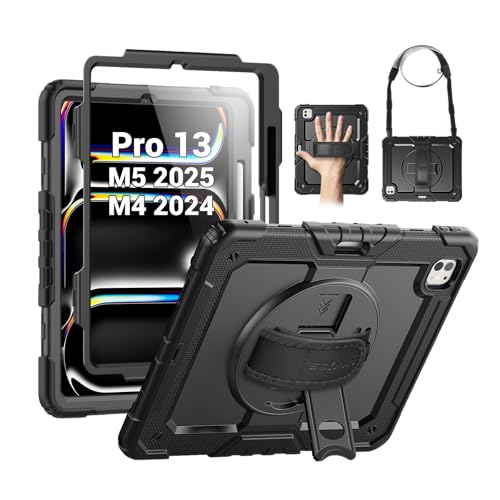
The SEYMAC case is the heaviest-duty pick in this guide, and the best choice when the tablet faces drops, dust, and rough handling at the lowest tier. It is a full-body case with a built-in screen protector, shock-absorbing corners, a rotating stand, straps, and a pen holder for the Apple Pencil. The stand turns a full circle, so the tablet props up in portrait for reading and video calls and in landscape for typing and watching video. The trade is bulk: it is the thickest and heaviest case in this guide, and the built-in screen protector adds a layer between finger and screen, which softens the feel of drawing and tapping.
Specs
– Fit: iPad Pro 13 inch M5 and M4 only per SEYMAC
– Form: Full-body heavy-duty case with built-in screen protector per SEYMAC
– Stand: Rotating stand, portrait and landscape per SEYMAC
– Carry: Hand strap and shoulder strap included per SEYMAC
– Pencil: Built-in pen holder per SEYMAC
– Tier: Budget
How to Choose
Confirm the exact model first
The first thing to check is not the case but the tablet. Check Settings, then General, then About: the model name should say iPad Pro 13-inch with the M4 or M5 chip. A case that only says 13-inch iPad Pro is a gamble: the older 12.9-inch Pro and the 13-inch Air both differ. Check the listing names the M4 or M5 model before ordering.
Pick the form: folio, shell, or heavy-duty case
A folio covers the front and back and folds into a stand for reading, typing, and video calls. A shell with a magnetic cover is slimmer and lighter, which suits a bag and one-handed reading. A heavy-duty case adds a built-in screen protector, corner armor, and a strap, which suits travel and classrooms. The trade is bulk: more protection means a heavier tablet, so match the form to where the tablet goes each day.
Check the stand before anything else
A case that cannot hold the tablet steady fights you all day. Count the viewing angles and check whether the stand works in portrait as well as landscape: portrait suits reading and video calls, while landscape suits typing and watching video. A rotating stand lets you switch orientation without taking the tablet out.
Make sure the Pencil stays charged
The Apple Pencil Pro and the Apple Pencil with USB-C charge by sitting on the magnetic edge of the tablet, and a badly designed case can block that edge. Every case in this guide leaves the Pencil edge open or adds its own holder, so the Pencil keeps charging while the case is on.
The recall record
No federal recall covers iPad Pro cases as a class, and none of the five cases in this guide appears in any recall notice. The only case recall in this class covers liquid glitter phone cases, a different design. Stop using a case if its magnets, hinges, or shell start to crack.
Who Should Skip
Skip the SEYMAC heavy-duty case if you mostly use the tablet at a desk, since its bulk and screen protector soften the slim feel of the tablet. Skip the Smart Folio if your tablet travels in a crowded bag or a work vehicle, since it has no corner armor and no Pencil holder. Skip the ZUGU case if you already own the Magic Keyboard, since the two cannot be used together. Skip the OtterBox Defender if a built-in stand matters. Skip every pick here if the goal is a keyboard case or a waterproof case.
Frequently Asked Questions
Will a case for the older 12.9-inch iPad Pro fit the 13-inch M4 model?
No. The 13-inch M4 model is thinner than the older 12.9-inch models, with its camera, buttons, and Pencil strip in different places, so a 12.9-inch case will fit loosely or block a button. Buy a case that names the 13-inch M4 or M5 model.
Do these cases fit the iPad Air 13-inch?
No. The 13-inch iPad Air shares the screen size but not the body, so its camera and button cutouts differ from the Pro. Every case here names the iPad Pro 13-inch with the M4 or M5 chip, and none lists the Air.
Will the Apple Pencil still charge with these cases on?
Yes. All five cases leave the magnetic charging strip open and include a holder or a clear edge, so the Pencil Pro and the Pencil with USB-C store along the edge and keep charging with the case on. The ZUGU and SEYMAC cases add a holder that keeps the Pencil in place during travel.
Which iPad Pro 13 case here protects best against drops?
The SEYMAC case offers the strongest protection here, with a full-body shell, a built-in screen protector, shock-absorbing corners, and straps that keep the tablet in hand. The OtterBox Defender is next, with its multi-layer shell and slipcover built for drops, dirt, and scrapes.
Final Verdict
Buy on fit first, then on the stand. Most buyers should take the ZUGU case for its ten-angle magnetic stand, Pencil holder, and slim shell. Take the Apple Smart Folio if you want the thinnest cover and do not need corner armor. Take the JETech case for a slim cover at the lowest tier, the OtterBox Defender for drops and rough handling, and the SEYMAC case for heavy-duty cover with a screen protector and straps. Whatever you buy, confirm the M4 or M5 model name before ordering.
Product and ASIN Reference
| Product | ASIN |
|---|---|
| ZUGU Case for iPad Pro 13 inch (M4/M5) | B0F14KMZS3 |
| Apple Smart Folio for iPad Pro 13-inch (M4) | B0D3J7739F |
| JETech Magnetic Case for iPad Pro 13-Inch M5/M4 | B0DCF25WXL |
| OtterBox Defender Series Case for iPad Pro 13-inch (M4 and M5) | B0D3JBK56B |
| SEYMAC Case for iPad Pro 13 Inch M5/M4 | B0D545H244 |
More from Amazon
Programs that pair well with the guide above. Offers and eligibility are set by Amazon and may change.
Free shipping on eligible items, Prime Video and more. Eligible new members can start with a free trial.
Start a Prime free trialAd-free music streaming. Eligible new subscribers can start with a free trial.
Try Music Unlimited freeA Prime membership for ages 18-24 with a trial period. Eligibility is set by Amazon.
See Prime for Young AdultsAudiobooks and podcasts to listen to on the go. Eligible new members can start with a free trial.
Try Audible freeAs an Amazon Associate we earn from qualifying purchases.