The best USB-C cable is the one that matches the job, not the one with the biggest number on the box. For a phone and a laptop in the same bag, the Anker USB C to USB C 100W 2-pack is our top pick because it covers both with a simple, well-known design. The runner-up is the INIU 240W 2-pack, which gives you the same two-cable value with a higher power rating and an indicator light. If you only own older USB-A chargers, the etguuds 2-pack of USB A to USB C cables is the cheap, sensible fix. This guide is research-based: we read manufacturer listings and independent explainers, and we did not personally use these products.
Shopping for the best USB-C cables is harder than it should be, because three separate things hide behind one connector shape: how much power the cable can carry, how fast it moves data, and what is on the other end (another USB-C plug, a USB-A plug, a printer-style USB-B plug, or a multi-tip retractable reel). Below you will find seven main picks grouped by job, a comparison table, a buying guide with concrete thresholds, and answers to the questions people actually search, such as the best USB C to USB A cable, the best fast charging cable, the best retractable charging cable and the best USB C printer cable.
Our top picks
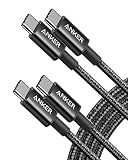
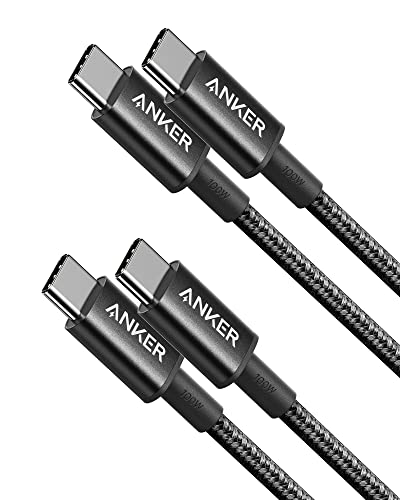
 Anker USB C to USB C Cable
- The Anker Advantage: Join the 80 million+ powered…
- Rapid Charging: Supports high-speed charging up to 100W…
- Highly Compatible: Designed to work flawlessly with any…
 Anker USB C to USB C Cable
- Durable Design: Reinforced nylon exterior and a robust…
- Fast Charging: Supports Power Delivery for up to…
- Versatile Compatibility: Works with virtually all USB-C devices,…
| Product | Key specs | |
|---|---|---|
| Anker USB C to USB C Cable | The Anker Advantage: Join the 80 million+ powered… Rapid Charging: Supports high-speed charging up to 100W… Highly Compatible: Designed to work flawlessly with any… | Check price |
| Anker USB C to USB C Cable | Durable Design: Reinforced nylon exterior and a robust… Fast Charging: Supports Power Delivery for up to… Versatile Compatibility: Works with virtually all USB-C devices,… | Check price |
 Anker USB C to USB C Cable Anker USB C to USB C Cable | Check price | |
 Anker USB C to USB C Cable Anker USB C to USB C Cable | Check price |
As an Amazon Associate we earn from qualifying purchases at no extra cost to you.
Top Picks at a Glance
- Best Overall: Anker USB C to USB C 100W (2-pack, 6 ft) for phones, tablets and most laptops
- Best Value for High Power: INIU 240W USB C to USB C (2 x 6.6 ft) with LED indicator
- Best Budget USB-A to USB-C: etguuds 6 ft USB A to USB C (2-pack)
- Best Retractable Charging Cable: Minlu 4-in-1 retractable multi-tip cable (2-pack, 4 ft)
- Best USB-C Printer Cable: CableCreation USB B to USB C (6.6 ft)
- Best Long Cable: Belkin USB C to USB C 100W braided (9.9 ft)
- Best Premium: Apple 240W USB-C to USB-C Woven Charge Cable (2 m)
Quick Comparison Table
| Product | Best for | Key specs (from the listing) | Watch for | Price tier |
|---|---|---|---|---|
| Anker USB C to USB C 100W | Phone plus laptop, everyday carry | 100W rating, C to C, 2-pack, 6 ft, black | Data speed not listed, assume USB 2.0 class | Budget |
| INIU 240W USB C to USB C | High-wattage laptops, gaming handhelds | 240W rating, 2 x 6.6 ft, nylon braided, LED indicator | 240W only matters with a 240W-capable charger and device | Budget |
| etguuds USB A to USB C | Old wall chargers, car USB-A ports | USB A to C, 2-pack, 6 ft, fast charging described | Wattage and data speed not listed | Budget |
| Minlu 4-in-1 Retractable | Car, desk drawer, travel pouch | 4A rating, retractable, multi-tip (Type C, L, Micro USB), 2-pack, 4 ft | Moving parts and thin conductors, not for laptops | Budget |
| CableCreation USB B to USB C | Printers, MIDI keyboards, DACs, DJ gear | Type B to Type C, 6.6 ft (2 m), black | Only for devices with a USB-B port | Budget |
| Belkin USB C to USB C 100W Braided | Couch, bedside and desk reach | 100W Power Delivery, braided, 9.9 ft | Longer cables lose some efficiency and are bulkier | Mid-range |
| Apple 240W USB-C Woven | Apple laptops and 240W setups | 240W, woven, 2 m | Costs more than the multi-pack options | Premium |
1. Anker USB C to USB C 100W: Best for Phone Plus Laptop
If you want one purchase that works for almost everyone, this is it. The listing describes a 100W fast charging cable sold as a 2-pack of 6 ft black cables, aimed at current iPhones, MacBook Pro models and iPads.
- Rating: 100W, which is the common ceiling for most laptop charging over USB-C
- Connectors: USB-C on both ends
- Length: 6 ft per cable, two cables in the pack
- Colour: black
- Data speed: not listed
Best for: people with one phone and one thin-and-light laptop who want a spare for the office. Skip if: you need a cable for fast external drives or a monitor, because the data speed is not stated.
What does 100W mean in practice? It means the cable will not be the bottleneck for most laptops that charge at 65W to 100W. A phone will only draw what it needs, usually somewhere in the 20W to 45W range, so you will not see any benefit from a bigger number on a phone. The 6 ft length is the sweet spot: long enough to reach a nightstand from a wall outlet, short enough that it does not become a tangle on a desk.
The two-pack format matters more than people expect. Cables usually fail at the strain relief near the plug, and having one at the desk and one in the bag removes the daily habit of unplugging and carrying a single cable, which is the main way connectors get worn out.
Pros: well-known brand, two cables in the box, 100W covers most laptops, sensible length. Cons: data speed not listed, no braided jacket described in the listing.
2. INIU 240W USB C to USB C: Best Value for High Power
This is the pick if you own, or expect to own, a device that charges at more than 100W. The listing describes a 240W nylon braided cable, sold as two 6.6 ft cables, with an LED indicator that shows when power is flowing.
- Rating: 240W
- Connectors: USB-C on both ends
- Length: 2 x 6.6 ft
- Jacket: nylon braided
- Extra: LED indicator
Best for: power users, gaming laptop owners and anyone who wants a cable that will not need replacing when the next charger arrives. Skip if: you only charge a phone and a pair of earbuds. You will not feel the difference.
A 240W cable is built for the USB Power Delivery 3.1 extended range, which allows up to 48V at 5A. The cable still only delivers what the charger offers and the device requests, so a 240W cable on a phone charger is just a normal phone cable. The advantage is headroom. If a future laptop or dock needs more than 100W, this cable is already ready, and the cable will carry an e-marker chip that tells the charger what it can handle.
The LED indicator is a small feature with real value. A quick glance tells you whether the cable is energised, which is handy when a laptop charge seems slow and you are trying to work out if the problem is the outlet, the brick or the cable.
Pros: high wattage headroom, two cables, braided jacket, indicator light. Cons: extra capacity is wasted on phones, data speed not listed, some people find LED lights distracting on a bedside table.
3. etguuds 6 ft USB A to USB C: Best Budget Pick for Older Chargers
Plenty of homes and cars still have USB-A ports, and a USB A to USB C cable is how a modern phone uses them. The etguuds listing describes a 2-pack of 6 ft fast-charging cords for current iPhone and Galaxy phones.
- Connectors: USB-A to USB-C
- Length: 6 ft each, two in the pack
- Pack: 2 cables
- Wattage: not listed
- Data speed: not listed
Best for: car chargers, old wall bricks, power banks with USB-A ports and spare cables for guests. Skip if: you need laptop charging, because USB-A ports cannot deliver 100W over this style of cable.
The best USB C to USB A cable is almost always a plain, short-to-medium cable from a recognised maker. USB-A chargers top out at modest wattages, so spending more on a premium A-to-C cable rarely changes charge speed. What matters here is durability and price per cable, and that is why a 2-pack at the low end of the range makes sense. If you buy this style, check the maker’s page for the current rating before you rely on it for anything beyond phone charging.
Pros: low cost, two cables, 6 ft reach in a car or on a sofa, fits every USB-A port. Cons: no wattage or data speed on the listing, unknown brand compared with big-name makers, not for laptops.
4. Minlu 4-in-1 Retractable Charging Cable: Best Retractable Option
A retractable cable solves one problem: clutter. The Minlu listing describes a 4-in-1 retractable cord with 4A output, sold as a 2-pack of 4 ft cables, with Type C, Lightning-style and Micro USB tips for mixed households and cars.
- Style: retractable, multi-tip (Type C, L and Micro USB ports per the listing)
- Rating: 4A
- Length: 4 ft
- Pack: 2 cables
- Data speed: not listed
Best for: the glove box, a desk drawer or a bag where loose cords turn into knots. Skip if: you want one cable for a laptop or a fast phone charger. Multi-tip retractables use thin internal conductors and are made for convenience, not peak speed.
The best retractable charging cable is the one that is realistic about its limits. The reel mechanism adds resistance and wear points. Treat it as a travel or car cable, extend it gently, do not yank it at an angle, and keep it away from heavy loads. When one tip dies, you still have the second cable in the pack.
For mixed households, a multi-tip cable is genuinely handy. A guest with an older phone, a kid with a tablet and a driver with a newer phone can all borrow the same cord. Just check which tip your devices need before you buy, because the listing mentions Type C, L and Micro USB, and not every combination fits every model.
Pros: tangle-free, multiple tips, 2-pack, handy in cars. Cons: not for laptops, moving parts, short reach at 4 ft.
5. CableCreation USB B to USB C: Best USB-C Printer Cable
Some people search for a USB C printer cable and end up with the wrong item. Most printers use a squarish USB-B port, which is not the same as a phone charging port. This CableCreation cable has a Type B plug on one end and a Type C plug on the other, so it connects a printer, MIDI keyboard, DAC or DJ controller to a modern laptop without an adapter.
- Connectors: USB-B to USB-C
- Length: 6.6 ft (2 m)
- Colour: black
- Use cases named in the listing: printers, MIDI and digital pianos, DACs, DJ controllers
- Wattage: not applicable, data cable
Best for: home offices with a USB-B printer and a MacBook or ultrabook that has only USB-C ports. Skip if: your printer is wireless-only or uses a different connector.
Check the shape of your printer’s port first. If it is a square-ish port with two notched corners, it is USB-B and this cable fits. If you see a small rectangular USB-A style port, you need a different cable. For music gear, a clean data path matters more than speed, so look for a cable that is sturdy and not excessively long. At 6.6 ft this one is long enough for a desk-to-shelf setup and short enough to avoid signal problems.
Pros: exact connector pairing, solid length, works for audio gear and printers. Cons: single-purpose, no charging role, and you must confirm the printer port type first.
6. Belkin USB C to USB C 100W Braided: Best Long Cable
A 10 ft cable changes how a charger fits into a room. The Belkin listing describes a 100W USB-C Power Delivery braided cable at 9.9 ft, which reaches from a wall socket behind a sofa to a laptop on your knees.
- Rating: 100W USB-C Power Delivery
- Connectors: USB-C on both ends
- Length: 9.9 ft
- Jacket: braided
- Data speed: not listed
Best for: bedrooms, living rooms, standing desks and workshops where outlets are far away. Skip if: you mainly charge on a desk with a short run, where a 3 ft cable is neater.
Long cables are a trade-off. Voltage drop rises slowly with length, so a 10 ft run can deliver a touch less than a 3 ft run at the far end. For phones, that is irrelevant. For a 100W laptop, a reputable braided cable is still a good solution, and the convenience of not hunting for a socket makes it worth it. Coil the extra length loosely instead of tight loops, which keeps the braid in good condition.
Pros: long reach, braided jacket, 100W rating, recognised brand. Cons: single cable, bulkier to pack, data speed not listed.
7. Apple 240W USB-C to USB-C Woven Charge Cable: Best Premium
Apple’s woven cable is the straightforward option if you are buying around Apple devices or want the manufacturer’s own cable. The listing describes a 240W woven cable at 2 m.
- Rating: 240W
- Connectors: USB-C on both ends
- Length: 2 m (about 6.6 ft)
- Jacket: woven
- Data speed: check the maker’s page, it is not stated in the listing
Best for: buyers who want a first-party cable and a high power rating. Skip if: you need multiple cables for the money, since multi-pack options from other brands are cheaper per cable.
The woven finish is designed to resist fraying, and 240W covers every USB-C device on the market today with room to spare. It is a one-cable buy rather than a bundle, so it suits a primary laptop desk setup rather than a drawer full of spares.
Pros: maker’s own cable, 240W rating, woven jacket, 2 m length. Cons: single cable, highest cost of the group, more capacity than a phone needs.
Also Consider
Anker USB A to USB C (2-pack, 6 ft)
A well-known alternative to the etguuds pack if you want a recognised brand for car and wall-brick charging. Same use case, same limits.
UGREEN 100W USB C to USB C (2-pack, 3.3 ft)
The short length suits a desk, a power bank or a travel pouch. A good second cable next to the Anker 6 ft pack.
Anker Nano USB C to USB C 240W (6 ft)
A flexible braided cable with a 240W rating for people who want the high-power headroom in a single, softer cable.
Anker Prime USB C to USB C 240W (6 ft)
The premium option from a brand that markets upcycled braided nylon. It suits buyers who want durability above all and do not mind paying more for one cable.
How We Chose
This guide is research-based. We did not personally use these products. We started with the products featured on this page and added others based on what a typical buyer needs: a phone and laptop cable, a budget USB-A cable, a retractable cable, a printer cable, a long cable and a premium option. We then read the product listings, checked the maker’s stated ratings and lengths, and compared them with independent USB explainers from Native Union, the USB Implementers Forum guidelines as summarised by technical sites, and general reviews of USB Power Delivery.
We only name specs that appear in the listing or on the manufacturer’s page. Where a rating is not stated, we say “not listed”. We do not quote prices. Instead we use three tier words: Budget, Mid-range and Premium. We limited the picks to two per brand and kept each one tied to a specific job, so that a reader can map the cable to their own situation.
Buying Guide
Match the wattage to the device, not to the biggest number
Use these thresholds as a starting point. Earbuds, watches and e-readers need under 10W. Most phones charge at roughly 20W to 45W. Tablets and thin laptops use 30W to 65W. Larger laptops and handheld PCs use 65W to 100W. Some gaming laptops and docks go beyond 100W, which is where 240W cables start to make sense. A 60W cable covers phones and most small laptops; a 100W cable covers almost everything; a 240W cable is for future-proofing and the heaviest users. Any cable rated above 60W should include an e-marker chip, and that is a normal feature.
Wattage is not data speed
A 100W or 240W cable can still carry data at USB 2.0 speed (480 Mbps). Power and data are separate specs. If you want to move large files, back up a phone or connect an external drive or monitor, look for a stated rating of 5 Gbps, 10 Gbps or higher (for example, USB 3.2 or USB4). If the listing does not state a data speed, assume USB 2.0. This is why several picks above say “data speed not listed”.
Choose the right connector pairing
USB-C to USB-C is for modern chargers and laptops. USB-A to USB-C is for older chargers and car ports, and is limited to lower wattages. USB-B to USB-C is for printers and music gear. A multi-tip retractable cable is for light-duty convenience. Buying the wrong pairing is the most common mistake, and it is easy to avoid by looking at the port on the device before you click buy.
Pick a length that fits the room
Use 3 ft for desks and power banks, 6 ft to 6.6 ft for nightstands and sofas, and 10 ft for far outlets. Longer cables are heavier and more tangle-prone, and for high wattage they lose a little to resistance. If you need two lengths, buy a multi-pack with mixed lengths or pair a short and long cable.
Look at durability features
Failure usually happens at the plug, where the cable bends. Braided jackets, reinforced strain relief and thicker cables resist this. A reel-style cable adds more moving parts. A plain cable with a flexible jacket often lasts as long as a fancy one, and a multi-pack lets you rotate use so no single cable wears out first.
Common Mistakes to Avoid
- Buying a 240W cable for a phone and expecting a speed boost. The phone sets the limit.
- Using a thin multi-tip retractable cable for a laptop. It is not built for that load.
- Assuming every USB-C cable carries video or fast data. Many only charge and sync at USB 2.0 speed.
- Ignoring the charger. A cable cannot deliver more than the charger offers.
- Buying a printer cable without checking whether the printer has a USB-B port.
More Picks Worth Considering
These additional options fit the same use case and are worth a look if the main picks above do not match your needs.
etguuds 6ft USB A to USB C Cable, 2Pack Fast Charging Cord Type C Charger

Listed as etguuds 6ft USB A to USB C Cable, 2Pack Fast Charging Cord Type C Charger. The maker’s listing highlights: for iPhone 17 16 15 Pro Max Plus 16e 17 Air, Samsung Galaxy S26 S25 S24 S23 S22 S21 S20 A17 A16 A56 A55 Flip Fold, Pink. Compare size, material and compatibility with your own setup before choosing, and check the maker’s size or fit chart where relevant.
CableCreation USB B to USB C Printer Cable 6.6FT, Type B to Type C Cord

Listed as CableCreation USB B to USB C Printer Cable 6.6FT, Type B to Type C Cord. The maker’s listing highlights: USB C MIDI Cable for MacBook Pro, Air, Yamaha Casio Digital Piano, MIDI Keyboard, DJ Controller, DAC to iPad-2M, Black. Compare size, material and compatibility with your own setup before choosing, and check the maker’s size or fit chart where relevant.
Multi USB Charger Cable 4A, Retractable Charging Cord for Multiple Devices

Listed as Multi USB Charger Cable 4A, Retractable Charging Cord for Multiple Devices. The maker’s listing highlights: 4 in 1 Retractable Charger Cord with Type C/L/Micro USB Ports for iPhone 17 16 15 14/Samsung/Kindle Car Accessories-2Pack 4Ft. Compare size, material and compatibility with your own setup before choosing, and check the maker’s size or fit chart where relevant.
Frequently Asked Questions
What is the best USB C cable for most people?
A 100W USB C to USB C cable in a 2-pack, like the Anker option above, covers most phones, tablets and laptops. It gives you a spare and enough power for almost every device.
What is the best USB C to USB A cable?
The best USB C to USB A cable is a plain 6 ft cable from a brand you trust, since USB-A ports limit power anyway. The etguuds 2-pack is the budget pick here, and the Anker 2-pack is a known-brand alternative.
Do I need a 240W cable for fast charging?
No. A fast charging cable for a phone only needs to match the phone’s charging rate, often 20W to 45W. A 100W cable is plenty. A 240W cable is mainly useful for large laptops, docks or future devices.
Is a retractable charging cable worth it?
It is worth it for convenience in a car, a bag or a drawer. It is not the right choice for laptops or the fastest phone charging, because the thin internal wiring and reel add limits.
Which USB C printer cable should I buy?
Check your printer’s port first. If it has a USB-B port, a USB B to USB C cable such as the CableCreation 6.6 ft cable connects it to a USB-C laptop directly. If it uses a different port, you need a different cable.
Does a longer cable charge slower?
Slightly, at the margin. Resistance rises with length, so a 10 ft cable can deliver a touch less power at the far end than a 3 ft cable. For phones it makes no real difference, and for laptops a quality braided cable is still fine.
How do I know if a cable supports data as well as charging?
Look for a stated data speed such as 480 Mbps (USB 2.0), 5 Gbps or 10 Gbps. If the listing only mentions wattage, assume it is a charging cable with basic data speed.
Which One Should You Buy?
Pick the Anker 100W 2-pack if you want one simple answer. Pick the INIU 240W pack if you have a power-hungry laptop or want headroom. Pick the etguuds A-to-C pack for older chargers and cars. Choose the Minlu retractable for a glove box or travel pouch, the CableCreation for a printer or music gear, the Belkin when the outlet is far, and the Apple cable when you want the maker’s own premium option. If you are unsure, buy two cables: a 6 ft C-to-C for the bedside and a short one for the desk.
Sources
- Native Union, USB-C Cable Guide: 60W vs 100W vs 240W
- USB Implementers Forum, USB Power Delivery and cable marking guidelines
- Anker product pages for USB-C cables
- INIU product pages for 240W USB-C cables
- Belkin product page for the 100W braided USB-C cable
- Apple Support, 240W USB-C Woven Charge Cable
Last updated: October 2026