
For most large homes the best long-range answer is a Wi-Fi 7 tri-band router from ASUS, TP-Link or Netgear placed centrally, while a mesh system such as TP-Link Deco, eero or ASUS ZenWiFi is the better choice for multi-storey or brick-walled houses; a single powerful router only wins when the space is open and one level. Range is determined as much by placement, walls and the devices you connect as by the model name on the box.
Our top picks

 TP-Link AC1200 Gigabit Dual Band WiFi Router
- Dual band router upgrades to 1200 Mbps high…
- Full Gigabit Ports - Gigabit Router with 4…
- Boosted Coverage - Four external antennas equipped with…

As an Amazon Associate we earn from qualifying purchases at no extra cost to you.
Long-Range Routers at a Glance
| Option | Best for | Key stated specs | Limits |
|---|---|---|---|
| ASUS RT-BE96U or similar flagship Wi-Fi 7 router | Large single-level homes with demanding users | ASUS lists Wi-Fi 7, multi-gig ports, many antennas and AiProtection security features | Large footprint; premium cost tier |
| TP-Link Archer BE series (BE800 class) | Strong coverage with simple setup | TP-Link lists Wi-Fi 7, multi-gig ports and a high-end antenna array on its flagships | Stated speeds are theoretical combined figures |
| Netgear Nighthawk Wi-Fi 7 models | Gamers and heavy streamers | Netgear lists Wi-Fi 7, multi-gig Ethernet and gaming-oriented features | Some advanced features sit behind subscriptions |
| TP-Link Deco mesh sets | Multi-storey homes, simple management | TP-Link lists multi-node coverage, with Wi-Fi 6 and Wi-Fi 7 options | Wireless backhaul reduces speed at far nodes |
| eero mesh systems | Easy app-driven setup | eero lists tri-band and Wi-Fi 6E or Wi-Fi 7 versions, with Thread and Zigbee support on some | Some features need a subscription; fewer advanced settings |
| ASUS ZenWiFi mesh sets | Mesh with deep settings | ASUS lists AiMesh, wired backhaul support and security tools | More settings can overwhelm beginners |
| Previous-generation Wi-Fi 6 routers | Budget coverage for modest speeds | Makers list Wi-Fi 6 with strong coverage in many AX models | No Wi-Fi 7 features; fewer future-proof ports |
Model names change frequently, so read the maker’s page for the current version. Independent outlets such as RTINGS, PCMag, Tom’s Guide and Wirecutter publish router and mesh comparisons that report measured throughput and range, and reviewers generally agree that coverage depends heavily on building layout.
What Long Range Really Means
Marketing numbers like AX or BE rating 11000 are the sum of speeds across all bands under ideal conditions, not what a laptop sees in a back bedroom. In practice, range comes from three things: transmit power and antenna design, the frequency band, and your environment. The 2.4 GHz band travels farther through walls but is slower and more congested. The 5 GHz band is faster but weaker through obstacles. The 6 GHz band, introduced with Wi-Fi 6E and used by Wi-Fi 7, is fastest and least crowded but has the shortest reach. A router that is strong at 5 GHz at a distance will usually matter more than headline 6 GHz speed for coverage purposes.
Your devices matter too. A phone has small antennas and weaker transmit power than the router, so it can hear the router but struggle to be heard. Many reviewers point out that a router with a high stated range does not fix this; adding a second access point does.
Single Router Versus Mesh
Choose a single router if
- The home is one level or a compact two-level layout.
- You want advanced features, lots of Ethernet ports, or low latency for gaming.
- You can mount the router centrally and high.
Choose mesh if
- The home has several floors, thick walls, or an awkward shape.
- You want roaming that hands devices to the nearest node without dropping calls.
- You can run Ethernet to the satellites. Wired backhaul usually delivers the strongest and most stable results because wireless nodes otherwise share bandwidth with your devices.
Placement and Setup Notes
- Put the router in a central, elevated position, away from metal, mirrors, fish tanks and microwave ovens.
- Do not tuck it in a cabinet or behind a TV; antennas need open air.
- Point external antennas roughly vertical if the maker advises; adjust one slightly sideways for multi-floor coverage.
- Use the 2.4 GHz network for smart-home devices and far corners, 5 GHz for general use, and 6 GHz for nearby, demanding devices.
- Update the firmware, change the default admin password, and use WPA3 or WPA2/WPA3 mixed mode where devices support it.
- Check that your modem and internet plan can use the router’s multi-gig ports before paying extra for them.
Budget Tiers
Budget: Wi-Fi 6 routers and entry mesh kits cover apartments and small homes well. They are enough for most streaming and video calls.
Mid-range: Wi-Fi 6E or entry Wi-Fi 7 routers and two- or three-node mesh kits. This tier suits most family homes and delivers good headroom.
Premium: Flagship Wi-Fi 7 routers with multi-gig ports and large mesh sets with wired backhaul. Choose it if you have gigabit-plus internet, a home office with many devices, or a very large property.
Pick X If … Decision Table
| Pick this | If you want |
|---|---|
| ASUS flagship Wi-Fi 7 router | Maximum control and power in a single box |
| TP-Link Archer BE flagship | Strong coverage with a straightforward interface |
| Netgear Nighthawk | Gaming-focused features and robust hardware |
| TP-Link Deco | Multi-room mesh that is easy to manage |
| eero | Simple app control for non-technical users |
| ASUS ZenWiFi or AiMesh | Mesh coverage with deep customization |
Alternatives
Powerline or MoCA adapters: if Ethernet cannot be run, these can bring a wired backhaul over existing electrical or coax wiring, with results that depend on the building.
Wi-Fi extenders: low-cost fixes for a single dead zone, but they often halve throughput when they relay wirelessly.
Access points via PoE: Ubiquiti UniFi and TP-Link Omada systems suit enthusiasts who want ceiling-mounted coverage managed from one dashboard.
Diagnosing Coverage Before You Buy
Before spending on a flagship, find out why coverage is weak. Run a speed test next to the router, then in the problem room, using a phone or laptop on the same band. If speed is fine near the router and poor in the far room, the cause is distance or obstacles, and a mesh node or access point is likely to help more than a stronger router. If speeds are poor even next to the router, the issue may be your internet plan, modem, cable or provider, and a new router will not fix it.
Walls matter more than most buyers expect. Drywall barely affects a signal, while brick, concrete, plaster with metal lath, tiled bathrooms and foil-backed insulation can absorb a large fraction. Floors with metal ducting or reinforced concrete are particularly hard on 5 GHz and 6 GHz. In such homes the usual advice from reviewers is to place a node on each floor rather than expecting one router to cover everything.
Interference and Channel Selection
In apartments, dozens of neighbouring networks compete for the same channels. Most modern routers choose a channel automatically, but you can check the router app for congestion and try a different channel if one band is crowded. Wi-Fi 6E and Wi-Fi 7 routers add a 6 GHz band that few neighbours use yet, which can help nearby devices, though it will not stretch your range.
Outdoor Coverage
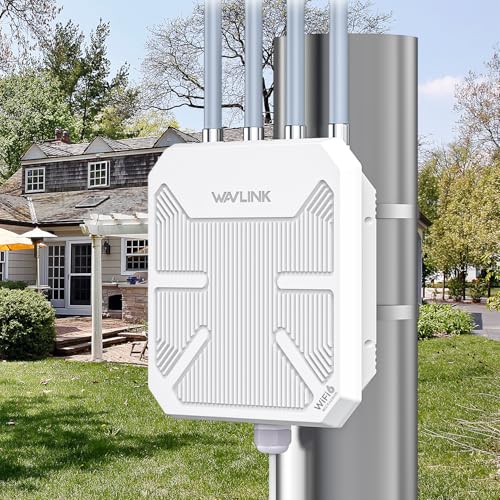
A router indoors will not reliably cover a large yard, workshop or detached garage. For those, an outdoor access point or a weatherproof mesh node, placed under cover and powered according to the maker’s instructions, is a safer approach than running a mains-powered indoor extender through a window. Any outdoor electrical installation should follow local code, and if you are unsure about wiring or power over Ethernet in a damp location, ask a qualified electrician.
Future-Proofing
If you have, or plan to have, an internet plan above one gigabit, look for a multi-gig WAN port so the router does not become the bottleneck. If you use many smart-home gadgets, a router or mesh that supports a separate IoT network, Thread or Zigbee may help. If none of this applies, a solid Wi-Fi 6 router remains a sensible choice and the money saved can pay for an extra node.
Frequently Asked Questions
Do more antennas mean longer range?
Not always. Antenna count and design help, but placement, power limits set by regulators, and your device’s capabilities matter as much. A well-placed router with fewer antennas can outperform a badly placed flagship.
Is Wi-Fi 7 necessary for range?
No. Wi-Fi 7 adds speed, efficiency and features such as multi-link operation, but older Wi-Fi 6 routers can cover large spaces. Your devices need to support Wi-Fi 7 to benefit from it.
Will a mesh system slow my internet?
Wireless backhaul can reduce speed at remote nodes. Tri-band mesh devices with a dedicated backhaul band or wired Ethernet backhaul reduce this effect. Reviewers commonly recommend wiring nodes where possible.
Where should I put my router?
Centrally, high on a shelf, in the open and away from large metal objects, mirrors and appliances. Avoid basements and closets. If the layout is awkward, a second node is often better than moving the router repeatedly.
Should I use the router from my internet provider?
Provider-supplied gateways are fine for small homes, but a separate router often offers better coverage and controls. If you add your own router, ask your provider about bridge or IP passthrough mode on the gateway.
How do I keep the router secure?
Change the default login, enable automatic firmware updates when offered, use WPA3 where supported and disable remote admin unless needed. Follow the maker’s guidance, and replace routers that no longer receive updates.





