Key takeaways
- Compare five portable photo printers for phones, from dye-sub 4x6 prints to pocket Zink stickers, with print size, battery life and app guidance.
A phone holds thousands of photos, but a photo on a screen is easy to forget. A portable photo printer turns a phone snap into a physical print in under a minute, with no desktop printer or photo lab visit. The five printers below cover the main ways to buy one: a dye-sub printer for full-size 4×6 prints, two pocket dye-sub printers for 2×3 stickers, a square-format dye-sub printer, and an instant-film printer for credit-card-size prints.
As an Amazon Associate, we earn from qualifying purchases.
Quick Answer
Most buyers should take the Canon SELPHY CP1500 for true 4×6 dye-sub prints with the best quality here. For pocket printing, the Polaroid Hi-Print 2nd Generation gives dye-sub quality in a 2×3 sticker format, while the HP Sprocket is the cheapest way into Zink stickers. The Kodak Mini 3 Retro is the pick for square 3×3 prints, and the Fujifilm Instax Mini Link 2 is the pick for instant film fun.
How to Choose Portable Photo Printers for Phones
Print technology sets the look
Three of the five printers here use dye sublimation, where heat transfers dye onto paper in layers and finishes with a protective coat. Dye-sub prints look smooth and resist water and fingerprints. The HP Sprocket uses Zink, or zero-ink, paper: heat activates dye crystals already embedded in the paper. Zink prints are fast and cheap per sheet, but the color is softer and the paper has a slightly waxy feel. The Fujifilm Instax Mini Link 2 uses instant film, which develops in front of you with the classic white border, at the highest running cost per print here.
Print size decides the use
The Canon SELPHY CP1500 prints full 4×6 inch photos, the standard frame and album size. The Polaroid Hi-Print and the HP Sprocket print 2×3 inch stickers, the size of a business card, made for journals, scrapbooks, laptops and phone cases. The Kodak Mini 3 Retro prints square 3×3 inch photos, and the Instax Mini Link 2 prints credit-card-size instant film. Buy the size that matches your use.
Battery, app and running cost
Every pocket printer here runs on a built-in rechargeable battery and connects to a phone over Bluetooth, except the Canon, which is a tabletop printer that runs on wall power unless you buy its optional battery pack separately. Check the app before buying: each printer needs its maker’s app for printing, and the app is where filters, frames, collages and ID-photo layouts live. Running cost matters more than the printer itself over time. Dye-sub and Zink printers use all-in-one cartridges that bundle paper and ink, so the cost per print is fixed. Instant film is sold in packs of ten, and the cost per print is the highest here.
Safety and the recall record
No federal recall covers portable photo printers as a class, and none of the five picks here appears in any recall notice. Two records from nearby product classes are worth knowing. A 2001 to 2002 recall covered Longwell LS-7C power cords shipped with certain HP DeskJet and Photosmart desktop inkjet printers, where the plug could crack and expose live contacts; that recall covered the cords on desktop inkjet printers, not pocket photo printers. A February 2024 recall, CPSC 24-095, covered the rechargeable lithium-ion battery sold with the Snap Pixy flying camera, which could overheat and catch fire; that was a flying camera battery, a different product entirely. All five printers here use small rechargeable lithium-ion batteries, so charge them on a hard surface.
The 5 Best Portable Photo Printers for Phones
1. Canon SELPHY CP1500, Black — Best Overall
The SELPHY CP1500 is the only printer here that makes full-size 4×6 inch prints, and it is the best image quality in this guide. It uses dye sublimation at 300 by 300 dots per inch, printing in layers of yellow, magenta and cyan, then sealing the photo with a protective coat. A 4×6 print takes about 41 seconds. It connects over Wi-Fi and USB, reads SD cards directly, and has a small LCD screen for printing without a phone. The trade is size and power: at about 1.9 pounds, it is a tabletop printer, and it runs on wall power unless you buy the optional battery pack separately. One flag: the listing record shows it shipping from Amazon and sold by a third-party store, so confirm the live offer before ordering.
Specs
– Print technology: Dye sublimation per Canon
– Print size: 4×6 in per Canon
– Resolution: 300 by 300 dpi per Canon
– Connectivity: Wi-Fi, USB, SD card slot per Canon
– Display: LCD screen per Canon
– Dimensions: 7.1 x 5.3 x 2.5 in per Canon
– Weight: About 1.9 lb per Canon
– Tier: Premium
Choose it for the best prints in this guide; the pocket printers below trade size for portability.
2. Fujifilm Instax Mini Link 2, Space Blue — Best for Instant Film Fun

The Instax Mini Link 2 is the fun pick. It prints on Instax Mini instant film, so each photo develops in front of you with the classic white border, and the app adds augmented-reality frames, sketch mode and a remote shutter that lets you trigger the phone camera from the printer. It connects over Bluetooth, prints in about 15 seconds, and weighs about 7.4 ounces, so it fits a jacket pocket. The trade is running cost: instant film is sold in packs of ten, and the cost per print is the highest of the five printers here. One flag: the listing crawl behind this guide is about 232 days old, so glance at the live offer before ordering.
Specs
– Print technology: Instax Mini instant film per Fujifilm
– Print size: Credit-card size, about 2×3 in per Fujifilm
– Resolution: 318 dpi per Fujifilm
– Connectivity: Bluetooth per Fujifilm
– Print time: About 15 seconds per Fujifilm
– Dimensions: 3.6 x 1.4 x 4.9 in per Fujifilm
– Weight: About 7.4 oz per Fujifilm
– Tier: Mid-range
Choose it for instant film and playful app features; the dye-sub picks below cost less per print.
3. HP Sprocket 2nd Edition, Lilac — Best Value
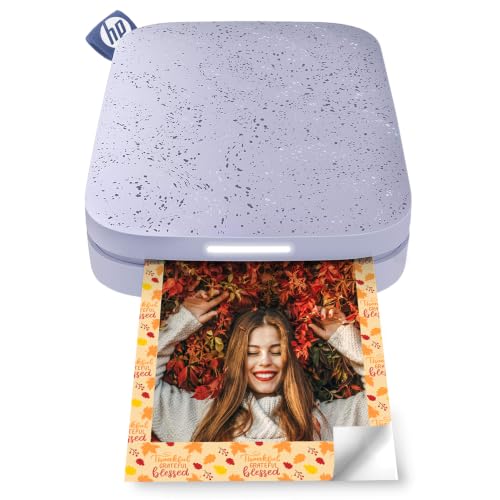
The HP Sprocket is the cheapest way into pocket printing. It uses Zink paper, so there is no ink cartridge to buy: heat activates dye crystals already in the 2×3 inch sticky-backed paper, and the print peels off as a sticker for journals, laptops and phone cases. It connects over Bluetooth, weighs about 6 ounces, and prints in about 40 seconds. The trade is image quality: Zink prints look softer than dye-sub prints, with less smooth gradients, and the paper has a slightly waxy feel. One flag: the listing crawl behind this guide is about 281 days old, so glance at the live offer before ordering.
Specs
– Print technology: Zink, zero-ink per HP
– Print size: 2×3 in, sticky-backed per HP
– Resolution: 313 by 400 dpi per HP
– Connectivity: Bluetooth per HP
– Print time: About 40 seconds per HP
– Dimensions: 3.15 x 4.72 x 0.98 in per HP
– Weight: About 6 oz per HP
– Tier: Budget
Choose it for the lowest entry cost and sticker prints; the Polaroid below gives sharper dye-sub stickers.
4. KODAK Mini 3 Retro, Black — Best Square Prints

The Kodak Mini 3 Retro is the only square-format printer here. It uses 4PASS dye sublimation, passing the paper through four times for yellow, magenta, cyan and a protective laminate coat, to make 3×3 inch square prints for social-media photos and scrapbooks. Prints take about 60 seconds. It connects over Bluetooth, runs on a built-in 1,250 milliamp-hour battery that charges in about 2.5 hours and prints about 25 to 35 photos per charge. The all-in-one cartridge holds 8 sheets, so you reload often at an event. One flag: one Amazon listing record showed this model as currently unavailable, while a separate price-tracking record shows recent Amazon activity, so confirm the live offer before ordering. The maker’s spec sheet lists the weight at about 11.9 ounces, while the Amazon record prints a heavier figure; this guide uses the maker’s number.
Specs
– Print technology: 4PASS dye sublimation per Kodak
– Print size: 3×3 in, square per Kodak
– Connectivity: Bluetooth per Kodak
– Battery: 1,250 mAh, about 25 to 35 prints per charge per Kodak
– Charge time: About 2.5 hours per Kodak
– Cartridge: 8 sheets, all-in-one per Kodak
– Dimensions: 4.2 x 5.2 x 1.18 in per Kodak
– Weight: About 11.9 oz per Kodak
– Tier: Mid-range
Choose it for square prints and durable laminated photos; the Canon above is the pick for standard 4×6 prints.
5. Polaroid Hi-Print 2nd Generation, White — Best Pocket Dye-Sub

The Polaroid Hi-Print 2nd Generation is the pocket dye-sub pick. It uses dye diffusion thermal transfer, the same 4PASS dye-sub process as the Canon and Kodak, to make 2×3 inch peel-and-stick prints at 291 dots per inch. It weighs about 9.2 ounces, connects over Bluetooth 5.0, charges over USB-C, and its battery prints up to 20 photos per charge. The maker lists a print time under 50 seconds, while one independent review measured about 80 seconds. One flag: only Polaroid Hi-Print 2×3 paper cartridges work in this printer, so check that the package you order includes paper before buying. The listing record shows it in stock and shipped by Amazon.
Specs
– Print technology: Dye diffusion thermal transfer, 4PASS per Polaroid
– Print size: 2×3 in, peel-and-stick per Polaroid
– Resolution: 291 dpi per Polaroid
– Connectivity: Bluetooth 5.0, USB-C charging per Polaroid
– Battery: Up to 20 prints per charge per Polaroid
– Print time: Under 50 seconds per the maker per Polaroid
– Dimensions: 5.9 x 3.1 x 1.06 in per Polaroid
– Weight: About 9.2 oz per Polaroid
– Tier: Budget
Choose it for the sharpest pocket stickers in this guide; the HP Sprocket above is cheaper per print.
Who Should Skip Portable Photo Printers for Phones
Skip a portable printer if you print rarely, since a photo lab or a home inkjet printer costs less per print at low volume. Skip the pocket printers if you want framed photos, since only the Canon makes 4×6 prints. Skip instant film if running cost matters, since Instax film is the most expensive per print here. Skip any pick whose listing shows no live offer, and skip Zink if you want the smoothest color.
Frequently Asked Questions
Which portable photo printer makes the best prints?
The Canon SELPHY CP1500 makes the best prints here, with full 4×6 inch dye-sub photos at 300 by 300 dots per inch and a protective coat. Among pocket printers, the Polaroid Hi-Print 2nd Generation is sharpest, while the HP Sprocket trades sharpness for a lower entry cost.
Do portable photo printers need ink?
Dye-sub printers use all-in-one cartridges that bundle paper and dye, Zink printers need no ink at all, and instant-film printers use film packs. In every case, the paper or film is the running cost, so check the cost per sheet before buying.
Can I print from my phone without Wi-Fi?
Yes. Four of the five printers here connect over Bluetooth, so they print with no Wi-Fi network. The Canon SELPHY CP1500 uses Wi-Fi or USB, and it can also print directly from an SD card.
How long does a portable photo printer battery last?
The Kodak Mini 3 Retro prints about 25 to 35 photos per charge, the Polaroid Hi-Print prints up to 20 photos per charge, and the Canon SELPHY CP1500 runs on wall power unless you buy its optional battery pack separately.
Final Verdict
Buy on print size and running cost first. Most buyers should take the Canon SELPHY CP1500 for the best 4×6 prints. Choose the Polaroid Hi-Print 2nd Generation for sharp pocket stickers, the HP Sprocket for the cheapest sticker printing, the Kodak Mini 3 Retro for square prints, and the Fujifilm Instax Mini Link 2 for instant film fun. Confirm the live offer on every pick before ordering.
More from Amazon
Programs that pair well with the guide above. Offers and eligibility are set by Amazon and may change.
Free shipping on eligible items, Prime Video and more. Eligible new members can start with a free trial.
Start a Prime free trialAd-free music streaming. Eligible new subscribers can start with a free trial.
Try Music Unlimited freeA Prime membership for ages 18-24 with a trial period. Eligibility is set by Amazon.
See Prime for Young AdultsAudiobooks and podcasts to listen to on the go. Eligible new members can start with a free trial.
Try Audible freeAs an Amazon Associate we earn from qualifying purchases.