Key takeaways
- A firewall router does more than hand out addresses. It sits at the edge of the network, inspects traffic, separates networks.
A firewall router does more than hand out addresses. It sits at the edge of the network, inspects traffic, separates networks, and often terminates VPN tunnels. Shoppers searching for one usually fall into two camps: small offices and home labs that have outgrown the box their internet provider supplied, and technical users who want rules, logs, and failover rather than a glossy app. The decision is less about Wi-Fi coverage and more about WAN count, throughput ports, firewall features, and how the device is managed.
This guide compares eight wired firewall and gateway options for that buyer. None of the entries below is a Wi-Fi unit; you pair them with access points or a separate wireless router. The comparison relies on specs named in each title, such as SPI firewall, multi-WAN ports, 2.5 Gb or 10G interfaces, pfSense compatibility, and Omada controller support. Heading into 2026, the main trade-off is between a managed ecosystem and an open platform you configure yourself.
Quick Picks
Our top picks
 TP-Link ER605
- 【Five Gigabit Ports】1 Gigabit WAN Port plus 2…
- 【One USB WAN Port】Mobile broadband via 4G/3G modem…
- 【Abundant Security Features】Advanced firewall policies, DoS defense, IP/MAC/URL…
 Omada ER707-M2
- 【Flexible Port Configuration】1 2.5Gigabit WAN Port + 1…
- 【High-Performace Network Capacity】Maximum number of concurrent sessions
- 【Cloud Access】Remote Cloud access and Omada app brings…
 TP-Link ER7206
- 【Flexible Port Configuration】1 Gigabit SFP WAN Port +…
- 【Increased Network Capacity】Maximum number of associated client devices
- 【Integrated into Omada SDN】Omada’s Software Defined Networking (SDN)…
| Product | Key specs | |
|---|---|---|
| TP-Link ER605 | 【Five Gigabit Ports】1 Gigabit WAN Port plus 2… 【One USB WAN Port】Mobile broadband via 4G/3G modem… 【Abundant Security Features】Advanced firewall policies, DoS defense, IP/MAC/URL… | Check price |
| Omada ER707-M2 | 【Flexible Port Configuration】1 2.5Gigabit WAN Port + 1… 【High-Performace Network Capacity】Maximum number of concurrent sessions 【Cloud Access】Remote Cloud access and Omada app brings… | Check price |
| TP-Link ER7206 | 【Flexible Port Configuration】1 Gigabit SFP WAN Port +… 【Increased Network Capacity】Maximum number of associated client devices 【Integrated into Omada SDN】Omada’s Software Defined Networking (SDN)… | Check price |
 Firewall Mini PC | 【CPU Optimized for Firewall Mini PCs】This firewall appliance… 【4×Intel i210 Ports】Equipped with four Intel i210 network… 【Memory & Storage】This Firewall Mini PC comes with… | Check price |
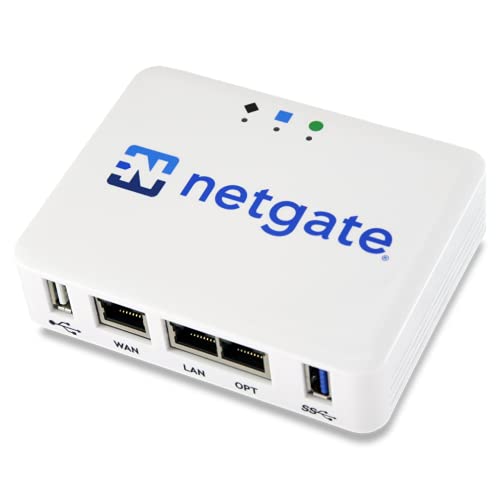 Netgate 1100 pfSense+ Security Gateway | pfSense+ software updates included for product lifetime Pre-loaded with pfSense+ software to get up and… A dual core ARM Cortex-A53 1.2 GHz delivers… | Check price |
 Omada Fusion 2.5G Multi-WAN Wired VPN Router | License‑Free Cloud Management Access and manage the network… Simplified Setup for Faster Deployment Easily set up… High-Performance Quad-Core CPU Ensures lightning-fast processing to overpower… | Check price |
 Omada ER8411 | 【Flexible Port Configuration】1 10G SFP+ WAN/LAN Port +… 【High-Performace Network Capacity】Maximum number of concurrent sessions 【Support Omada SDN】Omada’s Software Defined Networking (SDN) platform… | Check price |
 Grandstream GWN7003 | 1x GbE RJ45 port with IEEE 802.3af/at PoE… Supports multiple Gigabit RJ45 ports and Gigabit SFP… Built-in VPN support allows easy access to corporate… | Check price |
As an Amazon Associate we earn from qualifying purchases at no extra cost to you.
| Product | Best for | Key spec from the title |
|---|---|---|
| TP-Link ER605 | Small office on a tight budget | Up to 3 WAN Ethernet plus 1 USB WAN, SPI firewall |
| Omada ER707-M2 | Multi-gig internet plans | Dual 2.5Gig WAN ports, SPI firewall |
| TP-Link ER7206 | Multi-WAN offices | Multi-WAN gigabit VPN router, SPI firewall |
| Intel J1900 firewall mini PC | pfSense or OPNsense tinkerers | 4-port i210, 4GB RAM, 64GB SSD, fanless |
| Netgate 1100 | Ready-made pfSense+ appliance | pfSense+ security gateway |
| Omada Fusion 2.5G | Feature-rich business gateway | 5×2.5Gb ports, IPS/IDS, touch screen |
| Omada ER8411 | Large networks with many WANs | Up to 10 WAN ports, 10G |
| Grandstream GWN7003 | Cameras and phones needing PoE | 11 ports, dual PoE output |
How to Choose
WAN ports and failover
Count how many internet lines you will connect. One line needs only one WAN port, but a second line from another provider gives you failover, and a cellular dongle on a USB WAN port adds a backup. If a title advertises load balance, the router can split traffic across lines. Offices that cannot afford downtime should look for at least two WAN ports, and homes with one fiber line can skip the extra cost.
Plan for growth too. Adding a second line later is easy on a router with spare WAN ports and impossible on one with a single port. If you are on the fence, buy the device with one more WAN than you need today.
Port speed and the firewall engine
Match router interface speeds to your plan. Gigabit ports suit lines up to 1 Gbps. For plans beyond that, look for 2.5 Gb or 10G ports, and remember that your switches must match. SPI, short for stateful packet inspection, is the baseline firewall feature listed on most business routers. Advanced entries mention ACL, QoS, and IPS/IDS, which add access rules, traffic shaping, and intrusion detection. Check which features the title names rather than assuming.
Throughput numbers on spec sheets usually assume large packets and no inspection. Once IPS/IDS or VPN encryption is on, real speed falls, so give yourself headroom beyond the plan speed you pay for.
Managed ecosystem versus open platform
Omada devices plug into a central controller, which suits networks with several access points and switches from the same family. A pfSense or OPNsense box offers deep rules, packages, and community documentation, but requires comfort with configuration. Choose an ecosystem if you want a single dashboard, and an open platform if you want control and don’t mind the learning curve.
Documentation matters more than most buyers expect. A platform with a large community guide library saves hours when something breaks at an inconvenient time, and vendor-managed systems offer firmware updates through one screen.
What to ignore and where budget models cut corners
Ignore large throughput claims you cannot verify. Budget gateways save money on CPU power, which matters once VPN encryption and intrusion detection are active together, and they often omit PoE, screens, and extra LAN ports. Older hardware such as the J1900 mini PC class trades speed for low power. If you expect heavy VPN use, favor entries with a quad-core CPU or enterprise class hardware.
Power and noise count in a closet or under a desk. Fanless designs run silently, and low-wattage devices keep a home lab bill small, so read the listing for those details too.
The 8 Best Options
TP-Link ER605
The ER605 is a wired gigabit VPN router with up to 3 WAN Ethernet ports plus one USB WAN, an SPI firewall, load balancing, and Omada SDN integration. The title targets small and medium business use.
- Strength: multi-WAN with a USB option supports failover on a small budget.
- Strength: Omada integration allows central management.
- Trade-off: gigabit-only ports cap multi-gig plans.
Skip it if your internet plan is faster than 1 Gbps. Small shops that only need a safe, simple gateway are the natural audience.
Omada ER707-M2
This multi-gigabit VPN router lists dual 2.5Gig WAN ports, an SPI firewall, load balance, and Omada SDN integration. It is a step up for connections that exceed gigabit speeds.
- Strength: two 2.5Gig WAN ports support fast dual-line setups.
- Strength: high network capacity is named in the title.
- Trade-off: mid-range tier cost, above the gigabit ER605.
Skip it if your lines are gigabit and you want to save money. Remember that your switches and cabling must also handle 2.5 Gb for the extra speed to matter.
TP-Link ER7206
The ER7206 is a multi-WAN professional wired gigabit VPN router with an SPI firewall, load balancing, and Omada integration. Its title stresses increased network capacity over entry units.
- Strength: multi-WAN suits offices that need line redundancy.
- Strength: Omada compatibility supports managed networks.
- Trade-off: gigabit interfaces only.
Skip it if you need 2.5 Gb or 10G ports. It is a better match for offices that care about stability and line redundancy than for those chasing top speed.
Intel J1900 Firewall Mini PC
This fanless mini PC has four i210 ports, 4GB RAM, and a 64GB SSD, and the title says it supports pfSense and OPNsense. It is for tinkerers who want to install their own firewall software.
- Strength: fanless design runs silently.
- Strength: Intel i210 ports are a common choice for open firewall software.
- Trade-off: the J1900 is an older processor, so heavy VPN loads may strain it.
Skip it if you want a managed appliance with vendor support. Plan time for installing and configuring the software before the box is in service.
Netgate 1100
The Netgate 1100 is sold as a pfSense+ security gateway for firewall, router, and VPN duty. It suits buyers who want pfSense on hardware built for it, without assembling parts.
- Strength: pfSense+ comes with the appliance.
- Strength: compact gateway form works for home labs.
- Trade-off: the title lists few hardware specs, so verify port counts.
Skip it if you prefer a graphical controller ecosystem. Buyers comfortable with pfSense documentation will find plenty of guides to lean on.
Omada Fusion 2.5G Multi-WAN
Fusion is a feature-heavy business router with five 2.5Gb ports, an Omada controller built in, a quad-core CPU, a touch screen, ACL, QoS, and IPS/IDS. It sits in the premium tier among these entries.
- Strength: IPS/IDS and ACL are named in the title.
- Strength: built-in controller reduces extra hardware.
- Trade-off: premium cost for features small offices may not use.
Skip it if basic SPI and gigabit speeds already cover your needs. The touch screen and built-in controller are conveniences for a small IT team rather than essentials.
Omada ER8411
The ER8411 is an enterprise wired 10G router with up to 10 WAN ports, an SPI firewall, load balancing, and Omada support. It is built for larger networks with many lines and high capacity.
- Strength: up to 10 WAN ports.
- Strength: 10G interfaces future-proof the core of a growing network.
- Trade-off: more router than a typical home needs.
Skip it if your network has one or two lines and a dozen devices. Think campus, multi-tenant building, or a lab with several carriers.
Grandstream GWN7003
This wired gigabit VPN router has 11 ports and two PoE output ports. That makes it a good fit where a camera or phone needs power from the router itself.
- Strength: PoE output removes a separate injector.
- Strength: 11 ports provide plenty of wired connections.
- Trade-off: the title lists no multi-gig ports.
Skip it if you need controller-based management across many devices. The PoE ports make most sense when a camera or desk phone sits near the router.
Before you buy, sketch your network on paper: how many internet lines, how many wired devices, which of them need power over Ethernet, and whether you will run a site-to-site VPN. That five-minute exercise usually points to one or two of the eight entries and rules out the rest. It also reveals whether you need a managed switch behind the router, since several of these gateways have only a handful of LAN ports.
Which One Fits Your Situation
A home office with one fiber line and a second backup
The TP-Link ER605 gives you multiple WAN ports and a USB WAN for a cellular backup at a modest tier. Pair it with a separate access point for wireless coverage, and use the Omada controller if you add more gear later.
A multi-gig internet plan
The Omada ER707-M2 lists dual 2.5Gig WAN ports and keeps Omada management. It gives you room above gigabit without jumping to enterprise hardware, which is useful if your provider upgrades the plan next year.
A home lab running your own firewall software
Choose the Netgate 1100 for a ready-made pfSense+ gateway, or the J1900 mini PC if you want to install pfSense or OPNsense yourself.
A small shop with cameras and desk phones
The Grandstream GWN7003 includes dual PoE output, so a camera or phone can draw power from the router. That removes a small injector and one more power brick from a crowded shelf.
Common Mistakes
- Buying gigabit ports for a plan that already exceeds 1 Gbps.
- Assuming a firewall router includes Wi-Fi; these entries need separate access points.
- Ignoring CPU limits when planning VPN tunnels and intrusion detection together.
- Mixing management ecosystems and ending up with several dashboards.
- Skipping a second WAN port when downtime would cost money.
- Leaving default admin settings and remote management open on the WAN side.
Related guides
- 3 In 1 Wireless Charging Stations For Iphone Apple Watch Airpods
- How To Tell If A Charger Is Damaging Your Phone Battery
- Rugged Phone Cases For Samsung Galaxy S25 Ultra
Frequently Asked Questions
What does SPI firewall mean?
Stateful packet inspection tracks active connections and blocks traffic that does not belong to a known session. It is the baseline for business routers.
Do I need a separate access point?
Yes for the wired-only entries. Pair them with Wi-Fi access points, ideally from the same family if you use Omada. Placing access points on different floors usually beats one strong unit in a closet.
Is pfSense harder than Omada?
Generally yes. pfSense and OPNsense offer deeper control and more learning, while Omada trades flexibility for a simpler controller. If you have never configured a firewall rule, start with the managed option and move to open software once you are comfortable.
When is multi-WAN worth it?
It matters when an internet outage costs you work or sales. A single line at home rarely justifies it, though a cellular backup on a USB WAN port is a cheap middle ground for remote workers who must stay online.